Kupu Whakataki
This manual provides detailed instructions for the operation and maintenance of your RadioShack Portable Bluetooth Speaker. This versatile audio device offers multiple connectivity options and features to enhance your listening experience.

Whakaahua 1: Mua view of the RadioShack Portable Bluetooth Speaker, showcasing its black fabric grille and red accent symbols.
Ihirangi mokete
I mua i te haere tonu, me whakarite kei roto i te kete ngā taonga katoa:
- RadioShack Portable Bluetooth Speaker
- USB Momo-C Taura Whakapae
- Auxiliary 3.5mm Cable (Note: Some packages may not include this cable, as per customer feedback.)
- Te Kawe i te Here

Figure 2: The speaker shown with its included USB Type-C charging cable and an auxiliary cable.
Tatūnga
1. Whakakii i te Tukuoro
Before first use, fully charge the speaker. The speaker is equipped with a 3000 mAh battery, providing up to 6 hours of playback on a full charge. A complete charge typically takes approximately 3 hours.
- Locate the USB Type-C charging port on the speaker. This is usually found on the top panel near the control buttons.
- Honoa te taura USB Momo-C kua whakaratohia ki te tauranga utu o te kaikorero.
- Honoa te tahi pito o te taura USB ki te urutau hiko USB hototahi (kaore i whakaurua) ki te tauranga USB rorohiko ranei.
- Ka tiaho te rama tohu utu i te wā e utu ana, ā, ka whakaweto, ka huri rānei te tae ina kī tonu te utu.
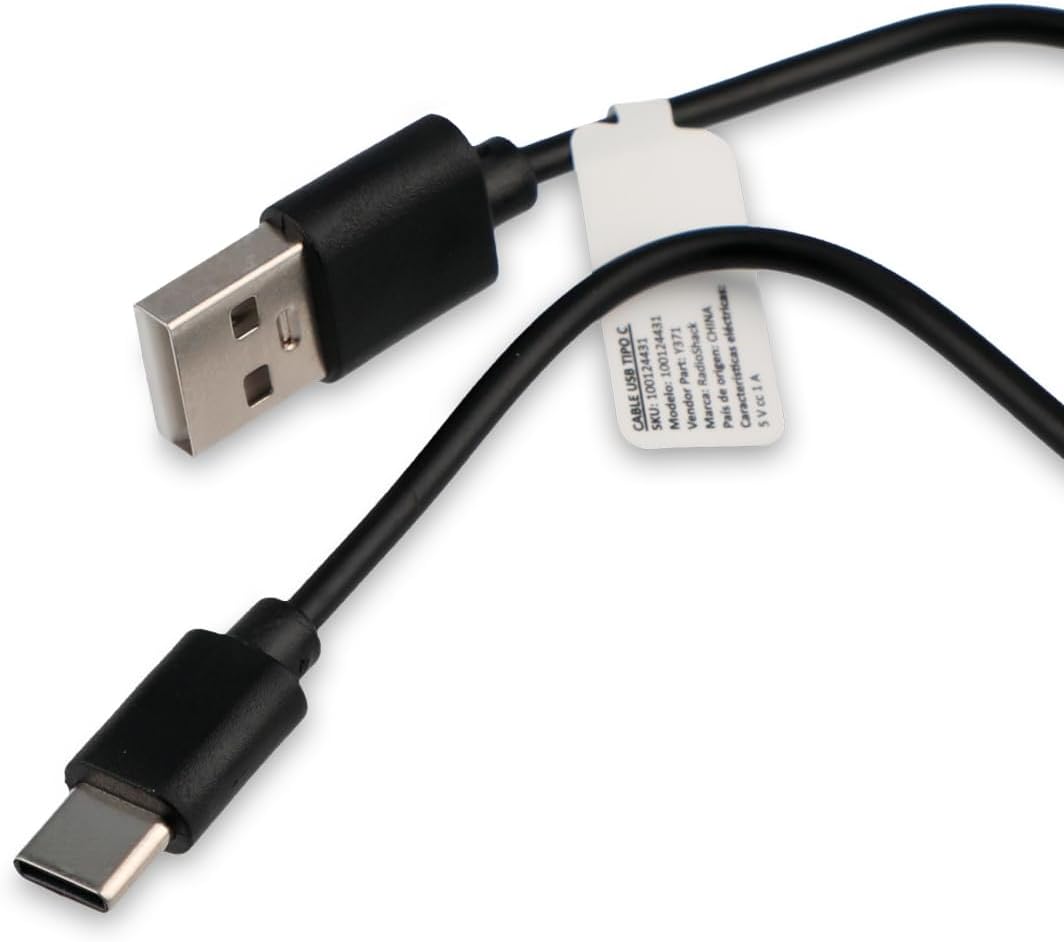
Figure 3: Close-up of the USB Type-C charging cable included with the speaker.
2. Hia Tuatahi
Press and hold the Power button (usually marked with a power symbol) on the speaker's control panel until you hear an audible prompt or see an indicator light illuminate.
Nga Tohutohu Whakahaere
Paewhiri Mana Neke Atuview

Figure 4: Top panel of the speaker, displaying the control buttons and various input ports (AUX, TF, USB, Type-C).
The control panel on the top of the speaker features several buttons and ports for various functions:
- Pātene Hiko: Ka whakakā/whakaweto i te kaikōrero.
- Patene Aratau: Cycles through input modes (Bluetooth, USB, SD, AUX, FM Radio).
- Pātene Purei/Tatari: Ka purei, ka whakamutu rānei i te pureitanga ororongo.
- Rōrahi Whakarunga/Pātene Riu Panuku: Increases volume (short press) or skips to the next track (long press).
- Rōrahi Whakararo/Pātene Riro o mua: Decreases volume (short press) or goes to the previous track (long press).
- Pātene Aratau Maama: Changes or turns off the RGB LED lighting effects.
- Tauranga AUX: For 3.5mm auxiliary cable connection.
- Mokamoka Kari TF (Micro SD): For playing audio from a Micro SD card.
- Tauranga USB: Mo te purei ororongo mai i te puku kohiko USB.
- Momo-C Port: Mo te utu i te kaikorero.
1. Hononga Nihokikorangi
This speaker supports wireless audio streaming via Bluetooth, compatible with smartphones, tablets, and computers.
- Turn on the speaker. It will automatically enter Bluetooth pairing mode, indicated by a flashing LED light or an audible prompt.
- I runga i to taputapu, whakahohea te Nihokikorangi me te rapu mo nga taputapu e waatea ana.
- Select "RadioShack Speaker" (or similar name) from the list of found devices.
- Once paired, the speaker will confirm with an audible sound, and the LED indicator will become solid.
2. Whakahoki USB
Whakauruhia he puku kohiko USB kei roto te ororongo files (MP3, WAV, etc.) into the USB port. The speaker will automatically switch to USB mode and begin playback.
3. SD Card Playback
Insert a Micro SD (TF) card with audio files into the TF card slot. The speaker will automatically switch to SD card mode and begin playback.
4. Auxiliary (AUX) Connection
For devices without Bluetooth, use the 3.5mm auxiliary input.
- Connect one end of a 3.5mm audio cable (not always included) to the AUX port on the speaker.
- Honoa tetahi pito ki te hononga paneoro, ki te putanga oro rānei o tō pūrere.
- Press the Mode button on the speaker until it switches to AUX mode.
5. Mahi Reo Irirangi FM
Hei whakamahi i te reo irirangi FM hanga-roto:
- Press the Mode button until you hear the FM radio mode activated.
- Pēhia te pātene Purei/Whakamutu hei matawai aunoa me te tiaki i ngā teihana reo irirangi e wātea ana.
- Use the Volume Up/Down buttons (long press) to navigate between saved stations.
6. Rama LED RGB
The speaker features an RGB LED light panel that adds visual ambiance. The light panel is located on one side of the speaker.

Whakaahua 5: Taha view of the speaker, highlighting the transparent panel designed for RGB lighting effects.
Press the Light Mode button (often indicated by a sun or lightbulb icon) on the control panel to cycle through different lighting modes or to turn the lights off.
Te tiaki
Te horoi
Hei pupuri i te ahua me te mahi o to kaikorero:
- Horoia te taha waho ki te kakahu ngohengohe, maroke, kore-miro.
- Kaua e whakamahia nga kai horoi, te wax, te whakarewa ranei.
- Āta tirohia kia kore te makuku e uru ki roto i ngā pūaha. Kāore te kaikorero e ārai i te wai.
Rokiroki
When not in use for extended periods, store the speaker in a cool, dry place away from direct sunlight and extreme temperatures. It is recommended to charge the battery at least once every three months to preserve its lifespan.
Raparongoā
| Raruraru | Take pea | Rongoā |
|---|---|---|
| Kare te kaikorero e ka ana. | Kua pau te pākahiko. | Whakahoutia te kaikorero mā te whakamahi i te taura USB Momo-C kua whakaratohia. |
| Karekau he oro mai i te kaikorero. | He iti rawa te oro, he ngū rānei. He aratau tāuru hē. | Increase volume on both speaker and connected device. Press the Mode button to select the correct input source (Bluetooth, USB, SD, AUX, FM). |
| Kaore e taea te hono ma te Nihokikorangi. | Kāore te kaikorero i te aratau takirua. He tawhiti rawa te taputapu. He pokanoa. | Ensure speaker is in Bluetooth pairing mode (flashing LED). Move device closer to speaker (within 10 meters). Turn off other Bluetooth devices. |
| Kāore te kāri USB/SD e purei ana. | Kore i tautokona file hōputu. Kāore i tika te whakaurunga o te kāri/puku. | Whakaritea te ororongo files are in a supported format (e.g., MP3). Reinsert the USB drive or SD card firmly. |
| Reo irirangi FM pūmau. | Tohu ngoikore. | Nekehia te kaikorero ki tētahi wāhi e pai ake ai te whiwhinga oro. |
Whakatakotoranga
| Āhuahira | Taipitopito |
|---|---|
| Tau tauira | 100124431 (Y371) |
| Ahu (L x W x H) | 9.6 cm x 22.7 cm x 8.2 cm |
| Taumaha | 500 Karamu |
| Rauemi | Te konganuku, Silicone |
| Hangarau Hononga | Bluetooth, USB, SD Card, 3.5mm Auxiliary |
| Awhe Nihokikorangi | Tae atu ki te 10 mita |
| Mana Putanga Puoro | 10 Watts |
| Whakautu auau | 80 KHz |
| Pūhiko Raukaha | 3000 mAh Lithium Ion |
| Ora Pūhiko | Tae atu ki te 6 haora |
| Waa Whakatau | Tata ki te 3 haora |
| Whakauru Voltage | 5 Volts |
| Nga waahanga motuhake | Portable, RGB LED Light, FM Radio |
| parewai | Kao |
Nga korero Whakaputanga
This RadioShack product comes with a limited warranty. For specific terms and conditions, including warranty duration and coverage details, please refer to the warranty card included with your product packaging or contact RadioShack customer support. Keep your purchase receipt as proof of purchase for warranty claims.
Tautoko Kiritaki
For further assistance, technical support, or warranty inquiries, please contact RadioShack customer service. Contact information can typically be found on the product packaging, the official RadioShack webpae, ma to waahi hoko ranei.
Tena koa pupurihia tenei pukapuka hei tohutoro a meake nei.


