1. Kupu Whakataki
Thank you for choosing the Baseus Bowie E5x True Wireless Stereo (TWS) Earphones. These earphones are designed to provide a high-quality audio experience with convenient wireless connectivity. This manual will guide you through the setup, operation, and maintenance of your new earphones.

Figure 1: Baseus Bowie E5x TWS Earphones and Charging Case with Retail Packaging
2. Ihirangi mokete
Tena koa tirohia nga ihirangi o te kete kia mohio kei te noho katoa nga taonga:
- Baseus Bowie E5x TWS Earphones (Left and Right)
- Puhi utu
- USB-C Uira Whakatau
- Pukapuka Kaiwhakamahi (tenei tuhinga)

Figure 2: Baseus Bowie E5x Charging Case and USB-C Charging Cable
3. Hua Neke Atuview
Familiarize yourself with the components of your Baseus Bowie E5x earphones:
- Nga taringa taringa: Left (L) and Right (R) earbuds with touch control areas and charging contacts.
- Kei te Whakatakihia te Puhi: Used for charging the earbuds and for storage. Features a USB-C charging port and LED indicators.
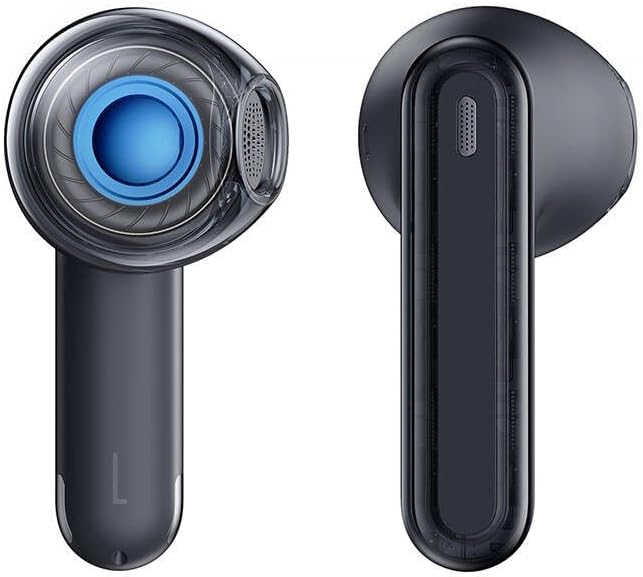
Figure 3: Left and Right Baseus Bowie E5x Earbuds
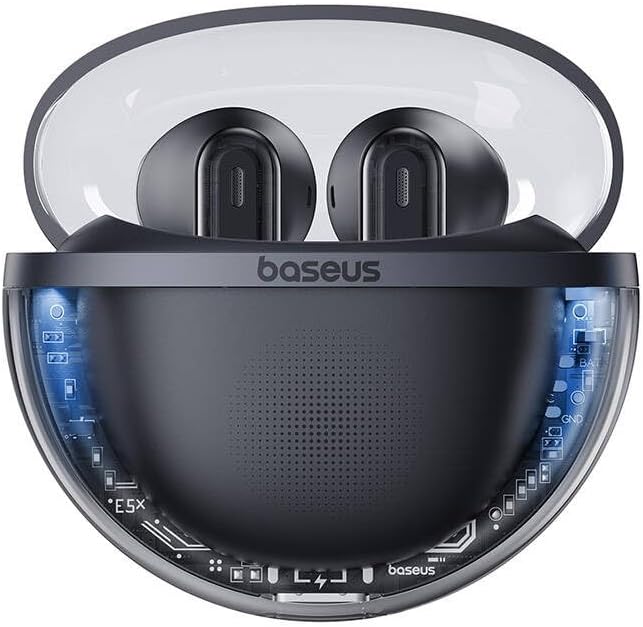
Figure 4: Baseus Bowie E5x Charging Case with Earbuds Inserted
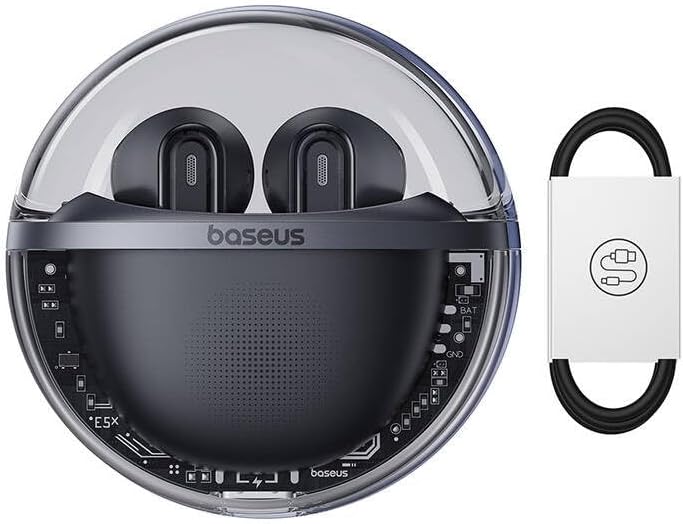
Figure 5: Close-up of an Earbud's Speaker
4. Tatūnga
4.1 Te Whakautu i ngā Taringa me te Pouaka
- Akona Tuatahi: I mua i te whakamahinga tuatahi, whakakīia katoatia te pouaka utu me ngā pane taringa. Whakanohoia ngā pane taringa ki roto i te pouaka utu.
- Kei te utu i te keehi: Connect the provided USB-C cable to the charging port on the case and the other end to a USB power adapter (not included). The LED indicator on the case will show charging status.
- Kei te utu i nga Puka-taringa: When placed in the charging case, the earbuds will automatically begin charging. The case's indicator lights will show the charging status of the earbuds.
4.2 Takirua Nihokikorangi
- Whakahiko: Open the charging case. The earbuds will automatically power on and enter pairing mode (indicated by flashing LED lights on the earbuds).
- Whakahohe Nihokikorangi: I runga i to taputapu (waea atamai, papa, rorohiko), whakaahei i te Nihokikorangi.
- Tīpako Pūrere: In your device's Bluetooth settings, search for available devices and select "Baseus Bowie E5x".
- Tūhono: Once selected, the earbuds will connect to your device. A voice prompt or steady LED light will confirm successful pairing.
- Whakahono ano: I muri i te hononga tuatahi, ka hono aunoa ngā pane taringa ki te pūrere whakamutunga i honoa ina tangohia mai i te pouaka, mena ka whakahohea te Nihokikorangi i runga i te pūrere.
5. Nga Tohutohu Whakahaere
The Baseus Bowie E5x earphones feature intuitive touch controls:
| Mahi | Mahi (Taringa Mauī/Matau) |
|---|---|
| Hiko Hiko | Open charging case / Long press touch area (if off) |
| Whakaweto Hiko | Place earbuds into charging case and close lid / Disconnect Bluetooth and wait |
| Purei/Tatari | Double tap touch area |
| Riro Panuku | Paatohia te taringa taringa matau |
| Tuhinga o mua | Paatohia te taringa taringa maui |
| Whakautu/Whakamutua te Waea | Double tap touch area |
| Whakakahoretia te Waea | Paa roa te waahi pa mo te 2 hēkona |
| Whakahohe Kaiāwhina Reo | Paa roa te waahi pa mo te 3 hēkona |
| Switch to Gaming Mode (Low Latency) | Specific gesture (refer to product packaging or Baseus app for exact control) |
Tuhipoka: Specific touch controls for features like volume adjustment or gaming mode may vary. Refer to the official Baseus app or product packaging for the most accurate and customizable controls.
6. Tiaki
Hei whakarite i te roa o te wā e whakamahia ana ō taringa me te mahi tino pai, whai i ēnei tohutohu tiaki:
- Te horoi: Me horoi i nga wa katoa nga pukoro me te pukoro utu ki te kakahu ngohengohe, maroke, kore-puru. Kaua e whakamahi i nga matū kino, i nga mea awhiowhio ranei.
- Kei te utu Hoapā: Ensure the charging contacts on both the earbuds and inside the case are clean and free of debris to ensure proper charging.
- Rokiroki: Mena karekau e whakamahia, rongoatia nga taringa ki roto i te pukoro utu hei tiaki i te puehu me te kino.
- Aukati i nga Tikanga Tino: Kaua e whakaatuhia ngā taringa ki ngā pāmahana tino kino, ki te haumākū, ki ngā wai rānei.
7. Te Raru
If you encounter issues with your Baseus Bowie E5x earphones, try the following solutions:
- Kore Oro:
- Me mohio kei te utu nga taringa.
- Check if Bluetooth is enabled on your device and connected to "Baseus Bowie E5x".
- Adjust volume on both your device and the earphones.
- Ngāna anō te hono i ngā pane taringa ki tō pūrere.
- Earbuds Not Pairing with Each Other:
- Whakahokia nga purongo e rua ki roto i te puha utu, kati te taupoki, tatari mo etahi hēkona, ka whakatuwhera ano i te taupoki.
- Ensure both earbuds have sufficient charge.
- Nga take utu:
- Tirohia te taura USB-C me te urutau hiko.
- Horoia nga hoapaki utu i runga i nga taringa me roto o te keehi.
- Kia tino mohio kua utaina te pākahiko ki roto i te pouaka utu.
- Connection Drops/Unstable:
- Whakatata atu ki to taputapu hono.
- A ape i nga taiao e kaha ana te wawaotanga hiko.
- Momotu ka hono ano i te hononga Nihokikorangi.
If the issue persists, consult the Baseus official website or customer support for further assistance.
8. Whakatakotoranga
| Āhuahira | Taipitopito |
|---|---|
| Waitohu | Baseus |
| Tauira | Bowie E5x |
| Tae | Pango |
| Nga Waenga kei roto | 1 package (Earphones, Charging Case, USB-C Cable, Manual) |
| Hononga | Tirotiro Ahokore Tika (TWS) |
| Tauranga Whakatau | USB-C |
Tuhipoka: Ko nga korero ka huri ki te kore korero i mua.
9. Pūtāhui me te Tautoko
Baseus products come with a manufacturer's warranty. Please refer to the warranty card included in your package or visit the official Baseus webpae mo nga kupu whakamana me nga tikanga mo to rohe.
For technical support, troubleshooting, or service inquiries, please contact Baseus customer support through their official webte waahi, nga korero whakapiri ranei kei runga i to kete hua.
Whaimana Webpae: www.baseus.com


