1. Kupu Whakataki
Thank you for choosing the RORRY D2 Portable Charger. This compact and versatile power bank is designed to keep your Apple Watch, iPhone, AirPods, and other compatible devices charged while you are on the go. Please read this manual carefully to ensure safe and optimal use of your device.
He aha kei roto i te Pouaka:
- RORRY Portable Charger (1 unit)
- 1M USB-C to USB-C Charging Cable (1 unit)
- Pukapuka Kaiwhakamahi (1 wae)
2. Nga waahanga matua
- Hototahi Ao: Designed for Apple Watch Ultra/11/10/9/8/7/6/SE, iPhone 17/16/15/14/13/12/11/Pro/Pro Max, AirPods, and Android devices.
- 5000mAh Raukaha Nui: Provides approximately 7-10 charges for Apple Watch, 1 full charge for iPhone 15, and 6-8 charges for AirPods.
- Whakataua Tukutahi: Capable of charging multiple devices concurrently, including Apple Watch, iPhone, AirPods, and other Android devices.
- Hoahoa Kawe: Features a compact and lightweight keychain design for easy portability in pockets or attached to backpacks.
- Haumaru Kairangi: Equipped with built-in protection against over-temperature, over-current, over-voltage, me te porotiti poto.
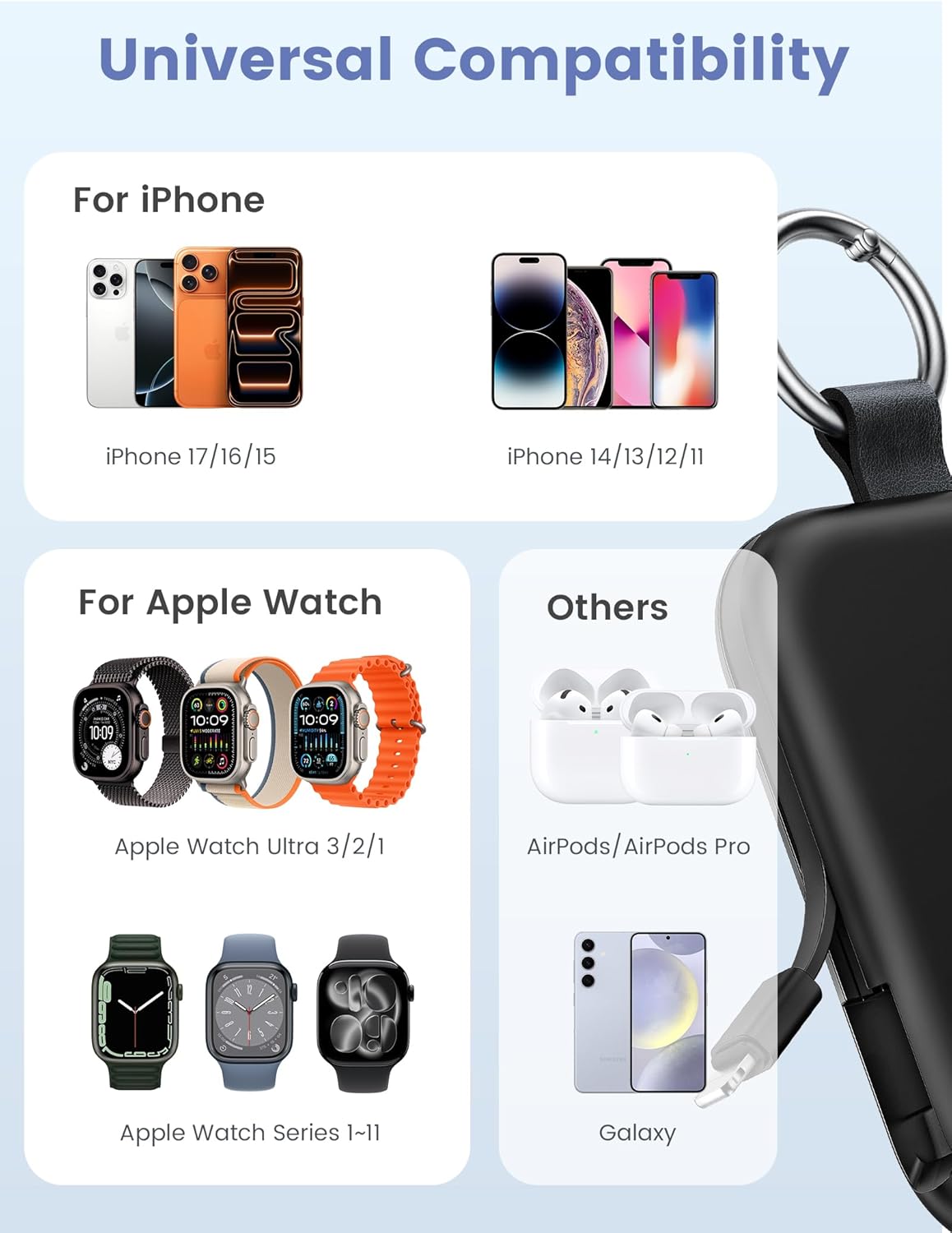
Image: Universal compatibility of the RORRY portable charger with various devices.
3. Tatūnga me te Utu Tuatahi
3.1 Te Whakataki i te Peeke Hiko
- Connect the provided USB-C to USB-C charging cable to the USB-C input port on the RORRY D2 Portable Charger.
- Honoa te pito kē atu o te taura ki tētahi urutau pakitara USB-C hototahi (kāore i roto).
- The LED indicator lights on the power bank will illuminate to show the charging status. A full charge typically takes approximately 2.5 hours.
- Once fully charged, all LED indicators will be solid. Disconnect the power bank from the charger.

Image: Charging the RORRY D2 Portable Charger using the included USB-C cable.
4. Nga Tohutohu Whakahaere
4.1 Ka utu Apple Watch
- Press the power button on the side of the RORRY D2 Portable Charger to activate the wireless charging pad.
- Place your Apple Watch onto the magnetic charging pad located on the top surface of the power bank.
- Ensure the watch is properly aligned for optimal charging. The watch screen will indicate charging status.
4.2 Charging iPhone and USB-C Devices
- Locate the built-in Lightning cable (for iPhone) or USB-C cable (for Android/other USB-C devices) on the sides of the power bank.
- Gently pull out the appropriate cable.
- Connect the cable to your device's charging port. The device should begin charging automatically.
- To charge multiple devices simultaneously, use the wireless charging pad for Apple Watch and the built-in cables for other devices.

Image: RORRY D2 Portable Charger actively charging an Apple Watch and an iPhone.

Whakaahua: Ka mutuview of charging times and capacities for various devices with the RORRY D2.
4.3 Tohu Mana
The LED lights on the front of the power bank indicate the remaining battery level. Press the power button once to check the current battery status.
Video: Demonstration of the RORRY Portable Apple Watch Charger's features and usage.
5. Whakatakotoranga
| Tau tauira | D2 |
| Pūhiko Raukaha | 5000 Miliamp Nga haora |
| Hunga Hua | 3.86 x 2.82 x 0.65 inihi |
| Taumaha Tūemi | 4.4 hekere |
| Momo Tuhono | Built-in Cable L+C, USB-C Port |
| Nga waahanga motuhake | Compact, Built-in Cables, All-in-one, Keychain Design |
6. Nga Ahuatanga Haumaru me nga Whakatupato
The RORRY D2 Portable Charger is equipped with multiple safety features to protect your devices and the power bank itself:
- Parenga-nui-Pamahana: Prevents overheating during charging and discharging.
- Parenga o naianei: Ka ārai i te rere nui o te iahiko.
- Neke Atu i te Voltage Parenga: Ārai i te ngaohikotage ngaru.
- Parenga-Poto: Ka whakaweto aunoa mēnā ka pā he ara iahiko poto.
Whakatupato Haumaru Whānui:
- Do not disassemble, squeeze, or hit the device.
- Keep away from fire, water, and heat sources.
- Kaua e taea e nga tamariki.
- Do not use the power bank in extremely high or low temperatures.
- A ape i te tuku i te taputapu, te tuku ranei ki nga paanga kaha.
7. Tiaki me te Tiaki
- Horoia te peeke hiko ki te kakahu ngohengohe, maroke. Kaua e whakamahi i nga matū kino, i nga mea awhiowhio ranei.
- Whakaorangia te taputapu ki te waahi makariri, maroke ina kore e whakamahia.
- If the power bank will not be used for an extended period, charge it fully at least once every three months to maintain battery health.
8. Te Raru
Kaore te taputapu e utu ana:
- Me whakarite kia rawaka te utu o te pēke hiko. Tirohia ngā tohu rama LED.
- Verify that the charging cables are securely connected to both the power bank and your device.
- For Apple Watch, ensure it is correctly placed on the magnetic charging pad and the power button has been pressed.
- Try using a different charging cable or wall adapter to charge the power bank itself.
Puturi te utu:
- Ensure you are using a compatible wall adapter for optimal charging speed.
- Mā te utu i ngā taputapu maha i te wā kotahi ka whakaiti i te tere utu mō ia taputapu.
Kāore te peeke hiko e tahuri:
- Charge the power bank fully. If the battery is completely depleted, it may take a few minutes for the LED indicators to light up.
9. Pūtāhui me te Tautoko
RORRY products are designed and manufactured to the highest quality standards. For warranty information, after-sales service, or technical support, please refer to the contact details provided in the packaging or visit the official RORRY webpae.
Mōhiohio Whakapā:
- Kaihanga: Shenzhen Xianyang Innovation Technology Co., Ltd
- Webpae: www.rorry.com (Kia mahara: He kaipupuri waahi tenei URL, refer to actual product for correct webpae)


