Kupu Whakataki
This manual provides detailed instructions for the installation, operation, and maintenance of your BTF-LIGHTING WS2805 IC RGBCCT Addressable Dual Data LED Strip. Please read this manual thoroughly before use to ensure proper functionality and safety.
Nga waahanga hua
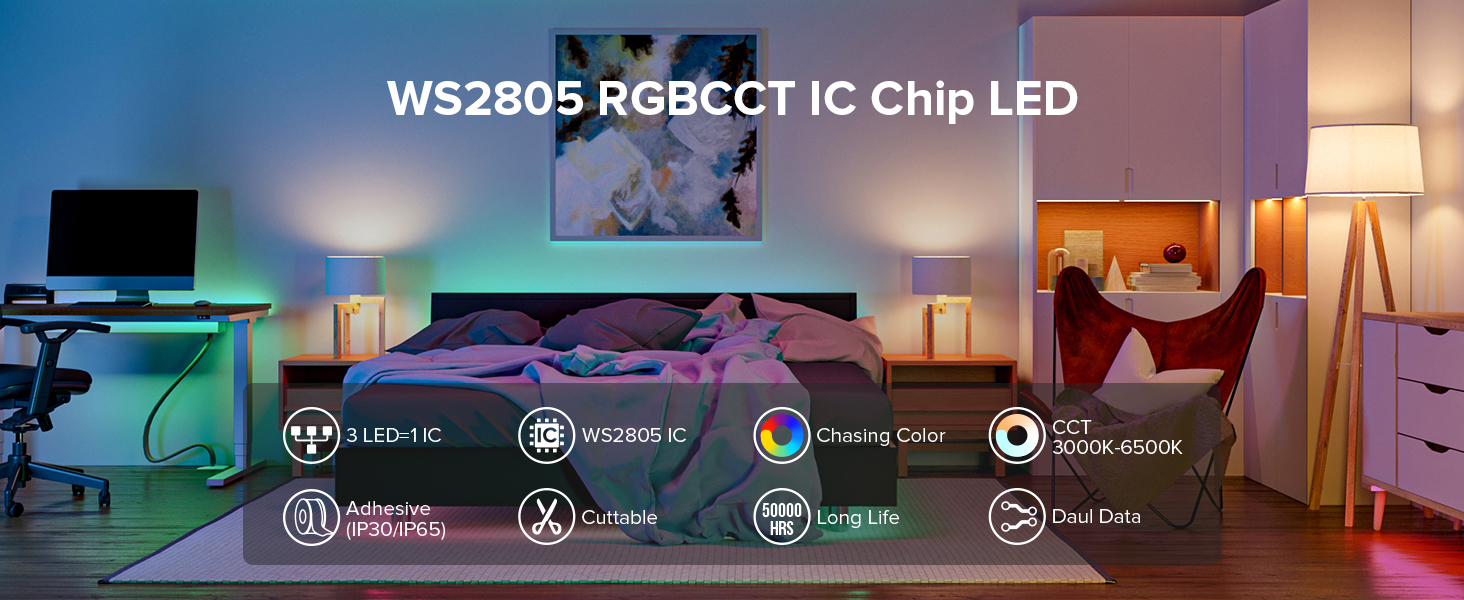
- Dual-Signal Data Transmission: Features signal break-point continuous transmission, ensuring that if one pixel is damaged, subsequent LEDs continue to function.
- RGBCCT 5-in-1 LED: Each 5050 SMD LED integrates Red, Green, Blue, Warm White (3000K), and Cool White (6500K) for a wide range of colors and tunable white light.
- Addressable Control: Equipped with WS2805 IC chips, allowing individual control of groups of 3 LEDs for dynamic chasing, wave, jump, and static effects.
- Hoahoa Cuttable: The strip can be cut every 3 LEDs at designated cut marks, offering flexibility for custom installations.
- Wide Color Temperature Range: Tunable white light from 3000K (Warm White) to 6500K (Cool White).
- Whakaritenga Hiko: Operates on DC12V. A power supply and controller are required and sold separately.
He aha kei roto
Kei roto i te kete:
- 1x 16.4FT (5 meters) WS2805 IC RGBCCT 300LED Light Strip
- 1x 4-pin JST connector
Note: A DC12V power supply and a compatible controller are required for operation and must be purchased separately.

Tatūnga me te Tāuta
- Whakapaia te Mata Tāuta: Ensure the surface is clean, dry, and smooth. For IP30 and IP65 strips, the self-adhesive backing requires a suitable surface for proper adhesion. IP67 strips do not have adhesive and require clips and screws for mounting.
- Whakamaherehia to Tahora: Determine the desired length and path for the LED strip. The strip can be cut every 3 LEDs at designated cut marks.
- Honoa te Kaiwhakahaere: Connect the 4-pin JST connector from the LED strip to a compatible DC12V RGBCCT controller (sold separately). Ensure correct polarity and pin alignment.
- Honoa te Kaihiko hiko: Connect a DC12V power supply (sold separately) to your controller. Do not use a DC24V power supply with this DC12V strip.
- Secure the LED Strip:
- For IP30/IP65: Peel off the protective backing from the double-sided tape and firmly press the strip onto the prepared surface.
- For IP67: Use the provided screws and clips to secure the strip along your desired path.
- Hononga Rangatū & Voltage Tāpiritanga: For longer installations or to prevent voltage drop, consider series connections with voltage supplementation as shown in the diagram below.


Nga Tohutohu Whakahaere
Once the LED strip is properly installed and connected to a compatible controller and power supply, you can operate it using the controller's interface (e.g., remote control or smartphone app).
- Tīpakonga Tae: Choose from 16 million colors using the RGB color palette on your controller's app.
- Mārama Mā e Taea te Whakarerekē: Adjust the white light temperature from 3000K (Warm White) to 6500K (Cool White) to suit your preference.
- Painga Hihiko: Select from various chasing, wave, jump, and static lighting effects.
- Whakaritenga Tirohanga: Control the overall brightness of the LED strip.


Video: Demonstrates the WS2805 IC RGBCCT Addressable Dual Data LED Strip in action, showcasing various chasing RGB effects, chasing pure white lighting effects, 16 million monochrome effects, and pure white color options. A controller and adapter are sold separately.
Video: Highlights the WS2805 RGBCCT 5-in-1 IC LED Strip, demonstrating its ability to produce a wide spectrum of colors and tunable white light, emphasizing its versatility for various lighting applications.
Te tiaki
- Te horoi: Gently wipe the LED strip with a dry, soft cloth. Avoid using harsh chemicals or abrasive materials.
- Parenga wai:
- IP30: Not waterproof. Suitable for indoor dry environments only.
- IP65: Silicone coating provides dust prevention and water splash protection. Suitable for indoor use where splashes may occur, but not for submersion.
- IP67: Sheathing waterproof design. Can work outdoors, but ensure 4-pin connectors are protected from water.
- Hononga Tikanga: Tirohia ngā hononga katoa i ia wā, i ia wā, kia mōhio ai kei te mau tonu, ā, kāore he waikura.
Raparongoā
| Raruraru | Take pea | Rongoā |
|---|---|---|
| Kāore te rīpene LED e mura. | No power, incorrect connection, faulty power supply/controller. | Verify power supply is connected and functional. Check all wiring connections for correct polarity and secure fit. Ensure the controller is powered on and set to an active mode. |
| Partial section of the strip is not lighting up. | Damaged LED segment, signal interruption. | Due to dual-signal design, if one pixel is damaged, subsequent LEDs should still work. If a section is out, inspect the specific segment for physical damage or a loose connection at the cut point. |
| Kāore i te tika, kāore rānei i te ōrite ngā tae. | Controller settings, data line issue. | Check your controller settings to ensure the correct LED type (WS2805 RGBCCT) is selected. Verify data line connection. |
| Strip flickers or shows unstable lighting. | Insufficient power, loose connections, voltage maturuturu. | Ensure your power supply provides adequate current for the entire strip length. Check all connections for looseness. Consider voltage supplementation for longer runs. |

Whakatakotoranga
| Āhuahira | Taipitopito |
|---|---|
| Tau tauira | HD-12V-WS2805-60L-B-IP30 |
| Momo LED | 5050 SMD RGBCCT (5 Colors in 1 LED) |
| IC Tipi | WS2805 (Dual Data) |
| Kiato LED | 60 LED/mita |
| Pika Kiato | 20 Pixels/meter (1 IC controls 3 LEDs) |
| Te roa o te Wehe | 16.4 Puawai (5 mita) |
| Voltage | DC12V |
| Wattage | 30 watts |
| Te Paemahana Tae | 3000K-6500K (Mā Whakarerekētia) |
| Whakatauranga parewai | IP30 (Kaore i te parewai) |
| Nga waahanga motuhake | Chasing Color, Dual Signal, Groups of 3 LEDs Addressable, Dimmable |
| Te Ora Toharite | 50,000 haora |
| Tikanga Mana | App Control, Remote Control (Controller sold separately) |
| Taumaha Tūemi | 4.2 hekere |
Pūtāhui me te Tautoko
For warranty information and technical support, please refer to the official BTF-LIGHTING webpaetukutuku, whakapā atu ranei ki ta raatau ratonga kaihoko. Puritia to rihiti hoko mo nga kereme whakamana.
You can visit the BTF-LIGHTING Store on Amazon for additional products and support: BTF-LIGHTING Amazon Store.


