1. Nga Tohutohu Haumaru Nui
I te wa e whakamahi ana i nga taputapu hiko, me whai nga tikanga tiaki haumaru, tae atu ki enei e whai ake nei:
- Panuihia nga tohutohu katoa i mua i te whakamahi i te taputapu.
- Kaua e ngana ki te whakahaere i tenei oumu me te tuwhera te kuaha na te mea ka puta he kino ki te hiko ngaruiti.
- Kaua e waiho he ahanoa i waenganui i te mata o mua o te oumu me te kuaha, kaua ranei e waiho te oneone, te toenga pokekore ranei kia whakaemi ki runga i nga mata hiri.
- Kaua e whakamahia te oumu mena kua whara. He mea nui kia kati tika te kuaha o te oumu kia kore ai he kino o te: (1) kuaha (piko), (2) hinge me nga pou (pakaru, kua wewete ranei), (3) hiiri kuaha me nga papa taatiraa.
- Kaua e whakatikaia, e whakatika ranei te oumu ma tetahi atu engari ko nga kaimahi ratonga e tika ana.
- Always ensure proper ventilation around the microwave.
- Kaua e whakamahana wai me etahi atu kai ki roto i nga ipu kua hiri na te mea ka pahū.
- Ko tenei taputapu he mea mo te kainga anake.
2. Hua Neke Atuview
The SHARP SMC0761KS is a compact 0.7 cubic feet countertop microwave oven, featuring 700 watts of cooking power and a removable 10-inch carousel turntable. Its stainless steel finish and child lock function provide both style and safety for your kitchen.

Mua view of the SHARP SMC0761KS Compact Countertop Microwave Oven in stainless steel.
Āhuatanga matua:
- Hoahoa Kiato: 0.7 cu. ft. capacity, ideal for small spaces.
- 700 Watts Mana: Efficient heating for various foods.
- 10" Carousel Turntable: Ensures even cooking results.
- Maukati Tamariki: Enhances safety by preventing unintended operation.
- Kuki Whakawhiti: Quick start cooking with single press up to 6 minutes.
- Tahua Tunu Aunoa: Pre-programmed settings for popular items like potato, popcorn, and beverages.
- Te Wā/Taumaha Whakarewa: Flexible defrosting options.
- Whakaaturanga LED Ma: Clear and modern display.
- Marama o roto LED: Provides visibility inside the oven.

o roto view of the microwave showing the removable glass carousel turntable.

Close-up of the control panel with digital display and function buttons.
3. Tatūnga me te Tāuta
Te Wetewete me te Whakanoho:
- Tangohia nga rawa whakakakahu katoa mai i roto i te kohao oumu me te tatau umu.
- Tirohia te oumu mo te kino, penei i te pakaru, i te kuaha hee ranei. Kaua e whakahaere i te oumu mena kua pakaru.
- Whakanohoia te ngaruiti ki runga i te mata papatahi, mau tonu ka taea te tautoko i tona taumaha me te kai tino taumaha ka tunua ki roto.
- Ensure adequate ventilation: Leave a minimum of 4 inches (10 cm) of space on the top, back, and sides for proper airflow. Do not block any ventilation openings.
- Keep the microwave away from heat sources and strong magnetic fields.
Huihuinga Hurihuri:
- Place the turntable ring inside the oven cavity.
- Position the glass turntable plate securely on top of the turntable ring, ensuring it sits properly on the center hub.
Hononga Hiko:
Plug the microwave into a properly grounded 3-prong outlet. Ensure the voltage and frequency match the specifications of the appliance (120V, 60Hz).
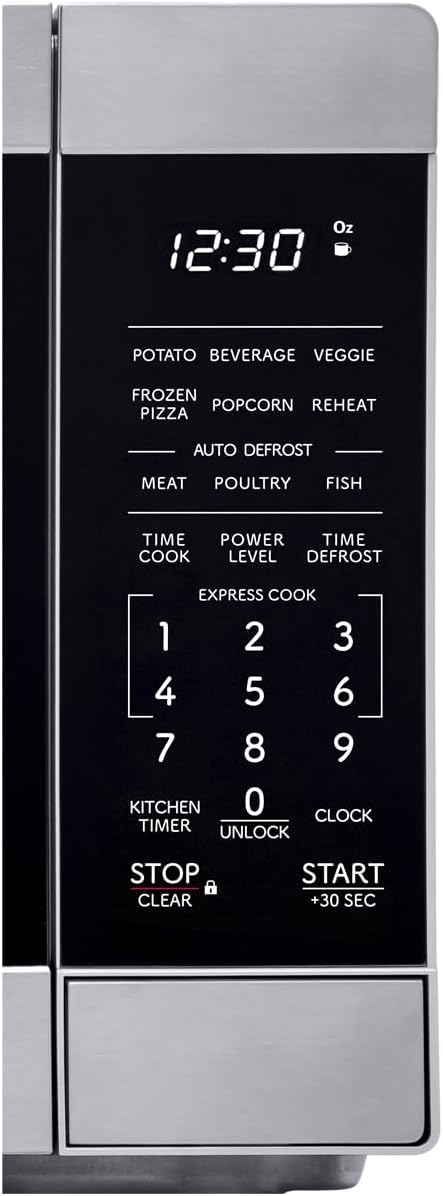
Diagram illustrating the dimensions of the SHARP SMC0761KS microwave oven.
4. Nga Tohutohu Whakahaere
Whakaritea te Karaka:
- Pehia te KARAKA kotahi te paatene.
- Whakamahia te papa tau hei whakauru i te wā o nāianei (hei tauira, 1-2-3-0 mō te 12:30).
- Pehia te KARAKA patene ano hei whakau.
Tunu Ngaruiti Taketake:
- Whakanohoia he kai ki roto i te ipu haumaru ngaruiti i runga i te tepu hurihuri.
- Katia te tatau umu.
- Pehia te PANUI KOTAHI pātene.
- Enter the desired cooking time using the number pad (e.g., 1-0-0 for 1 minute).
- To adjust power level (default is 100%): Press TAUMATA MANA, then enter a number from 1 to 10 (10 for 100%, 1 for 10%).
- Perehi WHAKATAMA/+30 SEC kia timata te tunu kai.
Using the +30 SEC Button:
For instant start at 100% power, simply press the WHAKATAMA/+30 SEC button. Each press adds 30 seconds to the cooking time. This can also be used to add 30 seconds during an ongoing cooking cycle.
Taumahi Maukati Tamariki:
- Hei Whakahohe: Patohia me te pupuri i te KATI/MAMA pātene mo te 3 hēkona. Ka puta he tohu raka ki te whakaaturanga.
- Hei Whakahohe: Patohia me te pupuri i te KATI/MAMA button for 3 seconds again. The lock indicator will disappear.
5. Nga Mahi Tunu
Tahua Tunu Aunoa:
The microwave features pre-programmed settings for common food items. Simply press the desired auto cook button and follow the prompts.
- POTATO: Mo te tunu rīwai.
- Inu: Hei whakamahana i ngā inu.
- VEGGIE: Hei tunu huawhenua.
- PIZZA MATEO: For reheating frozen pizza.
- POPCORN: Mo te pupuhi popcorn.
- Whakawerahia: For reheating various dishes.
Whakatakaa:
The microwave offers two defrosting methods:
- TIME DEFROST: Perehi PANUITANGA TIME, enter the desired defrosting time, then press WHAKATAMA/+30 SEC.
- TE PAIMAHI TE PAPA: Perehi TE TAMAITI TATA, enter the weight of the food in ounces or grams, then press WHAKATAMA/+30 SEC.
Kuki Whakawhiti:
For quick cooking, press any number button (1-6) to start cooking immediately for that many minutes at 100% power. For example, pressing '1' will cook for 1 minute.
Rua-Stage Te tunu kai:
This feature allows you to program two different cooking stages (e.g., defrost then cook). Program the first stage (e.g., defrost time/weight), then program the second stage (e.g., cook time and power level), and finally press WHAKATAMA/+30 SEC.
6. Tiaki me te Tiaki
Te horoi i te umu:
- roto: Horoia te roto o te oumu ki te panuiamp kakahu i muri i ia whakamahinga. Mo nga piro maro, whakamahia he horoi ngawari, he kai horoi ngaruiti ranei. Kaua e whakamahi i nga taputapu horoi, i nga papa horoi ranei.
- Waho: Horoia nga papa o waho ki te ngohengohe, damp kakahu. A ape i te tuku wai ki roto i nga kohao hau.
- hiri kuaha: Keep the door seals and adjacent parts clean. Wipe with a damp he kakahu hei tango i nga maringi marara ranei.
- Papamahi: The glass turntable and turntable ring can be washed in warm, soapy water or in the dishwasher. Ensure they are completely dry before placing them back in the oven.
Aki Whānui:
- Wewetehia te ngaruiti i mua i te horoi.
- Do not use harsh chemicals or steam cleaners.
- Regular cleaning helps maintain performance and extends the life of the appliance.
7. Te Raru
Mena ka raru koe ki to ngaruiti, tirohia nga raru me nga otinga e whai ake nei:
| Raruraru | Take pea | Rongoā |
|---|---|---|
| E kore te umu e timata | Door not closed properly; Power cord unplugged; Fuse blown or circuit breaker tripped; Child lock activated. | Ensure door is firmly closed; Check power cord connection; Reset circuit breaker; Deactivate child lock. |
| Kai kore whakamahana | Incorrect cooking time/power level set; Microwave-safe dish not used. | Adjust cooking time and power level; Use appropriate microwave-safe cookware. |
| Papa hurihuri kaore i te hurihuri | Turntable not correctly placed; Obstruction under turntable ring; Motor malfunction. | Ensure turntable and ring are correctly seated; Remove any obstructions; Contact service if issue persists. |
| Ko te whakaaturanga e whakaatu ana i te waehere hapa | He kino o roto. | Unplug the oven for 1 minute, then plug it back in. If the error persists, contact customer support. |
For more detailed troubleshooting or issues not listed here, please refer to the complete user manual PDF or contact Sharp customer support.
8. Whakatakotoranga
| Āhuahira | Whakatakotoranga |
|---|---|
| Tau tauira | SMC0761KS |
| Te kaha | 0.7 Waewae Putoru |
| Wattage | 700 watts |
| Voltage | 120 Volts |
| Rahi Hua (D x W x H) | 12.8" x 17.3" x 10.2" |
| Taumaha Tūemi | 24.2 pauna |
| Tae | Kowiri tira |
| Āhuahira Motuhake | Maukati Haumaru Tamariki |
| Momo Tāuta | Papapaepae |
| Nga Waahanga kei roto | Tahurihuri |
9. Pūtāhui me te Tautoko
Mōhiohio Pūtāhui:
This SHARP microwave oven comes with a limited manufacturer's warranty. Please refer to the warranty card included with your product or visit the official Sharp webpae mo nga tikanga me nga tikanga mo te kapi, te roa, me nga tikanga ratonga.
Tautoko Kiritaki:
For technical assistance, service inquiries, or to order replacement parts, please contact Sharp customer support. You can typically find contact information on the Sharp official webte waahi kei roto ranei i te kete o te hua.
For a comprehensive guide, you can download the official user manual in PDF format: Tikiake i te Pukapuka Kaiwhakamahi (PDF)


