Kupu Whakataki
Thank you for choosing the ErGear Whole Piece Standing Desk. This electric computer workstation is designed to enhance your home office experience with its seamless design, spacious work area, and ergonomic adjustability. This manual provides essential information for assembly, operation, maintenance, and troubleshooting to ensure optimal performance and longevity of your desk.

Figure 1: ErGear Whole Piece Standing Desk in a typical setup.
Nga Korero Haumaru Nui
Please read all instructions carefully before use. Failure to follow these instructions may result in injury or damage to the product.
- Do not place more than 176 lbs (79.8 kg) on the desk top to ensure stability and safety.
- Tiakina nga tamariki me nga kararehe mai i te tepu i te wa e mahi ana.
- Me whakarite kia tika te whakahaere i ngā taura katoa kia kore ai e rarapa i te wā e whakarerekētia ana te teitei.
- Kaua e wetewete, e whakarerekē rānei i ngā wāhanga hiko o te tēpu. Whakapā atu ki ngā kaimahi whai tohu mō ngā whakatikatika.
- Kaua e whakatakoto wai ki runga i te mata o te tēpu me te kore he taupoki tiaki.
Tatūnga me te Runanga
The ErGear Whole Piece Standing Desk is designed for hassle-free assembly. A detailed instruction manual and labeled hardware are included in the packaging to guide you through the process.
For comprehensive assembly steps, please refer to the official Installation Manual (PDF): Tikiake Manual Tāuta
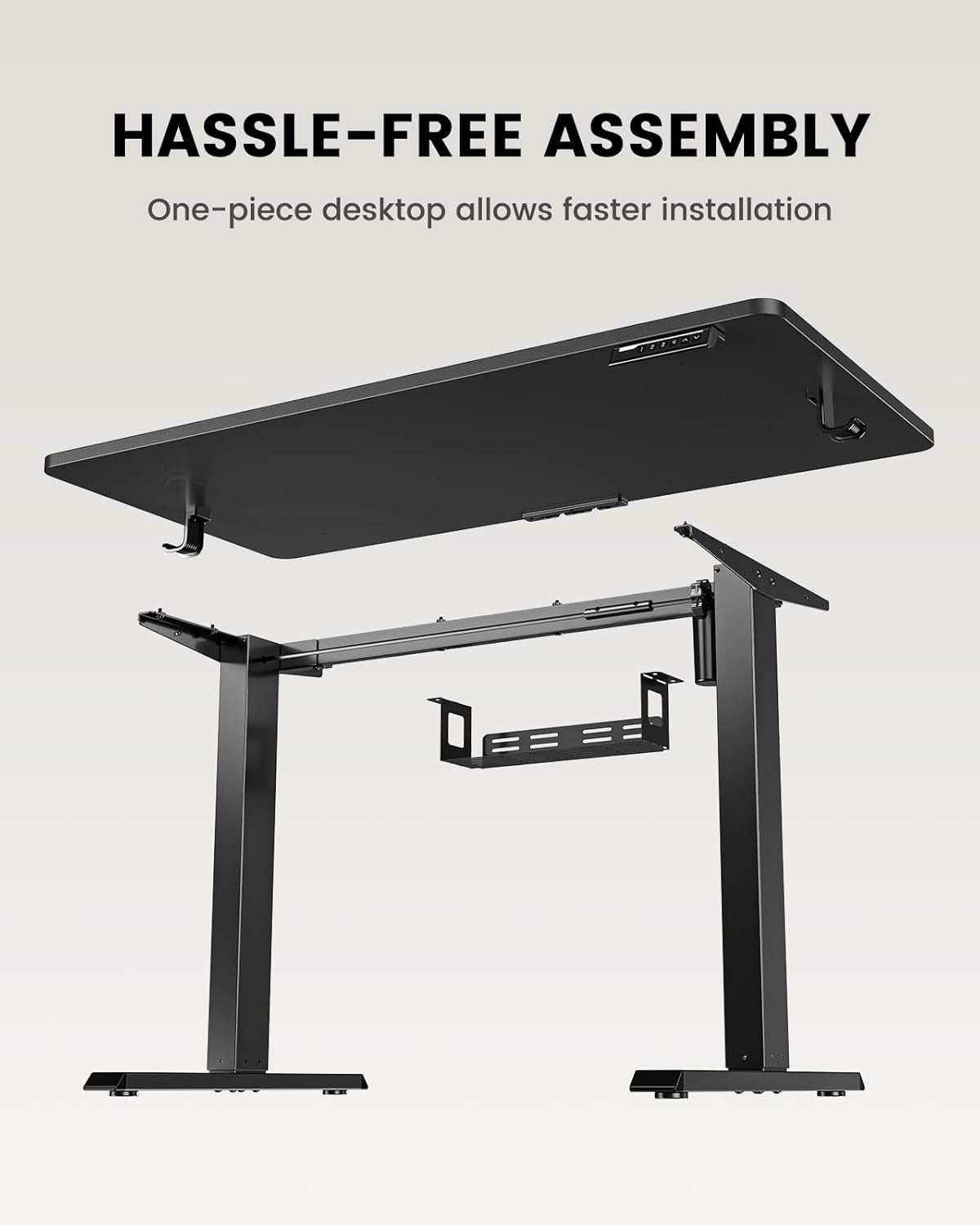
Figure 2: Components of the ErGear Standing Desk for assembly.
The one-piece desktop design simplifies installation compared to multi-piece desktops, allowing for quicker setup.
Nga Tohutohu Whakahaere
The ErGear standing desk offers smooth and quiet electric height adjustment, allowing you to effortlessly switch between sitting and standing positions.
Whakatikatika Teitei
The desk smoothly adjusts from a minimum height of 27.9 inches to a maximum height of 46.9 inches. Use the up and down arrow buttons on the control panel to achieve your desired height.
Mahara Tatūkē
The control panel features three memory preset buttons. To save a preferred height:
- Whakaritehia te teepu ki te teitei e hiahia ana koe.
- Press the 'M' button (or similar memory set button) followed by one of the numbered preset buttons (1, 2, or 3).
- The height is now saved. To recall a saved height, simply press the corresponding numbered button.
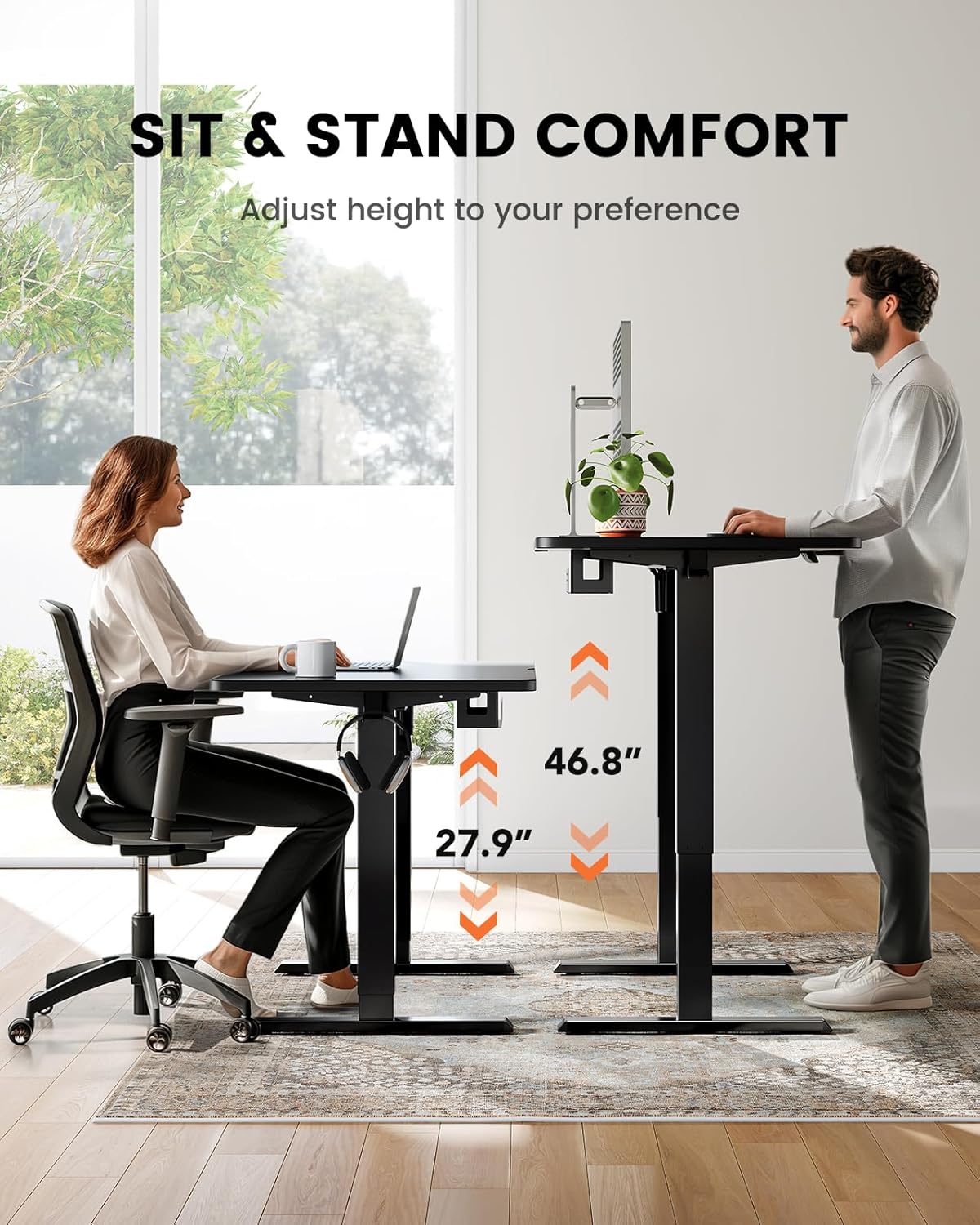
Figure 3: Sit and stand comfort with adjustable height.
Whakahaere Taura
A cable management tray is attached underneath the desktop to help keep your workspace organized and clutter-free. Utilize this tray to route and secure power cords and other cables.
Video: Official ErGear brand video demonstrating desk features and usage.
Te Tiaki me te Tiaki
To ensure the longevity and optimal performance of your ErGear standing desk, follow these simple maintenance guidelines:
- Te horoi: Horoia te mata o te teepu ki te ngohengohe, damp kakahu. A ape i nga matū kino, i nga kai horoi ranei ka pakaru te mutunga.
- Whakaha Uepu: Periodically check and reorganize cables in the management tray to prevent tangles and ensure smooth operation.
- Tiaki motuka: The electric motor is designed for durability. Avoid overloading the desk beyond its maximum weight capacity (176 lbs / 79.8 kg) to prevent strain on the motor.
- Takitaki auau: Me whakarite kia mau tonu nga tira me nga hononga. Whakapiri ano mehemea e tika ana.
Raparongoā
If you encounter any issues with your ErGear standing desk, please refer to the following common troubleshooting tips. For more complex problems, contact customer support.
- Kaore e nekehia te teepu: Check if the power cord is securely plugged into both the desk and a working power outlet. Ensure no obstructions are blocking the desk's movement.
- Nekehanga koretake: Verify that the desk is placed on a flat, level surface. Check for any loose connections in the frame or legs.
- Ko nga Tatūkē Pūmahara Kāore i te Mahi: Re-program the memory presets following the steps in the 'Operating Instructions' section.
- Haruru rerekee: A slight hum during operation is normal. If you hear grinding or loud noises, stop operation immediately and contact customer support.
Whakatakotoranga Hua
| Āhuahira | Whakatakotoranga |
|---|---|
| Waitohu | ErGear |
| Tau tauira | EGESD64B |
| Hunga Hua | 24"D x 48"W x 28"H |
| Tae | Pango |
| Kāhua | Hou |
| Rauemi turanga | Kowiri tira |
| Momo Rawa Runga | Bamboo |
| Momo Whakaoti | Kua peita |
| Momo Whakaeke | Pūkana |
| Nga Waahanga kei roto | Paepae Whakahaere Taura |
| Teitei iti | 27.9 Inihi |
| Teitei Morahi | 46.9 Inihi |
| Tohunga Taumaha Morahi | 176 Pauna (79.8 kg) |
| Huihuinga e hiahiatia ana | Ae |
| Momo Rarangi | He iti |
Pūtāhui me te Tautoko Kiritaki
The ErGear Whole Piece Standing Desk comes with a Limited Warranty. For specific terms and conditions, please refer to the warranty information provided with your purchase or contact ErGear customer service.
If you have any questions about assembly, product selection, or require technical assistance, please do not hesitate to contact our U.S.-based customer support team. We are here to help.
Tautoko Kiritaki: Please refer to your product packaging or the official ErGear website for the most current contact information (phone, email, or live chat).


