1. Kupu Whakataki
The Mastfuyi FY12DMM is a versatile 2-in-1 device combining a high-resolution thermal imager with a comprehensive digital multimeter. This instrument is designed for professionals and enthusiasts requiring precise measurements and visual thermal analysis in various fields, including electrical, mechanical, construction, and automotive diagnostics. This manual provides essential information for safe and effective operation.
2. Nga korero haumaru
Always adhere to the following safety precautions to prevent personal injury or damage to the device.
- Pānuihia me te mohio ki nga tohutohu katoa i mua i te whakamahi.
- Kaua e whakahaerehia te pūrere mēnā te āhua nei kua pakaru, kāore rānei e mahi tika ana.
- Ensure proper test lead connection before taking any measurements.
- Kaua e neke ake i ngā whakatauranga tāuru mōrahi mō tētahi mahi.
- Use caution when working with live electrical circuits.
- Kia maroke, kia ma te taputapu.
- Only use accessories and replacement parts specified by the manufacturer.
3. Ihirangi mokete
Manatokona kei roto katoa nga mea kei roto i te kete:
- 1 x Mastfuyi FY12DMM Thermal Imager Multimeter
- 1 x Taura Utu (Momo USB-C)
- 1 x Kawe Kawe
- 1 x Manual Kaiwhakamahi (tenei tuhinga)
- Nga Tohu Whakamatau (Whero me te Pango)
Tuhipoka: The flexible AC current clamp is not included in the standard package.

4. Pūrere Neke Atuview
The Mastfuyi FY12DMM integrates thermal imaging and digital multimeter functionalities into a single, portable unit. Its design focuses on ease of use and comprehensive diagnostic capabilities.

Ko nga waahanga matua ko:
- 3.98-inch TFT LCD Touch Screen: A full-view display for clear visualization of thermal images, multimeter readings, and intuitive menu navigation.
- Thermal Imager Lens: The optical component responsible for capturing infrared radiation.
- Multimeter Input Jacks: Standard ports for connecting test leads for electrical measurements.
- Pātene Hiko: Controls the device's power state.
- Wīra/Pātene Whakatere: Provides alternative control for menu selection and parameter adjustments.
- Tauranga Momo-C USB: Used for charging the internal battery and transferring data to a computer.

5. Tatūnga
5.1 Whakataki Tuatahi
I mua i te whakamahinga tuatahi, whakakiia katoatia te taputapu.
- Connect the supplied USB Type-C charging cable to the device's charging port.
- Honoa te tahi pito o te taura ki te urutau hiko USB paerewa (kaore i whakauruhia), ki te tauranga USB rorohiko ranei.
- Ka mura te tohu utu. Tukua te pūrere kia utu kia kitea rā anō e te tohu kua kī te utu.

5.2 Hiko / Whakaweto
- To power on: Press and hold the power button until the screen illuminates.
- To power off: Press and hold the power button until the shutdown prompt appears, then confirm.
6. Operating the Thermal Imager
6.1 Whakaahua Wera Taketake
Upon powering on, the device typically defaults to thermal imaging mode, displaying a real-time thermal image with temperature readings.
- Awhe Pawera: Measures temperatures from -20℃ to 550℃ (-4℉ to 1022℉).
- Taumira IR: Features a 320 x 320 pixel infrared resolution for clear and detailed thermal images.
- Rere tāmata: Operates at 25Hz, providing a smooth, real-time thermal video feed.
- Te Manawaariki (NETD): With a sensitivity of less than 60mk, the device can detect subtle temperature differences.
The device can perform microscopic detection at a component level, though a macro lens is not included as a standard accessory. If detailed close-up thermal imaging is required, a corresponding macro lens package would need to be acquired separately.

6.2 Thermal Palettes
The device offers 15 distinct thermal palettes to enhance the visualization of temperature differences. Selecting the appropriate palette can significantly improve the clarity of thermal patterns for specific applications.
- Access palette options via the touchscreen menu or navigation controls.
- Experiment with palettes like Iron Red, Rainbow, White Hot, and Black Hot to find the most suitable display for your inspection.
6.3 Te Whakatikatika i te Tukunga
Accurate temperature measurements depend on correct emissivity settings. The emissivity value (adjustable from 0.01 to 1.0) should match the material surface being measured.
- Locate the emissivity setting in the thermal imaging menu.
- Consult standard emissivity tables for common materials or adjust the value to achieve the most accurate readings for your specific target.
6.4 Whakaoho Pāmahana Teitei me te Iti
The intelligent alarm function allows you to set custom temperature thresholds. The device will trigger immediate audible and visual alerts if temperatures exceed or fall below these predefined safety ranges.
- Access the alarm settings through the thermal imaging interface.
- Configure the upper and lower temperature limits to suit your monitoring requirements.
7. Operating the Multimeter
The FY12DMM includes a 20,000-count digital multimeter for precise electrical measurements.
7.1 Te hono i nga kaiarahi Whakamātautau
- Insert the red test lead into the "VΩmA" input jack.
- Insert the black test lead into the "COM" (common) input jack.
- For AC current measurements with an optional clamp, refer to the clamp's instructions.
7.2 Nga Mahi Ine
Use the touchscreen or navigation to select the desired measurement function. The device supports auto-ranging for most functions.
- DC Voltage: Tae atu ki te 1000V.
- AC Voltage: Tae atu ki te 750V.
- Ātete: Tae atu ki te 200MΩ.
- Te kaha: Up to 99.999mF.
- Whakamatau Whakatautau: Checks diode functionality.
- Whakamātautau Tonu: Audible indication for continuity.
- Flexible AC Current: Up to 2000A (requires optional clamp).
- Te pāmahana: -20℃ to 1300℃ (-4℉ to 2372℉) using a K-type thermocouple (not included).
Ko te taputapu he a Puritia function to freeze the current reading and Awhe measurement modes for manual range selection if desired.
8. Whakahaere Raraunga
8.1 Rokiroki Whakaahua
The FY12DMM has a built-in memory card capable of storing up to 30,000 images in BMP format.
- To save a thermal image, press the designated capture button on the screen.
- Images are automatically saved to the internal memory.

8.2 Kaweake Raraunga
Stored images and recorded waveform data can be exported to a computer for further analysis.
- Connect the device to a computer using the USB Type-C cable.
- The device should appear as a removable storage device.
- Copy the desired BMP image files or data logs to your computer.
9. Tiaki
9.1 Te horoi
- Horoia te taha waho o te taputapu ki te wai ngohengohe,amp kakahu. Kaua e whakamahi i nga kai horoi me nga whakarewa.
- Gently clean the thermal imager lens with a lens cleaning cloth.
- Me whakarite kua whakawetohia te taputapu, ā, kua momotu hoki i tētahi pūtake hiko i mua i te horoinga.
9.2 Tiaki Pūhiko
- Whakakīia anō te pākahiko i ia wā, ahakoa kāore te pūrere e whakamahia pinepine ana, hei pupuri i te hauora o te pākahiko.
- Avoid storing the device in extreme temperatures.
10. Te Raru
| Raruraru | Take pea | Rongoā |
|---|---|---|
| Kaore te taputapu i te hiko. | He iti, he pau ranei te pākahiko. | Charge the device fully using the supplied USB Type-C cable. |
| Ko nga panui pāmahana hē. | Incorrect emissivity setting; dirty lens. | Adjust emissivity for the target material; clean the thermal imager lens. |
| Multimeter readings are unstable or incorrect. | Poor test lead connection; incorrect function selected. | Ensure test leads are securely connected; verify the correct measurement function is selected. |
| Cannot transfer data to computer. | Faulty USB cable; incorrect connection mode. | Try a different USB Type-C cable; ensure the device is properly connected and recognized by the computer. |
11. Whakatakotoranga
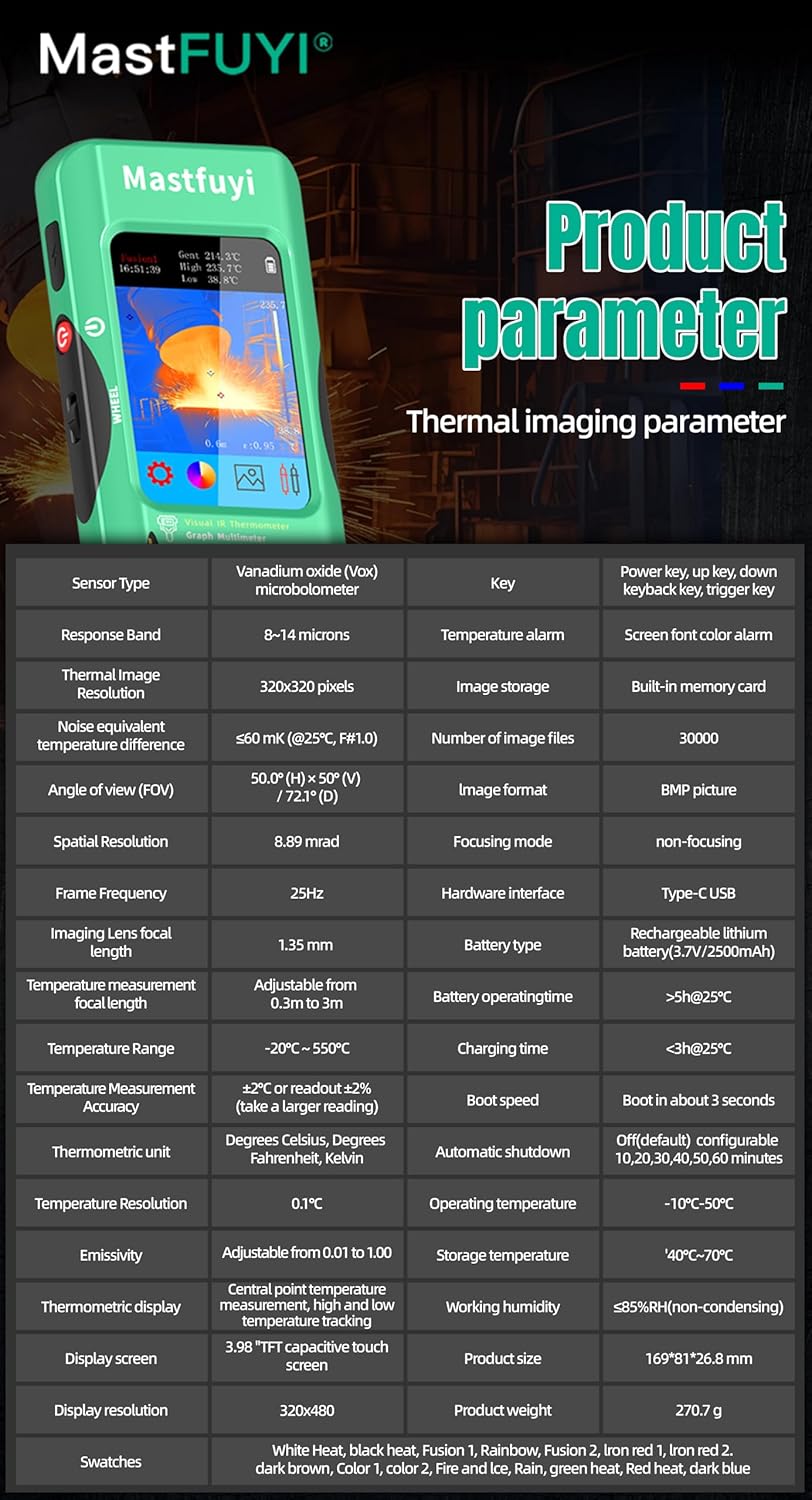
11.1 Infrared Camera Specifications
| Āhuahira | Whakatakotoranga |
|---|---|
| Rahi Whakaatu | 3.98 Inihi TFT LCD |
| Whakatau IR | 320 x 320 pika |
| Whakatau Mata | 320 x 480 pika |
| Tuhinga o mua View (FOV) | 50.0°(H) x 50.0°(V) / 72.1°(D) |
| Taumira Mokowā (IFOV) | 8.89mra |
| Awhe Pawera | -20 ℃ ki te 550 ℃ (-4 ℉ ki te 1022 ℉) |
| Te Manawaariki/NETD | Less than 60mk |
| Rere tāmata | 25Hz |
| Tautuhinga Tawhiti | 0.3 - 3 mita |
| Harikiri | 0.01 - 1.0 (adjustable) |
| Thermal Palettes | 15 |
| Number of Storage Images | 19,000 (internal memory) |
11.2 Digital Multimeter Specifications
| Āhuahira | Awhe | Whakatau | Tika |
|---|---|---|---|
| Whakaatu MAX | 20000 tatau | ||
| DC Voltage | 20mV/200mV/2V/20V/200V/1000V | 0.001mV ki te 0.1V | ±(0.05%+3) ki te ±(0.5%+3) |
| AC Voltage | 20mV/200mV/2V/20V/200V/750V | 0.001mV ki te 0.1V | ±(0.1%+3) ki te ±(0.5%+3) |
| Flexible AC Current | 200A/2000A | 0.1A/1A | ±(1.0%+5) |
| Ātete | 200Ω ki te 200MΩ | 0.01Ω ki te 0.01MΩ | ±(0.2%+3) ki te ±(5%+5) |
| Te kaha | 999.99nF ki te 99.999mF | 0.01nF ki te 0.001mF | ±(2%+5) ki te ±(5%+20) |
| Te pāmahana | -20℃~1300℃/-4℉-2372℉ | 1 ℃ / 1 ℉ | ±(2%+5) |
| Diode | Ae | ||
| Tonu | Ae | ||

11.3 Whakatakotoranga Whānui
- Mana: 2500mAh rechargeable battery (built-in)
- Rahi: 169 x 81 x 26.8 mm
- Taumaha: 270g
- Operating System Languages: English, Spanish, German, French, Italian, Japanese, Chinese (selectable)

12. Pūtāhui me te Tautoko
For warranty information and technical support, please refer to the warranty card included with your product or visit the official Mastfuyi webpae.
Visit the Mastfuyi Store on Amazon mo etahi atu hua me nga rauemi tautoko.


