Kupu Whakataki
Thank you for choosing the Nexus Bendz Prostate Edition Bendable Vibrating Prostate Massager. This manual provides essential information for the safe and effective use, maintenance, and troubleshooting of your device. Please read it thoroughly before first use and retain it for future reference.
The Nexus Bendz Prostate Edition is designed for customized pleasure, featuring a bendable, rippled design with dual-density silicone. It offers 6 vibrating functions for the shaft and 6 for the base, providing 48 combinations of pleasure. The device includes a slimline remote control for convenient operation, and both the massager and remote are rechargeable and fully waterproof/submersible.
Nga korero haumaru
- Me horoi i nga wa katoa te taputapu i mua i muri i ia whakamahinga.
- Use only water-based lubricants with this product. Oil-based lubricants can damage silicone.
- Do not use if the device appears damaged or if the silicone is torn.
- Kati tonu te whakamahi mēnā ka pāngia koe e te mamae, te kore whakamarie rānei.
- Kaua e taea e nga tamariki.
- Me kōrero ki tētahi tohunga hauora mēnā he mate hauora, he āwangawanga rānei ōu i mua.
Ihirangi mokete
- 1 x Nexus Bendz Prostate Edition Massager
- 1 x Slimline Remote Control
- 1 x USB Utaura Whakatau
- 1 x Manual Kaiwhakamahi (tenei tuhinga)
Tatūnga
Charging the Device and Remote
Before first use, fully charge both the Nexus Bendz Prostate Edition massager and its remote control.
- Locate the charging ports on both the massager and the remote. These are typically small, recessed magnetic contact points.
- Connect the provided USB charging cable to the charging points on the device and remote.
- Monohia tetahi pito o te taura USB ki roto i tētahi urutau hiko USB paerewa (kāore i te whakaurua) ki tētahi tauranga USB rorohiko rānei.
- The indicator light on the device and remote will illuminate during charging and turn off or change color when fully charged. Charging typically takes 2-3 hours.
- Momotuhia te taura utu ina kua utua katoatia.
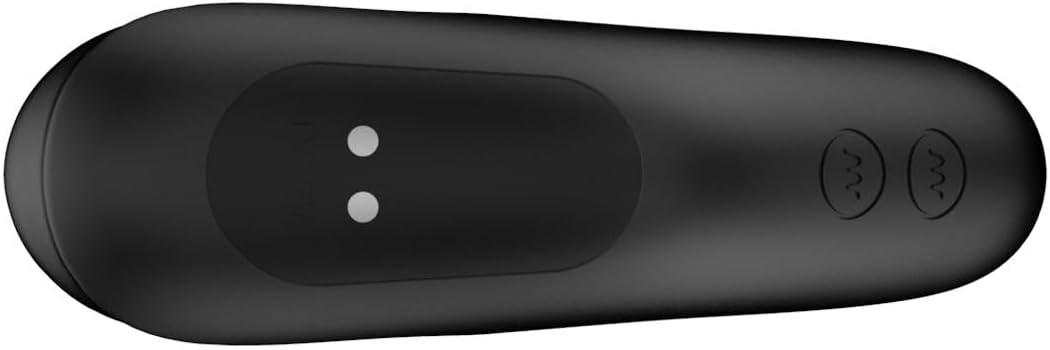
Whakaahua 1: Raro view of the massager, highlighting the magnetic charging points. Ensure these points are clean and dry before charging.

Whakaahua 2: The slimline remote control, showing the power button and vibration control buttons. The charging port is typically on the underside or end.
Nga Tohutohu Whakahaere
Te Hia/Weto
- To power on the massager: Press and hold the power button on the massager for 2-3 seconds until it vibrates briefly.
- To power on the remote: Press and hold the power button on the remote for 2-3 seconds.
- To power off both: Press and hold the power button on either the massager or the remote for 2-3 seconds until the vibrations stop.
Te whakamahi i te Mana Mamao
The remote control allows for convenient operation of the massager from up to 8 meters away.
- Ensure both the massager and remote are powered on.
- The remote has separate buttons for controlling the shaft vibrations and the base vibrations.
- Press the respective vibration buttons to cycle through the 6 shaft vibration modes and 6 base vibration modes.
- Experiment with different combinations to find your preferred setting from the 48 available pleasure combinations.
Taupānga
Apply a generous amount of water-based lubricant to the massager before insertion. The bendable design allows the device to conform to your body for optimal comfort and targeted stimulation of the prostate and perineum.

Whakaahua 3: The Nexus Bendz Prostate Edition massager. Note the bendable shaft and the rippled texture on the base designed for perineum stimulation.

Whakaahua 4: Te taha view demonstrating the ergonomic shape and bendable nature of the massager, designed for comfortable use.
Te Tiaki me te Tiaki
Te horoi
Proper cleaning is essential for hygiene and to prolong the life of your device.
- Always clean the massager immediately after each use.
- Wash the device thoroughly with warm water and a mild, toy-safe soap.
- Horoi rawa kia tangohia nga toenga hopi katoa.
- Whakamarokehia ki te kakahu kore-miro, waiho rānei kia maroke rawa i te hau i mua i te penapena.
- The device is waterproof/submersible, allowing for easy cleaning under running water.
Rokiroki
Store the massager and remote in a clean, dry, and cool place, away from direct sunlight and extreme temperatures. Keep them separate from other toys made of different materials to prevent material degradation.
Raparongoā
| Raruraru | Take pea | Rongoā |
|---|---|---|
| Kaore te taputapu e huri ana. | Kua pau te pākahiko. | Me utu te taputapu ma te whakamahi i te taura USB kua whakaratohia. |
| Kāore te pūrere mamao e whakahaere. | Remote battery is depleted; Device is off; Out of range. | Charge the remote; Ensure device is powered on; Move remote closer to the device (within 8 meters). |
| He ngoikore, he koretake rānei ngā wiri. | Low battery; Device malfunction. | Recharge the device. If problem persists after charging, contact customer support. |
| Kaore te taputapu e utu ana. | Charging cable not properly connected; Faulty cable/adapter; Dirty charging points. | Ensure cable is securely connected; Try a different USB port or adapter; Clean charging points with a dry cloth. |
Whakatakotoranga
- Tau tauira: 87909
- Waitohu: nohonga
- Tae: Pango
- Rauemi: Luxury Silicone
- Ahu (L x W x H): 7.09 x 7.09 x 1.97 inihi
- Taumaha: 10.16 hekere
- Vibration Functions: 6 shaft modes, 6 base modes (48 combinations)
- Mana: Device button and Slimline Remote Control
- Rangi Rawa: Tae atu ki te 8 mita
- Puna Hiko: Ka taea te utu (kua uru te taura USB)
- parewai: Yes, submersible
Pūtāhui me te Tautoko
For warranty information or technical support, please refer to the official Nexus webpae, whakapā atu ranei ki to kaihoko. Puritia to tohu hoko mo etahi kereme whakamana.
Kaihanga: nohonga
Te Ra Tuatahi Wātea: Hui-tanguru 8, 2024