1. Kupu Whakataki
The AVMATRIX SHARK H4 PLUS is an all-in-one multi-camera video mixer switcher designed for professional live streaming and video production. It integrates a 10.1-inch Full HD display for real-time monitoring, a silent fan for optimal temperature control, and a robust metallic enclosure for durability. This device offers extensive connectivity and advanced features to streamline your workflow, making it ideal for various applications including live sports, virtual studios, education, concerts, and more.

Whakaahua 1: Mua view of the AVMATRIX SHARK H4 PLUS Video Mixer Switcher.
2. He aha kei roto i te Pouaka
Upon unboxing your AVMATRIX SHARK H4 PLUS, please verify that all the following components are included:
- AVMATRIX SHARK H4 PLUS Video Mixer Switcher Unit
- 12V 2A Pūurutau Hiko
- USB AC Cable
- Tuhono Tally
- Pukapuka Kaiwhakamahi (tenei tuhinga)
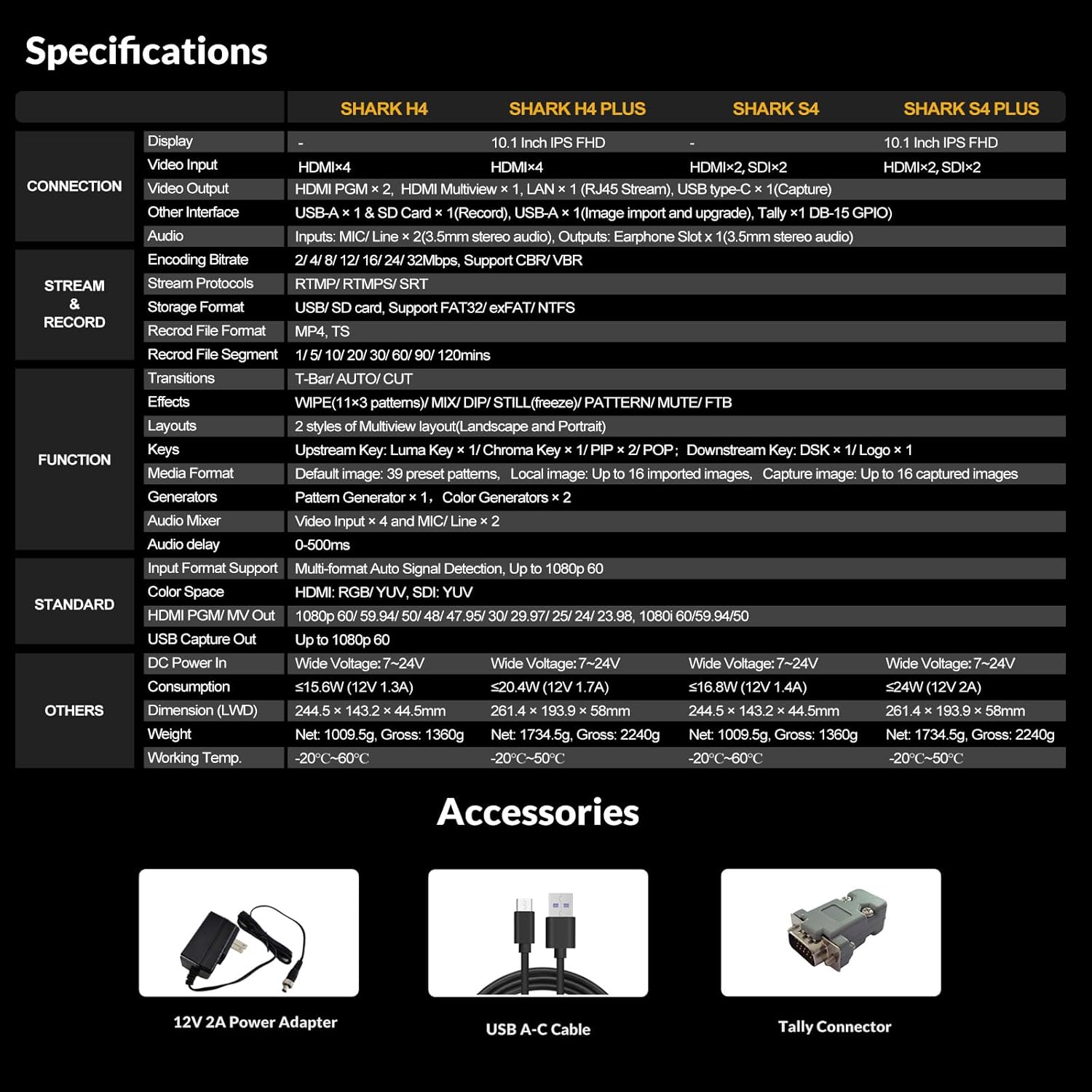
Figure 2: Included accessories for the SHARK H4 PLUS.
3. Aratohu Tatūnga
Follow these steps to set up your SHARK H4 PLUS for operation:
- Hononga Hiko: Connect the provided 12V 2A power adapter to the 'DC 12V IN' port on the rear panel of the switcher and then plug it into a power outlet.
- Waitohu Ataata: Connect your HDMI video sources (e.g., cameras, computers) to the 'HDMI IN 1' through 'HDMI IN 4' ports.
- Putanga Ataata: Connect your program monitors or recording devices to the 'HDMI PGM OUT' ports. Use the 'HDMI Multiview Output' for monitoring all your inputs and program feed on a single screen.
- Tāuru Ororongo: Connect microphones or line-level audio sources to the 'MIC/Line In' ports. The switcher also supports 4 HDMI embedded audio channels.
- Streaming/Recording: For live streaming, connect an Ethernet cable to the 'LAN' port and/or a USB Type-C cable to the 'USB Type-C Output' for direct streaming to software like OBS, vMix, or Zoom. For recording, insert an SD card into the 'SD Card Slot' or connect a USB drive to the 'USB-A' port.
- Tally System: If using a tally system, connect it to the 'TALLY' port.

Figure 3: Rear panel connections of the SHARK H4 PLUS.

Figure 4: Connection diagram for the SHARK H4 PLUS.
4. Nga Tohutohu Whakahaere
The SHARK H4 PLUS offers intuitive controls and a comprehensive menu system accessible via the integrated 10.1-inch FHD screen and physical buttons. Below are key operational aspects:
4.1. Video Switching and Transitions
Select your desired input sources using the numbered buttons (1-4 for HDMI inputs). Use the 'CUT' button for an instant transition or the 'AUTO' button for a smooth transition with a preset speed. The transition effects (WIPE, DIP, MIX) can be configured via the menu.
4.2. Audio Mixing
The built-in 6-channel audio mixer allows you to control the levels of 4 HDMI embedded audio sources and 2 external MIC/Line inputs. Adjust individual channel volumes and apply audio delay as needed. An earphone output is available for monitoring each audio channel.
4.3. Advanced Effects and Keying
The SHARK H4 PLUS supports up to six layers of effects, including Chroma Key (green screen), Luma Key, Logo insertion, and DSK (Downstream Key). These features enable real-time post-production for dynamic live presentations.
4.4. Recording and Streaming
Record your program output directly to an SD card or USB drive in MP4/TS format with encoding and recording bitrates up to 32Mbps. For live streaming, utilize the USB Type-C output for webcam functionality or the LAN output for RTMP/SRT streaming to platforms like YouTube, Skype, Facebook, and Twitch.

Figure 5: Widespread applications of the SHARK H4 PLUS.
4.5. User Interface and Menu Navigation
The intuitive button layout and rotary knob allow for easy navigation through the menu system. Access settings for transitions, upstream/downstream keying, multiview layout, output formats, recording/streaming parameters, PTZ control, and system settings.
Video 1: Demonstration of the AVMATRIX video switcher's user interface and key features, including menu navigation, audio mixing, and effect application.
5. Tiaki
To ensure the longevity and optimal performance of your AVMATRIX SHARK H4 PLUS, adhere to the following maintenance guidelines:
- Te horoi: Regularly wipe the exterior with a soft, dry cloth. Avoid using liquid cleaners or solvents, which may damage the finish or internal components.
- Whakahau: Ensure the device is placed in a well-ventilated area. Do not block the perforated grille panels, as they are crucial for enhanced thermal dissipation and maintaining optimal operating temperature.
- Rokiroki: When not in use for extended periods, store the switcher in a cool, dry place, away from direct sunlight and extreme temperatures.
- Te whakahaere: Handle the unit with care to prevent physical damage. The compact design is built for portability and durability, but impacts should be avoided.
6. Te Raru
If you encounter issues with your SHARK H4 PLUS, consider the following common troubleshooting steps:
- Kore Mana: Ensure the power adapter is securely connected to both the switcher and a working power outlet. Verify the power indicator light is on.
- Kore he Putanga Ataata: Check all HDMI cable connections. Ensure the input sources are active and sending a signal. Verify the correct input is selected on the switcher. Confirm the output resolution is compatible with your display.
- Kore Ororongo: Check audio cable connections for external microphones/line-in. Verify audio levels in the audio mixer settings. Ensure HDMI embedded audio is enabled for the respective inputs.
- Ngā Take Rere: Verify network connectivity if using LAN output. Check streaming software settings (e.g., OBS, vMix) for correct input selection and stream key. Ensure sufficient internet bandwidth.
- Nga take hopu: Check if the SD card or USB drive is properly inserted and has sufficient free space. Verify the recording format and bitrate settings.
For persistent issues, please refer to the detailed troubleshooting section in the full product manual or contact AVMATRIX customer support.
7. Whakatakotoranga
Key technical specifications for the AVMATRIX SHARK H4 PLUS:
- Rahi Hua: 10.29 x 7.6 x 2.2 inihi
- Taumaha Tūemi: 5.1 pauna
- Whakaatu: 10.1 inch FHD IPS Screen
- Ataata Ataata: 4 x HDMI
- Putanga Ataata: HDMI PGM x 2, HDMI Multiview x 1
- Streaming Output: USB Type-C x 1, LAN x 1 (RJ45 Stream)
- Urupare Ororongo: MIC/Line x 2 (3.5mm stereo audio), 4 x HDMI embedded audio
- Putanga Ororongo: Earphone Slot x 1 (3.5mm stereo audio)
- Te tuhi: USB/SD card, MP4/TS format, up to 32Mbps bitrate
- Mana: DC 12V I roto
- Te Waahi Mahi: -20°C ki te 60°C
8. Pūtāhui me te Tautoko
For warranty information, technical support, or service inquiries, please contact AVMATRIX customer service through their official website or the contact details provided with your product packaging. Keep your purchase receipt and product serial number handy for faster assistance.


