Kupu Whakataki
This manual provides essential information for the safe and efficient operation of your Mistral 46-inch Blade-Free Fan with Air Purifier, Model MBFAP460. This appliance combines powerful airflow with advanced air purification technology, featuring a DC motor turbo system, HEPA13 filtration, and UV sterilization. Please read these instructions thoroughly before use and retain them for future reference.
Nga Tohutohu Haumaru
Hei whakaiti i te tupono o te ahi, te wiri hiko, te whara ranei, me whai tonu i enei tikanga tiaki haumaru:
- Whakaritehia te voltage ōrite ana ki te tapanga whakatauranga i runga i te taputapu.
- Kaua e whakahaere i te taputapu me te taura, te mono rānei kua pakaru. Mena kua pakaru, whakapā atu ki ngā kaimahi ratonga whai tohu.
- Keep the appliance away from water or other liquids. Do not immerse any part of the appliance in water.
- Momotuhia te taputapu mai i te putanga hiko i mua i te horoinga, i te mahi tiaki, i te wā rānei kāore e whakamahia ana.
- Do not insert fingers or foreign objects into any openings of the appliance.
- Ko tenei taputapu mo te whare o roto anake.
- Tirotiro i nga tamariki kia kore ratou e takaro ki te taputapu.
Ihirangi mokete
Manatokona kei roto katoa nga mea kei roto i te kete:
- Mistral Blade-Free Fan with Air Purifier Main Unit
- Mana Mamao
- HEPA13 Filter (pre-installed or separate)
- Pukapuka Kaiwhakamahi (tenei tuhinga)
Tatūnga
The Mistral MBFAP460 requires minimal assembly. Follow these steps to prepare your unit for operation:
- Wewete ana: Kia ata tangohia nga waahanga katoa mai i te kete. Puritia te takai mo te rokiroki a muri ake nei, hei kawe ranei.
- Base Attachment (if separate): If the base is separate, align it with the main unit and secure it according to the markings. Ensure it clicks into place or is fastened securely.
- Whakanoho Tātari: If the HEPA13 filter is not pre-installed, locate the filter compartment (usually at the base or rear of the unit), remove the cover, insert the filter with the correct orientation, and replace the cover.
- Turanga: Place the fan on a firm, level surface, ensuring adequate space around the unit for optimal airflow and purification.

Whakaahua 1: Mua view of the Mistral MBFAP460 Blade-Free Fan with Air Purifier.
Nga Tohutohu Whakahaere
Your Mistral MBFAP460 can be operated using the control panel on the unit or the included remote control.
Paewhiri Mana Neke Atuview

Figure 2: Close-up of the control panel, showing the digital display and touch-sensitive buttons for various functions.
Mahi Taketake
- Hiko Whakaka/Weto: Patohia te mana hiko (U) i te papatohu whakahaere, i te mana mamao rānei hei whakakā, hei whakaweto rānei i te waeine.
- Aratau rangi: Cycle through the 5 available air modes: Auto, Turbo, Sleep, Natural, and Normal. Each mode adjusts fan speed and purification settings for different environments.
- Whakatairite: Activate or deactivate the automatic left-right oscillation feature. Select from 30, 60, 90, or 120-degree oscillation angles to distribute air across a wider area.
- UV Whakahoromata: The unit features UV sterilization to kill up to 99.99% of most viruses, airborne bacteria, and mold. This function operates automatically with the air purification system.
- Tohu Whakakapi Tātari: The control panel will display an indicator when the HEPA13 filter requires replacement. Refer to the Maintenance section for instructions.
Te tiaki
Regular maintenance ensures optimal performance and longevity of your Mistral MBFAP460.
Te horoi i te Waehe
- Wewetehia te waeine i mua i te horoi.
- Horoia nga mata o waho ki te ngohengohe, damp kakahu. Kaua e whakamahi i nga kai horoi me nga whakarewa.
- Me whakarite kia kore te wai e uru ki roto i nga waahanga o roto.
HEPA13 Filter Replacement
The HEPA13 filter removes up to 99.97% of allergens, pollutants, and dust as small as 0.3 microns. Replace the filter when the filter replacement indicator illuminates on the control panel.
- Wewetehia te taputapu mai i te putanga hiko.
- Locate the filter compartment, usually at the base of the unit.
- Whakatuwheratia te uhi o te wahanga tātari.
- Tangohia te tātari tawhito ka maka atu i te wāhi tika.
- Insert a new Mistral HEPA13 replacement filter, ensuring correct orientation.
- Katia kia mau te uhi o te wahanga tātari.
- Plug in the unit and reset the filter indicator (refer to specific instructions in the full manual if a reset button is present).
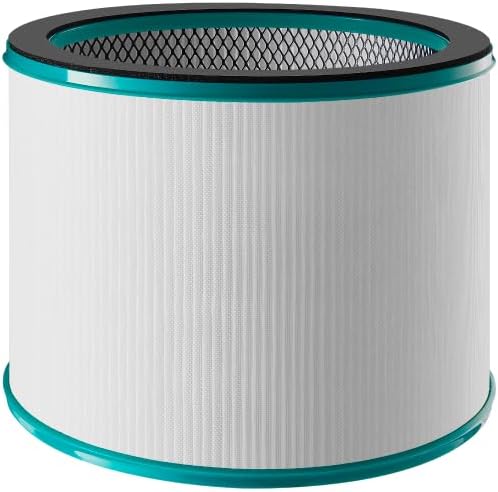
Figure 3: Mistral HEPA13 replacement filter, essential for maintaining air purification efficiency.
Raparongoā
If you encounter issues with your Mistral MBFAP460, consult the following table for common problems and solutions.
| Raruraru | Take pea | Rongoā |
|---|---|---|
| Karekau te waeine e ka ana. | No power supply. Power cord not securely plugged in. | Check if the power cord is firmly plugged into a working outlet. Ensure the power switch (if any) is on. |
| He ngoikore, kore ranei te rere o te hau. | Air intake/outlet blocked. Filter is dirty or clogged. | Ensure no obstructions are blocking the air intake or outlet. Check and replace the HEPA13 filter if dirty. |
| Haruru rereke i te wa e mahi ana. | Unit not on a level surface. Foreign object inside. | Place the unit on a stable, level surface. Unplug and carefully inspect for any foreign objects. |
| Ka noho tonu te tohu whakakapinga tātari i muri i te whakawhiti tātari. | Ko te tohu tātari kaore i te tautuhi. | Refer to the full manual for specific instructions on how to reset the filter replacement indicator. |
Mena kei te haere tonu te raru i muri i te whakamatau i enei otinga, tena koa whakapā atu ki te tautoko a te kaihoko.
Whakatakotoranga
| Āhuahira | Taipitopito |
|---|---|
| Tauira | MBFAP460 |
| Waitohu | MISTRAL |
| Hunga Hua | 38D x 35.8W x 116.2H henimita |
| Taumaha Tūemi | 5.5 Kirokaramu |
| Puna Mana | Hiko Hiko |
| Tikanga Mana | Mamao |
| Momo Tātari | HEPA13 |
| Rahi Pupuri Matūriki | 0.3 Micron |
| Te Rahi o te Papa | 700 Puawai Tapawha |
| Nga waahanga motuhake | DC Motor Turbo System, UV Sterilisation, 5 Air Modes, Auto Oscillation |
| Huihuinga e hiahiatia ana | Ae |
| Te Taiao Whakaaetanga Hauora | Ae |
Pūtāhui me te Tautoko
This product comes with a manufacturer's warranty. Please refer to the warranty card included in your package for specific terms and conditions. For technical support, replacement parts, or service inquiries, please contact Mistral customer service through their official webte pae, te korero whakapā ranei kei roto i to tuhinga whakamana.


