1. Kupu Whakataki
This manual provides essential instructions for the safe and effective operation of your HIKMICRO B01S Thermal Camera. Please read this manual thoroughly before using the device and retain it for future reference. The HIKMICRO B01S is a handheld thermal imaging camera designed for various applications, including home inspection, electrical maintenance, and mechanical fault detection.
2. Nga korero haumaru
Kia mau ki nga whakaritenga haumaru e whai ake nei hei aukati i te whara me te kino o te taputapu:
- Do not point the camera directly at intense heat sources such as the sun or lasers, as this may damage the thermal sensor.
- Keep the device dry. Do not expose it to rain or moisture.
- Operate the camera within the specified temperature and humidity ranges.
- Use only the charger and accessories provided or approved by HIKMICRO.
- Kaua e ngana ki te wetewete, ki te whakarerekē rānei i te taputapu. Me mahi anake ngā mahi whakatikatika e ngā kaimahi whai mana.
- Me mohio kua whakakiia te pākahiko i mua i te whakamahinga tuatahi.
3. Tatūnga
3.1 Ihirangi mokete
Manatokona kei roto katoa nga mea kei roto i to kete:
- HIKMICRO B01S Thermal Camera
- 2-in-1 USB C to USB A and USB C Cable
- Carrying Case with Shoulder Strap
- Te here a ringa
- Pukapuka Kaiwhakamahi
- Kari Whakatau

Figure 3.1: Included items in the HIKMICRO B01S Thermal Camera package.
3.2 Ka mutu te taputapuview
Familiarize yourself with the physical components of the HIKMICRO B01S Thermal Camera.

Whakaahua 3.2: Mua view of the HIKMICRO B01S Thermal Camera and included accessories.

Figure 3.3: The 3.2-inch LCD screen provides a clear display for thermal imaging.
3.3 Te Whakakaha me te Utu Tuatahi
- Te Whakataki i te Pūhiko: Connect the camera to a power source using the provided USB-C cable. The charging indicator will illuminate. A full charge supports approximately 6 hours of continuous operation.
- Kei te Hia/Weto: Press and hold the power button until the screen illuminates to power on. Repeat the action to power off.
- Āpitihanga here ringa: Attach the wrist strap to the designated loop on the camera for secure handling.
- Tāuta Takitoru: The camera features a standard tripod mount for stable, scheduled captures. This is useful for monitoring temperature changes over time in a fixed location.

Figure 3.4: The camera can be mounted on a tripod for stable, continuous monitoring.
4. Nga Tohutohu Whakahaere
4.1 Whakaahua Wera Taketake
The HIKMICRO B01S provides clear thermal imagery with a 25Hz refresh rate for smooth viewing.
- Viewi te Atahanga Ora: Once powered on, the camera displays a live thermal image on the 3.2-inch LCD screen.
- Hopu Ataahua: Press the capture button to save a thermal image to the internal 16GB eMMC flash storage, which can hold over 90,000 images.
- Papatae Tae: The camera supports 6 color palettes to visualize temperature differences. Cycle through these palettes using the dedicated button to find the most suitable display for your inspection.

Figure 4.1: Multiple color palettes are available for different viewing preferences and analysis.
4.2 Te Ineina o te Hahana
The B01S offers precise temperature measurement capabilities:
- Measurement Presets: Utilize automatic Center Spot, Hot Spot, and Cold Spot tracking to quickly identify temperature extremes. Three user-defined spots can also be set for specific areas of interest.
- Awhe Pawera: The camera measures temperatures from -20°C to 550°C (-4°F to 1022°F).
- Tautuhinga Whakaritea: For improved accuracy, adjust emissivity settings based on the material being inspected and input the distance to the object.
- Pūoho Teitei/Hakarekare: Configure the camera to trigger an audio alarm and warning light when temperatures exceed or fall below preset thresholds.
- Level and Span Selection: Switch between automatic and manual level and span adjustments to precisely highlight specific temperature ranges.

Figure 4.2: Instant temperature display with automatic and user-defined spot measurements.

Figure 4.3: High/Low temperature alarm indicators on the display.

Figure 4.4: Adjustable settings for emissivity and temperature range to enhance measurement accuracy.

Figure 4.5: Manual level and span selection for precise temperature visualization.
4.3 Āhuatanga Arā Atu Anō
- SuperIR Image Enhancement: The B01S utilizes HIKMICRO's SuperIR technology to upscale thermal images from 256x192 pixels to 640x480 pixels, providing enhanced detail for analysis.
- SuperScene Detection: This feature, powered by deep learning, automatically detects potential moisture leaks and insulation defects, simplifying inspections.
- Pro Scene Color Alarm: For advanced diagnostics, the Pro Scene Color Alarm provides customized data-driven alerts for thermal anomalies, such as condensation or insulation issues.
- Image Transfer & Auto-Update: Wirelessly transfer images and reports to mobile devices using the HIKMICRO Viewer app (available on Google Play and Apple App Store). The app also facilitates seamless firmware updates.
- Image Analysis & Instant Projection: Use the HIKMICRO Analyzer PC software for comprehensive image analysis, screen projection, real-time monitoring, and 3D plotting.

Figure 4.6: SuperIR technology enhances thermal image resolution for greater detail.

Figure 4.7: SuperScene detection highlights potential water leaks and insulation voids.

Figure 4.8: Pro Scene Color Alarm identifies specific thermal anomalies like condensation.

Figure 4.9: Wireless image transfer and auto-update functionality via the HIKMICRO Viewer taupānga.
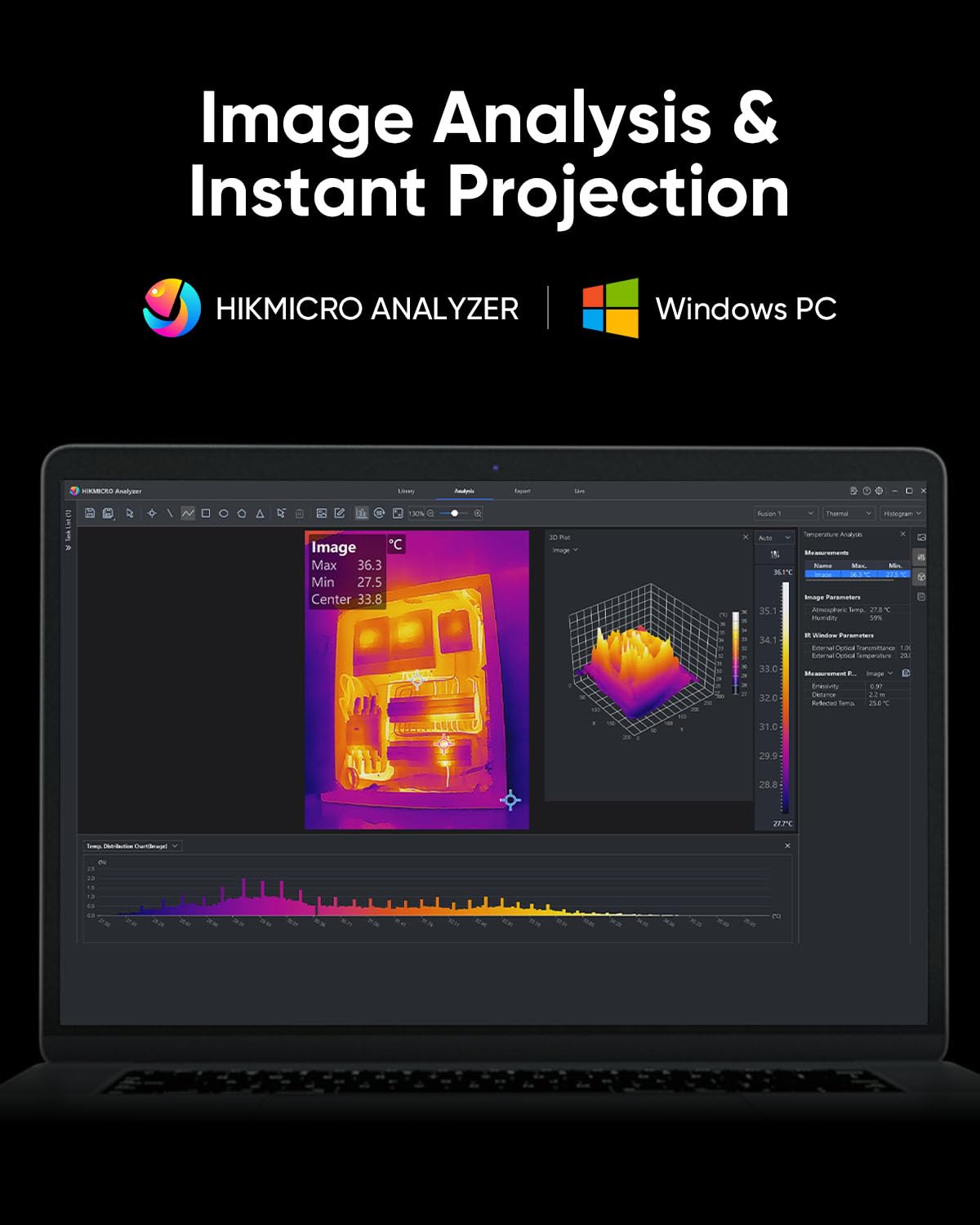
Figure 4.10: HIKMICRO Analyzer PC software for detailed image analysis and projection.
5. Tiaki
5.1 Te horoi
- Whakamahia he kakahu ngohengohe, maroke hei horoi i te tinana o te kamera.
- Mo te arotahi, whakamahia he kakahu horoi mo te arotahi motuhake me te otinga kia kore e pakaru.
- Kaua e whakamahi i nga kai horoi me nga whakarewa.
5.2 Rokiroki
- Store the camera in its protective carrying case when not in use.
- Puritia te taputapu ki te wāhi hauhautanga, maroke, kia matara atu i te rā tika me te pāmahana tino kino.
- If storing for extended periods, ensure the battery is partially charged (around 50%) and recharge it every few months to maintain battery health.
5.3 Te mauroa
The HIKMICRO B01S is designed for durability, featuring an IP54 rating for dust and water resistance and a 2-meter (6.6 ft) drop resistance.

Figure 5.1: The B01S is built to be durable with IP54 protection and 6.6 ft drop resistance.
6. Te Raru
If you encounter issues with your HIKMICRO B01S, refer to the following common problems and solutions:
| Raruraru | Take pea | Rongoā |
|---|---|---|
| Kaore te taputapu i te hiko | Pūhiko iti; Kaore i tika te pehi i te paatene hiko | Charge the battery; Press and hold the power button firmly for a few seconds |
| Fuzzy or unclear image | Lens is dirty; Incorrect focus (if applicable); Extreme temperature difference | Clean the lens; Adjust focus (if manual focus is available); Allow camera to acclimate to environment |
| Kore i tika te panui o te pāmahana | Incorrect emissivity setting; Incorrect distance setting; Object outside temperature range | Adjust emissivity for the material; Input correct distance; Ensure object temperature is within camera's range |
| Cannot connect to app/PC software | Wi-Fi/USB connection issue; Outdated app/software; Firewall blocking connection | Ensure Wi-Fi is enabled on camera and device; Check USB cable connection; Update app/software; Temporarily disable firewall |
| He poto te ora o te pākahiko | Battery degradation; Frequent use of power-intensive features | Contact support for battery replacement; Reduce screen brightness or turn off Wi-Fi when not needed |
7. Whakatakotoranga
| Āhuahira | Whakatakotoranga |
|---|---|
| Whakatau IR | 256 x 192 (49,152 pika) |
| Taumira SuperIR | 640 x 480 (307,200 pika) |
| Manawaariki (NETD) | <40mK |
| Awhe Pawera | -20°C ki te 550°C (-4°F ki te 1022°F) |
| Te Tikanga o te Pamahana | ±2°C ±2% rānei (ko tēhea te mea nui ake) |
| Rere tāmata | 25Hz |
| Whakaatu Mata | 3.2" LCD, 640 x 480 resolution |
| Rokiroki | 16GB eMMC (stores >90,000 images) |
| Hononga | Wi-Fi, USB-C |
| Momo Pūhiko | 1 pākahiko Lithium Ion (kei roto) |
| Ora Pūhiko | Approx. 6 hours continuous operation |
| Whakatauranga IP | IP54 |
| Whakataka Atete | 2 mita (6.6 ft) |
| Ngā Ahu (Mōkihi) | 31.2 x 21.1 x 11.8 cm |
| Taumaha (Mōkihi) | 1.08 kg |
| Tau tauira | HM-TP52+-3AQF/W-B01S |
| Kaihanga | HIKMICRO |
| Whenua Taketake | Haina |
8. Pūtāhui me te Tautoko
HIKMICRO products are covered by a limited warranty. Please refer to the warranty card included in your package for specific terms and conditions. For technical support, service, or warranty claims, please contact HIKMICRO customer service through their official website or the contact information provided on your calibration card.


