Ka mutu te huaview
The SUNOL H08 Mecha Bluetooth Wireless Headset offers a unique transparent design combined with advanced audio technology. Engineered for comfort and convenience, these headphones provide clear sound quality, low latency, and extended battery life, making them suitable for various activities from daily listening to gaming and calls.
Key features include Bluetooth 5.3 for stable connectivity, environmental noise reduction for clear calls, and a robust charging case with an LED display.
He aha kei roto i te Pouaka
- H08 Mecha Bluetooth Wireless Headset (Left and Right Earbuds)
- Puhi utu
- Uera Whakatau
- Multiple Sizes of Ear Tips (for comfortable fit)
Aratohu Tatūnga
1. Whakataki Tuatahi
Before first use, fully charge the headset and charging case. Place the earbuds into the charging case. Connect the charging cable to the case and a USB power source. The LED display on the charging case will indicate the charging status and battery level.
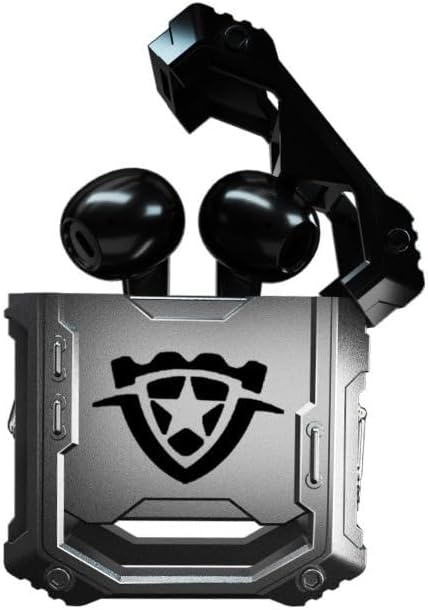
Image: The H08 Mecha Bluetooth Wireless Headset, showing both earbuds securely placed within their open charging case. The case features a distinctive, rugged design with a central emblem.
2. Tauhoa ki te Pūrere
- Me whakarite kua utuhia nga purongo ka tuu ki roto i te putunga utu.
- Whakatuwherahia te putea utu. Ka uru aunoa nga taringa ki te aratau takirua.
- I runga i tō pūrere (waea atamai, papa, rorohiko), haere ki ngā tautuhinga Nihokikorangi ka whakakā i te Nihokikorangi.
- Rapua available devices and select "H08" from the list.
- Once connected, a voice prompt will confirm successful pairing. The effective connection distance is up to 10 meters.

Image: The H08 Mecha Bluetooth Wireless Headset charging case in a closed position, showcasing its metallic, rugged exterior. The image highlights the zinc alloy material and suggests a long battery life.
3. Te mau i nga Paorooro
Select the ear tips that provide the most comfortable and secure fit for your ears. Gently insert each earbud into your ear canal and twist slightly to ensure a snug fit. A proper fit enhances sound quality and noise isolation.
Nga Tohutohu Whakahaere
Te Hiko / Whakaweto
- Whakahiko: Whakatuwheratia te pukoro utu, ka hiko aunoa nga taringa.
- Weto Whakakore: Whakahokia nga purongo ki roto i te puha utu ka kati te taupoki. Ka weto aunoa ka timata ki te utu.
Whakahaere Purei Waiata
- Purei/Tatari: Patohia kotahi te wāhi mana pā o tētahi pane taringa.
- Riu Panuku: Pato rua te purongo katau.
- Riu o mua: Pato rua te purongo maui.
Whakahaa Piiraa
- Whakautu/Whakamutu Waea: Patohia kotahi te wāhi mana pa o tētahi o ngā taringaoro i te wā e waea mai ana.
- Whakakore Waea: Pēhia me te pupuri i te wāhi pa o tētahi taringaoro mō te 2 hēkona i te wā e waea mai ana.
The built-in environmental noise reduction (ENC) chip ensures clear sound quality during calls by filtering out ambient noise.

Image: A close-up of the H08 Mecha Bluetooth Wireless Headset earbuds, highlighting their sleek design. The background features a graphic representation of sound waves, illustrating the intelligent noise reduction technology for clear audio.
Aratau Rooputanga Iti (Keikari)
The headset features a low latency mode, significantly improving Bluetooth transmission speed for a more synchronized audio experience, especially beneficial for gaming. This ensures that sound effects and dialogue are heard with minimal delay.
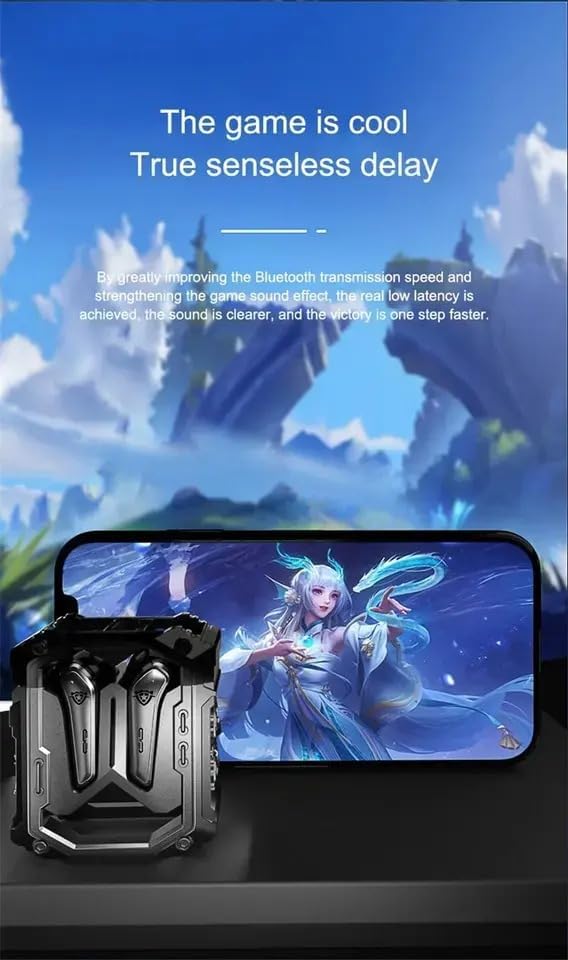
Image: The H08 Mecha Bluetooth Wireless Headset charging case positioned next to a smartphone displaying a vibrant game scene. This image emphasizes the headset's low latency feature, ideal for an immersive gaming experience.
Te tiaki
Charging the Headset and Case
- The charging case has a built-in 600mAh battery, capable of charging the earbuds approximately four times, providing up to 48 hours of total playtime.
- The LED display on the charging case shows the battery level of both the case and the earbuds.
- Use the provided charging cable to charge the case.

Image: The H08 Mecha Bluetooth Wireless Headset with its charging case open, revealing the earbuds inside. The image highlights the "mechanical metal technology" and the robust design of the charging compartment, emphasizing its durability and environmental noise filtering capabilities.
Te horoi
Regularly clean the earbuds and charging case with a soft, dry, lint-free cloth. Avoid using abrasive materials or harsh chemicals. Ensure charging contacts on both the earbuds and case are clean and dry.
Rokiroki
Mena kāore e whakamahia ana, rongoatia te pane whakarongo ki roto i tana pouaka utu hei tiaki i a ia mai i te puehu me te pakaru. Rokirokihia ki te wāhi hauhautanga, maroke, kia matara atu i ngā pāmahana tino wera.
Raparongoā
- Kaore e taea te takirua:
- Me mohio kei te whakahohea te Nihokikorangi ki to taputapu.
- Make sure the earbuds are charged and in pairing mode (open the case).
- Nekehia nga pukoro kia tata atu ki to taputapu.
- Forget "H08" from your device's Bluetooth list and try pairing again.
- Karekau he Oro mai i tetahi Puka-taringa:
- Whakahokia nga purongo e rua ki roto i te pukoro utu, kati te taupoki, tatari mo etahi hēkona, ka whakatuwhera ano.
- Me whakarite kia utu nga purongo e rua.
- Nga take utu:
- Tirohia mehemea kei te hono pai te taura utu ki te take me te puna hiko.
- Me whakarite kia ma ngā hononga utu o runga i ngā pane taringa me roto o te pouaka.
- Whakamātauria he taura utu rereke, he urutau hiko ranei.
- Kounga Waea Pai:
- Me whakarite kia kore te hopuoro e arai.
- Move to a quieter environment if environmental noise is excessive.
- Tirohia ngā tautuhinga oro waea o tō pūrere.
Whakatakotoranga
| Āhuahira | Taipitopito |
|---|---|
| Ingoa Tauira | H08 |
| Hangarau Hononga | Ahokore (Nihokikorangi) |
| Hangarau Whakawhitiwhiti Ahokore | Nihokikorangi 5.3 |
| Awhe Nihokikorangi | Tae atu ki te 10 mita (33 putu) |
| Latency Ororongo | 60 Milihekona |
| Te ora o te Pūhiko (Ngā taringa) | Tae atu ki te 18 Hāora (utu kotahi) |
| Wā Takaro Tapeke (me te Puhi Katoa) | Approx. 48 haora |
| Whakatauhia te kaha o te pākahiko | 600mAh |
| Momo Atekōkiri Ororongo | 14mm Dynamic Bass Unit |
| Mana Haruru | Environmental Noise Reduction (ENC) for calls |
| Momo Mana | Media Control, Call Control (Touch/Remote) |
| Rauemi | Plastic (Earbuds), Zinc Alloy (Charging Case) |
| Taumaha | 6.4 hekere (tāpeke mōkihi) |
| Tae | Pango |
| Te Whakanoho Taringa | I te Taringa |
| Kaihanga | SWISSES |
Pūtāhui me te Tautoko
For warranty information and detailed support, please refer to the documentation included with your purchase or visit the official SUNOL website. You may also contact the seller, SWISSES, through the platform where the product was purchased for assistance.
Tena koa pupurihia to tohu mo te hoko mo etahi kereme whakamana.


