1. Kupu Whakataki
Thank you for choosing the Gosund SP111 Smart WiFi Plug. This device allows you to control your electronic appliances remotely via a smartphone application or voice commands, and to set schedules for automated operation. Please read this manual carefully before use to ensure proper installation and operation.
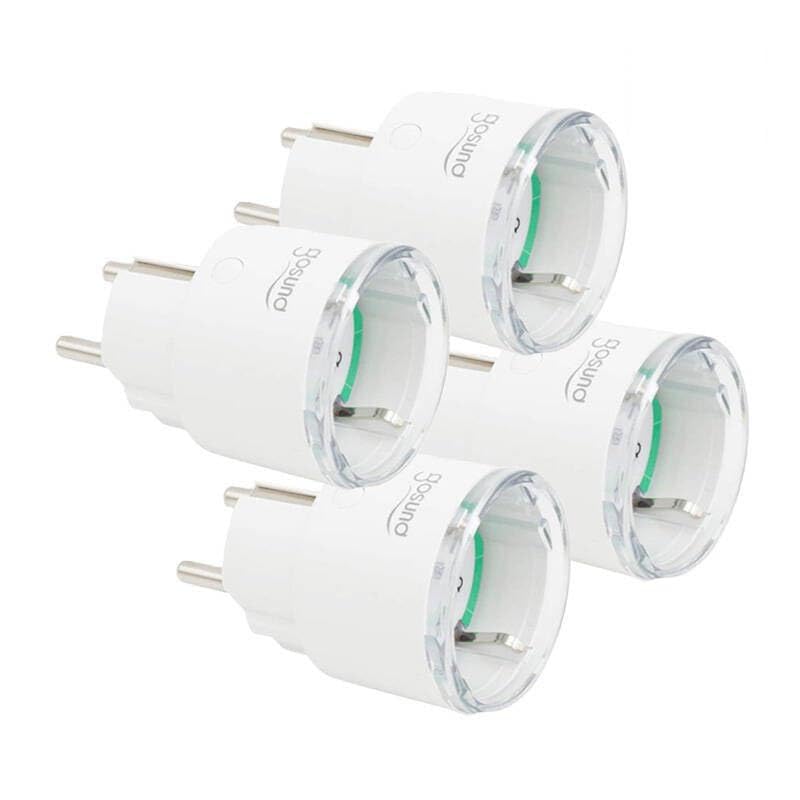
This image displays four white Gosund SP111 Smart WiFi Plugs. Each plug features a standard European Type F (Schuko) plug on one side and a corresponding socket on the other, with the Gosund logo printed on the side. A small indicator light and a button are visible on the top surface of each plug.
2. Nga korero haumaru
- Do not exceed the maximum load current of 16A or power of 3680W.
- Kaua e wetewete, whakarereke ranei i te taputapu.
- Puritia te taputapu kia matara atu i te wai, te makuku me ngā pāmahana tiketike.
- Mo roto anake.
- Me whakarite kua whakaurua katoatia te mono ki roto i te putanga pakitara.
- Do not connect appliances that could cause a fire hazard if left unattended (e.g., irons, heaters).
3. Ihirangi mokete
Kei roto i te kete nga mea e whai ake nei:
- 4 x Gosund SP111 Smart WiFi Plugs
- 1 x Manual Kaiwhakamahi (tenei tuhinga)
4. Hua Neke Atuview
Familiarize yourself with the components of your Gosund SP111 Smart WiFi Plug:
- Pātene Hiko: Press to manually turn the plug on/off. Press and hold for 5 seconds to enter pairing mode.
- Maama Tohu: Indicates the status of the plug (e.g., solid blue for ON, flashing blue for pairing mode, off for OFF).
- Type F (Schuko) Socket: Hei hono i tō taputapu.
- Type F (Schuko) Plug: For inserting into a wall outlet.
5. Tatūnga
5.1 Tangohia te Whakaaturanga
The Gosund SP111 Smart WiFi Plug works with the Tuya Smart or Smart Life app. Download the app from the App Store (iOS) or Google Play Store (Android).
- Rapua "Tuya Smart" or "Smart Life".
- Tāutahia te taupānga me te rēhita i tētahi pūkete.
5.2 Taapirihia te Pūrere
- Plug the Gosund SP111 Smart WiFi Plug into a wall outlet.
- The indicator light should flash rapidly (approximately twice per second), indicating it's in pairing mode. If not, press and hold the power button for 5 seconds until it flashes rapidly.
- Whakatuwheratia te taupānga Tuya Smart or Smart Life.
- Patohia te tohu "+" i te kokonga matau o runga hei taapiri taputapu.
- Select "Electrical Outlet" or "Socket (Wi-Fi)".
- Confirm that the indicator light is flashing rapidly.
- Enter your 2.4 GHz Wi-Fi network password (5 GHz Wi-Fi is not supported).
- Wait for the device to connect. Once connected, you can rename the plug.
6. Mahi
6.1 Mana a-ringa
Press the power button on the plug to manually turn the connected appliance on or off.
6.2 Mana Taupānga
- Mamao Ka Ka/Weto: Tap the plug icon in the app to turn it on or off from anywhere.
- Whakahōtaka: Set timers or schedules for the plug to turn on or off automatically at specific times.
- Whakawhiwhinga: Set a countdown timer for the plug to turn off after a set duration.
- Aroturuki Pungao: (If supported by the specific SP111 variant) View real-time and historical power consumption.
6.3 Mana Reo
The Gosund SP111 Smart WiFi Plug can be integrated with voice assistants like Amazon Alexa and Google Assistant via the Tuya Smart or Smart Life app. Follow the instructions within the app to link your smart home assistant account.
- ExampLe whakahau:
- "Alexa, turn on [Plug Name]"
- "Hey Google, turn off [Plug Name]"
7. Tiaki
- Wewetehia te taputapu i mua i te horoi.
- Horoia te mata ki te kakahu ngohengohe, maroke. Kaua e whakamahi i ngā wai horoi, i ngā rauemi whakakoi rānei.
- Whakaorangia ki te waahi makariri, maroke ki te kore e whakamahia mo te wa roa.
8. Te Raru
| Raruraru | Rongoā |
|---|---|
| Plug cannot connect to Wi-Fi. |
|
| Kua mate te rama tohu. |
|
| Appliance connected to the plug does not turn on. |
|
9. Whakatakotoranga
| Tauira: | SP111-4 |
| Whakauru Voltage: | AC 230V, 50/60Hz |
| Uta Mamao Naianei: | 16A |
| Te Mana Nui: | 3680W |
| Momo Ahokore: | Wi-Fi 2.4GHz (802.11 b/g/n) |
| Tautoko App: | Tuya Smart / Smart Life |
| Te Waahi Mahi: | 0°C ki te 40°C (32°F ki te 104°F) |
10. Pūtāhui me te Tautoko
Gosund products are designed and manufactured to the highest quality standards. For warranty information and technical support, please refer to the official Gosund webpae, whakapā atu ranei ki to kaihoko. Puritia to riiki hoko hei tohu mo te hoko.
Mo etahi atu awhina, tirohia: www.gosund.com/support