Kupu Whakataki
Mauruuru koe mo te hokoasing the BlitzWolf BW-S25 75W Wall Charger. This manual provides important information regarding the setup, operation, maintenance, and troubleshooting of your device. Please read this manual thoroughly before using the product to ensure safe and optimal performance.
Nga korero haumaru
- Kaua e tukuna te rihi ki te wai, ki te makuku, ki te wera nui ranei.
- A ape i te tuku, te tuku ranei i te rihi ki nga paanga kaha.
- Do not disassemble, modify, or attempt to repair the charger yourself. This will void the warranty and may cause electric shock or fire.
- Kaua e taea e nga tamariki.
- Me whakarite te putanga hiko voltage is compatible with the charger's input specifications (100-240V AC).
- Wewetehia te rihi i te wa e uira ana te tupuhi, i te kore e whakamahia mo te wa roa.
- Whakamahia me nga taputapu hototahi me nga taura anake.
Ka mutu te huaview
The BlitzWolf BW-S25 is a powerful 75W wall charger designed to efficiently charge multiple devices simultaneously. It features a versatile port configuration to accommodate various modern electronics.
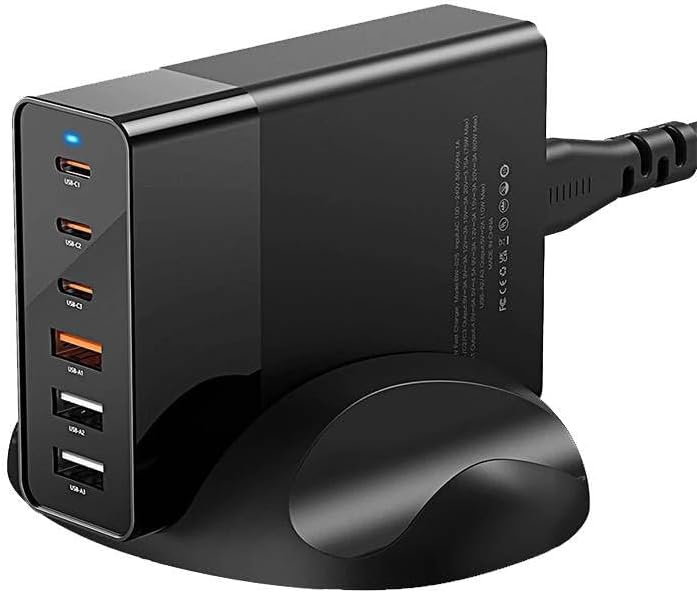
Whakaahua: Mua view of the BlitzWolf BW-S25 wall charger, clearly showing its three USB-C ports and three standard USB-A ports, along with a blue LED indicator light.
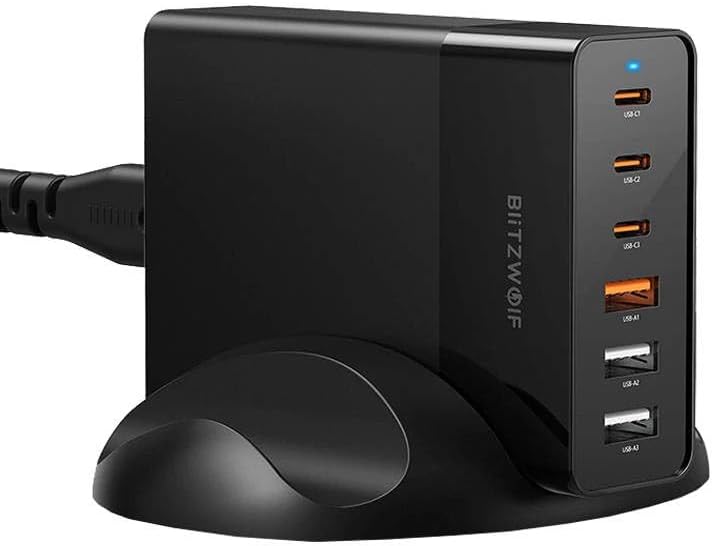
Whakaahua: Taha view of the BlitzWolf BW-S25 wall charger, highlighting the "BlitzWolf" brand logo vertically printed on its side, confirming its authenticity.
Whirihoranga Tauranga:
- 3 x Ngā Tauranga USB-C: For fast charging compatible devices like laptops, tablets, and smartphones.
- 3 x Ngā Tauranga USB-A: For charging a wide range of standard USB devices.
Tatūnga
- Wewete: Carefully remove the BlitzWolf BW-S25 charger from its packaging.
- Tūhono ki te Hiko: Plug the charger's integrated power cord into a standard AC wall outlet (100-240V).
- Maama Tohu: A blue LED indicator light on the charger will illuminate, indicating that the charger is powered on and ready for use.
Nga Tohutohu Whakahaere
- Tūhono Pūrere: Use appropriate charging cables to connect your devices to the available USB-C or USB-A ports on the charger.
- Kei te utu: The charger will automatically detect your device and deliver the optimal charging current up to its maximum output. The total output power is 75W shared across all active ports.
- Pūrere Maha: When charging multiple devices, the 75W power output will be intelligently distributed among the connected devices. For optimal fast charging, consider the power requirements of each device.
- Momotu: Once your devices are fully charged, disconnect them from the charger.
Tuhipoka: For best performance and safety, always use certified charging cables that are compatible with your devices and the charger.
Te tiaki
- Te horoi: Momotuhia te rihi mai i te putanga hiko i mua i te horoi. Whakamahia he kakahu ngohengohe, maroke hei muru i te mata. Kaua e whakamahia nga kai horoi wai, aerosol ranei.
- Rokiroki: Whakaorangia te rihi ki te waahi makariri, maroke atu i te ra tika me te wera nui ka kore e whakamahia.
- Tiaki taura: Āta kaua e piko rawa, e kume rānei i te taura hiko.
Raparongoā
| Raruraru | Take pea | Rongoā |
|---|---|---|
| Charger not powering on (no LED light) | Kāore he hiko mai i te putanga hiko; he koretake te hononga; he hapa te rihi hiko. | Check if the outlet is working by plugging in another device. Ensure the charger is firmly plugged in. If the issue persists, contact support. |
| Karekau te taputapu ki te utu, ki te puhoi ranei | Faulty cable; incompatible device; device's charging port issue; charger overloaded. | Try a different charging cable. Ensure your device is compatible. Try charging fewer devices simultaneously to reduce load. Clean device's charging port. |
| Ka mahana te pukoro i te wa e whakamahia ana | Normal operation under load. | It is normal for chargers to generate some heat during operation, especially when charging multiple devices or high-power devices. If it becomes excessively hot or emits smoke/smell, unplug immediately and contact support. |
Whakatakotoranga
| Waitohu | BlitzWolf |
| Tauira | BW-S25 |
| Huinga Whakaputanga Katoa | 75 Watts |
| Tauranga USB-C | 3 |
| Tauranga USB-A | 3 |
| Tae | Pango |
| Whakauru Voltage | 100-240V AC |
Pūtāhui me te Tautoko
The BlitzWolf BW-S25 charger comes with a standard manufacturer's warranty. Please refer to the warranty card included in your product packaging for specific terms and conditions. For technical support, troubleshooting assistance, or warranty claims, please contact the retailer or BlitzWolf customer service through their official webpae.
Tena koa pupurihia to tohu hoko mo nga kaupapa whakamana.