Kupu Whakataki
This manual provides detailed instructions for the setup, operation, and maintenance of your Donner B1 Analog Bass Synthesizer & Sequencer. Please read this manual thoroughly before using the device to ensure proper functionality and to maximize your musical experience.
Ka mutu te huaview
The Donner B1 is an analog bass synthesizer and sequencer designed for creating dynamic basslines and electronic music. It features a fully analog signal path, intuitive controls, and versatile connectivity options.
Mana Paewhiri Mua
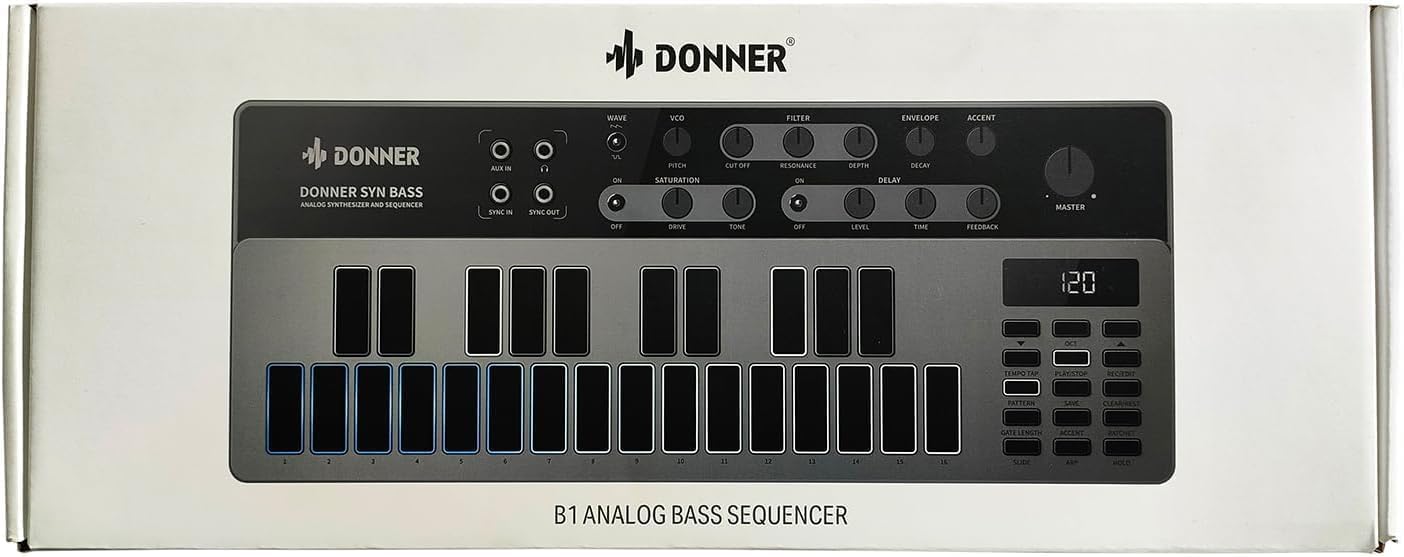
The front panel of the Donner B1 features various controls for sound shaping, sequencing, and performance.
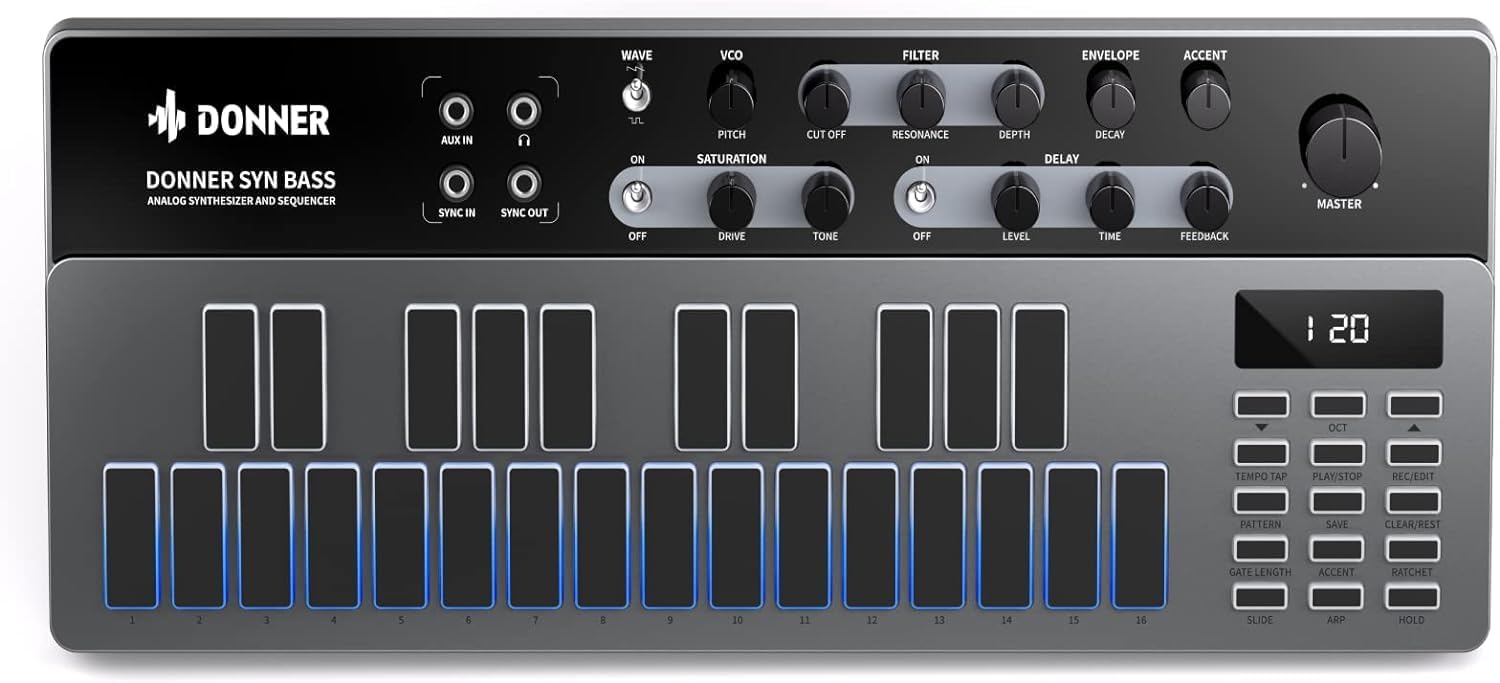
Whakaahua 1: Mua view of the Donner B1 Analog Bass Synthesizer, showing the control knobs, haptic pads, and display.
Key controls include:
- VCO Section: Controls for Waveform (Saw/Square), Pitch.
- Wāhanga Tātari: Cutoff, Resonance, Depth.
- Wāhanga Kōpaki: Decay.
- Accent Control: Adjusts the intensity of accented notes.
- Saturation Effect: Drive and Tone controls for analog distortion.
- Pānga whakaroa: Level, Time, and Feedback controls for echo effects.
- Rōrahi Matua: Overall output level.
- Haptic Pads: 16 velocity-sensitive pads for playing notes and programming sequences.
- Sequencer Controls: Buttons for Tempo Tap, Play/Stop, Rec/Edit, Pattern, Save, Clear/Rest, Gate Length, Accent, Ratchet, Slide, ARP, Hold.

Whakaahua 2: A user's hand adjusting the controls on the Donner B1, demonstrating interaction with the knobs and pads.
Tatūnga
Follow these steps to set up your Donner B1 for the first time.
- Hononga Hiko: Connect the included power adapter to the DC 9V 500mA input on the rear panel of the B1 and plug it into a power outlet.
- Putanga Ororongo: Connect the MAIN OUT (1/4" TS jack) to your mixer, audio interface, or amplifier using an appropriate audio cable.
- Tāuru Āwhina: If desired, connect an external audio source to the AUX IN (3.5mm stereo jack) to process its signal through the B1's effects.
- MIDI/Sync Connections: For integration with other MIDI devices or synthesizers, connect MIDI IN/OUT (5-pin DIN) or Sync IN/OUT (3.5mm TS jacks) as needed.
- Hononga USB: Connect the USB Type-C port to your computer for MIDI control and firmware updates.

Whakaahua 3: Rear panel of the Donner B1, showing the power input, USB-C port, MIDI I/O, Sync I/O, Aux In, and Main Out connections.
Nga Tohutohu Whakahaere
Whakahoki Taketake
- Whakahiko: Flip the power switch on the rear panel to the "ON" position.
- Tīpakohia he Tautuhinga Tatūnga: The B1 comes with 128 factory presets. Use the Pattern buttons and the display to navigate and select a preset.
- Play Notes: Press the haptic pads to play individual notes. The pads are velocity-sensitive, allowing for expressive performance.
- Whakatikatika i te Oro: Use the VCO, Filter, Envelope, and Accent knobs to shape the sound in real-time.

Whakaahua 4: A user's hands positioned over the haptic pads of the Donner B1, ready to play or program a sequence.
Mahi Whakaraupapa
The B1 features an intuitive step sequencer for creating and editing bassline patterns.
- Enter Record Mode: Press the "Rec/Edit" button to enter recording mode.
- Hipanga Papatono: Press the haptic pads to input notes into the sequence. Each pad corresponds to a step in the sequence.
- Adjust Parameters per Step: While in record/edit mode, you can adjust parameters like Gate Length, Accent, Ratchet, and Slide for individual steps.
- Play Sequence: Press "Play/Stop" to start playback of the programmed sequence.
- Save Pattern: Press the "Save" button to store your created pattern to a user memory slot.
Arapipurero
The built-in 8-mode arpeggiator can generate rhythmic patterns from held notes.
- Activate Arpeggiator: Press the "ARP" button.
- Tīpako Aratau: Use the pads or a combination of buttons to cycle through the 8 arpeggiator modes.
- Pupuri Taumahi: Press "Hold" to sustain the arpeggiated pattern without continuously holding down notes.
Analog Effects
The B1 includes analog saturation and delay effects to enhance your sound.

Whakaahua 5: Kati-ake view of the saturation and delay effect sections on the Donner B1, showing the dedicated control knobs.
- Waipuku: Turn the "ON" switch to activate. Adjust "Drive" for distortion intensity and "Tone" to shape the character of the saturation.
- Whakaroa: Turn the "ON" switch to activate. Adjust "Level" for delay volume, "Time" for delay duration, and "Feedback" for the number of repeats.
Hononga
The Donner B1 offers various connectivity options for integration into your studio or live setup.
Whakaahua 6: The Donner B1 connected via USB-C to a laptop and MIDI cables to other musical equipment, demonstrating its versatile connectivity.
- USB Momo-C: Functions as a MIDI controller, allowing you to send and receive MIDI data with your Digital Audio Workstation (DAW) or other software. It also facilitates firmware updates.
- MIDI I/O (5-pin DIN): Standard MIDI connections for communicating with external hardware synthesizers, drum machines, or MIDI interfaces.
- Sync I/O (3.5mm TS): Allows for synchronization with other analog gear that supports clock pulse signals.
- AUX IN (3.5mm stereo): Input for routing external audio through the B1's analog effects.
- MAIN OUT (1/4" TS): Main audio output for connecting to speakers, mixers, or audio interfaces.
Te tiaki
To ensure the longevity and optimal performance of your Donner B1, follow these maintenance guidelines:
- Te horoi: Whakamahia he kakahu ngohengohe, maroke hei horoi i te taha waho o te taputapu. Āta karohia ngā kaihoroi whakakoi, ngā whakarewa rānei.
- Rokiroki: Store the B1 in a cool, dry place away from direct sunlight, extreme temperatures, and high humidity.
- Te whakahaere: Kia tupato ki te hapai i te taputapu. A ape i te tuku, te tuku ranei ki nga paanga kaha.
- Mana: Always use the specified power adapter. Disconnect power when the device is not in use for extended periods.
Raparongoā
If you encounter issues with your Donner B1, refer to the following common problems and solutions:
| Raruraru | Take pea | Rongoā |
|---|---|---|
| Kaore he putanga oro. | Master volume too low; incorrect audio connections; external equipment issues. | Check Master volume knob; ensure audio cables are correctly connected to MAIN OUT and receiving device; verify external equipment is powered on and functioning. |
| Kaore te taputapu i te hiko. | Power adapter not connected; power outlet not working; faulty adapter. | Ensure power adapter is securely connected; try a different power outlet; contact support if adapter is suspected faulty. |
| MIDI not working. | Incorrect MIDI cable connections; wrong MIDI channel; software settings. | Verify MIDI IN/OUT connections; check MIDI channel settings on both B1 and external device/software; consult your DAW's MIDI setup guide. |
| Kāore te raupapatanga e purei ana. | No pattern programmed; "Play/Stop" not pressed; external sync issues. | Program a pattern using the haptic pads; press "Play/Stop"; check Sync IN/OUT connections and external clock source if applicable. |
Whakatakotoranga
Technical specifications for the Donner B1 Analog Bass Synthesizer & Sequencer:
- Ingoa Tauira: B1
- Waitohu: Donner
- Tae: Pango
- Rauemi: Silicone (for haptic pads)
- Mihini Oro: Fully Analog Signal Path (VCO, VCF, VCA designs)
- Kairangahau: 16-step sequencer with 128 user patterns
- Arpeggiator: 8 aratau
- Ngā Pānga: Analog Saturation, Analog Delay
- Hononga: USB Type-C (MIDI), MIDI IN/OUT (5-pin DIN), Sync IN/OUT (3.5mm TS), AUX IN (3.5mm stereo), MAIN OUT (1/4" TS)
- Mana: DC 9V 500mA
Pūtāhui me te Tautoko
Donner provides a limited warranty for its products. For detailed warranty information, product registration, and technical support, please visit the official Donner webpaetukutuku, whakapā atu ranei ki ta raatau ratonga kaihoko.
For further assistance, please refer to the official Donner support channels:
- Āpiha a Donner Webpae: www.donnerdeal.com
- Ratonga Kiritaki: Tirohia nga korero whakapā e whakaratohia ana i runga i te rangatira webpae.


