1. Kupu Whakataki
Welcome to the user manual for your TUINYO Open Ear Headphones. These Bluetooth 5.4 wireless earbuds are designed to provide a premium sound experience while allowing you to stay aware of your surroundings. With an LED display for battery status and IPX5 waterproofing, they are ideal for sports, driving, and office use.

Figure 1: TUINYO Open Ear Headphones in their charging case, showcasing the sleek black design and the digital display for battery percentage.
2. Nga waahanga matua
- Hoahoa Tuwhera Taringa: Allows you to hear ambient sounds for increased situational awareness and safety.
- Nihokikorangi 5.4 Hononga: Ensures stable, fast, and seamless wireless connection.
- Whakaatu LED: Provides real-time battery status of the charging case.
- Wā purei roa: Tae atu ki te 25 hāora o te wā tākaro katoa me te pouaka utu.
- IPX5 Whakatauranga parewai: He ātete ki te werawera me te pupuhi marama, he pai mo nga mahi whakangungu me nga mahi o waho.
- Oro Rawa: Equipped with 12mm speakers for Hi-Fi stereo bass.
- Tino Mamaa: Each earbud weighs approximately 5.3g for comfortable, all-day wear.
- Aratau Kēmu Whakaroa Iti: Optimized for gaming and video conferencing with a latency of 50ms.

Figure 2: Demonstrates the comfortable and secure fit of the open-ear design, allowing for awareness of surroundings.
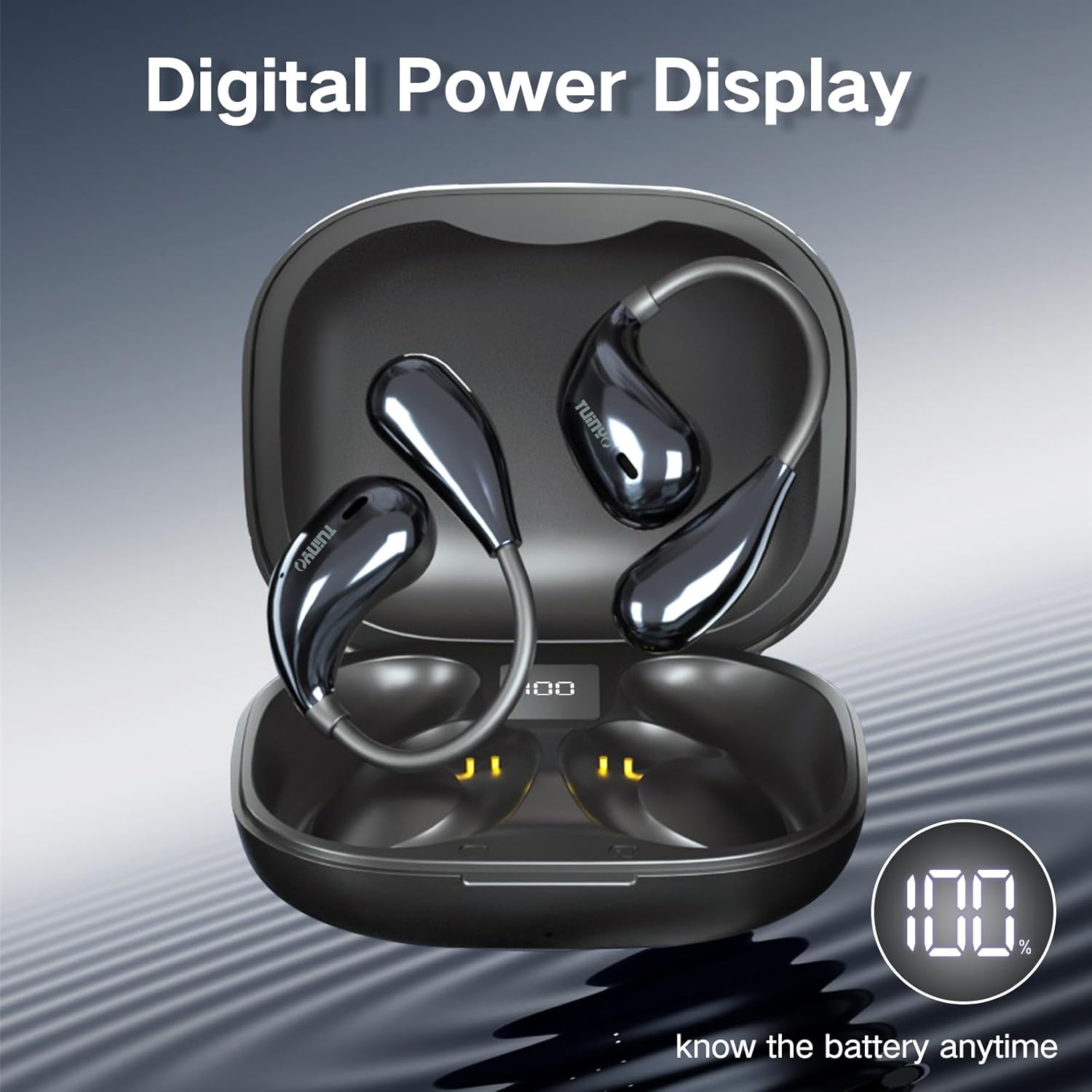
Figure 3: The charging case features a digital LED display, indicating the battery percentage for convenient monitoring.

Whakaahua 4: He roto view of the earbud highlighting the 12mm speaker, responsible for delivering Hi-Fi stereo bass.
3. He aha kei roto i te Pouaka?
I te whakatuwheratanga o to kete hua, me kitea e koe nga mea e whai ake nei:
- 2 x TUINYO Open-ear True Wireless Earbuds
- 1 x Puhi utu
- 1 x Manual Kaiwhakamahi (tenei tuhinga)
- 1 x Momo-C Uira Kaiha

Figure 5: Visual representation of the package contents, including the charging case, earbuds, and charging cable.
4. Aratohu Tatūnga
4.1 Whakataki Tuatahi
Before first use, fully charge the earbuds and the charging case. Connect the provided Type-C charging cable to the charging port on the case and a USB power source. The LED display on the case will show the charging progress.
4.2 Te Whakamaunga i nga Paoro
For optimal sound and comfort, ensure the earbuds are worn correctly. The open-ear design sits comfortably over your ear, directing sound without blocking your ear canal.

Figure 6: Step-by-step guide on how to properly wear the open-ear headphones for a secure and comfortable fit.
4.3 Takirua Nihokikorangi
- Whakatuwherahia te putea utu. Ka uru aunoa nga taringa ki te aratau takirua.
- I runga i to taputapu (waea atamai, papa, aha atu), whakaahei i a Nihokikorangi.
- Rapua "TUINYO S08" in the list of available Bluetooth devices.
- Select "TUINYO S08" to connect. Once connected, you will hear an audible confirmation.
Kia mōhio: Ka hono anō aunoa ngā pane taringa ki te pūrere whakamutunga i honoa ina tangohia mai i te pouaka, mēnā kua whakahohea te Nihokikorangi i runga i te pūrere.
5. Nga Tohutohu Whakahaere
The TUINYO S08 headphones feature touch controls on each earbud for easy management of audio playback and calls.

Whakaatu 7: Neke Atuview of the touch control functions on the earbuds.
| Mahi | Mahi (Taringa Mauī/Matau) |
|---|---|
| Purei/Tatari | Double tap (x2 L/R) |
| Rōrahi Whakararo | Single tap (x1 L) |
| Rōrahi Whakarunga | Single tap (x1 R) |
| Waiata o mua | Triple tap (x3 L) |
| Waiata Panuku | Triple tap (x3 R) |
| Whakautu/Tauhia te Waea | Double tap (x2 L/R) |
| Aratau Keemu Ki/Weto | Press and hold for 2 seconds (2s L) |
| Whakahohe Kaiāwhina Reo | Press and hold for 2 seconds (2s R) |
5.1 Ataata Hua Whaimana
Video 1: An official product video demonstrating the features and usage of the TUINYO S08 Open Ear Bluetooth Headphones. This video provides a visual guide to the product's design, key functionalities, and how it integrates into daily life.
6. Tiaki
- Te horoi: Whakamahia he kakahu ngohengohe, maroke hei horoi i ngā pane taringa me te pouaka utu. Kaua e whakamahi i ngā kaihoroi whakakoi, i ngā whakarewa rānei.
- Ātete wai: The earbuds are IPX5 waterproof, meaning they can resist a sustained, low-pressure water jet spray. They are suitable for protection against sweat and light rain. Do not submerge them in water or expose them to high-pressure water.
- Rokiroki: Whakaorangia nga purongo i roto i te pukoro utu ina kore e whakamahia hei tiaki me te pupuri i te utu. A ape i te wera nui.
- Tiaki Pūhiko: To prolong battery life, avoid fully discharging the battery frequently. Charge regularly, even if not used for extended periods.
7. Te Raru
| Raruraru | Rongoa pea |
|---|---|
| Karekau nga taringa e hono ana |
|
| Karekau he oro mai i tetahi pukoro |
|
| Raro iti |
|
| Karekau e utuhia ana |
|
8. Whakatakotoranga
| Āhuahira | Taipitopito |
|---|---|
| Ingoa Tauira | S08 |
| Putanga Nihokikorangi | 5.4 |
| Te Whakanoho Taringa | Taringa tuwhera |
| Te ora o te Pūhiko (Ngā taringa) | 5 Hours (single use) |
| Wā Takaro Tapeke (me te pouaka) | 25 haora |
| Whakatauranga parewai | IPX5 |
| Momo Mana | Pa, Mana Media |
| Taumaha Tūemi | 4.2 hekere (tāpeke mōkihi) |
| Ahu mōkihi | 4.72 x 3.62 x 1.57 inihi |
| Awhe Auautanga | 20 Hz - 20,000 Hz |
| Te aukati | 31.98 Aue |
9. Raihana me te Tautoko
TUINYO products are designed and manufactured to the highest quality standards. For information regarding warranty coverage, technical support, or customer service, please refer to the contact information provided on the product packaging or visit the official TUINYO webpae.
For further assistance, you may also refer to the product's detail page on Amazon.com: https://www.amazon.com/dp/B0CXSW131H


