1. Kupu Whakataki
The Mastech MS8233A is a compact, battery-powered digital multimeter designed for measuring AC/DC voltage, DC current, resistance, diode, continuity, and temperature. It features a 2000-count display, data hold function, and a low battery indicator, making it suitable for various electrical testing applications.
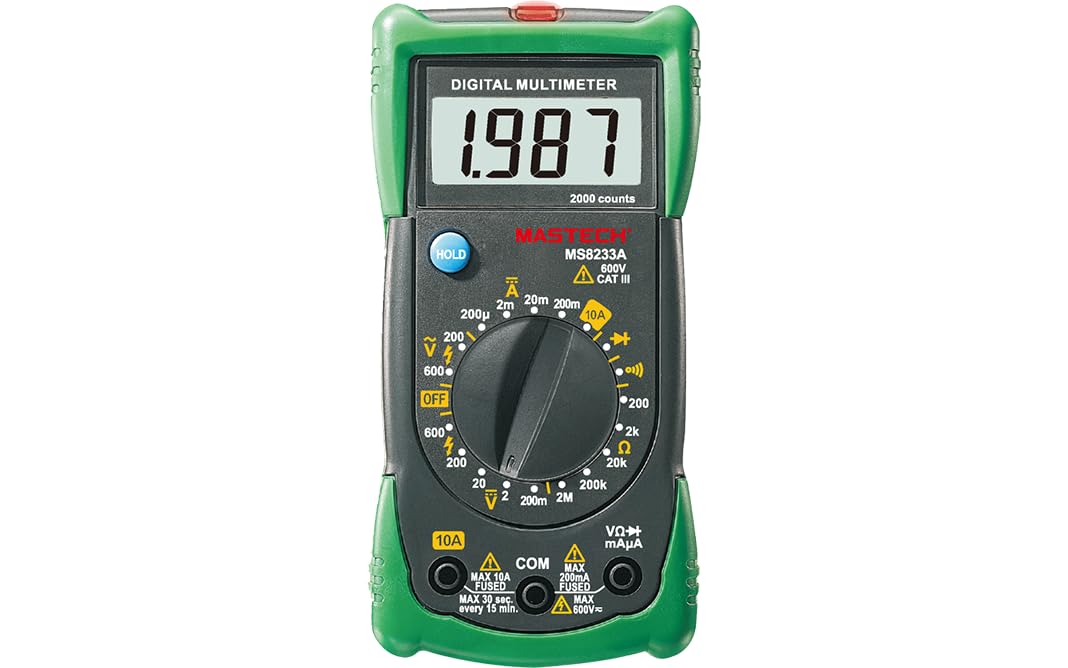
Whakaahua 1: Mua view of the Mastech MS8233A Digital Multimeter, showing the display, rotary switch, and input jacks.
2. Nga korero haumaru
Hei whakarite i te haumaru o te mahi me te ratonga o te mita, whai i ēnei tohutohu:
- Always ensure the meter is in good working condition before use.
- Kaua e tono voltage or current that exceeds the maximum specified limits for the meter.
- Kia tupato ki te mahi tahi me te voltagneke atu i te 60V DC, 30V AC RMS rānei, nā te mea he mōrearea ru ēnei.
- Momotuhia nga arataki whakamatautau mai i te ara iahiko i mua i te huri i nga mahi.
- Whakakapihia te pākahiko ina puta te tohu iti o te pākahiko kia tika ai nga panui.
- Do not operate the meter if the case is open or if it appears damaged.
- Kia mau ki nga ture haumaru o te rohe me te motu.
3. Nga Hua o te Hua
- Whakaatu: 2000 tatau
- Diode Tuwhera Voltage: 3.0v
- Continuity Buzzer: Sounds at less than 60Ω
- Mahi Raraunga Pupuri
- Tohu Whakaaturanga Pūhiko Iti
- Ine AC/DC voltage, DC current, resistance, diode check, continuity test, and temperature.
4. Ihirangi mokete
Manatokona kei roto katoa nga mea kei roto i te kete:
- Mastech MS8233A Digital Multimeter
- Nga Tohu Whakamatau
- 1x 9V 6F22 Battery (pre-installed or included separately)
- Tiwhikete Whakatau
- Aratohu Timata Tere

Figure 2: Illustration of package contents and main applications for the MS8233A multimeter.
5. Tatūnga
5.1 Tāuta Pūhiko
The MS8233A requires one 9V 6F22 battery. If the battery is not pre-installed or needs replacement:
- Me whakaweto te mita maha, kātahi ka momotu i ngā taura whakamātautau katoa.
- Kimihia te uhi o te wahanga pākahiko kei muri o te waeine.
- Unscrew the retaining screw(s) and carefully remove the cover.
- Honoa te pākahiko 9V ki te topenga pākahiko, me te tirotiro tonu i te polarity tika.
- Whakatakotoria te pākahiko ki roto i te wāhanga ka whakahokia te taupoki, me te whakau ki te/ngā tīwiri.
5.2 Te hono i nga kaiarahi Whakamātautau
Insert the test leads into the appropriate input jacks:
- Insert the black test lead into the “COM” (common) jack.
- Mo te nuinga o nga inenga (voltage, resistance, diode, continuity, temperature), insert the red test lead into the “VΩmA” jack.
- For DC current measurements up to 10A, insert the red test lead into the “10A” jack.
6. Nga Tohutohu Whakahaere
To operate the multimeter, turn the rotary switch to the desired function. The display will show the measurement value.
6.1 DC Voltage Ine (V–)
- Whakatakotoria te pana hurihuri ki te DC Voltage e hiahiatia anatage awhe (hei tauira, 200mV, 2V, 20V, 200V, 600V).
- Honoa te taura whakamātautau whero ki te taha pai (+) o te ara iahiko, me te taura whakamātautau pango ki te taha kino (-).
- Pānuihia te voltage uara kei runga i te whakaaturanga.
6.2 AC Voltage Ine (V∼)
- Tautuhia te huri hurihuri ki te Vol AC e hiahiatia anatagte awhe hiko (hei tauira, 200V, 600V).
- Honoa ngā taura whakamātautau puta noa i te hiko ACtage puna.
- Pānuihia te voltage uara kei runga i te whakaaturanga.
6.3 DC Current Measurement (A–)
- Set the rotary switch to the desired DC Current range (e.g., 200µA, 2mA, 20mA, 200mA, 10A).
- Hiranga: For 10A measurements, move the red test lead to the “10A” jack. For other current ranges, use the “VΩmA” jack.
- Open the circuit where current is to be measured and connect the meter in series.
- Pānuihia te uara o nāianei i te whakaaturanga.
6.4 Te Ine Ātete (Ω)
- Whakatakotoria te pana hurihuri ki te awhe ātete e hiahiatia ana (hei tauira, 200Ω, 2kΩ, 20kΩ, 200kΩ, 2MΩ).
- Me mohio kua whakakorehia te hiko, te waahanga ranei i mua i te ine i te parenga.
- Honoa nga arataki whakamatautau puta noa i te waahanga hei ine.
- Panuihia te uara aukati kei runga i te whakaaturanga.
6.5 Diode Test (→|–)
- Set the rotary switch to the Diode Test function.
- Honoa te taura whakamātautau whero ki te anode me te taura whakamātautau pango ki te cathode o te diode.
- Ka whakaatuhia te rōrahi whakamua e te whakaaturangatage drop. Reverse the leads to check for open circuit (OL) indication.
6.6 Continuity Test (♫)
- Set the rotary switch to the Continuity Test function.
- Honoa nga arataki whakamatautau puta noa i te ara iahiko, i te waahanga ranei.
- Mena kei raro iho te ātete i te 60Ω, ka tangi te buzzer, e tohu ana i te haere tonu.
6.7 Temperature Measurement (℃/℉)
The MS8233A can measure temperature using a K-type thermocouple (not always included, check package contents).
- Set the rotary switch to the Temperature function.
- Connect the K-type thermocouple to the input jacks, observing polarity.
- Place the thermocouple probe at the point where temperature is to be measured.
- Pānuihia te uara pāmahana kei runga i te whakaaturanga.
6.8 Taumahi Pupuri Raraunga
Press the “HOLD” button to freeze the current reading on the display. Press it again to release the hold function and resume live readings.
7. Tiaki
7.1 Whakakapinga Pūhiko
When the low battery indicator appears on the display, replace the 9V battery as described in Section 5.1.
7.2 Te horoi
Mukua te keehi me te panuiamp kakahu me te hopi horoi ngawari. Kaua e whakamahia he mea whakakoi, he mea whakarewa rānei. Me whakarite kia maroke rawa te mita i mua i te whakamahinga.
7.3 Whakakapinga Puka
The current input jacks are typically protected by fuses. If the meter fails to measure current, the fuse may need replacement. Refer to the specific fuse ratings printed on the meter or in the detailed specifications. Fuse replacement should only be performed by qualified personnel.
8. Te Raru
If the multimeter does not function correctly, consider the following:
- Kāore he whakaaturanga, he whakaaturanga ngoikore rānei: Check battery charge and ensure it is correctly installed. Replace if necessary.
- Ngā pānui hē: Verify the correct function and range are selected. Ensure test leads are properly connected and making good contact. Check battery level.
- Cannot measure current: Check the fuse for the current input. Ensure the red test lead is in the correct current jack (e.g., 10A).
- “OL” (Overload) displayed: The measured value exceeds the selected range. Switch to a higher range or verify the circuit is not open.
Mena kei te haere tonu nga raru, whakapā atu ki te tautoko a te kaihoko.
9. Whakatakotoranga
9.1 Whakatakotoranga Whānui
- Power Source: 2 LR44 batteries required (included) - Note: Product description states 1x 9V 6F22 battery. Please verify with actual product.
- Rahi Hua: 16 x 9 x 5 cm
- Taumaha: 0.5 Kirokaramu
- Kaihanga: MASTECH/MGL
- Whakatauranga Haumaru: CAT III 600V
- Tiwhikete: CE, RoHS
- Te Whakatauranga Pāmahana o Runga: 50 Ngā Tohu Celsius
9.2 Whakatakotoranga Hiko
| Whakatakotoranga | Awhe | Whakatau | Tika |
|---|---|---|---|
| DC Voltage | 200mV/2V/20V/200V 600V | 0.1mV/1mV/10mV/100mV 1V | ±(0.5%+3) ±(0.5%+3) |
| AC Voltage | 200V 600V | 100mV 1V | ±(1.2%+10) ±(1.2%+10) |
| DC Naianei | 200µA/2mA/20mA/200mA 10A | 0.1µA/1µA/10µA/0.1mA 0.01A | ±(1.0%+3) ±(3.0%+5) |
| Ātete | 200Ω/2kΩ/20kΩ/200kΩ 2MΩ | 0.1Ω/1Ω/10Ω/100Ω 1kΩ | ±(0.8%+4) ±(0.8%+4) |
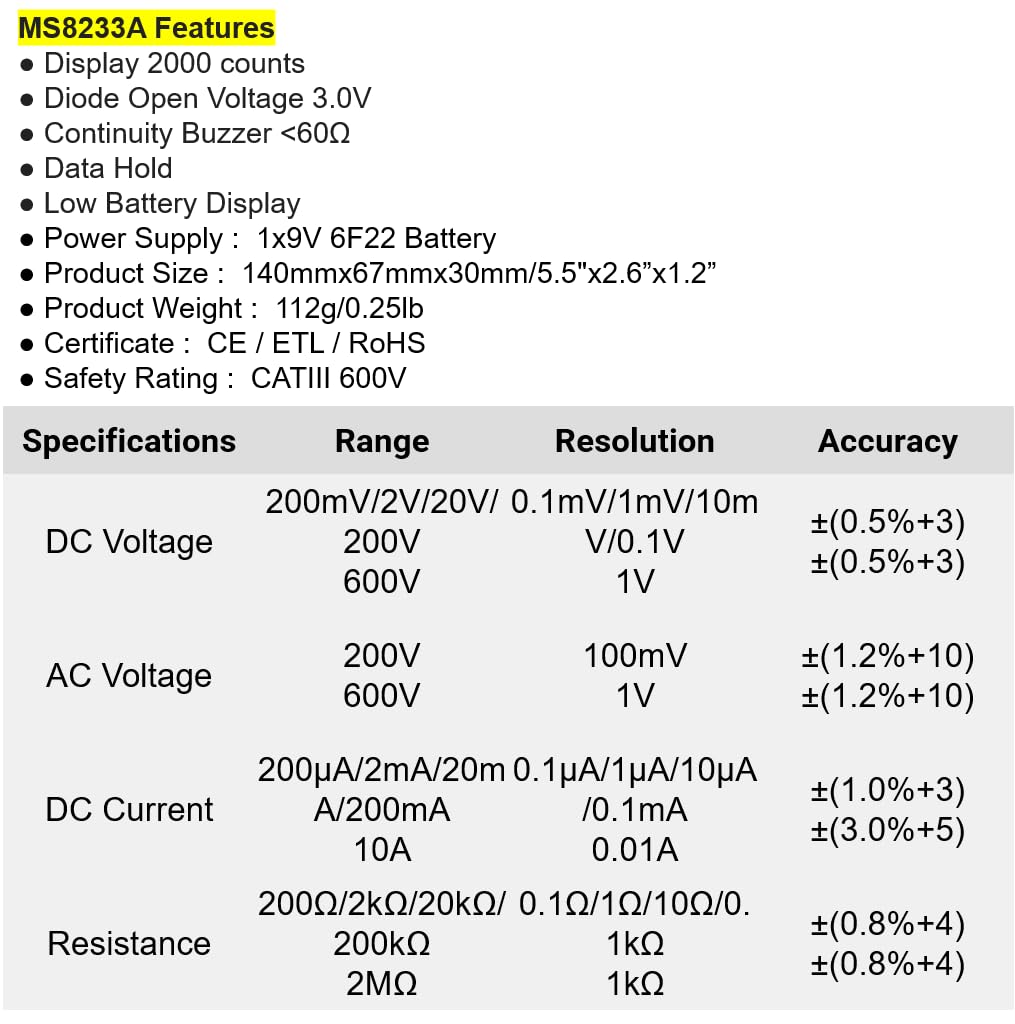
Figure 3: Detailed electrical specifications for the Mastech MS8233A.
9.3 Related Models Comparison

Figure 4: Comparison table of various Mastech manual ranging digital multimeters, including the MS8233A.
10. Pūtāhui me te Tautoko
Mastech products are designed for reliability and performance. For warranty information or technical support, please refer to the warranty card included with your product or contact Mastech customer service through their official webpae. Puritia to riirii hoko hei tohu mo te hoko mo nga kereme whakamana.


