1. Kupu Whakataki
This manual provides essential information for the safe and correct assembly, operation, and maintenance of your Rfiver Mobile TV Stand MT200. Please read all instructions carefully before beginning assembly and retain this manual for future reference.
Nga korero haumaru
- Me whakarite kia wātea ngā wāhanga katoa, ā, kia kore he pakaru i mua i te huihuinga. Kaua e whakamahia mēnā he hapa, he ngaro rānei ētahi wāhanga.
- Do not exceed the maximum load capacity of 40 kg (88 lbs) for the TV and 10 kg (22 lbs) for the media shelf.
- Kua hangaia tēnei tūnga mō ngā pouaka whakaata i waenga i te 32 me te 70 inihi.
- Always ensure the casters are locked when the stand is in a stationary position to prevent accidental movement.
- Assembly should be performed by at least two people for safety.

Whakaahua 1.1: Ka mutuview of the Rfiver Mobile TV Stand MT200 with a TV and laptop.
2. Ihirangi mokete
Manatokohia ko nga waahanga katoa kei raro nei kei roto i to kete. Mena kei te ngaro, kua pakaru ranei etahi waahanga, tena koa whakapiri atu ki te tautoko a nga kaihoko.
- Base (X-shaped)
- Vertical Support Pillars (2)
- Pouaka Whakapiki TV
- Papa Papaaho
- Casters (4, with locking mechanism)
- Hardware Kit (various screws, washers, spacers, Allen wrench)
- Topenga Whakahaere Taura

Image 2.1: Key features and components of the TV stand.
3. Tohutohu Tatūnga
Follow these steps carefully to assemble your Rfiver Mobile TV Stand.
3.1 VESA Compatibility and TV Requirements
Before assembly, ensure your TV meets the following criteria:
- Rahi Mata: 32 ki te 70 inihi
- Raukaha Taumaha: Morahi 40 kg (88 lbs)
- Tauira VESA: Compatible with VESA patterns from 100x100 mm to 400x400 mm. (e.g., 100x100, 200x100, 200x200, 300x200, 400x200, 300x300, 400x300, 400x400 mm).
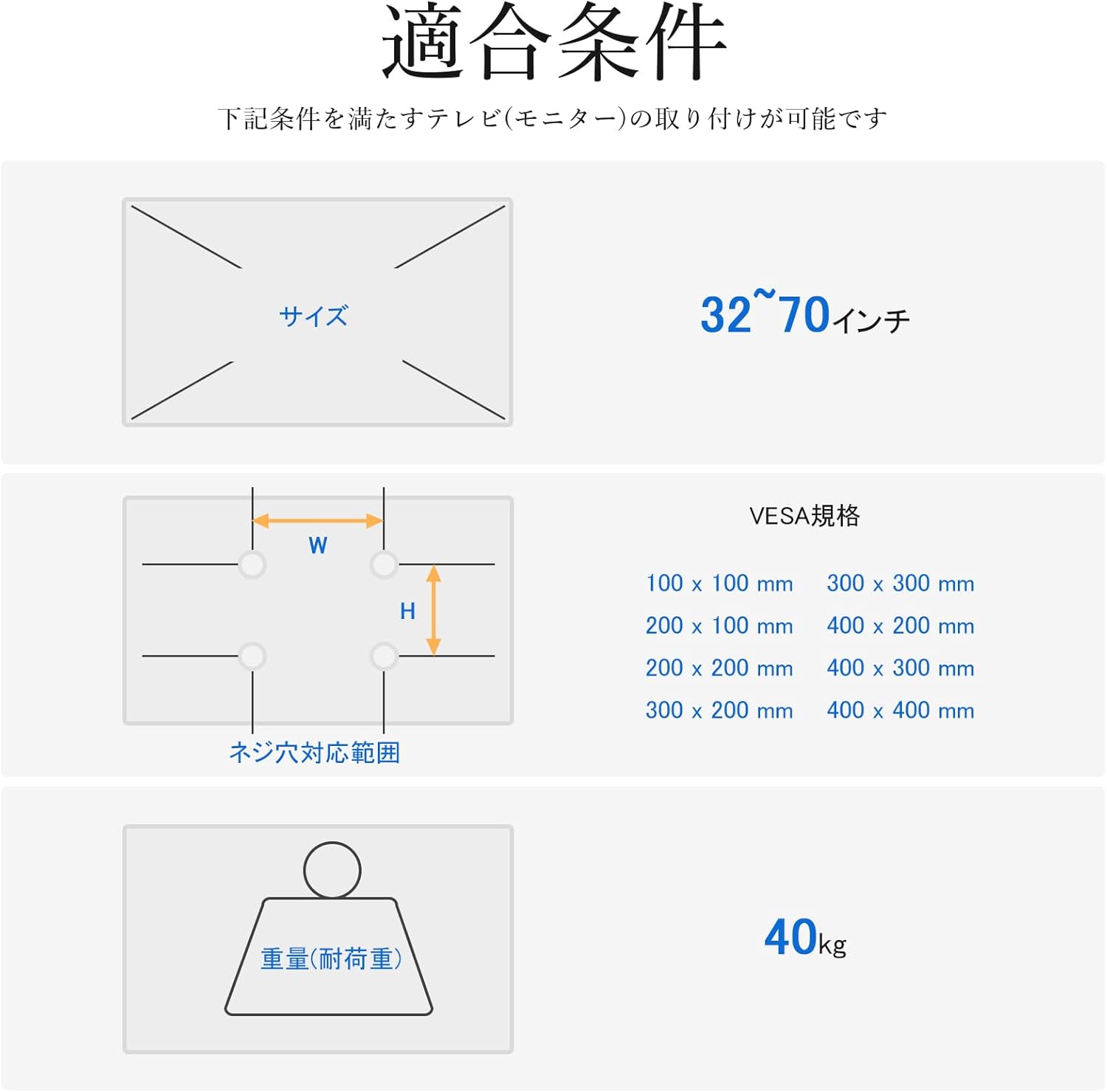
Image 3.1: VESA mounting hole patterns, compatible TV sizes, and maximum load capacity.
3.2 Nga Mahi Huihuinga
- Huihuia te turanga: Attach the four casters to the X-shaped base using the provided screws. Ensure they are securely tightened.
- Attach Vertical Pillars: Secure the two vertical support pillars to the assembled base using the designated hardware.
- Install TV Mounting Bracket: Attach the TV mounting bracket to the top of the vertical pillars. Ensure it is oriented correctly and securely fastened.
- Maunga te TV: Carefully attach the TV to the mounting bracket. Use the appropriate screws and spacers from the hardware kit that match your TV's VESA pattern. Ensure the TV is centered and level.
- Install Media Shelf: Attach the media shelf to the vertical pillars at your desired height. The shelf is adjustable and can hold devices up to 10 kg.
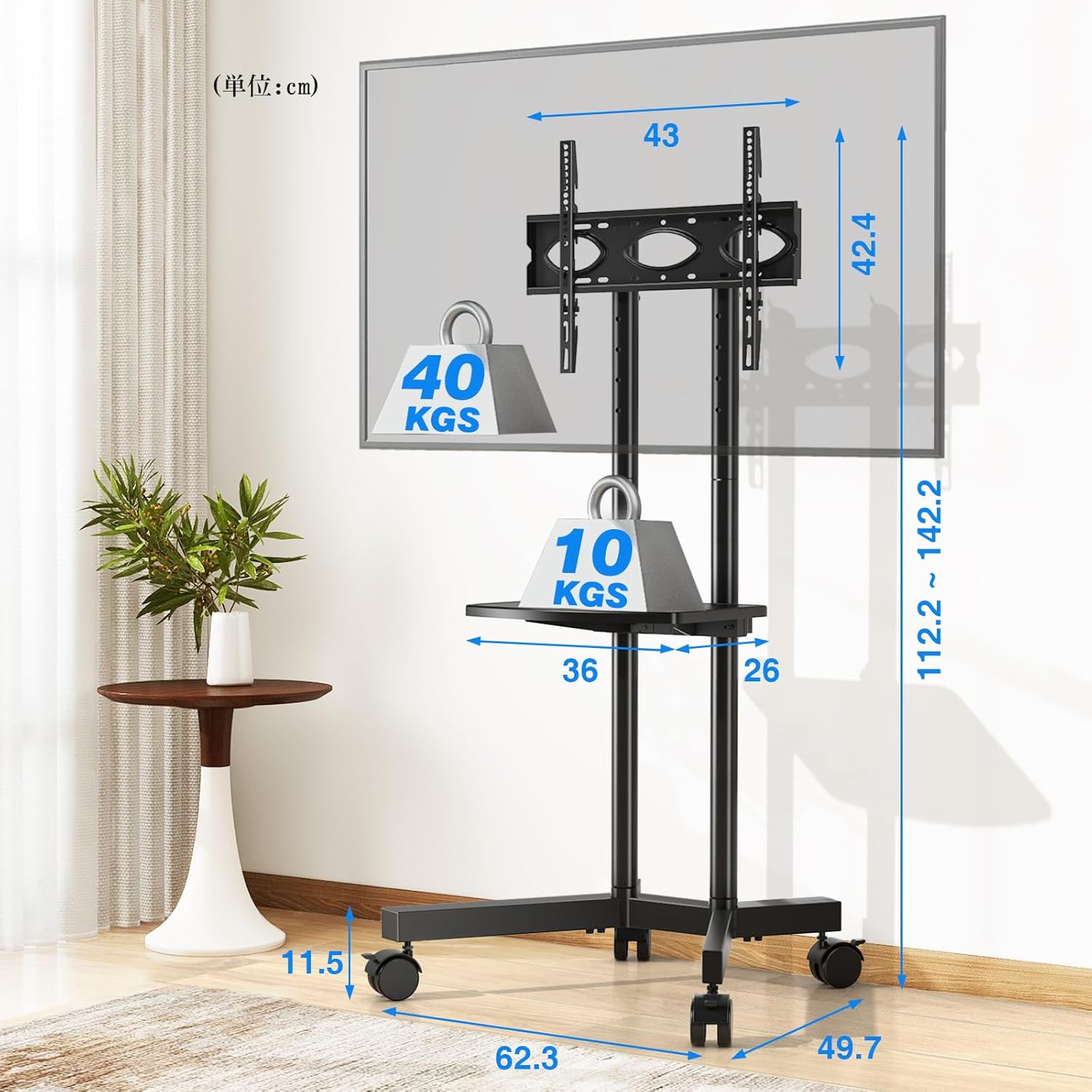
Image 3.2: Detailed dimensions and load capacities of the stand and shelf.
4. Nga Tohutohu Whakahaere
4.1 Whakatikatika Teitei
The Rfiver Mobile TV Stand offers flexible height adjustment for optimal viewing.
- Teitei katoa: The stand's total height can be adjusted from 112.2 cm to 142.2 cm.
- TV Plate Adjustment: The TV plate has 5 adjustable height levels.
- Whakaritenga Taiapa: The TV mounting brackets have 3 adjustable height levels.
To adjust the height, loosen the securing bolts on the vertical pillars and TV plate/brackets, slide to the desired height, and re-tighten all bolts securely.

Image 4.1: Height adjustment options for the TV plate and mounting brackets.
4.2 Te nekeneke me te pumau
The stand is equipped with four 360° rotating casters for easy movement. Each caster includes a stopper for stability.
- Te neke i te tūnga: Unlock all four casters by flipping their stoppers upwards. Gently push the stand to its new location.
- Te Whakapūmau i te Tūnga: Once in the desired position, lock all four casters by pressing their stoppers downwards to prevent unintended movement.

Image 4.2: Detail of the 360° rotating casters with locking function.
4.3 Whakahaere taura
Integrated cable management clips help keep your cables organized and out of sight, contributing to a tidy setup.
- Route TV and device cables along the vertical pillars.
- Use the provided cable management clips to secure the cables neatly to the pillars.
5. Tiaki
Mā te tiaki auau ka roa te ora me te haumaru o te mahi a tō tūnga pouaka whakaata.
- Te horoi: Horoia te tūnga ki te kakahu ngohengohe, maroke. Mō ngā tohu uaua, whakamahia he hinu iti.amp cloth and mild detergent, then dry thoroughly. Avoid abrasive cleaners.
- Taki Hononga: Takitaki ia ia nga wa katoa nga wiri me nga tutaki kia mau tonu. Whakapiri ano mehemea e tika ana.
- Ngā Mahi a te Kaiwhakarewa: Keep casters free of debris to ensure smooth movement. Lubricate if needed.
6. Te Raru
Mena ka pa ki a koe etahi take, tirohia nga raru me nga otinga e whai ake nei:
- Kāore i te pumau te tūnga:
- Ensure all screws and bolts are securely tightened.
- Verify the TV weight does not exceed 40 kg and is centered on the bracket.
- Ensure the stand is on a flat, level surface. - Te uaua ki te neke i te tūnga:
- Check that all casters are unlocked.
- Clean any debris from the caster wheels.
- If casters are stiff, apply a small amount of lubricant. - TV does not fit the bracket:
- Re-check your TV's VESA pattern against the stand's compatibility (100x100mm to 400x400mm).
- Ensure you are using the correct screws and spacers from the hardware kit. - Nga wahanga ngaro:
- Double-check the package contents against Section 2. If parts are genuinely missing, contact customer support.
7. Whakatakotoranga
| Āhuahira | Whakatakotoranga |
|---|---|
| Tau tauira | MT200 |
| Rahi TV Hototahi | 32-70 inihi |
| Maximum TV Load Capacity | 40 kg (88 lbs) |
| Te Kaha Utaina Papa Mōrahi | 10 kg (22 lbs) |
| VESA Hototahi | 100x100 mm ki te 400x400 mm |
| Awhe Whakatikatika Teitei | 112.2 cm - 142.2 cm |
| Media Shelf Dimensions | 36 cm x 26 cm |
| Rahi Hua (L x W x H) | 62.3 x 49.7 x 137.2 cm |
| Taumaha Hua | 7.2 kg |
| Rauemi | Korotahi Steel |
| Tae | Pango |
| Momo Nekehanga | Swivel (Casters) |
| Tikanga Huihuinga | Maunga Papa |
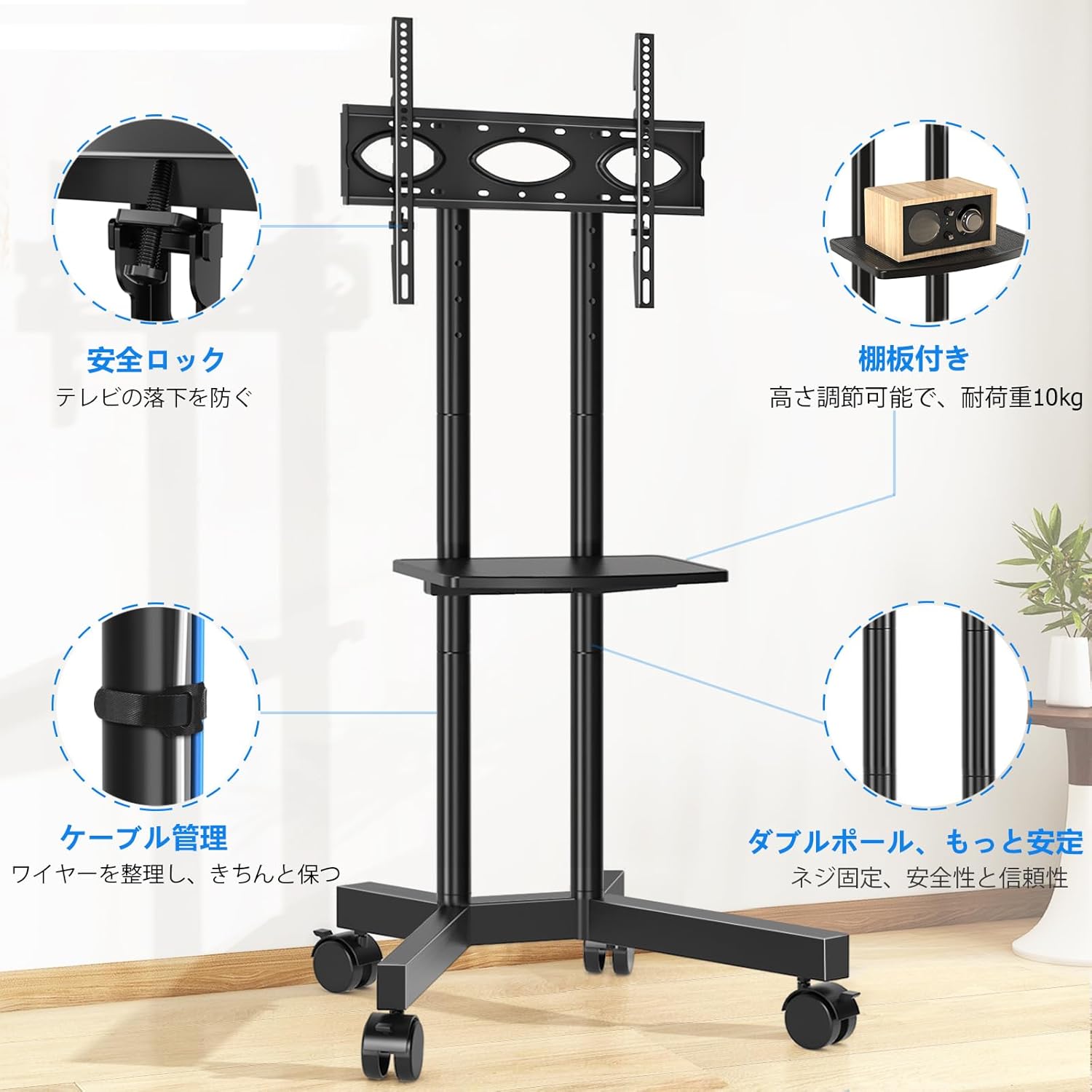
Image 7.1: The Rfiver Mobile TV Stand in a living room environment.
8. Pūtāhui me te Tautoko
Rfiver products are manufactured with quality and durability in mind. For warranty information, technical support, or to report missing/damaged parts, please contact your retailer or the manufacturer directly. Please have your model number (MT200) and purchase date available when contacting support.


