1. Kupu Whakataki
This manual provides instructions for the Varmilo Koi 73 JIS Keyboard with Sakura Switches (Model: VMMA73A039SAKURA). This keyboard features a unique design inspired by traditional Chinese Koi fish and water elements, combined with a modern aesthetic. It is a compact 65% size keyboard with a Japanese Industrial Standard (JIS) layout, designed for both functionality and portability. The keyboard is equipped with Cherry-style stabilizers for a stable typing experience.
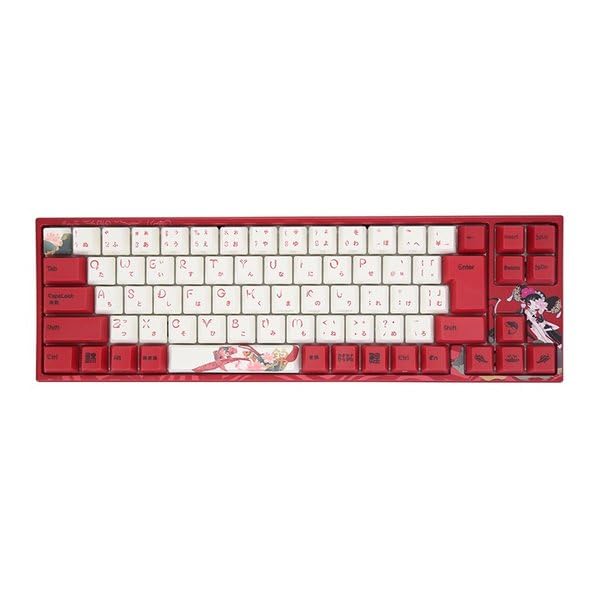
Image: Varmilo Koi 73 JIS Keyboard overview.
2. Nga waahanga matua
- Unique Koi Design: Features vibrant koi fish illustrations and a red aesthetic, developed in collaboration with illustrator Li Huan.
- JIS Layout: 73-key Japanese Industrial Standard layout for specific regional input needs.
- Compact 65% Size: Optimizes desk space while retaining essential function and arrow keys.
- Customizable Switches: Offers a choice of Varmilo mechanical electrostatic capacity switches to suit individual typing preferences.
- Cherry-Style Stabilizers: Ensures consistent and stable key presses, especially for larger keys.
- Hononga USB: Reliable wired connection for stable performance.
3. Aratohu Tatūnga
3.1 Ihirangi mokete
I mua i to tiimata, me whakarite kei roto katoa nga mea kei roto i te kete:
- Varmilo Koi 73 JIS Keyboard
- Tauira USB
- Pukapuka Kaiwhakamahi (tenei tuhinga)
3.2 Te hono i te Papapātuhi
To connect your Varmilo Koi 73 keyboard to your computer, follow these steps:
- Kimihia te tauranga USB-C kei muri o te papapātuhi.
- Honoa tetahi pito o te taura USB kua whakaratohia ki te tauranga USB-C o te papapātuhi.
- Honoa te pito o te taura USB ki tetahi tauranga USB e waatea ana i runga i to rorohiko.
- Me mohio aunoa te papapātuhi e to punaha whakahaere.
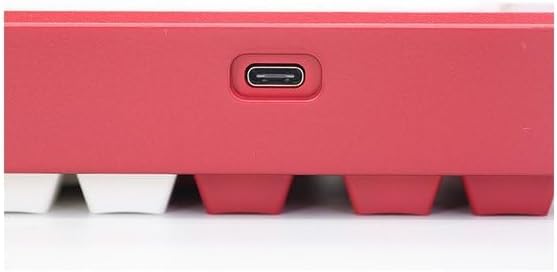
Image: USB-C port for keyboard connection.
3.3 Tāuta Atekōkiri (Kōwhiringa)
For advanced customization and optimal performance, it is recommended to install the Varmilo driver software. This software allows you to remap keys, adjust performance settings, and customize lighting effects.
Video: This video demonstrates the driver installation process and software usage for Varmilo keyboards. While it features the Muse65 model, the steps for driver installation and basic software navigation are generally applicable to other Varmilo keyboards like the Koi 73.
Please visit the official Varmilo website for the latest driver downloads specific to your keyboard model. Follow the on-screen instructions during installation.
4. Nga Tohutohu Whakahaere
4.1 Nga Mahi Matua Matua
The Varmilo Koi 73 keyboard features a standard JIS layout. Most keys function as labeled. For special functions, refer to the combination keys below.
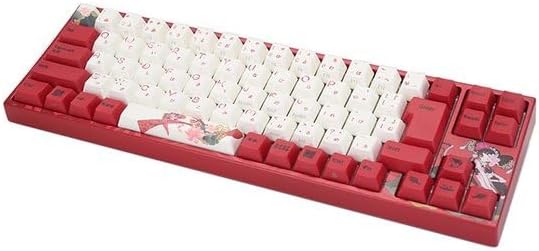
Whakaahua: Ka mutuview of the Varmilo Koi 73 JIS Keyboard layout.
4.2 Function (Fn) Key Combinations
Since this is a 73-key layout, some functions are accessed via the Fn key. Hold down the Fn key and press the corresponding key to activate its secondary function. Common Fn combinations include:
- Fn + F1-F12: Multimedia controls (e.g., volume, play/pause).
- Ngā Pātene Fn + Pere: Page Up/Down, Home/End (specific to model, refer to keycap legends).
- Pātene Fn + Win: Locks/unlocks the Windows key.

Image: Left side keys, often used with Fn for additional functions.
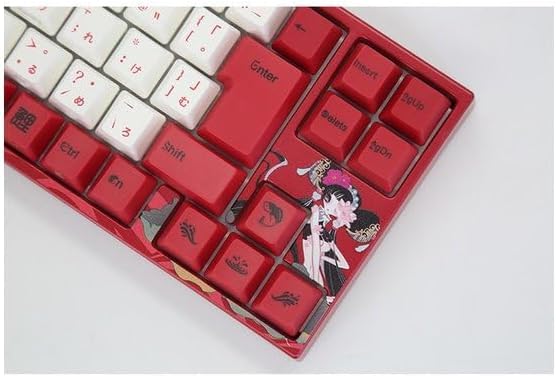
Image: Right side keys, including navigation and utility keys.
4.3 Painga Rama
The Varmilo Koi 73 keyboard supports various RGB lighting effects. You can cycle through different modes and adjust brightness using specific key combinations. Refer to your keyboard's specific keycap legends or the driver software for detailed lighting controls.
Video: This video showcases various RGB lighting effects on a Varmilo keyboard. While the model shown is Muse65, it provides a general idea of the dynamic lighting capabilities available on Varmilo keyboards, including the Koi 73.
5. Tiaki me te Tiaki
Proper maintenance ensures the longevity and optimal performance of your Varmilo Koi 73 keyboard.
- Te horoi i nga taapu matua: Gently remove keycaps using a keycap puller. Clean the keycaps with a soft cloth dampened with mild soap and water. Ensure they are completely dry before reattaching.
- Te horoi i te Tinana Papapātuhi: Use a soft, dry cloth to wipe down the keyboard body. For stubborn dirt, a slightly damp cloth with a small amount of isopropyl alcohol can be used. Avoid excessive moisture.
- Tango Puehu: Whakamahia te hau kōpeke hei tango i te puehu me te para i waenganui i nga ki.
- A ape i te Wai: Puritia kia matara atu ngā wai i te papapātuhi hei ārai i te pakaru.
- Tiaki taura: Kaua e whakapikoa, e kumekume rawa rānei te taura USB.
6. Te Raru
If you encounter issues with your Varmilo Koi 73 keyboard, try the following solutions:
- Papapātuhi Kaore i te whakautu:
- Me mohio kei te hono pai te taura USB ki te papapātuhi me te rorohiko.
- Ngana ki te hono i te papapātuhi ki tetahi tauranga USB rereke i runga i to rorohiko.
- Tīmataria anō tō rorohiko.
- Mena kei te whakamahi i te puku USB, ngana ki te hono tika ki te rorohiko.
- Kī Kāore i te Rēhita:
- Check for any debris or foreign objects under the keycaps.
- If specific keys are not working, consider reinstalling the keyboard driver.
- Nga take rama:
- Ensure the keyboard driver is installed and up to date.
- Use the Fn key combinations or driver software to adjust lighting modes and brightness.
- Kua Maukati te Kī Matapihi:
- Perehi Fn + Win Key hei huri i te raka kī Windows.
If the problem persists, please contact Varmilo customer support for further assistance.
7. Whakatakotoranga
| Waitohu | Varmilo |
| Tau tauira | VMMA73A039SAKURA |
| Tahora Papapātuhi | 73-key JIS (Japanese Industrial Standard) |
| Hononga | Waea USB |
| Momo Whakawhiti | Mechanical (Linear) |
| Pūrere Hototahi | Pona |
| Hunga Hua | 34.2 cm (L) x 34.2 cm (W) x 5.1 cm (H) |
| Nga Waahanga kei roto | Tauira USB |
8. Pūtāhui me te Tautoko
Varmilo products typically come with a manufacturer's warranty. Please refer to the warranty card included with your product or visit the official Varmilo webpae mo nga tikanga me nga tikanga whakamana.
For technical support, driver downloads, or further inquiries, please visit the official Varmilo support page or contact their customer service.
Official Varmilo Webpae: www.varmilo.com


