
AROEVE MK11W
AROEVE MK11W Smart WiFi 2-in-1 Air Purifier and Circulator Fan User Manual
Model: MK11W | Brand: AROEVE
1. Kupu Whakataki
Thank you for choosing the AROEVE MK11W Smart WiFi 2-in-1 Air Purifier and Circulator Fan. This device is designed to enhance your indoor air quality by combining advanced air purification with powerful air circulation. Featuring smart WiFi connectivity, a multi-layer filtration system including a washable filter, and wide-angle oscillation, the MK11W provides comprehensive air treatment for large rooms.
2. Nga Tohutohu Haumaru Nui
Please read all safety instructions carefully before using this appliance to prevent injury or damage. Keep this manual for future reference.
- Momotuhia te mono o te pūwero hau i mua i te horoinga, i te mahi tiaki, i te wā rānei kāore e whakamahia ana.
- Kaua e whakahaere i te taputapu me te taura pakaru, te mono ranei.
- Keep the appliance away from water or wet environments.
- Me whakarite kia tika te hau huri noa i te waeine; kaua e aukati i ngā tomokanga, i ngā putanga rānei o te hau.
- Ko tenei taputapu mo roto anake.
- Do not allow children to operate the air purifier without supervision.
3. Ihirangi mokete
Manatokona kei roto katoa nga taonga ki to kete:
- AROEVE MK11W Air Purifier Fan
- Washable Filter (pre-installed or separate)
- Pukapuka Kaiwhakamahi
- Waea hiko
- Essential Oil Pads (may be included in a small box)
4. Hua Neke Atuview
The AROEVE MK11W combines powerful air purification with efficient air circulation, offering a range of features for a healthier home environment.
Āhuatanga matua:
- 360° Surround Clean Air: Continuously releases clean air through a unique spiral air outlet system, covering areas over 1980 sq.ft with an 11m distance.
- Super-Fast Air Outlet: Utilizes a DC variable frequency brushless motor and turbo-style fan blade for concentrated air volume (28.8m³/min).
- 3D Wide-Angle Swing: 90-degree oscillation both up/down and left/right for comprehensive air distribution.
- Millisecond Air Detection: Highly accurate sensor detects PM values as low as 1, providing real-time air quality feedback.
- Complete Air Treatment System: Features a 5-layer filtration system including a washable pre-filter, air pretreatment, high-efficiency filter, activated carbon filter, and UV internal disinfection.
- Smart WiFi & App Control: Manage settings remotely via the 'Smart Life' app, with compatibility for Google Assistant, Amazon Alexa, and SmartThings.
- Mahi Ataahua: Designed with various functional modes, including a sleep mode operating as low as 27dB.
- Pouaka Kakara: Integrated compartment for adding essential oils to diffuse fragrance.
Waehanga:

The AROEVE MK11W Air Purifier and Circulator Fan.

Diagram illustrating the 5-layer filtration system, including UV disinfection, activated carbon, impressive filter layer, air pretreatment, and washable filter.

The air purifier actively circulating clean air throughout a room, highlighting its 360-degree coverage.
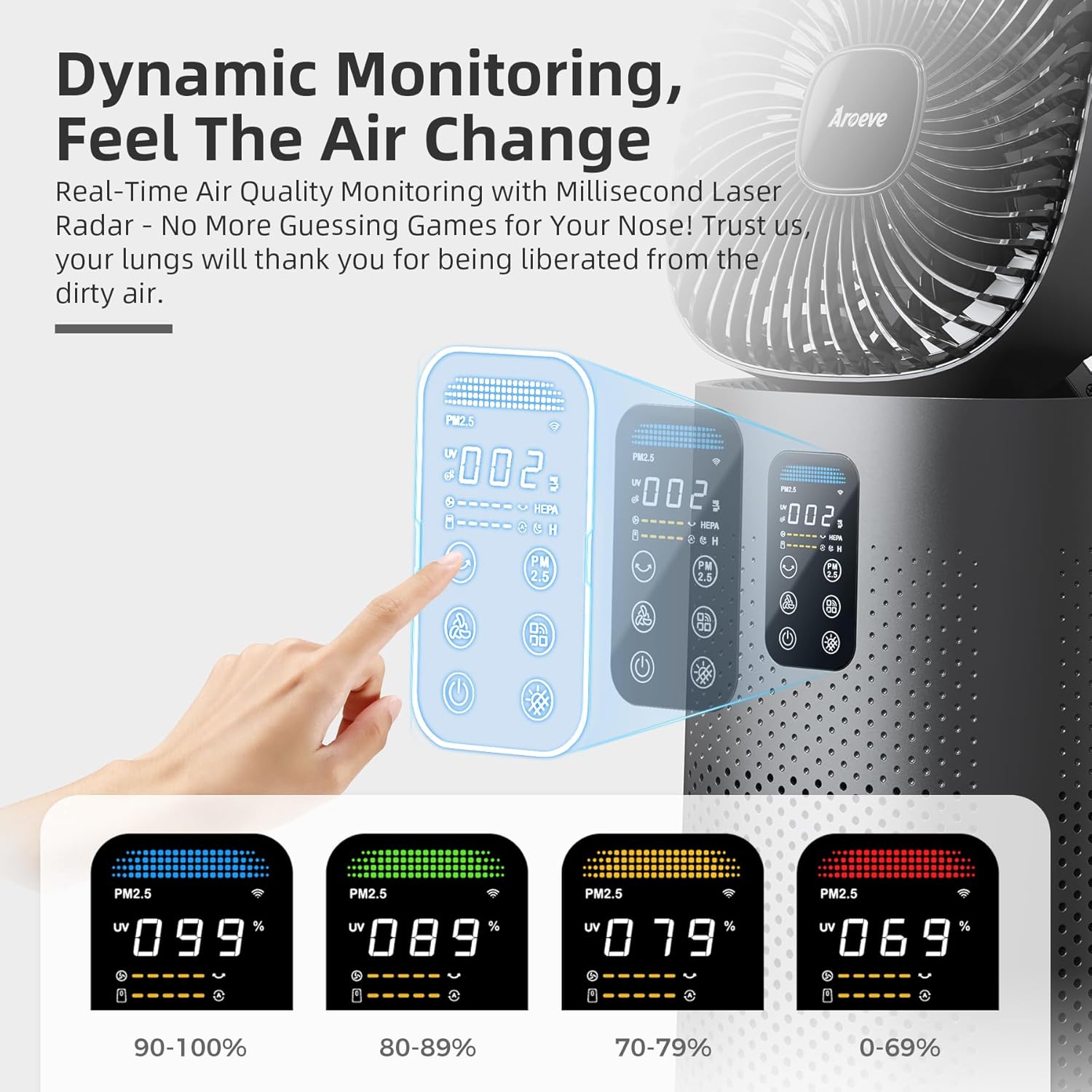
Close-up of the digital control panel showing air quality readings and various control buttons.

A hand adding essential oil drops to the integrated aroma box on the air purifier.
5. Tohutohu Tatūnga
Follow these steps for initial setup of your AROEVE MK11W air purifier:
- Wewetehia te Waehe: Me ata tango te para rangi me nga taputapu katoa mai i te kete.
- Whakapaia te Tātari: The filter may come wrapped in plastic. Locate the filter compartment (usually at the bottom or back of the unit), open it, and remove the filter. Remove all plastic packaging from the filter.
- Whakauruhia te Tātari: Insert the unwrapped filter back into the compartment, ensuring it is seated correctly. Close the filter compartment cover securely.
- Whakaturia te Waeine: Place the air purifier on a flat, stable surface, ensuring there is adequate space around it for optimal airflow.
- Tūhono ki te Hiko: Plug the power cord into the air purifier and then into a standard electrical outlet.
- Smart App Setup (Optional but Recommended):
- Download the 'Smart Life' app from your smartphone's app store (available for iOS and Android).
- Rēhita whakauru atu ranei ki to nama.
- Follow the in-app instructions to add your AROEVE MK11W device. Ensure your phone is connected to a 2.4GHz WiFi network during setup.
6. Nga Tohutohu Whakahaere
Your AROEVE MK11W can be operated via its touch control panel or the 'Smart Life' app.
Nga Mahi Paewhiri Mana:
The touch control panel on the front of the unit.
- Pātene Hiko: Pēhia ki te whakakā i te waeine ki te ON, ki te OFF ranei.
- Tere Kiri: Adjust the fan speed (e.g., Low, Medium, High, Turbo).
- Patene Aratau: Cycle through different operating modes (e.g., Auto, ECO, Sleep).
- Pene Whakatika: Activate or deactivate the 3D wide-angle oscillation.
- Pātene Matawā: Set a timer for automatic shutdown (up to 24 hours).
- UV Light Button: Turn the UV internal disinfection ON or OFF.
- Maama Manawa: Control the ambient breathing light feature.
Mana Taupānga Ataata:
Once connected to the 'Smart Life' app, you can remotely control all functions of your AROEVE MK11W, including:
- Hiko ON/OFF
- Adjusting fan speed and modes
- Controlling oscillation angle
- Setting timers and schedules
- Monitoring real-time air quality data
- Voice control integration with Google Assistant and Amazon Alexa.

Remote control via the 'Smart Life' app on a smartphone.
7. Tiaki
Ko te tiaki i nga wa katoa ka tino pai te mahi me te whakaroa i te roanga o to horoi rangi.
Te Horoi me te Whakakapinga Tātari:
The AROEVE MK11W features a unique washable pre-filter. The app or control panel may indicate when filter maintenance is due.
- Weto Whakakore: Always unplug the unit before accessing the filter.
- Tātari Uru: Whakatuwheratia te uhi o te wahanga tātari.
- Tango Tātari: Carefully pull out the filter assembly.
- Clean Washable Pre-filter: The outermost layer is a washable pre-filter. Gently remove it (it may be attached with Velcro) and rinse it under running water. Allow it to air dry completely before reattaching.
- Replace Main Filter: The inner high-efficiency and activated carbon filters are not washable and should be replaced periodically (typically every 6-8 months, depending on usage and air quality). Refer to the app for filter life percentage.
- Tāuta anō: Place the clean/new filter back into the unit and close the compartment cover.

Adding essential oils to the aroma box.
Demonstration of washing the reusable pre-filter under running water.
Aroma Box Usage:
To use the aroma box, locate the small compartment on the unit. Pull it out, add a few drops of your preferred essential oil to the included pad, and reinsert the box. Do not add essential oils directly into the air outlet or filter.
8. Te Raru
If you encounter issues with your AROEVE MK11W, please refer to the following common problems and solutions:
| Raruraru | Take pea | Rongoā |
|---|---|---|
| Karekau te waeine i te hiko. | Power cord not securely plugged in; no power from outlet. | Tirohia nga hononga hiko; whakamatauria he putanga rereke. |
| Te ngoikore o te mahi purenga hau. | Filter is dirty or needs replacement; air inlets/outlets blocked. | Clean the washable pre-filter or replace the main filter. Ensure no obstructions around the unit. |
| Te haruru nui i te wa e mahi ana. | Filter not installed correctly; foreign object in fan; unit on an uneven surface. | Reinstall filter; check for obstructions; place unit on a stable, level surface. |
| Nga take honohono taupānga. | Incorrect WiFi network (not 2.4GHz); app not properly configured. | Ensure your router supports 2.4GHz and your phone is connected to it during setup. Follow app pairing instructions carefully. |
9. Whakatakotoranga
| Āhuahira | Taipitopito |
|---|---|
| Tau tauira | MK11W |
| Hunga Hua | 9.96 x 9.96 x 20.55 inihi |
| Taumaha Tūemi | 13.1 Pauna |
| Puna Mana | DC |
| Tikanga Mana | Touch, App, Voice |
| Momo Tātari | 5-layer system (Washable Pre-filter, Air Pretreatment, High-Efficiency Filter, Activated Carbon Filter, UV Internal Disinfection) |
| Te Rahi o te Papa | Tae atu ki te 2000 Puawai Tapawha |
| Rahi Pupuri Matūriki | 0.3 Micrometer |
| Nga waahanga motuhake | 360° Surround Clean Air, Millisecond Air Detection, 3D Wide-Angle Swing, Smart WiFi, Aroma Box |
10. Pūtāhui me te Tautoko
For warranty information or technical support, please refer to the contact details provided in your product packaging or visit the official AROEVE webpae. Puritia to riiki hoko hei tohu mo te hoko.
Ask a question about this manual
Ask about setup, troubleshooting, compatibility, parts, safety, or missing instructions. Manuals+ will review the question and use this page’s manual context to help answer it.