Kupu Whakataki
Thank you for choosing the TIMESS 13-Inch Wall Clock. This clock combines classic analog timekeeping with a modern LCD display for perpetual calendar and temperature. Its silent, non-ticking movement ensures a peaceful environment. Please read this manual thoroughly before use to ensure proper setup and operation.
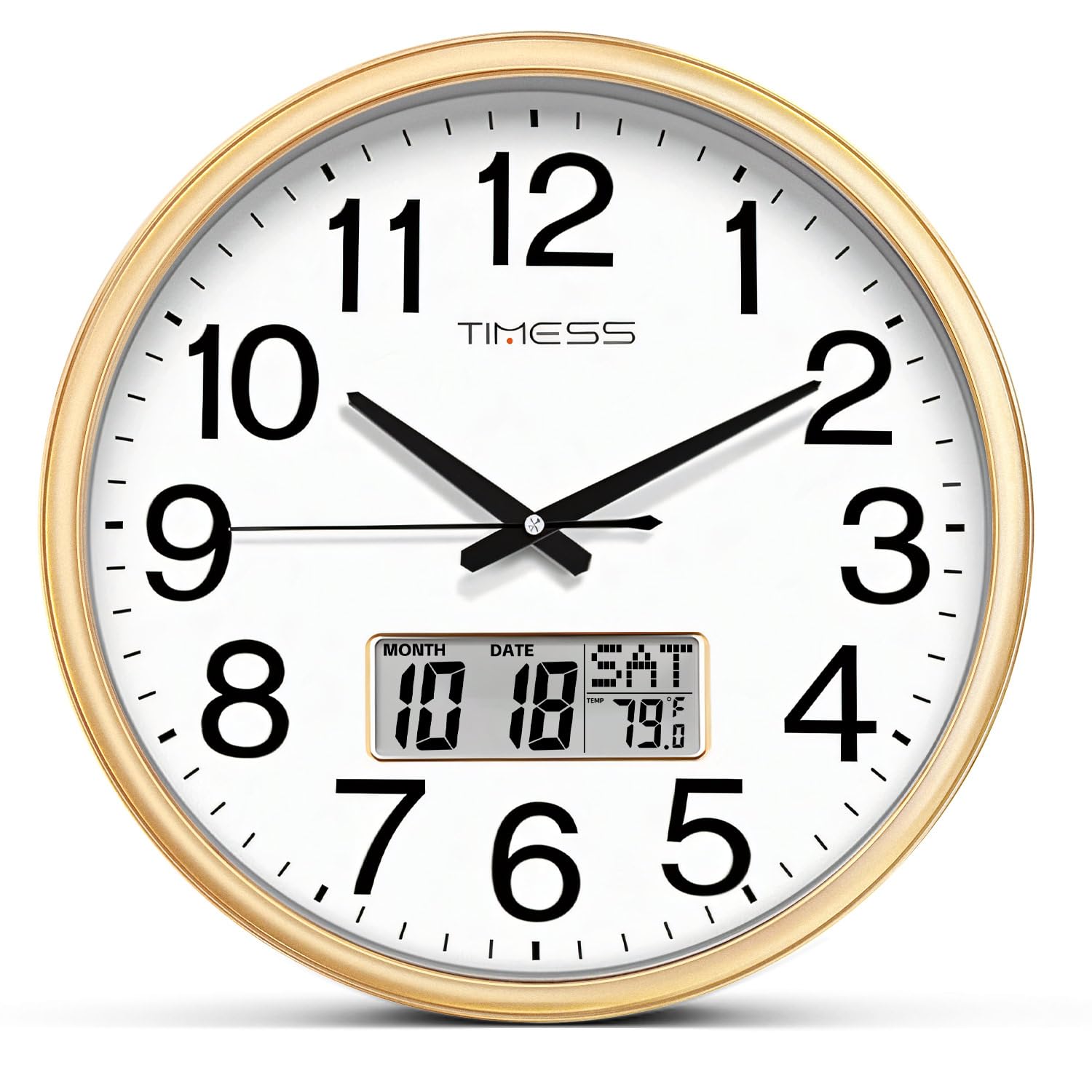
Whakaahua: Mua view of the TIMESS 13-Inch Wall Clock, showcasing the analog dial and the integrated LCD display for date and temperature.
Nga korero haumaru
- Whakamahia anake AA carbon batteries. Do not use alkaline or rechargeable batteries, as they may damage the clock mechanism.
- Puritia nga pākahiko kei taea e nga tamariki.
- Do not expose the clock to extreme temperatures or direct sunlight.
- Kaua e whakataka te karaka, e tukua rānei kia pāngia e ngā pānga kaha.
- Horoia te karaka ki te kakahu ngohengohe, maroke. Kaua e whakamahi i ngā kaihoroi whakakoi, i ngā whakarewa rānei.
Ihirangi mokete
- 1 x TIMESS 13-Inch Wall Clock
- 1 x Manual Kaiwhakamahi (tenei tuhinga)
- Note: 2x AA carbon batteries are required and not included.
Tatūnga
1. Tāuta Pūhiko
The clock requires two (2) AA carbon batteries: one for the analog movement and one for the LCD display.
- Locate the battery compartments on the back of the clock. There is one for the clock movement and one for the LCD display.
- Insert one (1) AA carbon battery into the clock movement compartment, ensuring correct polarity (+/-).
- Insert one (1) AA carbon battery into the LCD display compartment, ensuring correct polarity (+/-).

Whakaahua: Rear view of the clock, highlighting the separate battery compartments for the analog movement and the LCD display.
2. Te Whakatakoto i Te Wa
After installing the battery for the clock movement:
- Turn the adjustment knob on the back of the clock movement to set the correct analog time.
3. Setting the Perpetual Calendar and Temperature Display
The LCD display has control buttons on the back for setting the date and time for the digital display.
- Pehia te SET pātene ki te tomo aratau tautuhinga.
- Whakamahia te UP a RARO buttons to adjust the values (Year, Month, Date, Hour, Minute).
- Perehi SET again after each adjustment to confirm and move to the next setting.
- The temperature display automatically calibrates after a few minutes.
- Pehia te WHAKATURU button to clear all settings and start over if needed.
Video: This video demonstrates the setup process for the TIMESS 13-Inch Silent Wall Clock, including battery installation and setting the perpetual calendar and temperature display.
4. Whakapiki i te Karaka
He mea hanga te karaka kia māmā ai te whakairi ki te pakitara.
- Choose a suitable location on a wall, ensuring it is sturdy enough to hold the clock's weight.
- Use a nail or screw (not included) in the desired position.
- Hang the clock using the universal hanging hole located on the back.

Image: Close-up of the back of the clock, showing the universal hanging hole for easy installation.
Nga Tohutohu Whakahaere
Reading the Analog Time
The clock features a traditional analog display with hour, minute, and second hands. The large, bold numbers ensure clear visibility from a distance.

Image: A close-up of the clock face, emphasizing the large numerals for easy time reading.
Te maarama ki te Whakaaturanga LCD
The integrated LCD screen provides three key pieces of information simultaneously:
- Maramataka Tuturu: Displays the current month and date.
- Weekly Calendar: Shows the current day of the week.
- Real-Time Temperature: Indicates the ambient temperature in Fahrenheit.

Whakaahua: Taipitopito view of the LCD screen, illustrating the perpetual calendar (month, date, day) and real-time temperature display.
Mahi Wahangu
The clock features a high-quality quartz sweep movement, ensuring a completely silent, non-ticking operation. This makes it ideal for bedrooms, offices, or any space where quiet is desired.

Image: The TIMESS wall clock displayed in a bedroom, emphasizing its silent operation for undisturbed sleep.
Te tiaki
Te horoi
- Wipe the clock's frame and glass panel with a soft, dry, lint-free cloth.
- For stubborn marks on the glass, a slightly damp cloth followed by a dry one can be used.
- Do not use chemical cleaners, sprays, or abrasive materials, as these can damage the finish and glass.
Video: This video highlights the silent sweep movement and various color options of the TIMESS wall clock, demonstrating its smooth operation and aesthetic appeal.
Whakakapinga Pūhiko
- Replace batteries when the clock stops or the LCD display fades.
- Always replace both AA carbon batteries simultaneously for optimal performance.
- Makahia nga pākahiko kua whakamahia kia rite ki nga ture o te rohe.
Raparongoā
| Raruraru | Take pea | Rongoā |
|---|---|---|
| Clock not moving / LCD not displaying | Nga pākahiko kua mate, kua he ranei te whakaurunga. | Check battery polarity. Replace with fresh AA carbon batteries. |
| He wa tika | Kāore i te tika te whakatakoto i te wā. | Adjust the time using the knob on the back for analog, and SET/UP/DOWN buttons for LCD. |
| Te panui pāmahana hē | Clock recently moved or in an area with fluctuating temperature. | Allow 15-30 minutes for the sensor to stabilize in its new environment. |
Whakatakotoranga
- Waitohu: WAI
- Tauira: P34B wall clock
- Rahi: 13 Inch (13"W x 13"H)
- Tae: Calendar Gold (as per current product)
- Momo Whakaatu: Analog with LCD Digital Display
- Nga waahanga motuhake: Perpetual Calendar Display, Temperature Display
- Puna Hiko: Battery Powered (2x AA carbon batteries required, not included)
- Nekehanga: Silent Quartz Sweep Movement
- Rauemi Tāpare: Wood (finish)
- Rauemi: Acrylonitrile Butadiene Styrene (ABS)
- Whakamahinga o roto/waho: Roo-roto
- Taumaha Tūemi: 2.14 pauna (0.97 Kirokaramu)
Pūtāhui me te Tautoko
TIMESS products are manufactured with high-quality standards. For any issues or inquiries regarding your wall clock, please contact TIMESS customer support through your purchase platform. Please retain your proof of purchase for warranty claims.
While specific warranty details are not provided in this manual, standard consumer rights and return policies apply. For extended protection, consider purchasing available protection plans at the time of purchase.


