Kupu Whakataki
Thank you for choosing the Edifier STAX Spirit S5 Wireless Planar Magnetic Headphones. These headphones are engineered to deliver an exceptional audio experience, featuring advanced planar magnetic drivers with EqualMass diaphragms for precise sound reproduction and minimal distortion. With Qualcomm Snapdragon Sound technology, LDAC, and LHDC codec support, the S5 provides high-resolution wireless audio. This manual provides detailed instructions for setup, operation, maintenance, and troubleshooting to ensure you get the most out of your new headphones.
Ihirangi mokete
Tirohia koa ko nga mea katoa kei raro nei kei roto i to kete:
- 1 x Edifier STAX Spirit S5 Headset
- 2 x Cooling Mesh Earpads (pre-installed or spare)
- 1 x USB Momo-C Utaura Whakatau
- 1 x Earpad Pick Tool
- 1 x Taura Ororongo AUX 3.5mm
- 1 x 3.5mm ki te 6.35mm Whāurutau
- 1 x Headphone Carrying Case
- 2 x Earpad Pouches
- 1 x Pukapuka Kaiwhakamahi
Ka mutu te huaview
Familiarize yourself with the components and controls of your Edifier STAX Spirit S5 headphones.

Mua view of the Edifier STAX Spirit S5 headphones, showcasintō rātou hoahoa pango maeneene me ngā kapu taringa-runga.

A user wearing the Edifier STAX Spirit S5 headphones, demonstrating their comfortable fit and profile i te wa e whakamahia ana.
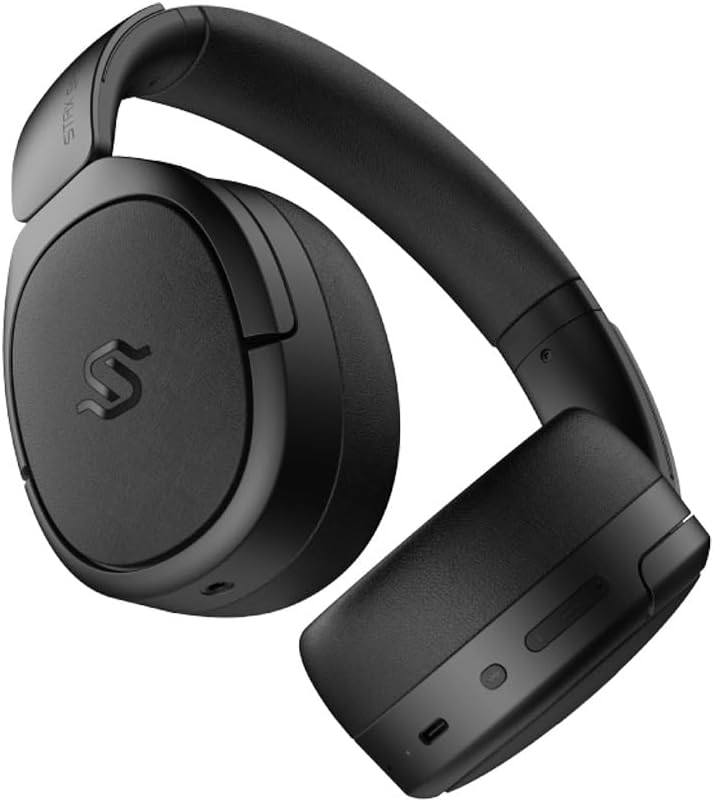
Te taha view of the headphones, highlighting the control buttons and ports located on the right earcup, including the USB-C port.

A detailed close-up of the control buttons on the earcup, showing the power button, volume controls, and the USB-C charging port.

The Edifier STAX Spirit S5 headphones folded compactly, illustrating their portability and ease of storage in the included carrying case.
Tatūnga
Te Whakataki i nga Paneoro
Before first use, fully charge your Edifier STAX Spirit S5 headphones.
- Connect the supplied USB Type-C cable to the charging port on the headphones and the other end to a USB power adapter (not included) or a computer's USB port.
- The LED indicator will show charging status. It typically takes approximately 10 minutes for a quick charge, providing extended playback. A full charge can provide up to 80 hours of battery life.
- Once fully charged, the LED indicator will change (refer to the specific indicator behavior in your quick start guide, if available).
Te Hia/Weto
- Whakahiko: Patohia me te pupuri i te paatene Hiko mo te 3 hēkona kia whiti te rama tohu.
- Weto Whakakore: Pēhia me te pupuri i te pātene Mana mō te 5 hēkona pea tae noa ki te wā e mate ai te rama tohu.
Tauira Nihokikorangi
The STAX Spirit S5 uses Bluetooth V5.4 for stable and fast transmission.
- Me mohio kua weto nga taringa.
- Pēhia me te pupuri i te pātene Mana mō te 5-7 hēkona pea kia tere te mura o te rama tohu, e tohu ana i te aratau takirua.
- On your device (smartphone, tablet, computer), enable Bluetooth and search for "Edifier STAX Spirit S5" in the list of available devices.
- Select the headphones to connect. Once successfully paired, the indicator light will stop flashing and remain solid or turn off, depending on the model's specific behavior.
- Takirua Tere a Google: For Android devices, the headphones support Google Fast Pair for quick and seamless connection. Simply power on the headphones near your Android device, and a pairing prompt will appear.
- Multi-device Connection: The S5 can connect to two audio devices simultaneously. After pairing with the first device, put the headphones back into pairing mode and connect to the second device. The headphones will intelligently switch between the two.
He hononga Whiriwhiria
The headphones support both USB-C and 3.5mm AUX wired connections.
- Ororongo USB-C: Connect the USB Type-C cable from the headphones to a compatible USB-C port on your device for digital audio playback and charging.
- 3.5mm AUX Audio: Connect the 3.5mm AUX cable to the audio input port on the headphones and the other end to your audio source's 3.5mm output. Use the included 3.5mm to 6.35mm adapter for devices with a 6.35mm jack. Note that the headphones must be powered on for passive wired mode.
Nga Tohutohu Whakahaere
Mana Taketake
The main controls are located on the earcup:
- Pātene Hiko:
- Press and hold for 3 seconds to Power On.
- Press and hold for 5 seconds to Power Off.
- Press and hold for 5-7 seconds (from off) to enter Bluetooth pairing mode.
- Rōrahi Whakarunga (+): Perehi poto hei whakanui i te rōrahi.
- Rōrahi Raro (-): Pēhi poto hei whakaiti i te rōrahi.
- Multi-function Button (often between volume buttons):
- Short press: Play/Pause music.
- Short press: Answer/End call.
- Long press: Reject call.
- Pehi rua: Riri panuku.
- Perehi toru: Riri o mua.
Hangarau Ororongo
The STAX Spirit S5 supports various high-fidelity audio codecs for an optimal listening experience:
- Qualcomm Snapdragon Sound: Ensures stable RF connection and efficient power consumption for extended listening.
- LDAC & LHDC: Compatible with Hi-Res Audio and Wireless Hi-Res Audio, delivering exceptional detail and clarity.
- aptX HD, aptX Adaptive, aptX Lossless: Part of the Snapdragon Audio technology, providing high-resolution audio with ultra-low latency (as low as 89ms with aptX Adaptive).
Taumahinga Waea
The headphones are equipped with dual microphones and Qualcomm cVc technology for clear calls.
- Whakakorea Noise: Integrated Qualcomm cVc actively suppresses ambient noise, enhancing voice clarity during calls.
- Tūmataitinga: The closed-back design helps ensure conversation privacy.
Te tiaki
Mā te tiaki tika ka roa te ora me te mahi a ō paneoro.
- Te horoi:
- Horoia nga taringa ki te kakahu ngohengohe, maroke.
- For earpads, use a slightly damp cloth if necessary, but avoid excessive moisture.
- Kaua e whakamahi i nga matū kino, i nga whakarewa horoi, i nga horoi kaha ranei.
- Whakakapinga Puka taringa:
- The STAX Spirit S5 comes with two sets of earpads (mesh and leather).
- To replace, gently pull off the existing earpad. Use the included earpad pick tool if needed to carefully detach it from the earcup.
- Align the new earpad with the earcup and press firmly around the edges until it clicks securely into place.
- Rokiroki:
- Ina kore e whakamahia, rongoatia ngā pane whakarongo ki roto i te putea kua whakaratohia hei tiaki i a rātou mai i te puehu, i ngā karawarawa, me ngā pānga.
- A ape i te rokiroki i roto i te wera nui, te makuku nui ranei.
- Tiaki Pūhiko:
- Hei pupuri i te roa o te pākahiko, kaua e tukua kia pau katoa te wai o ngā paneoro i ngā wā katoa.
- Mena kei te rongoa mo te wa roa, utuhia te pākahiko ki te 50% i mua i te rokiroki.
Raparongoā
Mena ka raru koe ki o taringa, tirohia nga raru me nga otinga e whai ake nei:
| Raruraru | Take pea | Rongoā |
|---|---|---|
| Karekau e kaha ana nga waea. | He iti te pākahiko. | Me utu nga taringa ma te whakamahi i te taura USB-C. |
| Kaore e taea te hono ma te Nihokikorangi. | Kāore ngā pane whakarongo i te aratau takirua; kua weto te Nihokikorangi o te taputapu; kua pokanoa. | Ensure headphones are in pairing mode (flashing light). Turn Bluetooth off/on on your device. Move closer to the device. Clear previous pairings on your device. |
| Karekau he oro, he iti te reo. | Volume too low; incorrect audio source; loose cable (wired mode). | Increase volume on headphones and source device. Ensure correct audio output is selected on your device. Check wired connections. |
| Poor audio quality (wireless). | Distance from device; interference; low-quality audio source. | Reduce distance to your device. Avoid strong electromagnetic interference. Use high-quality audio files/streaming services. |
| Kaore e mahi te hopuoro i te wa e waea ana. | Incorrect input device selected; microphone muted. | Ensure the headphones are selected as the input device in your call application settings. Check if the microphone is muted. |
If the problem persists, please contact Edifier customer support.
Whakatakotoranga
Key technical specifications for the Edifier STAX Spirit S5 headphones:
| Waitohu | Kaiwhakatika |
| Ingoa Tauira | S5 |
| Tau tauira | S5spaceblack |
| Tae | Pango |
| Hangarau Hononga | Waea, Ahokore (Nihokikorangi) |
| Hangarau Whakawhitiwhiti Ahokore | Nihokikorangi |
| Putanga Nihokikorangi | V5.4 (implied from feature bullets) |
| Tiki Waeoro | 3.5mm Jack, USB-C |
| Te aukati | 120 ohm |
| Te Whakanoho Taringa | Runga-taringa |
| Tauwehe Puka | Circum-Aural |
| Taumaha Tūemi | 420 Karamu |
| Hanganga Pūhiko | Lithium-ion |
| Pūhiko Rechargeable | Ae |
| Waa Whakatau | Approx. 10 minutes (for quick charge) |
| Nga waahanga motuhake | Whakatau Tere |
| Pūrere Hototahi | Computer, Laptop, Mobile Phone |
| Nga Whakamahinga Motuhake mo te Hua | Music, Professional, Studio Listening |
Pūtāhui me te Tautoko
The Edifier STAX Spirit S5 headphones come with a two-year warranty, ensuring reliable performance and support.
For technical assistance, warranty claims, or further inquiries, please contact Edifier customer support through their official webpae, te kaihokohoko ranei i hokona mai e koe te hua. Tena koa pupurihia to tohu mo te hoko mo te whakamana whakamana.


