1. Kupu Whakataki
The VOCOO Wireless Indoor Outdoor Thermometer Hygrometer (Model 5276) provides accurate, real-time monitoring of temperature and humidity both indoors and outdoors. This device features a large LCD display, a wireless remote sensor, and various functions to help you maintain a comfortable and healthy environment. This manual will guide you through the setup, operation, and maintenance of your device to ensure optimal performance.

Image 1.1: Main unit and wireless outdoor sensor.
2. He aha kei roto i te Pouaka
- 1 x Indoor Thermometer Unit
- 1 x Ahokore Pūoko waho
- 4 x AAA Batteries (kei te whakauru-a-mua, ka uru motuhake ranei)
3. Nga Hua o te Hua
- Aroturuki Ahokore: Connects to 1 wireless outdoor sensor (IP43 waterproof) with a transmission range of up to 100m/328ft in open areas.
- Whakaaturanga LCD Whakamuri Nui: A 3.7-inch screen (90x87x23 mm) for easy reading of temperature, humidity, and settings, even from a distance or in low light conditions.
- High Precision & Fast Refresh: Updates readings every 10 seconds for current data.
- Awhe inenga whanui:
- Indoor Temperature: 14°F~140°F (-10℃~60℃)
- Outdoor Temperature: -40°F~158°F (-40℃~70℃)
- Haumākū: 10%~95% RH
- Tika: Temperature ±1℃, Humidity ±3-5%RH.
- Whakaaturanga Maha: Includes switchable ℃/℉ units, 12/24 hour time and date display, air comfort indicators, temperature and humidity trend arrows, and a low battery icon.
- Ngā Rekoata Iti/Nui: Displays maximum and minimum temperature/humidity data, which automatically clears after 24 hours.
- Kōwhiringa Whakapuru Hangawari: The indoor unit has a wall-hanging hole and a retractable stand for tabletop placement. The outdoor sensor includes a hook for easy mounting.

Whakaahua 3.1: Ka mutuview o nga ahuatanga hua.
4. Tatūnga
4.1 Tāuta Pūhiko
- Wae o Roto: Open the battery compartment cover on the back of the main unit. Insert 2 AAA batteries, observing the correct polarity (+/-). Close the cover.
- Pūoko o waho: Open the battery compartment cover on the back of the outdoor sensor. Insert 2 AAA batteries, observing the correct polarity (+/-). Close the cover.
4.2 Takirua pūoko
The indoor unit and outdoor sensor should automatically pair once batteries are installed. If the outdoor temperature/humidity is not displayed after a few minutes, follow these steps:
- Ensure both units have fresh batteries.
- Place the outdoor sensor close to the indoor unit.
- Press and hold the 'CLEAR' button on the indoor unit for 3 seconds to clear previous data and initiate a new search for the sensor.
- If pairing fails, remove batteries from both units, wait 1 minute, and reinsert them.
4.3 Whakanoho
- Wae o Roto: Place the indoor unit on a flat surface using its retractable stand, or mount it on a wall using the hanging hole. Ensure it is away from direct sunlight, heat sources, or drafts that could affect readings.
- Pūoko o waho: Mount the outdoor sensor in a shaded, dry location, protected from direct rain and sunlight, to ensure accurate readings. Avoid placing it near metal objects or large electrical appliances that could interfere with the wireless signal. The maximum effective range is 100m/328ft in an open area, but walls and obstacles will reduce this distance.

Image 4.1: Dimensions and mounting options for the main unit and sensor.

Image 4.2: Wireless transmission range and recommended placement for the outdoor sensor.
5. Nga Tohutohu Whakahaere
5.1 Temperature Unit Selection (℃/℉)
Press the '℃/℉' button on the back of the indoor unit to switch between Celsius and Fahrenheit temperature displays.
5.2 Ngā Rekoata Iti/Nui rawa
The device automatically records the maximum and minimum temperature and humidity values over a 24-hour period. These records are automatically cleared every 24 hours.
- Press the 'MAX/MIN' button once to view the maximum recorded values.
- Press the 'MAX/MIN' button again to view the minimum recorded values.
- Press the 'MAX/MIN' button a third time to return to current readings.
- To manually clear the Min/Max records, press and hold the 'MAX/MIN' button for 3 seconds while viewte tuhi i nga rekoata.

Image 5.1: Display showing Min/Max temperature and humidity records.
5.3 Mahi Whakamarama
The LCD display features a white backlight for improved visibility in dark conditions.
- Touch the light icon area at the bottom of the screen to activate the backlight.
- The backlight will remain on for a few seconds before automatically turning off to conserve battery power.

Image 5.2: Backlit LCD display for clear visibility.
5.4 Tautuhinga Wā me te Rā
The device displays the current time and date. Refer to the specific instructions on the back of the unit or the included quick start guide for detailed steps on setting the time and date (12/24 hour format).
6. Whakaatuhia nga korero
The large LCD screen provides comprehensive information at a glance:
- KI WAHO: Displays outdoor temperature and humidity from the wireless sensor.
- IN: Displays indoor temperature and humidity measured by the main unit.
- CH1: Indicates the channel for the outdoor sensor (this model supports one sensor).
- Temperature/Humidity Trend Arrows: Arrows indicate whether temperature or humidity is rising, falling, or remaining stable.
- Tohu Whakamarie Hau: A colored bar graph categorizes the current indoor humidity level into DRY (0-30%), COMFORT (31-70%), or WET (71-99%).
- Wā me te Ra: Current time and date (AM/PM indicator for 12-hour format).
- Low Battery Icon: Appears when batteries in either the main unit or sensor need replacement.
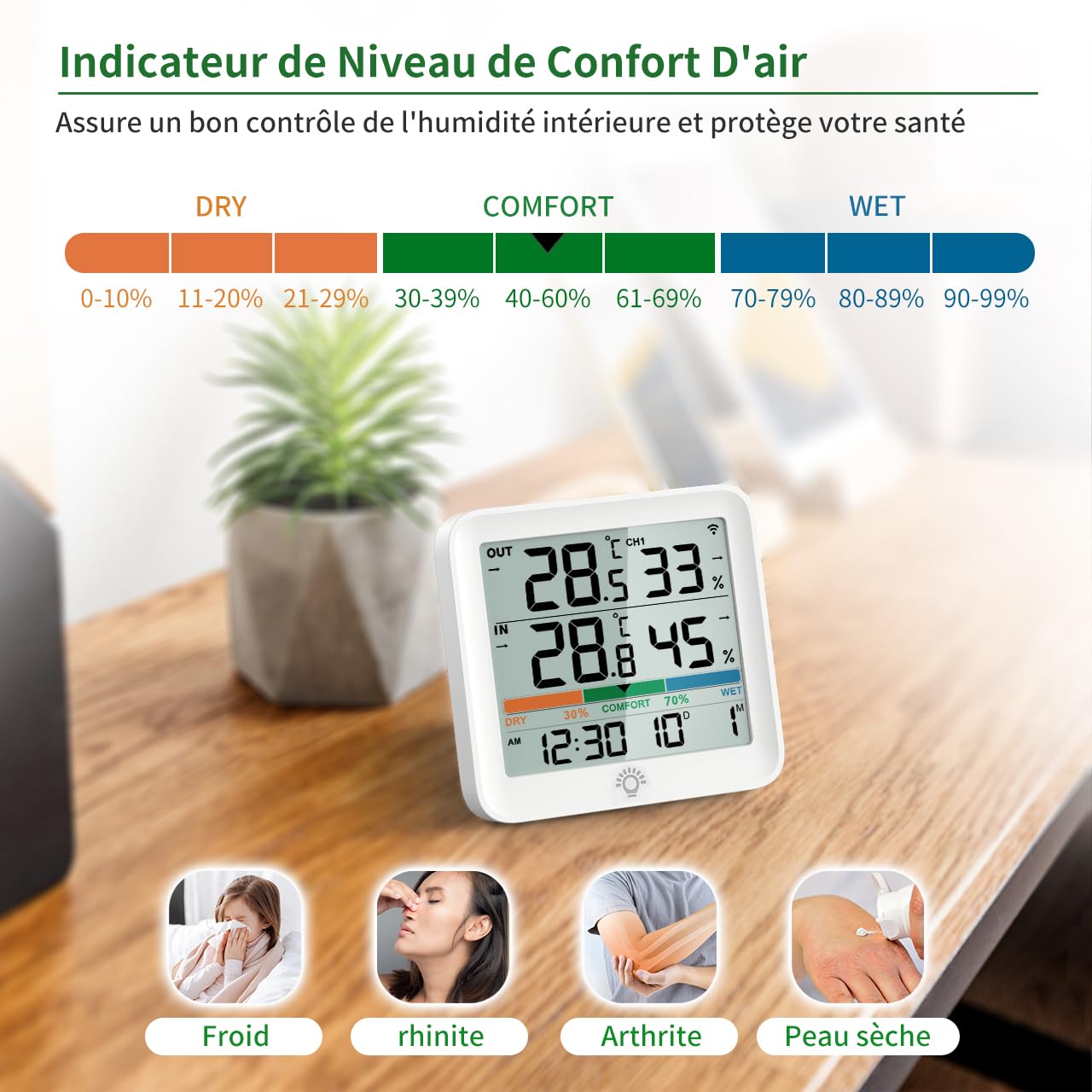
Image 6.1: Air comfort indicator showing DRY, COMFORT, and WET zones.
7. Whakatakotoranga
| Āhuahira | Whakatakotoranga |
|---|---|
| Tau tauira | 5276 |
| Awhe Temperature Roto | -10 ℃ ki te 60 ℃ (14°F ki te 140°F) |
| Awhe Temperature Waho | -40 ℃ ki te 70 ℃ (-40°F ki te 158°F) |
| Taumata Humidity | 10% ki te 95% RH |
| Te Tikanga o te Pamahana | ±1°C |
| Te tika o te haumākū | ±3-5% RH |
| Awhe Whakawhiti Ahokore | Tae atu ki te 100m / 328ft (wāhi tuwhera) |
| Puna Mana | 4 x pākahiko AAA (2 mō te wae matua, 2 mō te pūoko) |
| Ahu Waeine Matua | 17 x 11 x 4 cm |
| Momo Whakaeke | Wall mount, Tabletop |
| UPC | 677222587383 |

Image 7.1: Detailed temperature and humidity monitoring ranges.
8. Tiaki
8.1 Whakakapinga Pūhiko
When the low battery icon appears on the display, replace the batteries in the respective unit (main unit or outdoor sensor) with new AAA batteries. Ensure correct polarity.
8.2 Te horoi
Wipe the device and sensor with a soft, damp cloth. Do not use abrasive cleaners or immerse the units in water. Ensure the outdoor sensor's waterproof seal is intact after battery replacement.
9. Te Raru
- Kāore he Pānui Mahana/Makuku o Waho:
- Check if the outdoor sensor batteries are installed correctly and are not depleted.
- Ensure the outdoor sensor is within the effective transmission range (100m/328ft in open air) and there are no major obstructions or sources of interference between the sensor and the main unit.
- Try re-pairing the sensor by pressing and holding the 'CLEAR' button on the main unit for 3 seconds.
- Nga Panui Heke:
- Ensure both units are placed away from direct sunlight, heat sources, or strong drafts.
- Allow the units to stabilize for at least 30 minutes after initial setup or relocation.
- Compare readings with another known accurate thermometer/hygrometer.
- Whakaatu Kaore i te Mahi:
- Check and replace the batteries in the main unit.
- Me whakarite kia whakauruhia nga pākahiko me te polarity tika.
10. Pūtāhui me te Tautoko
This product comes with a standard return policy. For specific warranty details, technical support, or further assistance, please refer to the manufacturer's official website or contact customer service through your point of purchase. Keep your purchase receipt for warranty claims.


