Kupu Whakataki
This instruction manual provides essential information for the setup, operation, and maintenance of your LOUTOC Replacement Remote Control, model URMT26CND002. This remote is designed as a universal replacement for various Philips Android and Google Smart TV models. Please read this manual thoroughly before use to ensure optimal performance and longevity of your device.
Tatūnga
1. Tāuta Pūhiko
E rua (2) ngā pākahiko AAA e hiahiatia ana mō te mana mamao (kāore i te whakaurua). Whāia ēnei mahi hei tāuta:
- Kimihia te uhi o te wahanga pākahiko kei muri o te mana mamao.
- Peia te uhi ki raro hei whakatuwhera i te wahanga.
- Whakauruhia kia rua nga pākahiko AAA, kia tika te hono o nga pito pai (+) me te kino (-) ki nga tohu kei roto i te waahanga.
- Whakahokia te uhi o te wahanga pākahiko ki tona waahi kia paoho pai.
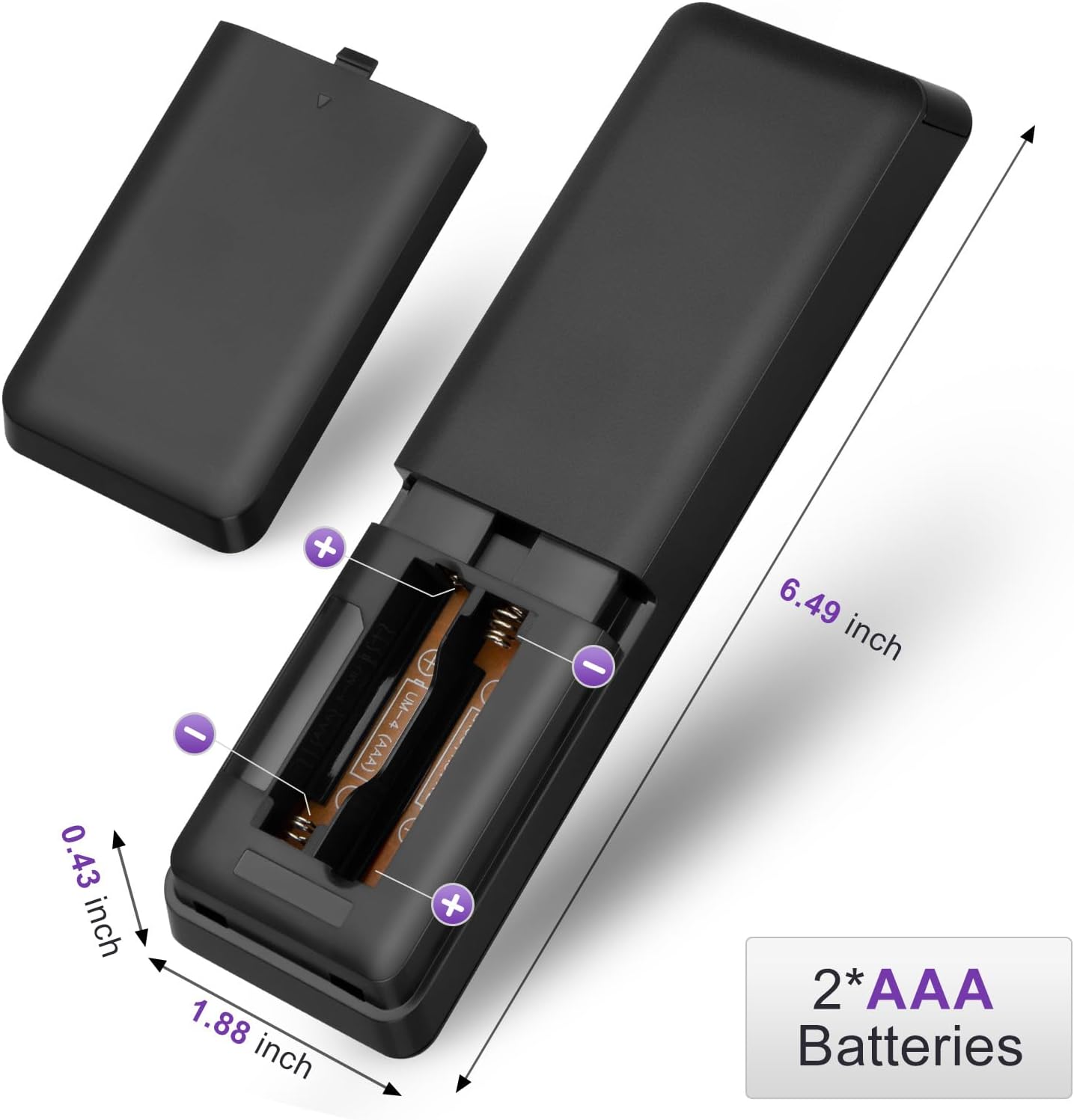
Figure 1: Battery installation for the LOUTOC remote control.
2. Whakamahinga Tuatahi
This LOUTOC remote control is pre-programmed and designed to work immediately with compatible Philips Smart TVs. No additional setup or pairing is required. Simply install the batteries, point the remote at your TV, and begin use.

Figure 2: Key features including no setup required and fast response time.
Nga Tohutohu Whakahaere
The LOUTOC remote control features a standard layout for easy navigation and control of your Philips Smart TV. Below is a detailed description of each button's function.
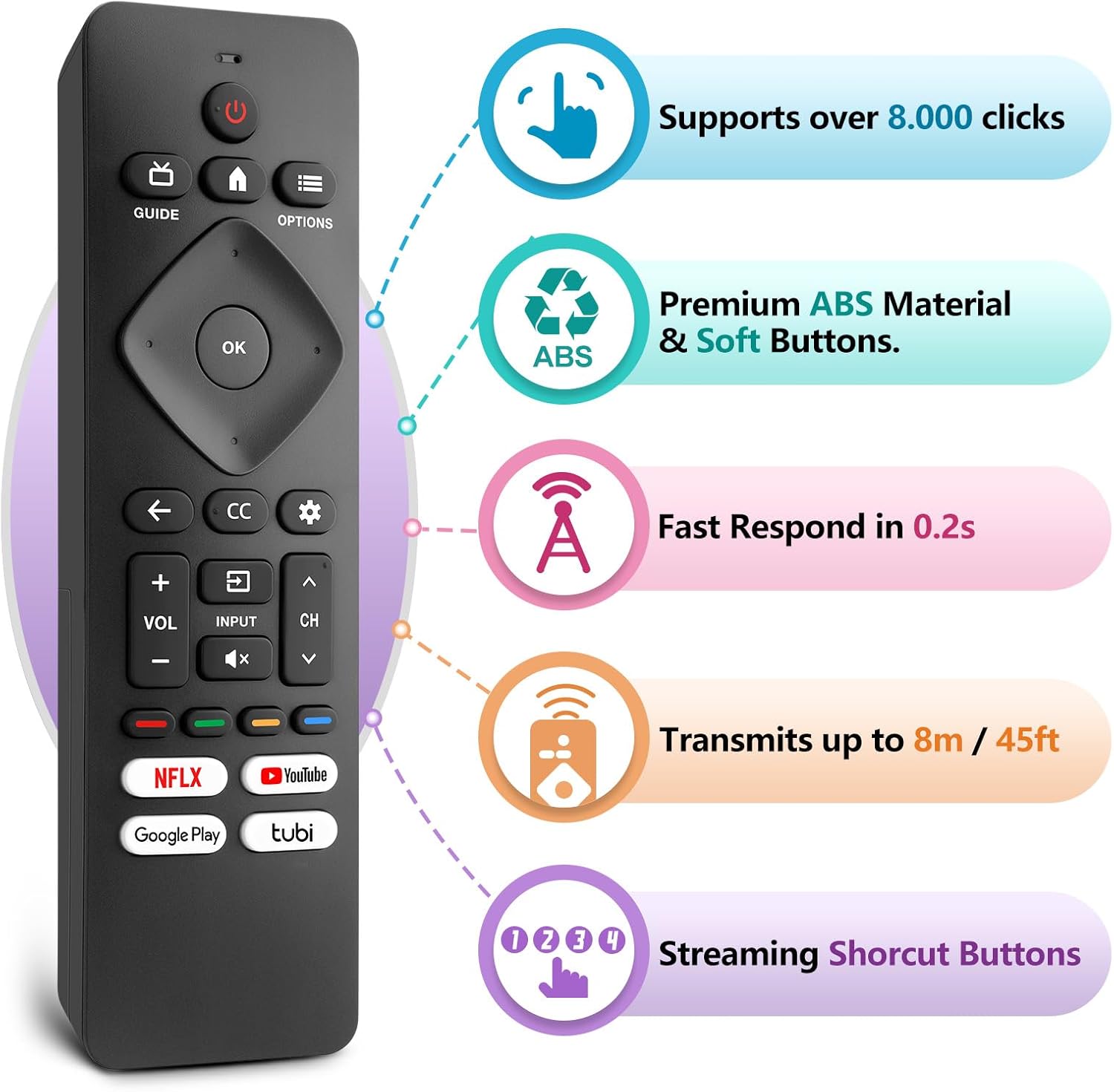
Figure 3: LOUTOC Remote Control Button Layout and Functions.
- MANA: Turns the TV on or off. Press for less than 1 second for Quick Start Standby. Hold for 1 second or more for Low Power Standby.
- ARIKI: Displays the TV program guide (availability may vary by service provider and region).
- KĀINGA: Accesses your apps, Live TV, input devices, settings, and the Google Play Store.
- NGĀ KŌWHIRINGA: Provides quick access to TV settings (settings vary depending on active screen).
- CURSOR (Up, Down, Left, Right) & OK: Moves to select an item and confirms selections on the menu.
- HOKI: Ka hoki ki te mata o mua.
- CC (Tapanga Kati): Selects closed caption settings.
- Papatohu: Accesses the Google TV dashboard for user settings, notifications, and kids mode.
- WHAKATOHU: Selects the input source for connected devices.
- wahangu: Toggles the sound on and off.
- VOL +/-: Whakaritea te taumata oro.
- CH +/-: Selects the next or previous channel.
- COLOR BUTTONS (Red, Green, Yellow, Blue): Works as direct access to user-specified net apps or functions.
Patene Pokatata
The remote includes dedicated shortcut buttons for popular streaming services:
- NETFLIX
- YouTube
- Google Play
- Tubi

Figure 4: Dedicated streaming service shortcut buttons.
Hototahi
This LOUTOC remote control is compatible with a wide range of Philips Android and Google Smart TV models. It is designed to replace various original Philips remote controls.
Compatible Philips Google TV Models:
- 70PUL7553/F7, 75PUL7552/F7, 65PUL7552/F7, 55PUL7552/F7, 50PUL7552/F7
- 43PUL7672/F7, 43PUL7652/F7, 65PUL7672/F7, 55PUL7672/F7, 50PUL7672/F7
- Generally compatible with Philips Google TV 7000 and 7600 Series.
Compatible Philips Android TV Models:
- 65PFL5766/F7, 55PFL5766/F7, 50PFL5766/F7, 43PFL5766/F7, 50PFL5806/F7
- 75PFL5604/F7, 75PFL5604/F7A, 75PFL5604/F7E, 75PFL5704/F7A, 75PFL5704/F7
- 32PFL5505/F7, 65PFL5604/F7, 55PFL5604/F7, 50PFL5604/F7, 43PFL5604/F7
- 50PFL5604/F7A, 43PFL5766/F6, 50PFL5766/F6, 65PFL5766/F6, 55PFL5766/F6
- 55PFL5704/F7, 65PFL5704/F7, 50PFL5704/F7, 43PFL5704/F7, 65PFL5504/F7
- 65PFL5604/F7A, 55PFL5604/F7A, 55PFL5766/F7E
- Generally compatible with Philips Android TV 5000, 5500, 5700, 5704, and 5800 Series.

Figure 5: Compatibility with Philips Google TV and Android TV series.
Whakatakotoranga
| Āhuahira | Taipitopito |
|---|---|
| Tau tauira | URMT26CND002 |
| Ahu | 6 x 1.2 x 0.8 inihi (15.24 x 3.05 x 2.03 cm) |
| Taumaha Tūemi | 1.76 hekere (50 karamu) |
| Nga Pikohiko e hiahiatia ana | 2 x AAA pākahiko (kaore i whakauruhia) |
| Tawhiti Whakawhiti | Approximately 6-8 meters (19-26 feet) |
| Wā Whakautu | I roto i te 0.5 hēkona |
| Rauemi | Premium ABS Material |
| Nga waahanga motuhake | Ergonomic, Lightweight, No Programming Required, Pre-Programmed, Universal |
Raparongoā
- Mamao kaore i te whakautu:
- Me whakarite kia tika te whakaurunga o ngā pākahiko, ā, kia tika hoki te polarity (+/-).
- Whakakapihia nga pākahiko tawhito ki nga pākahiko AAA hou.
- Tirohia mēnā he arai kei waenganui i te mana mamao me te kaiwhiwhi hihi infrared o te pouaka whakaata.
- Ensure you are within the effective operating range (6-8 meters) of the TV.
- Ko nga paatene motuhake kaore e mahi:
- Verify that the button is clean and not stuck.
- Some functions may be specific to certain TV models or require the TV to be in a particular mode (e.g., input selection).
- No Voice Control:
- This remote control does not support voice control functionality.
Te tiaki
Hei whakarite i te roa o te wā e mahi ana tō mana mamao, me whai i ēnei aratohu tiaki:
- Te horoi: Whakamahia he kakahu ngohengohe, maroke hei horoi i te mana mamao. Kaua e whakamahi i ngā wai horoi, i ngā rauemi whakakoi rānei.
- Rokiroki: Whakaorangia te mamao ki te waahi makariri, maroke atu i te ra tika me te wera nui.
- Tiaki Pūhiko: Tango pākahiko ki te kore e whakamahia te mamao mo te wa roa kia kore ai e pakaru.
- Aukati i nga Whakataka: Āraia te mana mamao mai i te pānga ā-tinana, nā te mea ka kino pea ngā wāhanga o roto.
Pūtāhui me te Tautoko
LOUTOC offers a 60-day replacement policy for this product. If you encounter any issues or have questions regarding your order, please contact LOUTOC customer support directly. Our team aims to respond within 12 hours during the work week to assist you.
For further assistance, please refer to the contact information provided with your purchase or visit the official LOUTOC store on Amazon: LOUTOC Store