1. Kupu Whakataki
The LAUNCH X431 PRO Star is an advanced automotive intelligent diagnostic tool designed for comprehensive vehicle analysis. This device features an 8-inch touch screen, runs on Android 10.0, and is powered by a 2.0GHz 4-Core processor with 4GB RAM and 64GB ROM. It includes a 6000mAh battery for extended operation. The PRO Star supports fault diagnosis for a wide range of vehicle models and systems, offering functions such as code reading, code clearing, data stream analysis, reset functions, action testing, coding, and matching.

Figure 1.1: LAUNCH X431 PRO Star Diagnostic Scanner with key features highlighted.
2. Tatūnga me te Whakamahi Tuatahi
2.1 Te Wetewete pouaka me nga Ihirangi
Carefully unpack all items from the carrying box. Verify that all components listed below are present.

Figure 2.1: Contents of the LAUNCH X431 PRO Star package.
- LAUNCH X-431 PRO STAR Tablet
- Pouaka Kawe
- Diagnostic Cable (OBDII)
- Taura-C USB Taura
- Pūurutau AC
- US Plug, UK Plug, EU Plug
- Pukapuka Kaiwhakamahi
- Aratohu Tere
- Rarangi Tapaki
- PIN Envelope
2.2 Whirihoranga Pūrere Tuatahi
- Utuhia te Pūrere: Fully charge the LAUNCH X431 PRO Star tablet using the provided AC adapter and Type-C USB cable before first use.
- Whakahiko: Patohia me te pupuri i te paatene hiko hei whakakā i te taputapu.
- Language and Time Zone: Whāia ngā tohutohu kei te mata hei tīpako i te reo me te rohe wā e pai ana ki a koe.
- Tūhono ki Wi-Fi: Connect the device to a stable Wi-Fi network (supports 2.4GHz and 5.0GHz). Internet access is required for registration and software updates.
- Puka Rehita: Register an account on the manufacturer's website using the serial number provided with your device.
- Whakahōu Pūmanawa: After registration, you will be prompted to update the software. Perform all available updates to ensure optimal functionality and access to the latest vehicle data. This process may take some time.
3. Nga Tohutohu Whakahaere
3.1 Te Hononga ki tētahi Waka
- Kimihia te tauranga OBDII o te waka, i raro i te papatohu i te taha o te taraiwa.
- Connect the diagnostic cable to the LAUNCH X431 PRO Star tablet.
- Connect the other end of the diagnostic cable to the vehicle's OBDII port.
- Turn the vehicle's ignition to the 'ON' position (do not start the engine).
3.2 Basic Diagnostic Functions
Once connected, the device will attempt to auto-detect the vehicle's VIN. If auto-detection fails, you can manually enter the vehicle information.
- Pūrongo Hauora: After identifying the vehicle, the system can generate a comprehensive health report.
- Matawai Pūnaha Katoa: Perform a complete scan of all available vehicle systems.
- Pānui/Mā Waehere: View nga waehere raruraru mate (DTCs) me te whakakore i muri i te whakatikatika.
- Raraunga Ora: Monitor real-time data streams from various sensors and components.
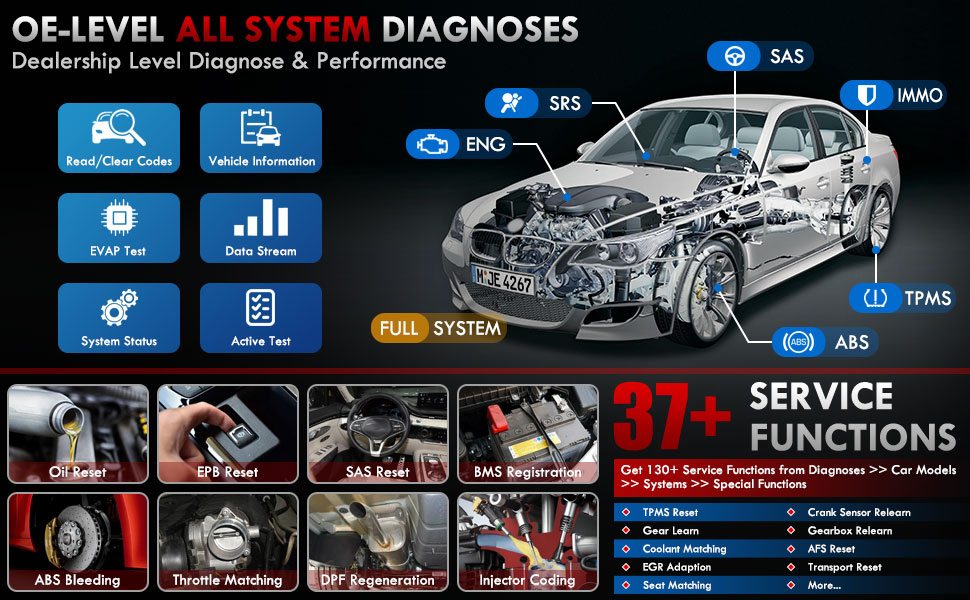
Whakaatu 3.1: Neke Atuview of OE-level all system diagnostic capabilities.
3.3 Advanced Maintenance Services (37+)
The LAUNCH X431 PRO Star offers over 37 advanced maintenance and reset functions, with the potential to expand to over 130 types depending on the vehicle's make, model, and year. These services include:
- Tautuhi Hinu
- ABS Whakaheke toto
- Rēhitatanga Pūhiko
- Tautuhi Anō EPB (Pēki Waka Hiko)
- Whakahoutanga DPF (Tātari Matūriki Tīhiera)
- Waehere Injector
- SAS Reset (Steering Angle Sensor)
- Throttle Matching
- TPMS Reset (Tire Pressure Monitoring System)
- Pouaka Pouaka Tautuhi
- Suspension Reset
- AFS Headlamp Tautuhi Anō

Whakaahua 3.2: Examples of the 37+ maintenance service functions.
3.4 Bi-Directional Control (Active Test)
This feature allows the technician to send commands to vehicle systems and components to test their functionality. This helps in quickly identifying faulty components without manual disassembly. Exampkei roto ko:
- Turning the radiator fan on/off
- Testing door lock actuators
- Energizing injectors
- Operating mirrors
- Opening/closing windows

Figure 3.3: Illustration of bi-directional control capabilities.
3.5 Te Whakawaehere ECU
ECU Coding enables the matching, relearning, and coding of newly installed ECU modules after repairs or replacements. It also allows for the activation of higher-level vehicle functions. This includes:
- Flash/Match/Calibration
- Recode and Relearn
- Alter Configuration
- Reprogram Adaptive Data
- Recognize New CPU
- Match Current Settings
- Customize Car Features (e.g., automatic lock, reverse rearview mirror down, windows close when rain)

Whakaahua 3.4: Examples of ECU coding applications.
3.6 FCA SGW Vehicle Access & Quick Guided Functions
- FCA SGW: The X431 PRO Star is AutoAuth certified, allowing secure diagnosis of SGW (Security Gateway) vehicles without limitations.
- Quick Guided: Provides step-by-step guidance for Volkswagen group vehicles, simplifying complex diagnostic procedures.
3.7 Extension Modules
The device supports various optional add-on tools to expand its capabilities, including:
- Battery Tester (e.g., BST360)
- Videoscope (e.g., VSP-600)
- Oscilloscope (e.g., O2-2)
- TPMS Detector (e.g., TSGUN, i-TPMS)
- WiFi Thermal Printer (e.g., X-431)
- Utauta Whakaritea ADAS
- XPROG 3 (Immobilizer Programmer)

Figure 3.5: Various optional extension modules for the X431 PRO Star.
4. Tiaki
4.1 Whakahōu Pūmanawa
The LAUNCH X431 PRO Star includes 2 years of free software updates. After this period, the device will continue to function, but new software releases and vehicle data updates will require a subscription. Regular updates ensure compatibility with new vehicle models and access to the latest diagnostic features.
4.2 Tiakitanga Whanui
- Puritia kia ma te taputapu kia kore he puehu me te makuku.
- Store the device in its protective carrying case when not in use.
- A ape i te tuku i te taputapu ki nga wera nui, ki te ra tika ranei mo nga wa roa.
- Use only the provided charging accessories to prevent damage.
5. Te Raru
If you encounter issues with your LAUNCH X431 PRO Star, consider the following:
- Nga Take Hononga: Ensure the diagnostic cable is securely connected to both the scanner and the vehicle's OBDII port. Verify the vehicle's ignition is in the 'ON' position.
- Ngā hapa o te pūmanawa: Ensure the device's software is up to date. A factory reset may resolve persistent software issues (note: this will erase user data).
- Hototahi Waka: While the device covers over 99% of vehicles, specific advanced functions may vary by make, model, and year. Consult the vehicle coverage list or contact support for details.
- Mahi a te Pūrere: If the device is slow or unresponsive, try restarting it. Ensure sufficient battery charge.
6. Whakatakotoranga
| Āhuahira | Whakatakotoranga |
|---|---|
| Tauira | LAUNCH X-431 PRO STAR |
| Pūnaha Mahi | Android 10.0 |
| Tukatuka | 2.0GHz 4-Core |
| RAM | 4GB |
| ROM (Rokiroki) | 64GB |
| Whakaatu | 8-inch Touch Screen (1280x800 resolution) |
| Pūhiko | 6000mAh |
| Hononga | Wi-Fi (2.4/5.0 GHz), CANFD, DoIP |
| Kāmera | 8.0 MP Rear-facing |
| Taumaha Tūemi | 8.4 pauna |
| Ahu mōkihi | 13.6 x 13.2 x 6.1 inihi |
| Momo Whakanoho Motika | Tikanga Ao |
7. Pūtāhui me te Tautoko
7.1 Nga Korero Whakaputanga
The LAUNCH X431 PRO Star comes with a 2-tau pūtāhui covering manufacturing defects and hardware malfunctions.
7.2 Tautoko Hangarau
LAUNCH provides 7*24 technical support for any post-sales issues or technical assistance. For support, please refer to the contact information provided in your product packaging or visit the official LAUNCH webpae.


