1. Kupu Whakataki
The LSC Smart Connect Solar IP Camera is designed to provide reliable outdoor surveillance with the convenience of solar power. This camera offers 1080p video recording, two-way audio, and night vision capabilities up to 10 meters. It integrates seamlessly with the LSC Smart Connect app, allowing for remote monitoring and control. Key features include a light and sound alarm, flash function, and privacy mode to enhance security.
This manual provides essential information for the proper setup, operation, and maintenance of your LSC Smart Connect Solar IP Camera, ensuring optimal performance and longevity.
2. Ihirangi me te Tatūnga
Before beginning installation, please ensure all components are present and undamaged.

Whakaahua 2.1: The LSC Smart Connect Solar IP Camera packaging, showing the camera, solar panel, and app interface. This image represents the complete product package as received.
2.1 Nga Waahanga Nekeview
The package typically includes the LSC Smart Connect Solar IP Camera unit, a solar panel for continuous power, and mounting accessories.
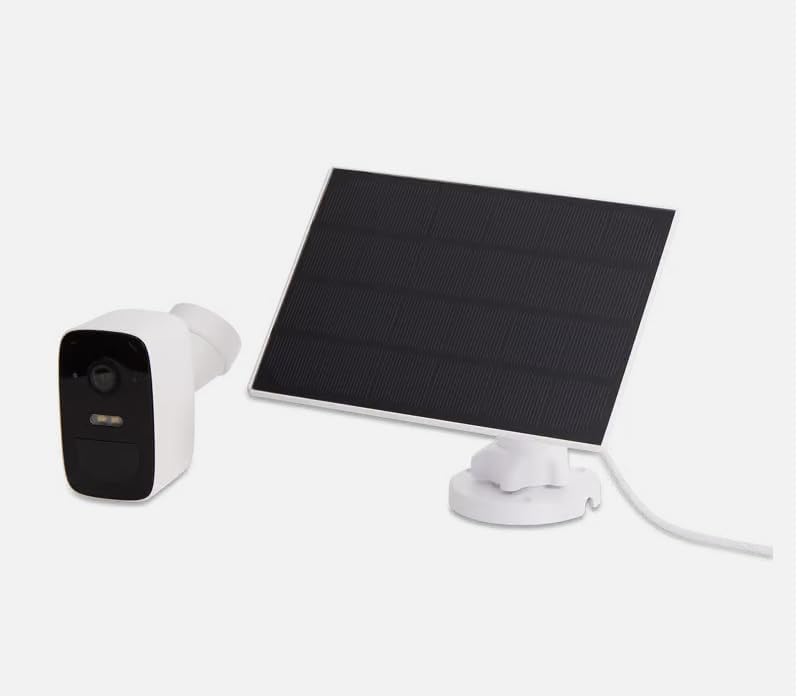
Whakaahua 2.2: The LSC Smart Connect Solar IP Camera shown alongside its separate solar panel. This illustrates the two main components of the surveillance system.
2.2 Ngā Hipanga Tatūnga Tuatahi
- Tikiake i te Taupānga: Download the "LSC Smart Connect" app from your smartphone's app store (iOS or Android).
- Waihanga Pūkete: Whakatuwheratia te taupānga me te rehita mo tetahi kaute hou, takiuru ranei mena kei a koe tetahi.
- Hia i te kamera: Ensure the camera is charged or connected to the solar panel. The camera should enter pairing mode (indicated by an LED light).
- Tāpiri Pūrere: In the app, select "Add Device" or the "+" icon. Follow the on-screen instructions to connect the camera to your 2.4GHz Wi-Fi network. Ensure your Wi-Fi signal is strong at the installation location.
- Whakapiki: Choose a suitable outdoor location for the camera and solar panel. The solar panel should receive direct sunlight for most of the day. Use the provided screws and mounting brackets for secure installation. The camera supports wall mounting.
For detailed mounting instructions, refer to the quick start guide included in your product packaging.
3. Nga Tohutohu Whakahaere
Once your camera is set up and connected, you can begin monitoring and utilizing its features through the LSC Smart Connect app.
- Ora View: Whakatuwheratia te taupānga ka tīpako i tō kāmera hei view te kai ora.
- Ororongo Ara-rua: Use the microphone icon in the app to speak through the camera and the speaker icon to hear audio from the camera's vicinity.
- Matakitenga po: The camera automatically switches to night vision in low-light conditions, providing clear images up to 10 meters.
- Te Motini me nga Matohi: Configure motion detection sensitivity and set up push notifications to receive alerts on your smartphone when activity is detected.
- Nga Mahi Whakaoho: Activate the light and sound alarm or flash function via the app to deter intruders.
- Hopu & Purei: The camera supports local storage (e.g., microSD card, not included) or cloud storage (subscription may be required) for recording. Access recorded footage through the app's playback feature.
- Aratau Tūmataitinga: Utilize the privacy function to temporarily disable recording and live view for specific periods.
4. Tiaki
Regular maintenance ensures the optimal performance and longevity of your LSC Smart Connect Solar IP Camera.
- Te horoi: Me horoi i ia wa te arotahi kamera me te panui solar ki te ngohengohe, damp cloth to remove dust, dirt, and debris. Avoid abrasive cleaners.
- Tikanga Paewhiri Solar: Ensure the solar panel is free from obstructions (e.g., leaves, snow) that could block sunlight and reduce charging efficiency.
- Whakahōu Firmware: Check the LSC Smart Connect app regularly for firmware updates. Keeping the camera's firmware updated ensures access to the latest features and security enhancements.
- Taki Hononga: Periodically verify the Wi-Fi connection strength and camera status in the app.
5. Te Raru
If you encounter issues with your LSC Smart Connect Solar IP Camera, refer to the following common troubleshooting steps:
- Kāmera Tuimotu:
- Tirohia te kaha tohu Wi-Fi i te waahi o te kamera.
- Ensure the camera is receiving adequate power from the solar panel or is sufficiently charged.
- Tīmataria anō tō pouara Wi-Fi me te kāmera.
- Verify that the camera is connected to a 2.4GHz Wi-Fi network.
- Kounga Atahanga Kino:
- Horoia te arotahi kamera.
- Kia tino mohio kāore he mea e arai ana i mua i te arotahi.
- Tirohia to tere hononga ipurangi.
- Kaore i te Mahi te Motini:
- Verify motion detection settings in the app (sensitivity, detection zones).
- Ensure notifications are enabled on your smartphone and in the app.
- Karekau te pākahiko i te utu:
- Me whakarite kei te ma te panui solar me te whiwhi i te ra tika.
- Tirohia te hononga i waenga i te papa rā me te kāmera.
If issues persist, consult the LSC Smart Connect app's help section or the manufacturer's support resources.
6. Whakatakotoranga
| Āhuahira | Whakatakotoranga |
|---|---|
| Whakataunga Hopu Ataata | 1080p |
| Tae | Pango/Ma |
| Hangarau Whakawhitiwhiti Ahokore | Wi-Fi (2.4GHz) |
| Momo Tāuta | Screw-in / Wall Mount |
| Awhe Tirohanga Po | 10 Mita |
| Rahi Tūemi (L x W x H) | 15 x 6 x 15 cm |
| Kaihanga | LSC |
| Tau tauira | 3203968 |
| ASIN | B0D899HFXL |
| Whakamahi Hua Manakohia | Haumarutanga o waho |
| Hangarau Hononga | Ahokore |
| Pūrere Hototahi | Waea atamai |
| Momo Kaiwhakahaere | SmartThings (via LSC Smart Connect App) |
| Whakamahi o roto/waho | Waho |
7. Pūtāhui me te Tautoko
For warranty information, please refer to the documentation included with your purchase or contact the retailer/manufacturer directly. Typically, products come with a limited warranty covering manufacturing defects.
For technical support, frequently asked questions, or further assistance, please visit the official LSC Smart Connect website or utilize the support section within the LSC Smart Connect mobile application.
Rauemi ipurangi:
- LSC Smart Connect App (available on iOS App Store and Google Play Store)
- Manufacturer's Official Website (for product updates and support)


