1. Nga Korero Haumaru Nui
Tena panuihia nga tohutohu haumaru katoa i mua i te huihuinga me te whakamahi. Ki te kore e whai i enei tohutohu ka whara, ka kino ranei te hua.
- Me whai tonu i ngā tohutohu huihuinga.
- Kaua e neke ake i te kaha o te kawenga o 100 kg.
- Keep the desk away from heat sources and liquids.
- Ensure the desk is properly anchored or placed on a stable surface to prevent tipping.
- Exercise caution when adjusting the desk height to avoid pinching or trapping objects.
This section provides critical guidelines for safe operation and handling of your ErGear Electric Height Adjustable Desk.
2. Hua Neke Atuview
The ErGear Electric Height Adjustable Desk is designed for ergonomic comfort and versatility in your workspace. It features a robust metal frame, a powerful brushless motor, and programmable memory presets for height adjustment.

Figure 2.1: The ErGear Electric Height Adjustable Desk in a typical office setup, showcasing its spacious white desktop and sturdy frame supporting multiple devices.
Āhuatanga matua:
- 100 kg Load Capacity: Supports multiple monitors, laptops, and heavy equipment.
- Mōta Kore Paraihe Matatau: Certified for reliable performance and smooth height transitions, tested for 100,000 lift cycles.
- Tāpare Whakakaha: Features thicker 2.36" legs, wider feet, and larger top plates for 30% more stability.
- Whakatikatika Teitei: Range from 72 cm to 118 cm with four programmable memory presets.
- Mahi Ataahua: Maximum noise level of 50 dB during height adjustment.
- Whakaha Uepu: Two cable grommets and an under-desk power strip holder for an organized workspace.
- Matau Apatoko: Two hooks for headphones or bags.
3. Nga Tohutohu Huihuinga
Assembly of the ErGear Electric Height Adjustable Desk is straightforward. It is recommended to have a second person assist with certain steps due to the weight of the components.
3.1. Te Wetewete me te Tirohanga Waa
Carefully unpack all components and lay them out on a clean, soft surface to prevent scratches. Verify that all parts listed in the packing list are present. If any parts are missing or damaged, contact customer support.
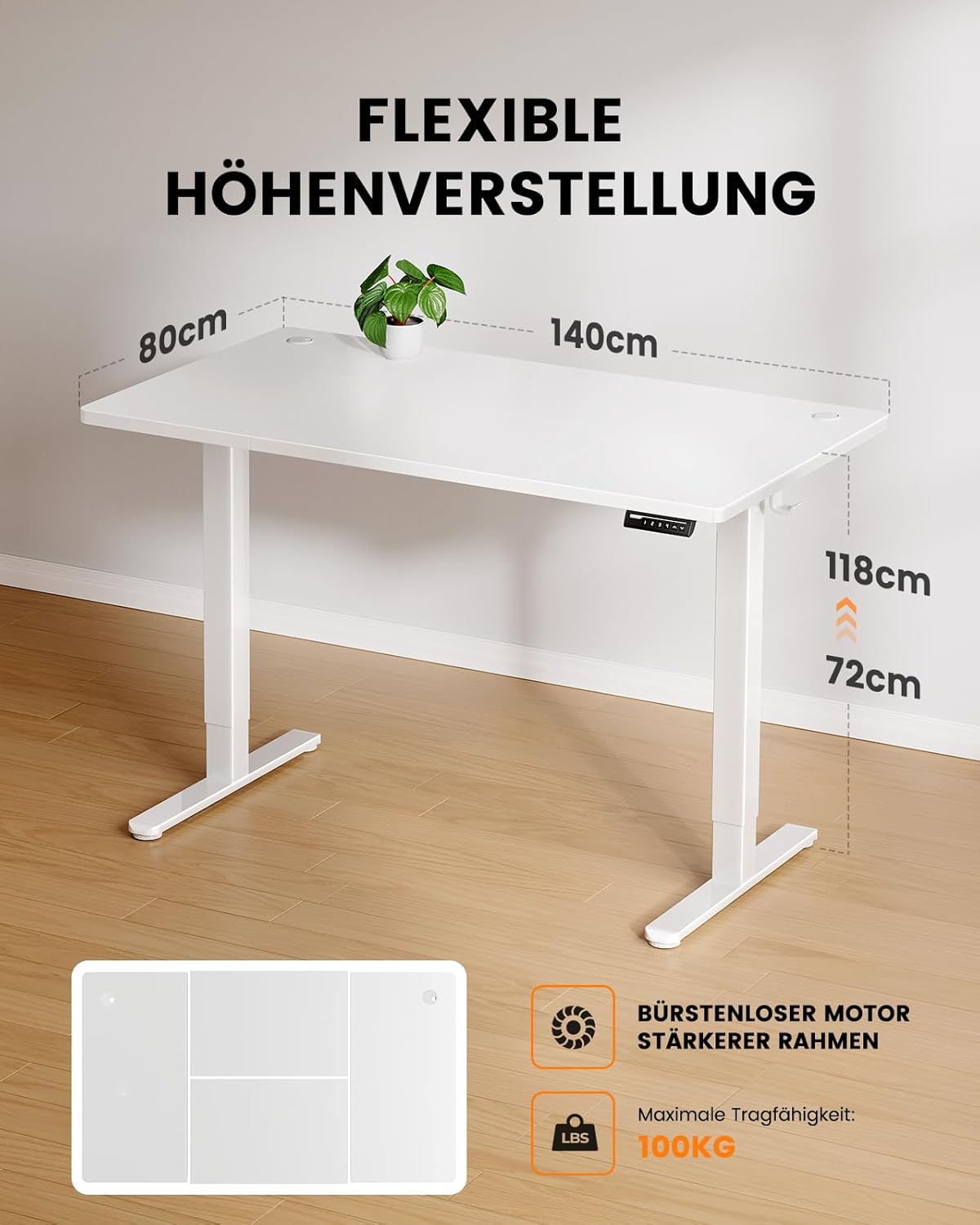
Figure 3.1: Illustration of the desk's flexible height adjustment range (72cm to 118cm) and its maximum load capacity of 100kg, highlighting the brushless motor and strong frame.
3.2. Huinga Anga
- Attach the lifting columns to the foot supports using the provided screws. Ensure they are securely fastened.
- Connect the crossbar to the lifting columns. This provides structural integrity.
- Install the control box onto the designated area of the frame.

Figure 3.2: A visual comparison demonstrating the thicker leg design of the ErGear desk (6cm) versus standard thinner legs (4.5cm), illustrating the enhanced stability provided by the robust frame.
3.3. Tāuta Papamahi
- Carefully place the desktop onto the assembled frame, aligning the pre-drilled holes.
- Secure the desktop to the frame using the appropriate screws. Use a screwdriver or electric drill (low torque setting) for best results.
3.4. Cable Management and Accessories
- Install the power strip holder under the desk.
- Attach the accessory hooks to the sides of the desk as desired.
- Route all cables through the cable grommets and into the power strip holder for a tidy setup.

Whakaatu 3.3: Taipitopito view of the desk's integrated cable management features, including dual cable grommets, an under-desk power strip holder, and convenient accessory hooks for headphones or bags.
4. Nga Tohutohu Whakahaere
Your ErGear Electric Height Adjustable Desk is designed for easy and intuitive operation.
4.1. Te Tatūnga Tuatahi me te Whakamahinga Tuatahi
- Monohia te tēpu ki tētahi putanga hiko paerewa.
- Ka tiaho te whakaaturanga o te papatohu whakahaere.
- Pehia te Up or Ki raro arrows to move the desk to your desired height.

Figure 4.1: The desk's control panel, featuring four programmable memory buttons (1-4) for quick height recall, along with standard up and down adjustment arrows.
4.2. Programming Memory Presets
The desk allows you to save up to four preferred height settings.
- Whakarerekētia te tēpu ki te teitei e hiahiatia ana mā te whakamahi i te Up or Ki raro pere.
- Pehia te "M" button (or similar memory button, if present, otherwise assume direct number press). The display might flash.
- Pēhia tonutia tētahi o ngā pātene tau (1, 2, 3, 4 ranei) to save the current height to that preset. The display will confirm the save.
- Hei maumahara i te teitei kua tiakina, pehia noa te paatene tau.

Figure 4.2: A user demonstrating the ergonomic benefits of the ErGear desk, easily transitioning between sitting and standing positions within the 72cm to 118cm height range.
5. Tiaki me te Tiaki
Proper maintenance ensures the longevity and optimal performance of your ErGear desk.
- Te horoi: Horoia te papamahi me te anga ki te ngohengohe, damp kakahu. A ape i nga kaihoroi awhiowhio me nga matū kino.
- Tirotiro: Takitaki ia ia nga wa katoa nga wiri me nga hononga kia mau tonu. Whakapaia ano mehemea e tika ana.
- Tiaki motuka: The brushless motor is designed for durability and requires no special maintenance. Avoid obstructing the motor's movement.
- Whakaha Uepu: Regularly check cables for wear or damage and ensure they are neatly routed to prevent tripping hazards or damage.
6. Te Raru
If you encounter any issues with your ErGear Electric Height Adjustable Desk, refer to the following common troubleshooting steps:
| Raruraru | Take pea | Rongoā |
|---|---|---|
| Kaore te tepu e neke. | Kaore i whakauruhia; mana outage; motor overload. | Check power connection; verify power supply; reduce load on desk. |
| He koretake te neke o te teepu, he haruru rereke ranei. | Loose connections; obstruction; uneven weight distribution. | Check and tighten all screws; remove any obstructions; redistribute weight evenly. |
| Kare e mahi nga tatūkē mahara. | He hē te hōtaka; me whakamahi i te huringa hiko. | Re-program the memory presets (refer to Section 4.2); unplug the desk for 30 seconds and plug back in. |
| Waehere hapa i te whakaaturanga. | Hapa pūnaha motuhake. | Tirohia te waehere hapa motuhake i roto i te pukapuka ā-ringa katoa (mēnā e wātea ana), whakapā atu rānei ki te ratonga kiritaki. |
If the problem persists after attempting these solutions, please contact ErGear customer support for further assistance.
7. Whakatakotoranga
- Tauira: B0D9MFMBBQ
- Waitohu: ErGear
- Ahu Papamahi: 140 cm (Roa) x 80 cm (Whanui)
- Awhe Whakatikatika Teitei: 72 cm - 118 cm
- Raukaha Uta: 100 kg
- Momo Motuka: Advanced Brushless Motor
- Taumata Haruru: ≤ 50 dB
- Rauemi: Metal (Frame), Wood (Desktop)
- Taumaha Hua: Tata ki te 29.6 kg
- Tae: Mā
8. Pūtāhui me te Tautoko
ErGear products are built with quality and durability in mind. For specific warranty details, please refer to the warranty card included with your product or visit the official ErGear webpae.
Tautoko Kiritaki:
If you have any questions, require technical assistance, or need to report an issue, please contact ErGear customer support through the following channels:
- Tautoko Aipurangi: Visit the ErGear official webpae (ErGear Store on Amazon) for FAQs and contact information.
- Īmēra: Tirohia te takai o tō hua, te kāri pūtāhui rānei mō te wāhitau īmēra ratonga kiritaki.
Please have your product model number (B0D9MFMBBQ) and purchase date ready when contacting support.


