1. Kupu Whakataki
Thank you for choosing the ErGear EGESD8 Electric Standing Desk. This manual provides essential information for the safe and efficient assembly, operation, and maintenance of your new desk. Please read these instructions carefully before use and retain them for future reference. This electric standing desk is designed to offer ergonomic flexibility, allowing you to easily switch between sitting and standing positions, promoting a healthier work environment.

The ErGear Electric Standing Desk, showcasing its sleek design and spacious desktop in a contemporary workspace.
2. Nga Tohutohu Haumaru
Hei whakarite i te haumaru o te mahi, me te ārai i ngā kino, me whai i ēnei:
- Me whakarite kia mau nga hononga katoa i mua i te whakahaere i te tepu.
- Tiakina nga tamariki me nga kararehe mai i te tepu i te wa e mahi ana.
- Do not place hands or other body parts near moving parts to avoid injury.
- Do not overload the desk. The maximum weight capacity is 80 kg.
- A ape i te tuku wai tika ki runga i te paewhiri mana, tata ranei ki nga waahanga hiko.
- If the desk makes unusual noises or movements, discontinue use and consult the troubleshooting section or contact support.
- Whakamahia anake te urutau hiko me ngā taura kua whakaratohia.

This image highlights the robust construction of the ErGear Electric Standing Desk, capable of supporting up to 80 kg, ensuring stability even under significant load.
3. Ihirangi mokete
Tena koa tirohia kei te noho katoa nga waahanga me te kore e pakaru:
- Desktop Panels (assembled)
- Waewae Papamahi (2)
- Foot Pads (2)
- Taiapa Taha (2)
- Paewere
- He Kaitohu
- Paewhiri Mana
- Pūurutau Hiko & Tauera
- Cable Grommets (2)
- Ngā Matau Paneoro (2)
- Pūmārō Huinga (ngā tīwiri, Allen wrech)
- Pukapuka Kaiwhakamahi
4. Nga Tohutohu Huihuinga
Follow these steps to assemble your ErGear Electric Standing Desk. It is recommended to have two people for assembly.
Official assembly video for the ErGear Electric Standing Desk, demonstrating step-by-step installation.
Hipanga 1: Huihuia te Tāpare
- Attach the side brackets to the desk legs using the provided screws and Allen wrench.
- Secure the foot pads to the bottom of each leg.
- Connect the two leg assemblies with the crossbar, ensuring all screws are tightened.
Step 2: Fix the Transmission Rod
- Insert the transmission rod into the designated openings on both desk legs.
- Ensure the rod is properly seated and secured with the retaining clips or screws.
Step 3: Assemble the Desktop Panel
- Lay the desktop panels face down on a soft, clean surface.
- Align the panels and secure them together using the provided connectors and screws.
Step 4: Attach the Frame to the Desktop
- Carefully place the assembled desk frame onto the underside of the desktop.
- Align the pre-drilled holes and secure the frame to the desktop using the appropriate screws.
- Āpitihia te papa whakahaere ki te taha raro o te papamahi ki tētahi wāhi watea mā te whakamahi i ngā tīwiri kua whakaratohia.
- Install the headphone hooks to the underside of the desktop as desired.
Hipanga 5: Honoa nga Tauera
- Connect the motor cables from the legs to the control box.
- Honoa te taura o te papa whakahaere ki te pouaka whakahaere.
- Tūhonohia te pūurutau hiko ki te pouaka mana, katahi ki te putanga hiko.
Step 6: Fix the Cable Grommets
- Insert the cable grommets into the pre-cut holes on the desktop to manage cables.
5. Nga Tohutohu Whakahaere
Your ErGear Electric Standing Desk features an intuitive control panel for easy height adjustment.
Short video showcasing key features of the ErGear Electric Standing Desk, including height adjustment and stability.
Paewhiri Mana Neke Atuview

The desk's intelligent control panel features an LED display showing current height in centimeters, along with up/down arrows and four memory preset buttons for quick adjustments.
- Up/Down Arrows (▲ / ▼): Press and hold to adjust the desk height manually.
- Whakaaturanga LED: Shows the current height of the desk in centimeters.
- Memory Presets (1, 2, 3, 4): Store and recall preferred height settings.
Te Whakarite Teitei
The desk can be adjusted between 72 cm me te 118 cm.
- Whakatikatika-a-ringa: Press and hold the up (▲) or down (▼) arrow button until the desk reaches your desired height.
- Te whakamahi i nga tatūkē mahara: Press the corresponding memory button (1, 2, 3, or 4) to automatically move the desk to the saved height.
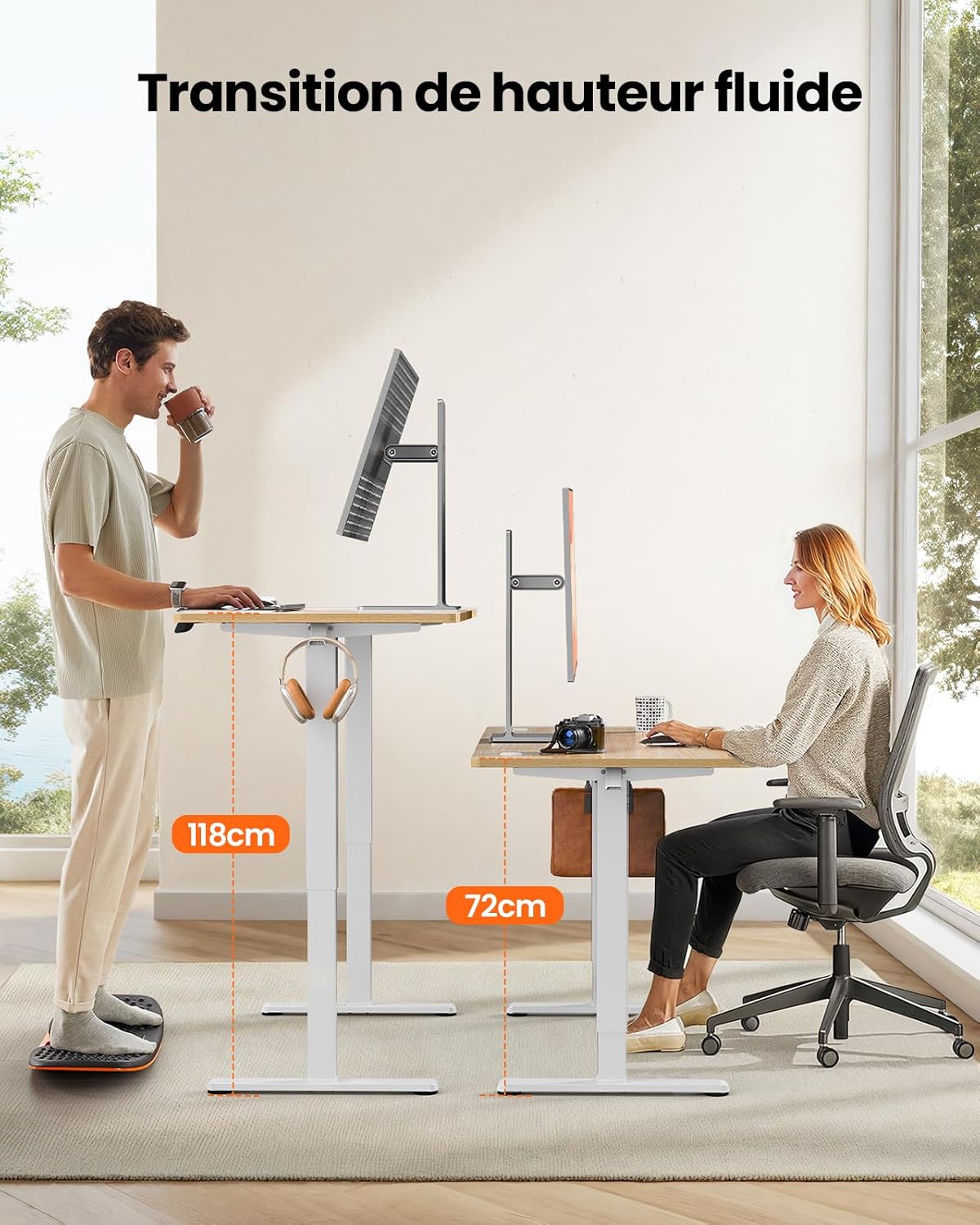
This image demonstrates the adjustable height range of the ErGear Electric Standing Desk, showing a user sitting at 72cm and standing at 118cm, emphasizing ergonomic flexibility.
Tautuhi Tatūkē Mahara
- Whakaritehia te teepu ki te teitei e hiahiatia ana ma te whakamahi i nga pere whakarunga/raro.
- Press the 'M' button (if available, or a 'Set' button) followed by the desired memory button (1, 2, 3, or 4). The display will typically flash or beep to confirm the setting is saved.
Mahi Wahangu
The desk operates with a quiet motor, producing a noise level of ≤ 55 dB, ensuring a peaceful work environment.

Illustrates the ultra-quiet operation of the ErGear Electric Standing Desk, with a noise level of 55dB, ensuring a peaceful and undisturbed work environment.
6. Tiaki
Regular maintenance helps prolong the life of your desk:
- Te horoi: Wipe the desk surface and legs with a soft, damp kakahu. A ape i nga matū kino me nga kai horoi.
- Whakahaere Taura: Periodically check that all cables are neatly organized and not pinched or tangled. Utilize the integrated cable grommets and hooks.
- Te Pūmau o te Tīwiri: Occasionally check and tighten any loose screws on the frame or desktop connections.
- Te tirotiro: Inspect the desk for any signs of wear or damage. If any issues are found, contact customer support.

Taipitopito view of the desk's integrated cable grommets and convenient hooks, designed to help maintain a tidy and organized workspace by managing cables and accessories.
7. Te Raru
Mena ka raru koe ki to papapu, tirohia nga raru me nga otinga e whai ake nei:
| Raruraru | Take pea | Rongoā |
|---|---|---|
| Kaore te tepu e neke. | Kua momotu te taura hiko, kua marere te taura motuka, kua utaina rawatia. | Tirohia ngā hononga hiko me te motuka katoa. Whakaitihia te taumaha i runga i te tēpu. |
| He koretake te neke o te tepu. | Ko te kawenga koretake, ko nga wiri wetewete, ko te aukati. | Distribute weight evenly. Check and tighten all assembly screws. Ensure no obstructions. |
| Ka mutu te tēpu i te wā e whakatikatikaina ana. | Overload protection activated, obstruction. | Remove some weight. Check for obstructions. Wait a few minutes before trying again. |
| Kāore te papa whakahaere e aro mai. | Control panel cable loose, power issue. | Check control panel cable connection. Verify power supply. |
If the problem persists after trying these solutions, please contact ErGear customer support.
8. Whakatakotoranga
| Āhuahira | Taipitopito |
|---|---|
| Waitohu | ErGear |
| Tau tauira | EGESD8 |
| Tae | Beige and Natural |
| Ahu Papamahi (L x W) | 120 cm x 60 cm |
| Awhe Whakatikatika Teitei | 72 cm - 118 cm |
| Rauemi | Wood (Desktop), Metal (Base) |
| Taumaha Taumaha | 80 kg |
| Taumata Haruru Motor | ≤ 55 dB |
| Nga waahanga motuhake | Ergonomic, Electric, 4 Memory Presets, Cable Grommets, Headphone Hooks |
| Taumaha Hua | 19.05 kg |

A clear diagram illustrating the overall dimensions of the ErGear Electric Standing Desk, including its 120cm x 60cm desktop and adjustable height range of 72cm to 118cm.
9. Pūtāhui me te Tautoko
ErGear products are designed for durability and performance. This product comes with a standard manufacturer's warranty. For specific warranty details, please refer to the warranty card included in your package or visit the official ErGear webpae.
If you have any questions, require technical assistance, or need to report a missing or damaged part, please contact ErGear customer support through the retailer where you purchased the product or via the contact information provided on the official ErGear webpae.
Please have your model number (EGESD8) and purchase information ready when contacting support.


