Kupu Whakataki
The PGYTECH MagFlex Phone Stand is a versatile accessory designed to enhance your mobile photography and viewing experience. Crafted from N52 aluminum alloy, it features a strong magnetic attachment system and multiple operational modes, making it suitable for various scenarios. This manual provides detailed instructions for setup, operation, maintenance, and troubleshooting to ensure optimal use of your device.
Ka mutu te huaview

The PGYTECH MagFlex Phone Stand in Mint Green, demonstrating its attachment to a smartphone. Other available colors, Classic Black and Misty Gray, are also displayed.
Āhuatanga matua:
- N52 Strong Neodymium Magnet: Ensures a secure connection with a vertical attraction force of up to 12N.
- Hoahoa maha-4-i-1: Functions as a Desktop Stand, Overhead Photography tool, Briefcase Mode grip, and Selfie Stick.
- Hanga Roa: Made from high-quality aluminum alloy for robustness and a premium feel.
- Iti me te Kawe: Weighs approximately 47.2g and measures 6.1mm thin, designed for on-the-go convenience.
- Koki Whakaritea: Offers 300° of rotation for flexible positioning.
- Hototahi Ao: Compatible with MagSafe-enabled iPhones (12/13/14/15/16/17 series) and Android smartphones using the included magnetic ring.

Taipitopito view of the PGYTECH MagFlex Phone Stand highlighting its aluminum alloy construction, elastic band for grip, extendable arm, and comfortable tactile surface.
Tatūnga me te Tāuta
For MagSafe Compatible Devices (iPhone 12/13/14/15/16/17 Series):
- Ensure your iPhone is clean and free of debris on the back surface or MagSafe-compatible case.
- Align the PGYTECH MagFlex Phone Stand with the MagSafe area on your iPhone. The strong N52 magnets will automatically snap it into place.
- Verify the stand is securely attached before use.
For Non-MagSafe Devices (Android and other smartphones):
- Locate the included super-slim magnetic ring.
- Clean the back surface of your smartphone or phone case thoroughly. Ensure it is dry and free of dust or oils.
- Tīhorea marietia te papa piri o te mowhiti aukume.
- Center the magnetic ring on the back of your phone or case. Press firmly for 30 seconds to ensure strong adhesion.
- Hiranga: Allow the adhesive to cure for at least 3 hours before attaching the MagFlex Phone Stand to ensure maximum bond strength.
- Once the magnetic ring is securely attached, align the PGYTECH MagFlex Phone Stand with the ring. The magnets will connect.

Illustration of the N52 neodymium magnets, the super-slim magnetic ring for non-MagSafe devices, and the strong 12N vertical attraction force.
Aratau Mahi
The PGYTECH MagFlex Phone Stand offers four distinct modes to adapt to various usage scenarios. Its 300° adjustable hinge allows for flexible positioning.
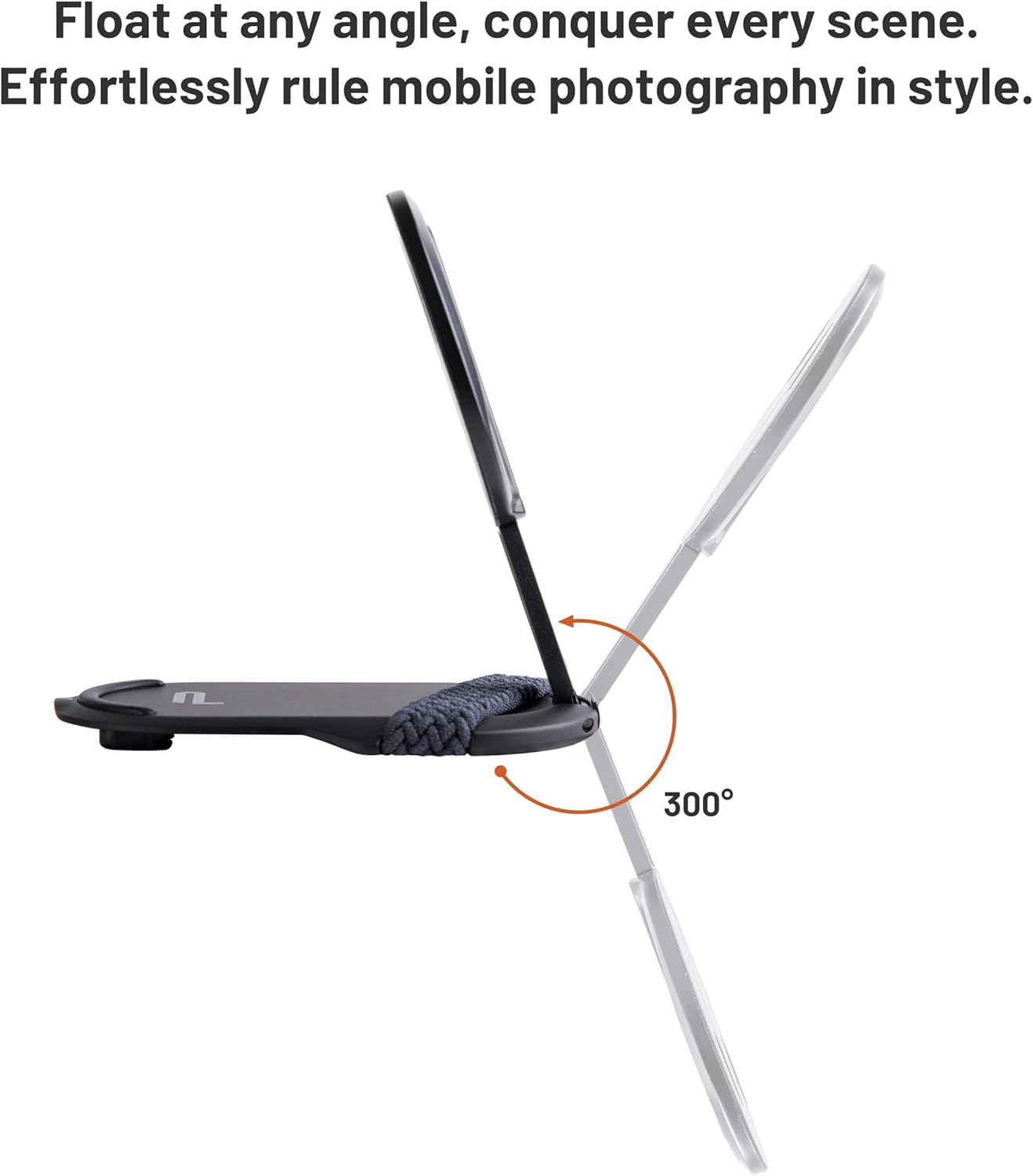
The MagFlex Phone Stand features a 300-degree adjustable hinge for versatile positioning.
1. Desktop Stand Mode
Ideal for hands-free viewing, video calls, or vlogging. Simply unfold the stand and place it on a flat surface. Adjust the angle to your preference for optimal viewing.
2. Overhead Mode
For unique top-down shots or time-lapse photography. Tilt the stand backward approximately 30° to achieve an overhead perspective. Ensure the stand is stable on a flat surface.
3. Briefcase Mode
Designed for low-angle filming, capturing perspectives of children or pets. Hold the stand by its base, allowing your phone to hang downwards for a unique low-angle shot.
4. Selfie Stick Mode
Extend the arm of the stand up to 30mm to create a short selfie stick. This mode is useful for wider selfies or group photos.

Visual representation of the four operational modes: Overhead, Briefcase, Desktop Stand, and Selfie Stick.
Te tiaki
- Te horoi: Horoia te tūnga ki te kakahu ngohengohe, maroke. Kaua e whakamahi i ngā mea horoi whakakoi, i ngā whakarewa rānei ka kino pea te āhua o te peita.
- Rokiroki: When not in use, fold the stand to its compact form and store it in a clean, dry place to prevent dust accumulation and potential damage.
- Magnetic Ring Care: If using the magnetic ring, ensure it remains firmly adhered to your device. Avoid peeling or repositioning it frequently, as this may weaken the adhesive.
Raparongoā
- Issue: Stand does not attach securely or falls off.
Rongoā:
- Ensure your phone or case is MagSafe compatible or has the magnetic ring properly installed and cured for at least 3 hours.
- Check for any obstructions (e.g., thick cases, pop sockets) between the stand and your phone/magnetic ring.
- Clean the magnetic surfaces on both the stand and your device/ring to ensure optimal contact.
- Issue: Stand feels unstable in desktop mode.
Rongoā:
- Me whakarite kia noho te turanga ki runga i te mata papatahi, pumau.
- Adjust the angle of your phone to find a balanced center of gravity, especially with larger or heavier phones.
- Issue: Difficulty extending or folding the stand.
Rongoā:
- The hinge is designed to be firm to maintain position. Apply gentle, consistent pressure.
- Avoid forcing the mechanism. If it feels stuck, check for any debris or foreign objects.
Whakatakotoranga
| Waitohu | Tuhinga |
| Tau tauira | 6976100486805 |
| Rauemi | Aluminum Aluminum |
| Taumaha Tūemi | 47.2g (1.66 oz) |
| Nga Rahi (Kaha) | Tata ki te 4.8 x 3.31 x 0.79 inihi (Ngā Ahu o te Mōkihi) |
| Mātotoru | 6.1mm |
| Te Mana Aukume | Up to 12N (Vertical Attraction) |
| Pūrere Hototahi | Smartphones (MagSafe-enabled iPhones 12/13/14/15/16/17 series, Android with magnetic ring) |
| Momo Whakaeke | Maunga Ripanga |

The PGYTECH MagFlex Phone Stand's slim design (6.1mm) and light weight (47.2g), alongside its available color variants.
Pūtāhui me te Tautoko
PGYTECH products are manufactured to high-quality standards. For warranty information, product support, or technical assistance, please refer to the official PGYTECH webpaetukutuku, whakapā atu ranei ki ta raatau ratonga kaihoko. Puritia to riirii hoko hei tohu mo te hoko mo nga kereme whakamana.
Mo etahi atu awhina, tirohia te Toa PGYTECH i runga i a Amazon.


