1. Neke atu i teview
This manual provides detailed instructions for the Jazmm CD Cassette Player Combo with Bluetooth, Model CD-W16. This versatile audio system offers multiple playback options including CD, cassette tape, FM radio, Bluetooth, USB, TF card, and AUX-IN. It features 10W HiFi speakers, a built-in rechargeable battery, and remote control for convenient use in various settings.

Image 1.1: The Jazmm CD Cassette Player Combo (Model CD-W16) highlighting its seven playback modes: CD Player, FM Radio, TF Card Playback, USB Playback, Tape Player, AUX-IN Playback, and Bluetooth 5.1.
2. Nga Korero Haumaru Nui
- Pānuihia nga tohutohu katoa i mua i te whakahaere i te taputapu.
- Puritia tenei pukapuka hei tohutoro a meake nei.
- Kaua e tukuna te taputapu ki te ua, ki te makuku ranei hei aukati i te ahi me te ru hiko.
- Kaua e araia nga whakatuwheratanga hau. Tāutahia kia rite ki nga tohutohu a te kaihanga.
- Kaua e whakauruhia ki te taha o nga puna wera penei i nga radiators, nga rehita wera, nga umu, me etahi atu taputapu (tae atu ki ampkaiwhakaora) e whakaputa ana i te wera.
- Tiakihia te taura hiko kia kaua e hikoi, ka kowhakina mai ranei, ina koa ki nga moko, nga waahi waatea, me te waahi ka puta mai i te taputapu.
- Me whakamahi noa i nga taapiri / taputapu kua tohua e te kaiwhakanao.
- Wewetehia tenei taputapu i te wa e uira ana te tupuhi, i te kore ranei e whakamahia mo te wa roa.
- Tirohia nga ratonga katoa ki nga kaimahi tohu tohu. E hiahiatia ana te mahi kaimahi ina kua pakaru te taputapu.
3. Nga Hua o te Hua
The Jazmm CD Cassette Player Combo (Model CD-W16) is designed for versatile audio playback and recording. Key features include:
- 7-in-1 Playback Modes: Supports CD, Cassette Tape, FM Radio, Bluetooth 5.1, USB, TF Card, and AUX-IN.
- Pūpāpāho CD: Compatible with CD, CD-R, CD-RW, MP3, and WMA formats. Features song programming.
- Cassette Player & Recorder: Play existing tapes or record audio onto blank tapes using the built-in microphone.
- Radio Irirangi: Extended antenna for improved reception, automatic scanning, and storage for up to 30 preset stations (FM 87.5-108MHz).
- Nihokikorangi 5.1: Supports both Bluetooth transmission (to external Bluetooth speakers/headphones) and reception (from mobile devices).
- High-Fidelity Speakers: Dual 10W HiFi speakers deliver clear sound with strong bass and pure treble.
- 5 EQ Sound Modes: Customize your audio experience with NORMAL, ROCK, POP, JAZZ, and CLASS settings.
- Ngā Tāuru Maha: USB port, TF (Micro SD) card slot, and 3.5mm AUX-IN jack for various media sources.
- Pūhiko Rechargeable: Built-in 5000mAh rechargeable battery for portable use.
- Mana Mamao: Conveniently operate the device from a distance of up to 7 meters.
- Tihakihihi 3.5mm headphone output for private listening.
4. Ihirangi mokete
Tena koa tirohia te kete mo nga mea e whai ake nei:
- Jazmm CD Cassette Player Combo (Model CD-W16)
- Mana Mamao
- Pūurutau/Taura Hiko
- Pukapuka Kaiwhakamahi
5. Ngā Mana Whakahaere me ngā Tauranga
Familiarize yourself with the controls and connection ports on your device.
Mana Paewhiri Mua:
- FUNC/REP/PROG: Function/Repeat/Program button.
- RŌPŪ- / RŌPŪ+: Volume down / Volume up.
- Matawai: Scan for radio stations.
- EQ: Tautuhinga Whakairite.
- Tuhinga o mua / Tuhinga: Riri o mua / Riri panuku.
- TARI/TARI: Pātene Purei/Tatari.
- KATI/PANA: Stop playback / Eject CD or cassette.
- FFWD / REW: Fast forward / Rewind (for cassette).
- REKE: Record button (for cassette).
- Pātene Hiko: Ka whakakā/whakaweto i te taputapu.
- Whakaaturanga LCD: Shows current mode, track number, time, etc.
Side/Rear Panel Ports:
- Jack Puoro (3.5mm): Mo te hono taringa.
- AUX-IN (3.5mm): Mo te hono i nga taputapu oro o waho.
- Tauranga USB: Mo nga puku kohiko USB.
- Kāniwha Kāri TF: Mō ngā kāri Micro SD.
- DC IN Tauranga: For power adapter connection.
- Antenna FM: Extendable antenna for radio reception.
6. Tatūnga
- Hononga Hiko:
Connect the provided power adapter to the DC IN port on the device and plug it into a standard wall outlet. The internal battery will begin charging automatically.
- Akona Tuatahi:
For optimal battery life, fully charge the device before first use. The charging indicator light will show charging status.
- Antenna (for FM Radio):
Extend the telescopic FM antenna for better radio reception.
- Whakahiko:
Pehia te Mana button to turn on the device. The LCD display will illuminate.
7. Nga Tohutohu Whakahaere
7.1 Whakahoki CD
- Whakatuwheratia te taupoki o te wāhanga CD.
- Whakatakotoria he CD (te taha tapanga ki runga) ki runga i te miro.
- Katia te taupoki o te wāhanga CD kia mau.
- Pehia te Puapuaki te paatene kia puta ra ano kia kowhiria te aratau "CD".
- Pehia te TAKARO/PAUSE paatene ki te tiimata te purei ano.
- Whakamahi Tuhinga o mua a KAUPAPA nga paatene ki te peke i nga ara.
- Perehi KATI/PUA kia mutu te purei.
7.2 Cassette Tape Playback & Recording

Image 7.1: The Jazmm CD Cassette Player Combo with a cassette tape inserted into the front loading slot.
- Whakatuwheratia te tatau o te wāhanga rīpene.
- Insert a cassette tape with the open edge facing the player.
- Katia te tatau o te wāhanga rīpene.
- Pehia te Puapuaki button repeatedly until "TAPE" mode is selected.
- Pehia te TAKARO/PAUSE paatene ki te tiimata te purei ano.
- Whakamahi FFWD or REW for fast winding.
- To record: Insert a blank tape. Press the REC button. The device will record audio from the built-in microphone. Press KATI/PUA ki te mutu te tuhi.
7.3 FM Radio Mahi

Image 7.2: The Jazmm CD Cassette Player Combo with its telescopic FM antenna fully extended for optimal radio reception.
- Whakaroahia te pūihi FM kia tino whānuitia.
- Pehia te Puapuaki te pihi tonu kia kowhiria te aratau "FM".
- Pehia te KAUPAPA pātene ki te matawai aunoa me te tiaki i nga teihana FM e waatea ana.
- Whakamahi Tuhinga o mua a KAUPAPA ngā pātene hei whakatere i roto i ngā teihana kua tiakina i mua.
7.4 Hononga Nihokikorangi
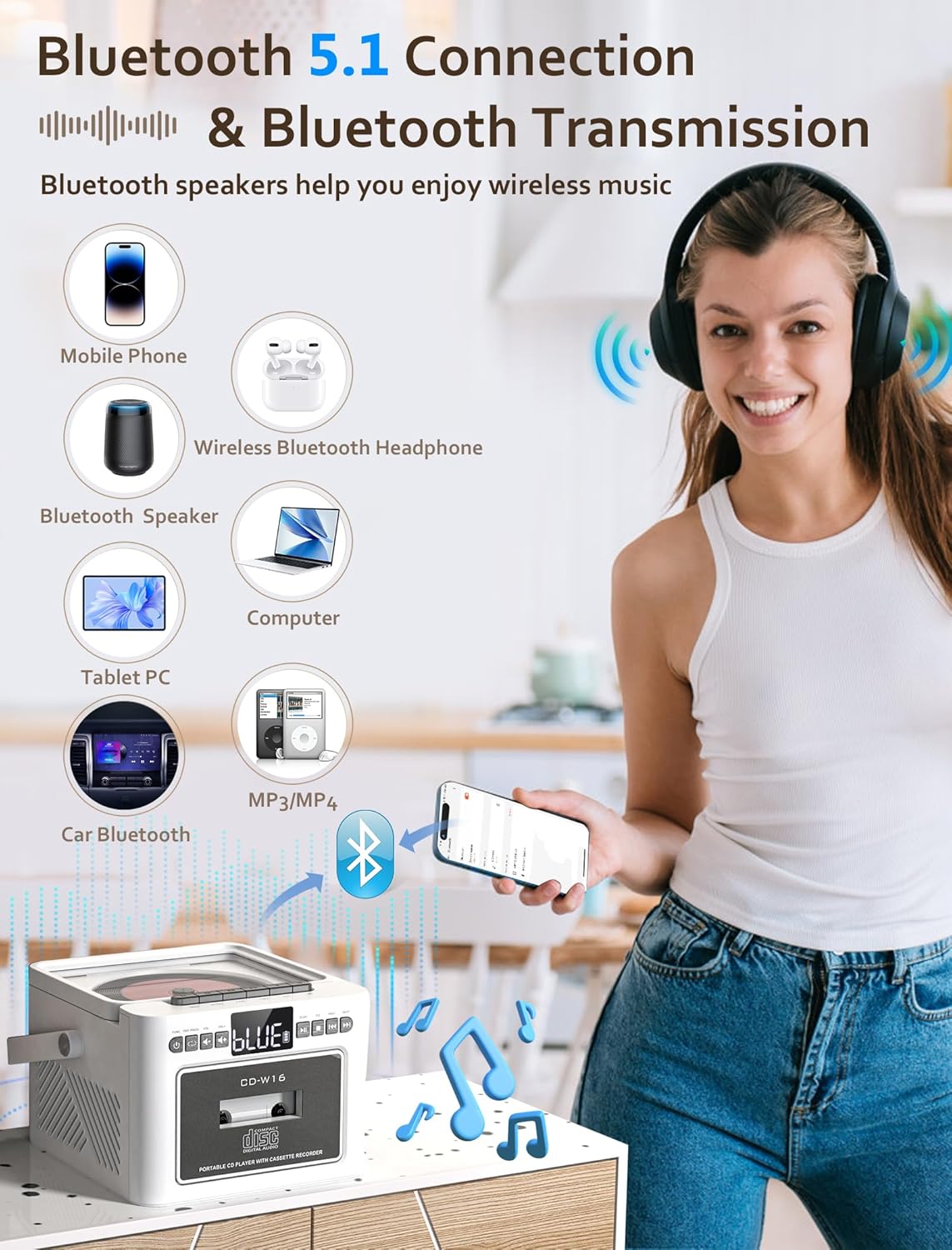
Image 7.3: The Jazmm CD Cassette Player Combo illustrating its Bluetooth 5.1 capabilities for both connecting to mobile devices and transmitting to Bluetooth speakers or headphones.
- Pehia te Puapuaki button repeatedly until "BT" (Bluetooth) mode is selected. The display will show "BLUE" and flash, indicating it's in pairing mode.
- On your external device (smartphone, tablet, etc.), enable Bluetooth and search for "CD-W16" (or similar).
- Select "CD-W16" to pair. Once connected, the "BLUE" indicator will stop flashing.
- You can now play audio from your device through the boombox speakers.
- Whakawhiti Nihokikorangi: To transmit audio from the boombox (e.g., CD playback) to external Bluetooth headphones or speakers, ensure the external device is in pairing mode. The boombox will automatically search and connect.
7.5 USB / TF Card / AUX-IN Playback
- Kāri USB/TF: Insert a USB flash drive into the USB port or a TF (Micro SD) card into the TF card slot. Press the Puapuaki button to select "USB" or "TF" mode. Playback will begin automatically.
- AUX-IN: Connect an external audio device (e.g., MP3 player) to the AUX-IN port using a 3.5mm audio cable (not included). Press the Puapuaki button to select "AUX" mode. Control playback from your external device.
7.6 Te whakamahi i te Mana Mamao

Image 7.4: The Jazmm CD Cassette Player Combo shown with its included remote control, allowing for convenient operation from a distance.
The remote control allows you to operate most functions from a distance. Ensure there are no obstructions between the remote and the boombox. Insert batteries (not included) into the remote control before use.
8. Tiaki
- Te horoi: Whakamahia he kakahu ngohengohe, maroke hei horoi i waho o te waahanga. Kaua e whakamahi i nga kai horoi me nga whakarewa.
- Tiaki Matapihi CD: Mena ka puta he raru ki te purei anō i te CD, whakamahia he kōpae horoi arotahi CD e wātea ana i te hokohoko.
- Horoi Upoko Ripene: Periodically clean the cassette player's heads with a cotton swab lightly dampened with isopropyl alcohol to ensure optimal sound quality.
- Rokiroki: Ki te kore e whakamahia mo te wa roa, penapenahia te taputapu ki tetahi waahi makariri, maroke.
- Tiaki Pūhiko: To prolong battery life, avoid fully discharging the battery frequently. Recharge the battery regularly, even if the device is not in active use.
9. Te Raru
| Raruraru | Take pea | Rongoā |
|---|---|---|
| Karekau he kaha | Power adapter not connected; Battery discharged. | Me mohio kei te hono pai te urutau hiko ka honoa ki te putanga mahi. Me utu te pākahiko. |
| Karekau he tangi | He iti rawa te rōrahi; Ko te aratau hē i tohua; Ka hono nga taringa. | Increase volume. Select the correct playback mode (CD, BT, FM, etc.). Disconnect headphones if sound is desired from speakers. |
| CD not playing / skipping | CD dirty or scratched; CD inserted incorrectly; CD format not supported. | Clean the CD with a soft cloth. Reinsert the CD label side up. Ensure the CD is a supported format (CD, CD-R, CD-RW, MP3, WMA). |
| Cassette tape not playing | Tape inserted incorrectly; Tape tangled or damaged. | Reinsert the tape correctly. Check the tape for damage. |
| He pai te manaaki reo irirangi FM | Kāore te pūihi i toronga; He ngoikore te tohu. | Fully extend the FM antenna. Reposition the unit for better reception. |
| I rahua te takirua Nihokikorangi | Device not in pairing mode; Boombox too far from device. | Ensure both devices are in pairing mode. Move devices closer. Restart Bluetooth on both devices. |
10. Whakatakotoranga
| Āhuahira | Taipitopito |
|---|---|
| Tauira | CD-W16 |
| Waitohu | Jazmm |
| Rahi Hua (L x W x H) | 7.5 x 6.2 x 4.3 inihi |
| Hangarau Hononga | Tautoko, Nihokikorangi, USB |
| Momo Kaikorero | Stereo (Dual 10W HiFi Speakers) |
| Puna Mana | Battery Powered (Built-in 5000mAh Rechargeable Battery) |
| Auautanga Radio Irirangi | 87.5-108 MHz |
| Putanga Nihokikorangi | 5.1 |
| Media Tautoko | CD, CD-R, CD-RW, MP3, WMA, Cassette Tape, USB, TF Card |
11. Pūtāhui me te Tautoko
Jazmm offers a lifetime warranty on this portable CD player boombox. For any inquiries, technical assistance, or warranty claims, please contact our customer service team. We provide 24/7 world-class customer service to ensure your satisfaction.
Please refer to your purchase documentation or the Jazmm official webpae mo nga taipitopito whakapā motuhake.


