Kupu Whakataki
The Xtorm FS405 Fuel Series Solar Powerbank 20W – 10.000 mAh is designed to provide portable power for your electronic devices, offering the flexibility to charge via USB-C or its integrated solar panel. This power bank is built for outdoor adventures, featuring a durable, splash-resistant design and a powerful LED flashlight.
Nga korero haumaru
- Kaua e whakaatuhia te pēke hiko ki ngā pāmahana tino kino (neke atu i te 45°C, i raro iho rānei i te -10°C).
- A ape i te taka, te wetewete, te ngana ranei ki te whakatika i te taputapu ma koe ano.
- Keep away from water, except for the specified splash resistance (IPX4). Do not submerge.
- Whakamahia anake nga taura utu whaimana me nga urutau.
- Kaua e taea e nga tamariki.
- Whakakorehia te hua kia rite ki nga ture o te rohe.
Ihirangi mokete
Tena koa tirohia te kete mo nga mea e whai ake nei:
- Xtorm FS405 Solar Powerbank
- USB-C Ura Whakatau (0.30m)
- Pukapuka Kaiwhakamahi
Ka mutu te huaview

Mua View: Shows the main solar charging panel and the Xtorm logo. The robust casing is visible around the edges.

Whakamuri View (LED Off): Displays the textured back casing and the integrated LED light panel in its off state.
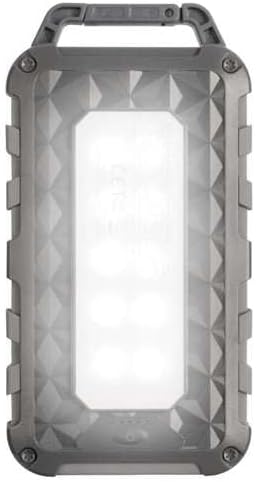
Whakamuri View (LED On): Shows the powerful LED light panel fully illuminated, indicating the flashlight function is active.

Runga View: Highlights the sturdy integrated carabiner handle, designed for easy attachment to bags or gear.
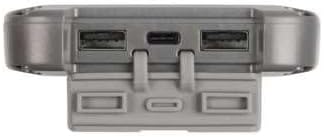
Raro View: Displays the USB-C PD input/output port and two USB-A Quick Charge 3.0 output ports, protected by a cover.
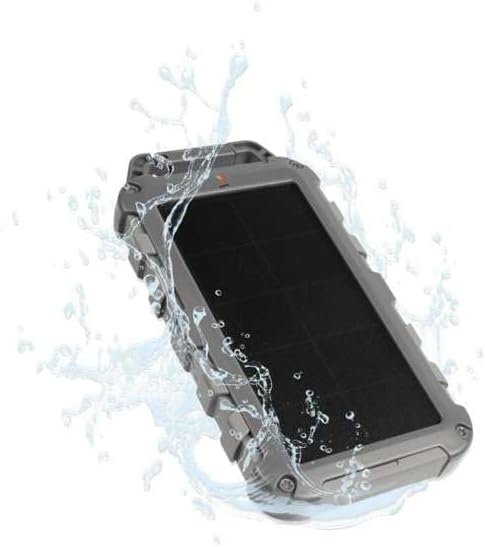
Durability Feature: Illustrates the power bank's splash-resistant design, suitable for outdoor conditions (IPX4 rated).
Tatūnga
Utu Tuatahi
Before first use, it is recommended to fully charge the Xtorm FS405 Solar Powerbank via the USB-C port for optimal performance.
- Honoa te taura USB-C kua whakaratohia ki te tauranga USB-C i runga i te peeke hiko.
- Connect the other end of the USB-C cable to a compatible USB wall adapter (not included) or a computer's USB port.
- The LED indicators on the power bank will show the charging status. A full charge via USB-C typically takes approximately 2 hours.
Nga Tohutohu Whakahaere
Te utu i te Peeke Hiko
The Xtorm FS405 can be charged using two methods:
1. Via USB-C (Recommended for Fast Charging)
- Connect the power bank to a USB-C power source using the included cable.
- The power bank will begin charging. This method provides the fastest charging speed for the power bank itself.
2. Via Solar Panel
The integrated solar panel allows for convenient charging when outdoors. For best results, place the power bank directly under strong sunlight.
- Place the solar panel facing direct sunlight.
- A small indicator light (usually green) will illuminate when solar charging is active.
- Note on Solar Charging Speed: Solar charging is a supplementary method and is significantly slower than USB-C charging. Factors like season, location, time of day, and cloud cover heavily influence charging speed.
Approximate solar charging times for a full charge:
- Spring/Summer (mostly sunny day): Tata ki te 10 nga ra
- Autumn/Winter (mostly sunny day): Tata ki te 20 nga ra
Solar charging is not effective on mostly cloudy days.
Kei te utu i nga taputapu o waho
The power bank features one USB-C PD (Power Delivery) output and two USB-A Quick Charge 3.0 outputs.

Te Whakaaetanga Tere: The power bank can charge compatible smartphones, such as an iPhone 14 or 12/13, up to 50% in approximately 30 minutes using the 20W USB-C PD output.
- Connect your device's charging cable to one of the available output ports (USB-C or USB-A) on the power bank.
- Whakauruhia tetahi atu pito o te taura ki to rorohiko.
- Ka timata te peeke hiko ki te utu aunoa i to taputapu.
- Mā ngā tohu LED i runga i te peeke hiko e whakaatu te toenga o te pākahiko.
The 10,000mAh capacity is sufficient to charge most smartphones at least 2 times.
Te whakamahi i te Rama Rama
The Xtorm FS405 includes a powerful integrated LED flashlight on its back.
- Locate the power button (usually on the side or near the ports).
- Press and hold the power button for a few seconds to turn the flashlight ON.
- Press and hold the power button again to turn the flashlight OFF.
Te tiaki
- Horoia te peeke hiko ki te kakahu ngohengohe, maroke. Kaua e whakamahi i nga matū kino, i nga mea awhiowhio ranei.
- Whakaorangia te peeke hiko ki te waahi makariri, maroke ina kore e whakamahia.
- For long-term storage, charge the power bank to about 50-70% every 3-6 months to preserve battery health.
- Ensure the port covers are properly sealed when exposed to water splashes.
Raparongoā
Karekau te Peeke Hiko i te utu
- Taki Waea: Ensure the USB-C cable is securely connected to both the power bank and the power source. Try a different cable.
- Tirohia te Puna Hiko: Verify that the wall adapter or USB port is functioning correctly.
- Whakatauhia te ra: For solar charging, ensure the panel is in direct, strong sunlight. Remember solar charging is slow and not effective in low light or cloudy conditions.
Kāore te Pūrere e Utuhia ana mai i te Pēke Hiko
- Tirohia te Utu o te Pēke Hiko: Me whakarite he rawaka te utu o te putea hiko.
- Tirohia nga taura: Use the original charging cable for your device and ensure it's properly connected to both the power bank and your device. Try a different cable.
- Hototahi: Verify that your device is compatible with USB charging.
- Tīmata anō: Momotu ka hono ano i te taputapu.
Kare e Mahi ana te Rama
- Tirohia te Utu o te Pēke Hiko: Ensure the power bank has some charge remaining.
- Mahi Tika: Ensure you are pressing and holding the power button correctly to activate the flashlight.
Whakatakotoranga
| Āhuahira | Taipitopito |
|---|---|
| Tauira | FS405 |
| Waitohu | Xtorm |
| Rangatū | Fuel Series 4 |
| Pūhiko Raukaha | 10,000 mAh (Lithium Polymer) |
| Putanga Mana Max | 20 W |
| Output 1 (USB-C PD) | 20 W |
| Output 2 (USB-A QC 3.0) | 18 W |
| Output 3 (USB-A QC 3.0) | 18 W |
| Te maha o nga Putanga | 3 |
| Momo Whakauru | USB-C PD |
| Te Mana Panui Solar | 1 W (SunPower cells) |
| Ahu (L x W x H) | 17 cm x 9 cm x 2 cm |
| Taumaha | 289 g |
| Rauemi | PC, ABS |
| Ātete wai | IPX4 (Ātete ki te Pāhū) |
| Kohiko Whakakotahi | Ae |
| Battery Charge Time (USB-C) | Approx. 2 haora |
Pūtāhui me te Tautoko
For warranty information and customer support, please refer to the Xtorm official webpaetukutuku, whakapā atu ranei ki to kaihokohoko o to rohe. Puritia to tohu hoko mo etahi kereme whakamana.
Tautoko Aipurangi: www.xtorm.eu


