1. Kupu Whakataki
This manual provides detailed instructions for the safe installation, operation, and maintenance of your PHORUS 48-inch Modern White Ceiling Fan with Lights and Remote/APP Control. Please read all instructions carefully before beginning installation and retain this manual for future reference.
2. Nga korero haumaru
- Me whakarite kia momotu te hiko i te whati ara iahiko i mua i te tāutanga, i te mahi tiaki rānei.
- Ko nga waea katoa me rite ki nga tohu hiko o te motu me te rohe. Mena kaore koe i te mohio ki nga waea waea, korero ki tetahi tohunga hiko.
- The fan must be mounted with a minimum of 7 feet (2.1 meters) clearance from the floor to the blade trailing edge.
- Me kaha te hanganga whakairi ki te tautoko i te taumaha o te pā hau (tata ki te 13.4 pauna).
- Do not bend the blade holders during installation or cleaning.
- I hangaia tenei mea powhiriwhiri hei whakamahinga mo roto.
3. Ihirangi mokete
Manatokona kei te noho nga waahanga katoa i mua i te tiimata o te whakaurunga:
- Fan Motor Huihui
- Te Poari Whakairi
- 5 Matatahi Kaiwhaiwhai
- LED Lampwhakamarumaru
- Mana Mamao (e rua nga pākahiko AAA)
- Nga Tiu me nga taputapu Whakaeke
- Pukapuka Tohutohu

4. Whakatakotoranga
| Āhuahira | Whakatakotoranga |
|---|---|
| Waitohu | PHORU |
| Ingoa Tauira | #8907 |
| Rahi | 48 Inihi |
| Tae | Mā |
| Rauemi | Kiriaku, Kirihou |
| Momo Motuka | DC Motor (30W) |
| Puna Maama | LED (28W) |
| Nga Tae Maama | 3 (White, Warm, Neutral) |
| Awhe Atarua | Kore-taahiraa (10%-100%) |
| Nga Tere Hau | 6 |
| Tikanga Mana | Remote Control, APP Control |
| Nga waahanga motuhake | Reversible Function, 2-Hour Timer, Memory Function |
| Taumata oro | Kei raro iho i te 35 dB |
| Hunga Hua | 48"L x 48"W x 10.83"H |
| Taumaha Tūemi | 13.4 pauna |
5. Tatūnga me te Tāuta
5.1 Rarangi Arowhai I mua i te Whakaaturanga
- Ensure the power supply is turned off at the main circuit breaker.
- Confirm you have all necessary tools (screwdriver, drill, wire strippers, etc.).
- Verify that the ceiling junction box is securely mounted and capable of supporting the fan.
5.2 Taahiraa-i-Taahiraa
- Attach Blades to Motor Assembly: Secure each of the five fan blades to the motor assembly using the provided screws. Ensure the 'THIS SIDE UP' marking on the blade attachment is facing upwards.
- Install LED Light Board: Carefully place the LED light board into the designated area on the motor assembly and secure it with screws. Connect the LED wires.
- Attach LED Lampwhakamarumaru: Whakanohoia te LED lampshade over the light board and twist it clockwise until it is securely fastened.
- Papa Whakairi Maunga: Secure the hanging board to your ceiling junction box using appropriate screws. Ensure it is firmly attached.
- Tūhono Waea: Connect the fan's electrical wires to your household wiring. The typical connections are: Black (Live) to Black (Live), White (Neutral) to White (Neutral), and Yellow/Green (Ground) to Green (Ground). Use the provided wire connectors.
- Secure Fan to Hanging Board: Lift the fan assembly and attach it to the hanging board, ensuring all wires are tucked safely inside the canopy. Secure the fan with the provided screws.
6. Nga Tohutohu Whakahaere
6.1 Nga Mahi Mana Mamao
The included remote control allows for convenient operation of your ceiling fan:
- Hiko Whakaka/Weto: Pēhia te pātene hiko hei whakakā i te powhiriwhiri me te rama ki runga, whakaweto ranei.
- Tere Kiri: Select from 6 wind speeds (1-6) to adjust airflow.
- Rama / Weto: Control the light independently from the fan.
- Paemahana Tae: Cycle through 3 light colors: White (6000K), Neutral (4500K), and Warm (3000K).
- Te auri: Whakaritea te kanapa marama mai i te 10% ki te 100%.
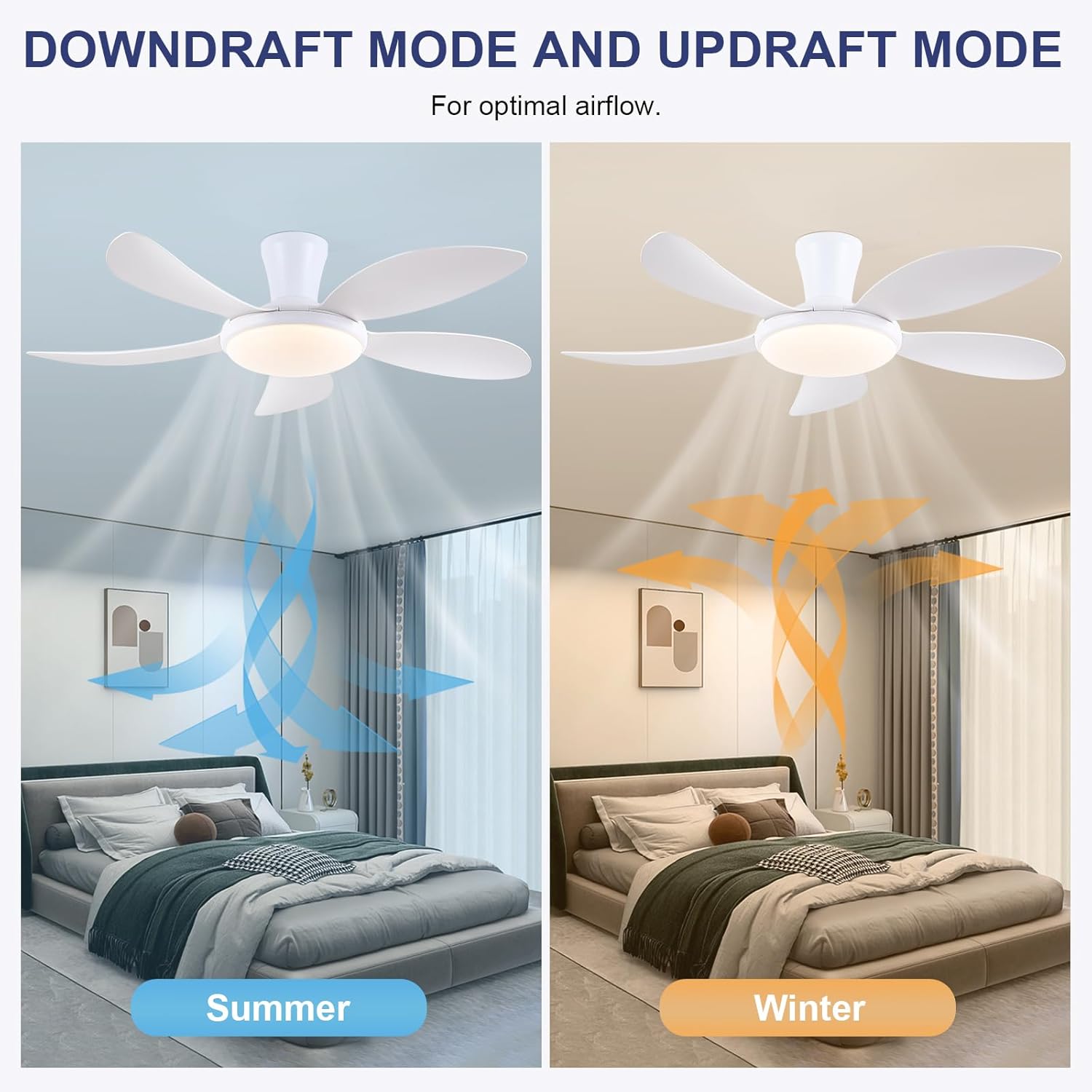
- Mahi Whakahokia: Press the F/R key to change the blade rotation direction for summer (downdraft) or winter (updraft) modes. The fan will stop briefly before reversing.
- Matawā: Set a 2-hour timer for automatic shutdown.
- Aratau Po: Activates a low-speed fan and dim light setting.

6.2 Remote Code Pairing
If the remote control is not responding, it may need to be paired:
- Turn off the main power supply to the fan for one minute.
- Turn on the main power supply and simultaneously long-press the 'Code Key' button on the remote control for 3-5 seconds.
- The fan light will blink 2-3 times, indicating successful code matching. The remote can now be operated normally.
6.3 Mana APP
Control your fan using the 'Fan Lamp Pro' mobile application:
- Tikiake APP: Scan the QR code provided in the product images or search for "Fan Lamp Pro" in your app store.
- Tūhono mā Nihokikorangi: Me mohio kei te whakahohea te Nihokikorangi o to waea.
- Pūrere Takirua: Open the app, add a new device, and follow the on-screen instructions to connect to your fan. The fan light will blink twice upon successful connection.
- Nga Mahi: The app allows control over fan speeds, light colors, dimming, reverse function, and timer settings, similar to the remote control.
6.4 Fan Speed and Airflow
- Taumata 1-2: Low Comfortable Wind, suitable for sleep.
- Taumata 3-4: Medium Natural Wind, suitable for daily life.
- Taumata 5-6: High Cooling Wind, suitable for hot weather.

6.5 Tautuhinga Maama
- The LED light source supports stepless dimming and memory function, retaining your last brightness and color temperature setting.
- Choose from 3 color temperatures: 3000K (Warm Light), 4500K (Natural Light), and 6000K (White Light).

6.6 Reversible Function
The reversible DC motor allows you to change the direction of the fan seasonally:
- Aratau Raumati (Whakahekenga): Blades rotate counter-clockwise, pushing cool air downwards.
- Aratau Hotoke (Whakahōu hau): Blades rotate clockwise, drawing cool air up and circulating warm air downwards.
7. Tiaki
- Te horoi: Hei horoi i te mea powhiriwhiri, horoia ki te ngohengohe, damp kakahu. Kaua e whakamahi i nga kai horoi me nga whakarewa.
- Tiaki Mata: The ABS blades are designed to be easy to clean and resistant to deformation.
- Takitaki auau: Periodically check all connections and screws to ensure they are secure.
8. Te Raru
Mena ka pa ki a koe nga raru me to kaiwhaiwhai, tirohia nga raru me nga otinga e whai ake nei:
- Karekau te Fan e mahi: Check power supply, ensure all wiring connections are secure, and verify remote control pairing.
- Kare te marama e mahi: Check power supply, ensure light wires are connected, and verify remote control pairing.
- Ka haruru te Fan: Ensure all screws are tightened, especially on the blades and mounting bracket. Check for any obstructions.
- Mana mamao kaore e mahi: Replace batteries, ensure line of sight to the fan, and re-pair the remote control as per section 6.2.
- APP connection issues: Ensure Bluetooth is on, the app is updated, and try re-pairing the device.
9. Pūtāhui me te Tautoko
PHORUS provides a one-year quality warranty for this product. For any damage or quality problems, free replacement service is offered. If you have any questions or require assistance, please contact PHORUS customer service. You will receive a satisfactory answer within 24 hours.
For additional support and resources, please visit the official PHORUS webpaetukutuku tirohia ranei ki nga korero whakapiri kua whakaratohia me to hoko.


