1. Kupu Whakataki
The Parkside PTI 380 B1 Infrared Thermometer is designed for quick and accurate non-contact surface temperature measurements. It is an ideal tool for identifying thermal bridges and areas at risk of mold formation. This manual provides essential information for the safe and proper operation of your device.
2. Nga korero haumaru
WARNING! Do not look directly into the laser beam. Direct exposure to the laser can cause eye damage.
- Me tiaki i nga wa katoa te taputapu.
- Kaua e ngana ki te wetewete, ki te whakarereke ranei i te taputapu.
- Tiakina te taputapu mai i te wai me te wera nui.
- Ensure proper battery disposal.
3. Hua Neke Atuview
The Parkside PTI 380 B1 features an ergonomic design with a soft-grip handle for comfortable use. It includes an 8-point laser for precise targeting of the measurement area and a color display with audible signals for easy interpretation of results.
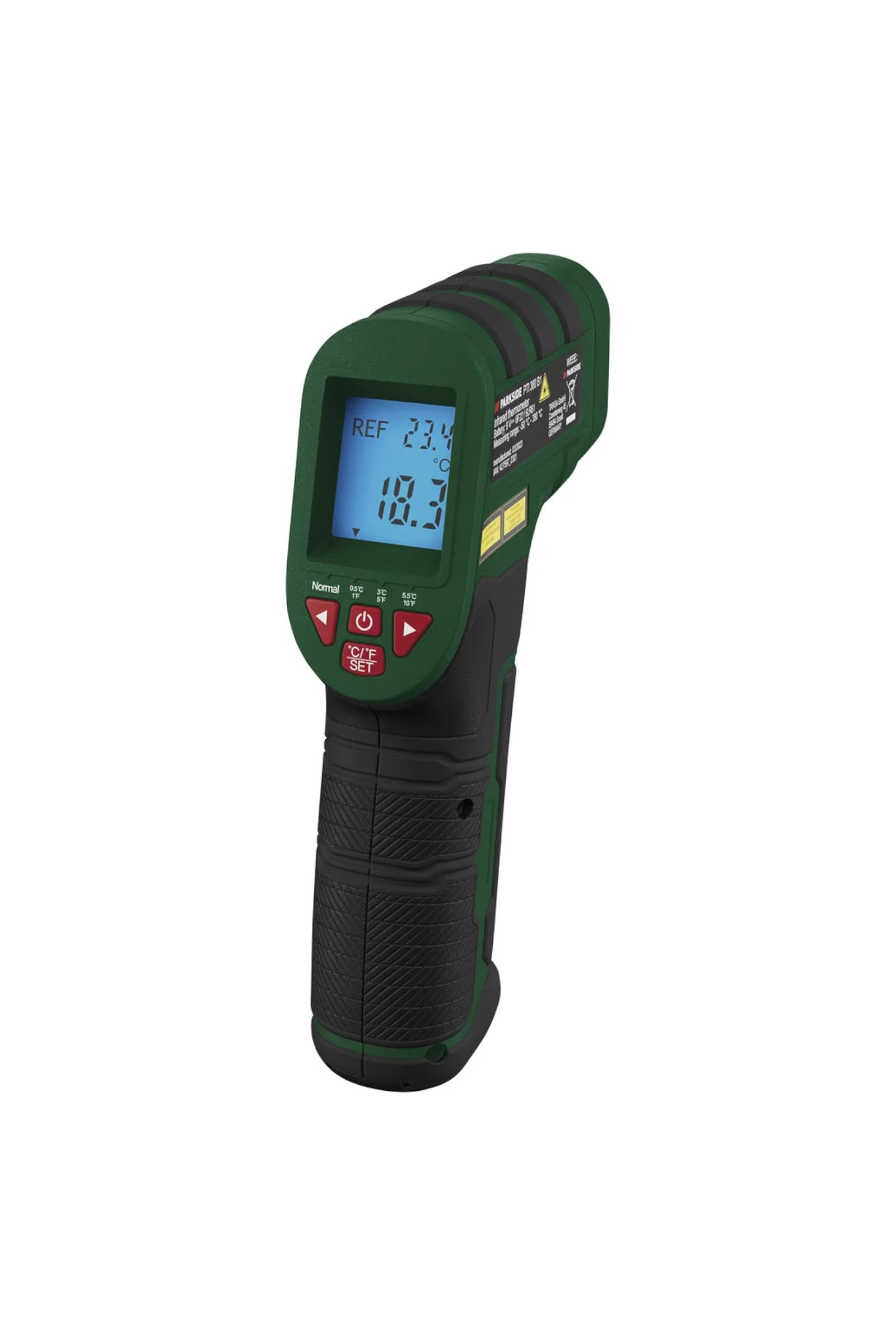
Whakaahua 1: Te katoa view of the Parkside PTI 380 B1 Infrared Thermometer.

Whakaahua 2: Taha view of the thermometer, highlighting the trigger and control buttons.

Whakaahua 3: Mua view, showing the infrared sensor and the 8-point laser aperture.
Waehanga:
- Pūoko Infrared
- 8-Ira Taiaho
- Whakaaturanga Tae LCD
- Ine Keu
- Mode Selection Buttons
- Unit Selection Button (°C/°F)
- Battery Compartment (located in the handle)
4. Tatūnga
4.1 Tāuta Pūhiko
- Locate the battery compartment cover on the handle of the device.
- Whakatuwheratia te uhi.
- Insert the included battery, ensuring correct polarity (+/-).
- Katia kia mau te uhi o te wahanga pākahiko.
The device includes a battery change indicator on the display to alert you when the battery level is low.
5. Nga Tohutohu Whakahaere
5.1 Kei te Hiko / Weto
Press the measurement trigger to power on the device. The device will automatically shut off after approximately 60 seconds of inactivity to conserve battery life.
5.2 Selecting Measurement Units
Pehia te °C/°F SET pātene hei whakawhiti i waenga i ngā wae pāmahana Celsius (°C) me Fahrenheit (°F).
5.3 Aratau Ine
The device offers two operating modes: Inenga ngawari a Ine Tohutoro.
5.3.1 Easy Measurement
In this mode, simply point the thermometer at the surface you wish to measure and press the trigger. The current surface temperature will be displayed.
5.3.2 Reference Measurement
This mode is ideal for comparing a measured temperature against a set reference value, useful for detecting thermal bridges or potential mold areas. You can select reference levels of ± 0.5 °C, ± 3 °C, or ± 5.5 °C.
- Set your desired reference temperature.
- Point the thermometer at the surface.
- The display will show a color and emit an audible signal based on the difference between the measured value and the reference value:
- Kahurangi: The measured temperature is colder than the reference value.
- Whero: The measured temperature is warmer than the reference value.
- Kākāriki: The measured temperature is approximately the reference value.

Whakaatu 4: Whakaatu examples showing blue (colder), red (warmer), and green (approximate) indications relative to a reference temperature.
5.4 Te Whanganga
- Aim the 8-point laser at the center of the area you wish to measure. The laser points define the measurement spot.
- Press and hold the measurement trigger.
- Ka puta te pānui pāmahana ki te mata.
- Release the trigger to hold the last measurement.

Figure 5: Using the thermometer to measure the surface temperature of a stove top.

Whakaatu 6: Taupānga example: measuring temperature around a fireplace to detect heat loss.
6. Tiaki
6.1 Te horoi
Wipe the device with a soft, dry cloth. Do not use abrasive cleaners or solvents. Ensure the infrared sensor lens and laser aperture are kept clean for accurate readings.
6.2 Whakakapinga Pūhiko
When the battery indicator appears on the display, replace the battery as described in the "Battery Installation" section (4.1). Always use the correct type of battery.
6.3 Rokiroki
Store the device in a cool, dry place, away from direct sunlight and extreme temperatures, when not in use for extended periods.
7. Te Raru
- Kaore te taputapu i te hiko: Tirohia mēnā kua tika te tāutanga o te pākahiko, ā, kua rawaka te utu. Whakakapia te pākahiko mēnā e tika ana.
- Ko nga panui kore tika: Ensure the sensor lens is clean and free from obstructions. Make sure the measurement distance is appropriate for the target size.
- Kāore e kitea te rēseri: Check if the laser function is enabled (if applicable) and ensure the battery has sufficient charge.
Mena kei te haere tonu nga raru, whakapā atu ki te tautoko a te kaihoko.
8. Whakatakotoranga
| Āhuahira | Whakatakotoranga |
|---|---|
| Aratau Mahi | Easy Measurement / Reference Measurement |
| Awhe Ine | -50 °C ki +380 °C (-58 °F ki +716 °F) |
| Measurement Deviation (> 0 °C) | ± 1.5 °C |
| Measurement Deviation (< 0 °C) | ± 3 °C |
| Selectable Reference Levels | ± 0.5 °C / ± 3 °C / ± 5.5 °C |
| Waeine ine | °C me °F |
| Whakaweto Aunoa | Approx. 60 hēkona |
| Rauemi | Kirihou |
| Ahu (L x W x H) | Approx. 17.6 x 11 x 4.2 cm (6.9 x 4.3 x 1.7 inihi) |
| Taumaha | Approx. 260 g (0.57 lbs) |
| Kaihanga | OWIM GmbH & Co. KG |
| Nga Waahanga kei roto | Measuring device, Battery |
9. Pūtāhui me te Tautoko
Mō ngā mōhiohio pūtāhui me te tautoko kiritaki, tirohia ngā tuhinga i whakaratohia me tō hoko, whakapā atu rānei ki te kaihokohoko. Puritia tō taunakitanga hoko mō ngā kereme pūtāhui katoa.
Kaihanga: OWIM GmbH & Co. KG


