1. Kupu Whakataki
This manual provides detailed instructions for the installation, operation, and maintenance of your STINGER Audio MT20001 Monoblock Class D Car Amplifier. The MT20001 is designed to deliver high-efficiency power for subwoofer systems in car audio applications, ensuring optimal sound quality. Please read this manual thoroughly before installation and use to ensure proper function and safety.
2. Nga korero haumaru
Kia mau ki nga whakaritenga haumaru e whai ake nei hei aukati i te whara, i te kino ranei o te ampwaka, waka rānei:
- Momotu Pūhiko Waka: Before beginning any installation, disconnect the vehicle's negative battery terminal to prevent electrical shorts.
- E taunakitia ana te whakaurunga ngaio: If you are unsure about the installation process, consult a qualified car audio professional.
- Waea Tika: Use appropriate gauge wiring as specified in this manual. Incorrect wiring can lead to overheating, fire, or damage to components.
- Whakahau: Me whakarite te amplifier is mounted in a location with adequate airflow to prevent overheating. Do not block cooling fins.
- Whakaeke Haumaru: Maunga te amplifier securely to prevent it from coming loose during vehicle operation, which could cause injury or damage.
- Aukati i te makuku: Kaua e hurahia te amplifier to moisture or water. This product is not waterproof.
- Parenga Puka: Always use the correct fuse rating as specified. Never replace a fuse with one of a higher rating.
3. Ihirangi mokete
Manatokona kei roto katoa nga mea kei roto i to kete:
- STINGER Audio MT20001 Monoblock Class D Ampkaikawe
- Remote Subwoofer Level Control with cable
- STINGER 4-Gauge Copper Amplifier Wiring Kit, including:
- 17FT Translucent Blue Power Wire
- 3FT Translucent Silver Ground Wire
- 17FT Translucent Blue Twisted Pair RCA interconnects
- 16FT Blue Remote Turn-on Wire
- 20FT Translucent Speaker Wire
- 3FT Black flex loom tubing
- 1pc Mini-ANL/AFS Fuseholder & Fuse
- Pūmārō whakapuru (nga tīwiri)
- Pukapuka Kaiwhakamahi (tenei tuhinga)

Image: STINGER 1200W Amplifier Wiring Kit packaging, showing the various cables and fuse holder included.
4. Nga Hua o te Hua
The STINGER Audio MT20001 amplifier incorporates advanced design and technology for superior performance:
- Digital Class-D Monoblock Design: High efficiency with a compact footprint, optimized for subwoofer applications.
- Robust Unregulated Power Supplies: Utilizes advanced pulse width modulator integrated circuits for improved performance and efficiency.
- Direct Insert Terminals: Features 0/1 Gauge Power and 8 Gauge Speaker direct insert terminals for secure connections.
- Whakautu Auautanga Whanui: 10Hz-180Hz, suitable for deep bass reproduction.
- Mana Taumata o te Wūruiti Mamao: Included for convenient bass level adjustments.
- Precision Metal Potentiometers: For accurate tuning of audio settings.
- Designed for 1 Ohm Load: Capable of driving demanding subwoofer configurations.

Whakaahua: Runga view of the STINGER MT-2000.1 amplifier, with text overlays indicating features such as small footprint, 2000W @ 1 Ohm, direct insert terminals, 0/1 gauge power, 8 gauge speaker, 10Hz-180Hz frequency response, and included bass knob.

Image: STINGER MT-2000.1 amplifier, labeled as Class-D Mono Block, with icons and text indicating it's designed for 1 Ohm load, has a small and compact design, features 0/1 Gauge Power Terminal, has a Bridged RMS Rating of 3,800W / 2 Ohm Minimum, and an Operating voltage o 9V ki 16V.
5. Tatūnga me te Tāuta
Careful installation is crucial for optimal performance and safety. Follow these steps for proper setup.
5.1 Tautuhinga Wae
Kia mohio koe ki te amplifier's input and output terminals and control panel:

Whakaahua: Rear view of the STINGER MT-2000.1 amplifier showing the control panel. Labels include PRT (Protection Indicator), PWR (Power Indicator), REMOTE port (for bass knob), INPUT RCA (L/R), BRIDGE IN RCA, GAIN knob (Min/Max), LPF knob (40Hz-180Hz), SUBSONIC knob (OFF/50Hz), FREQ knob (30Hz/80Hz), BOOST knob (0dB/12dB), and INPUT BRIDGE OUT RCA.
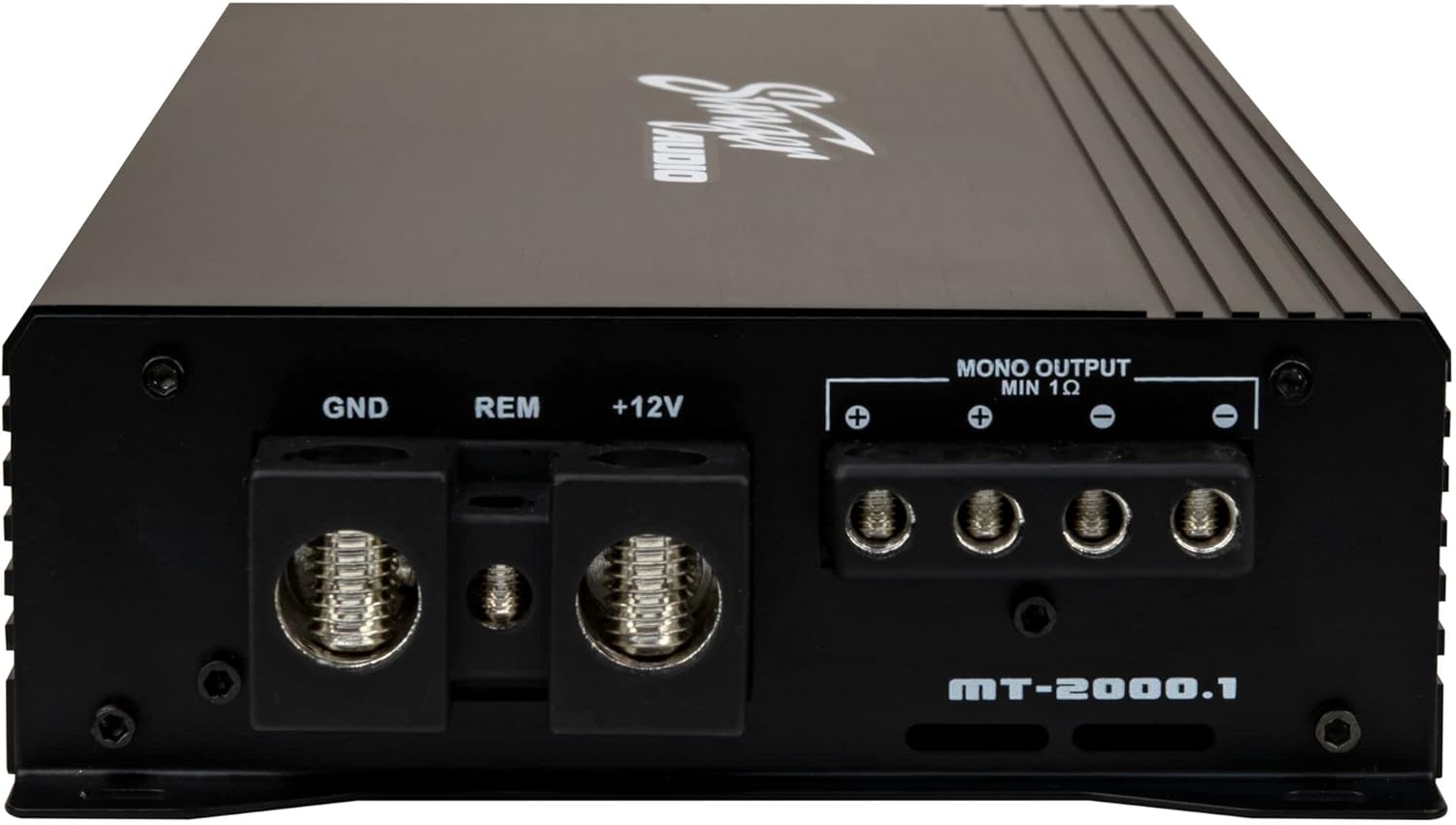
Whakaahua: Rear view of the STINGER MT-2000.1 amplifier showing the power and speaker terminals. Labels include GND (Ground), REM (Remote Turn-on), +12V (Power), and MONO OUTPUT MIN 1 Ohm speaker terminals (+ and -).
5.2 Hononga Waea
Follow these steps for secure and correct wiring:
- Waea Hiko (+12V): Connect the 17FT Translucent Blue Power Wire from the vehicle's positive battery terminal (via the Mini-ANL/AFS Fuseholder & Fuse, installed within 18 inches of the battery) to the +12V terminal on the amplifier. Ensure a secure, crimped connection.
- Waea Whenua (GND): Connect the 3FT Translucent Silver Ground Wire from the GND terminal on the ampWhakakīia te hiko ki tētahi mata whakarewa ma, kāore anō kia peitahia i runga i te anga o te waka. Me whakarite he hononga pakari, he iti te ātete.
- Remote Turn-on Wire (REM): Connect the 16FT Blue Remote Turn-on Wire from the REM terminal on the amplifier to the remote output of your head unit or other switched 12V source. This wire turns the ampwhakakoi me te whakaweto me to wae upoko.
- RCA Tāuru: Connect the 17FT Translucent Blue Twisted Pair RCA interconnects from the RCA output of your head unit to the INPUT RCA terminals (L/R) on the amplifier. For bridged input, use the BRIDGE IN RCA terminal.
- Putanga Kaikōrero: Connect your subwoofer(s) to the MONO OUTPUT MIN 1 Ohm terminals on the amplifier using the 20FT Translucent Speaker Wire. Observe correct polarity (+ to + and - to -). Ensure the total impedance of your subwoofer(s) is 1 Ohm or higher.
- Mana Taumata o te Wūruiti Mamao: Plug the included remote bass knob into the REMOTE port on the ampkaikawe
5.3 Whakapiki
Choose a mounting location that provides adequate ventilation and is secure. Avoid mounting the amplifier directly to carpet or in enclosed spaces without airflow. Use the provided mounting hardware to firmly attach the amplifier to a solid surface in your vehicle.
6. Nga Tohutohu Whakahaere
Kia whakauruhia, whakatikahia te ampnga tautuhinga riipene mo te mahi oro tino pai.
6.1 Whakatikatika Mana
- GAIN (Input Level): Ka rite tenei mana ki te amplifier's input sensitivity to the output of your head unit. Start with the gain at minimum (fully counter-clockwise). Play a familiar track at about 75% of your head unit's maximum volume. Slowly increase the gain until you hear distortion, then back off slightly.
- LPF (Tatari Utu Iti): This filter allows only frequencies below the set point to pass through to the subwoofer. Adjust this knob (40Hz-180Hz) to blend the subwoofer's output with your main speakers. A common starting point is 80Hz.
- SUBSONIC: This high-pass filter removes extremely low frequencies that are below the audible range or harmful to your subwoofer. Set it to OFF or 50Hz, depending on your subwoofer's capabilities and enclosure tuning.
- FREQ (Bass EQ Frequency): This knob (30Hz/80Hz) selects the center frequency for the Bass BOOST.
- BOOST (Bass EQ Level): This control (0dB/12dB) increases the output at the selected FREQ. Use sparingly to avoid distortion and potential damage to your subwoofer.
6.2 Mana Taumata o te Ipu-iti Mamao
The included remote level control allows you to conveniently adjust the subwoofer output level from your driving position. This control only adjusts the output level and does not affect the ampte tautuhinga whakanui a te lifier.

Image: The STINGER remote subwoofer level control, a small black box with a rotary knob labeled 'MIN' to 'MAX', connected by a cable.
7. Tiaki
The STINGER MT20001 ampHe iti noa te tiaki e hiahiatia ana mō te kaiwhakaora kia roa ai te mahi.
- Te horoi: Ia wā horoia te ampHe kakahu ngohengohe, maroke te taha o waho. Kaua e whakamahi i nga matū kino, i nga horoi horoi ranei.
- Taki Hononga: Annually, inspect all power, ground, remote, RCA, and speaker connections to ensure they are secure and free from corrosion. Loose connections can cause performance issues or damage.
- Whakahau: Me whakarite ko te amplifier's cooling fins remain clear of obstructions to maintain proper heat dissipation.
8. Te Raru
Mena ka raru koe ki to amplifier, refer to the following table for common issues and solutions:
| Raruraru | Take pea | Rongoā |
|---|---|---|
| Kāore he hiko (kāore te rama PWR e mate ana) | Blown fuse, loose power/ground/remote wire, no 12V at battery. | Check fuse, verify all power connections, test battery voltage. |
| Protection Mode (PRT LED on) | Overheating, speaker short circuit, low impedance load. | Ensure proper ventilation, check speaker wiring for shorts, verify speaker impedance is 1 Ohm or higher. Allow amphe whakamatao. |
| Kore Putanga oro | No RCA signal, gain too low, speaker wires disconnected, head unit off. | Check RCA connections, adjust gain, verify speaker wiring, ensure head unit is on and playing audio. |
| Oro Kopikopiko | Gain set too high, poor ground connection, damaged speaker, incorrect LPF/BOOST settings. | Reduce gain, check ground connection, inspect speaker, adjust LPF/BOOST settings. |
| Amplifier Ka wera rawa | Insufficient ventilation, impedance too low, gain too high. | Te hūnuku amplifier for better airflow, verify speaker impedance, reduce gain. |
9. Whakatakotoranga
Detailed technical specifications for the STINGER Audio MT20001 Monoblock Class D Car AmpKaiwhakaora:
| Whakatakotoranga | Uara |
|---|---|
| Ingoa Tauira | MT20001 |
| Rauemi | Te whakarewa |
| Momo Kaikorero | Subwoofer |
| Kaikorero Te Mana Putanga Morahi | 2000 Watts |
| Aratau Putanga Ororongo | Mono |
| Hangarau Hononga | RCA |
| Hangarau Hononga Subwoofer | Waea |
| Tikanga Mana | Mamao |
| Puna Mana | Hiko Hiko |
| Mahinga Mahi Voltage | 9V ki te 16V |
| Impedance Iti | 1 Aue |
| Momo Whakaeke | Maunga Huruhuru |
| He parewai | He teka |
| Tauira Tuemi | MT20001 |
| Te Ra Tuatahi Wātea | Akuhata 20, 2024 |

Image: STINGER MT-2000.1 amplifier with dimensions indicated: 12.16 inches (309 mm) length, 6.1 inches (155 mm) width, and 2.09 inches (53 mm) height.
10. Pūtāhui me te Tautoko
STINGER products are designed for reliability and performance. For specific warranty information, please refer to the warranty card included with your product or visit the official STINGER website. If you encounter any issues not covered in this manual or require technical assistance, please contact STINGER customer support through their official channels.
STINGER Customer Support: Refer to your product packaging or the official STINGER webpae mo nga korero whakapā o naianei.


