1. Kupu Whakataki me te Hua Nekeview
The Rfiver Mobile TV Cart is a versatile and robust solution designed to provide a portable and adjustable viewing experience for your television. Equipped with a built-in power outlet, height adjustment capabilities, and lockable wheels, this stand offers convenience and flexibility for various environments, including home, office, and outdoor settings. It is engineered for stability and ease of use, accommodating a wide range of TV sizes.
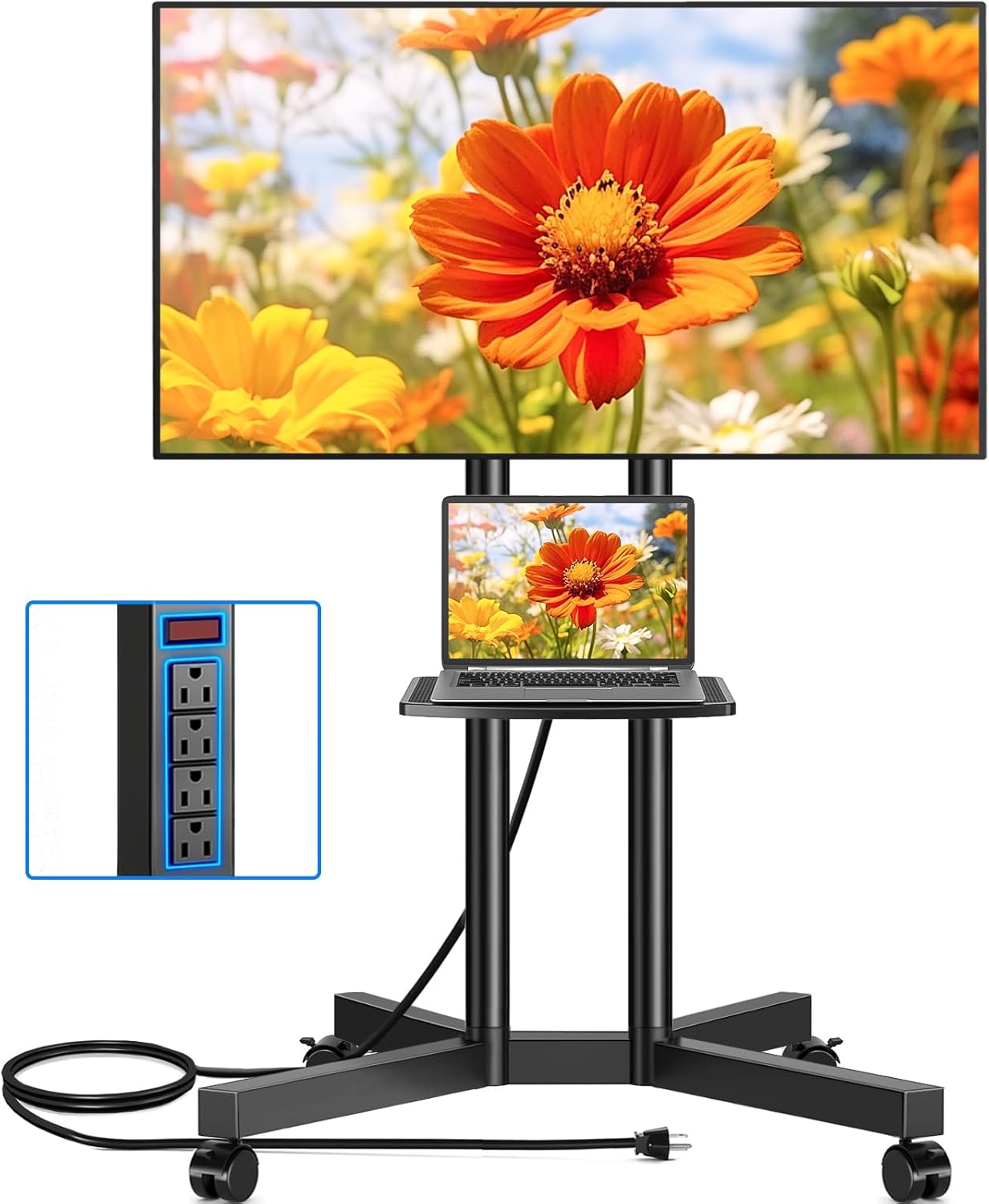
Figure 1: Rfiver Mobile TV Cart with TV and laptop on shelf.
2. Nga Hua o te Hua
- Putanga Hiko Whakauru: Features a power socket with 4 AC outlets and a 6.5-foot 16 AWG pure copper wire (12A capacity) for powering multiple media devices simultaneously. Includes a one-key switch for convenient power control and enhanced safety. The socket's height is adjustable along with the shelf.

Figure 2: Detail of the built-in power strip with 4 AC outlets and a power switch.
- Hototahi Whānui: Compatible with most flat/curved TVs ranging from 32 to 75 inches. Supports VESA sizes from 100x100mm to 400x400mm. The overall load capacity is 88 lbs, and the media shelf can hold up to 22 lbs.

Figure 3: Compatibility details for TV sizes, VESA patterns, and weight limits.
- 15-Taumata Whakaritenga Teitei: Offers 15 levels of height adjustment, with 5 levels for the support pole and 3 for the wall mount. Each level adjusts by 1.97 inches, allowing the TV cart to be set between 44.1 inches and 56 inches for optimal viewnga koki.
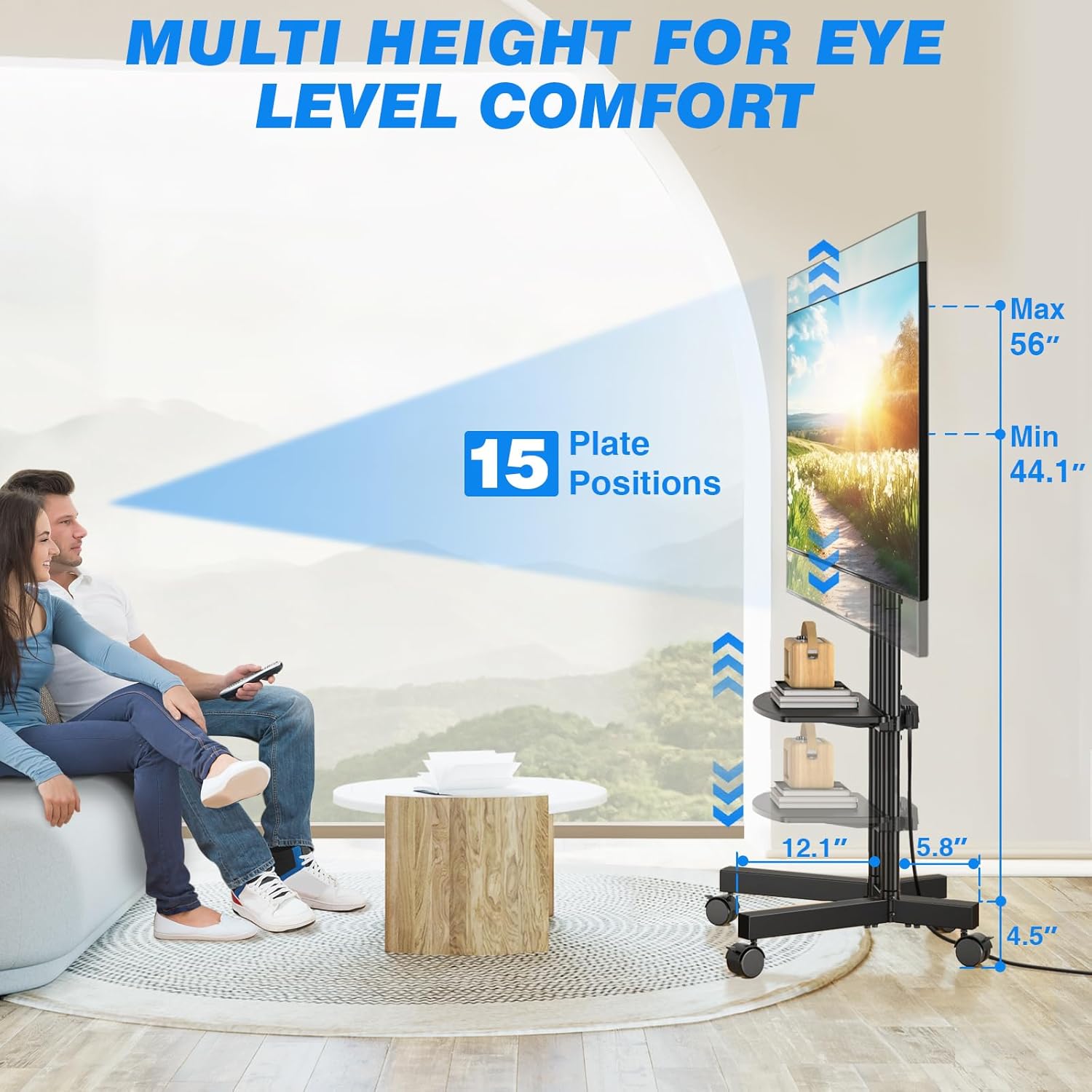
Figure 4: Visual representation of the 15-level height adjustment feature.
- 360° Rotating Lockable Wheels: Equipped with four upgraded 360° rotating silent wheels for smooth and scratch-free movement on various floor types. Wheels include fixed locks to secure the cart in place.
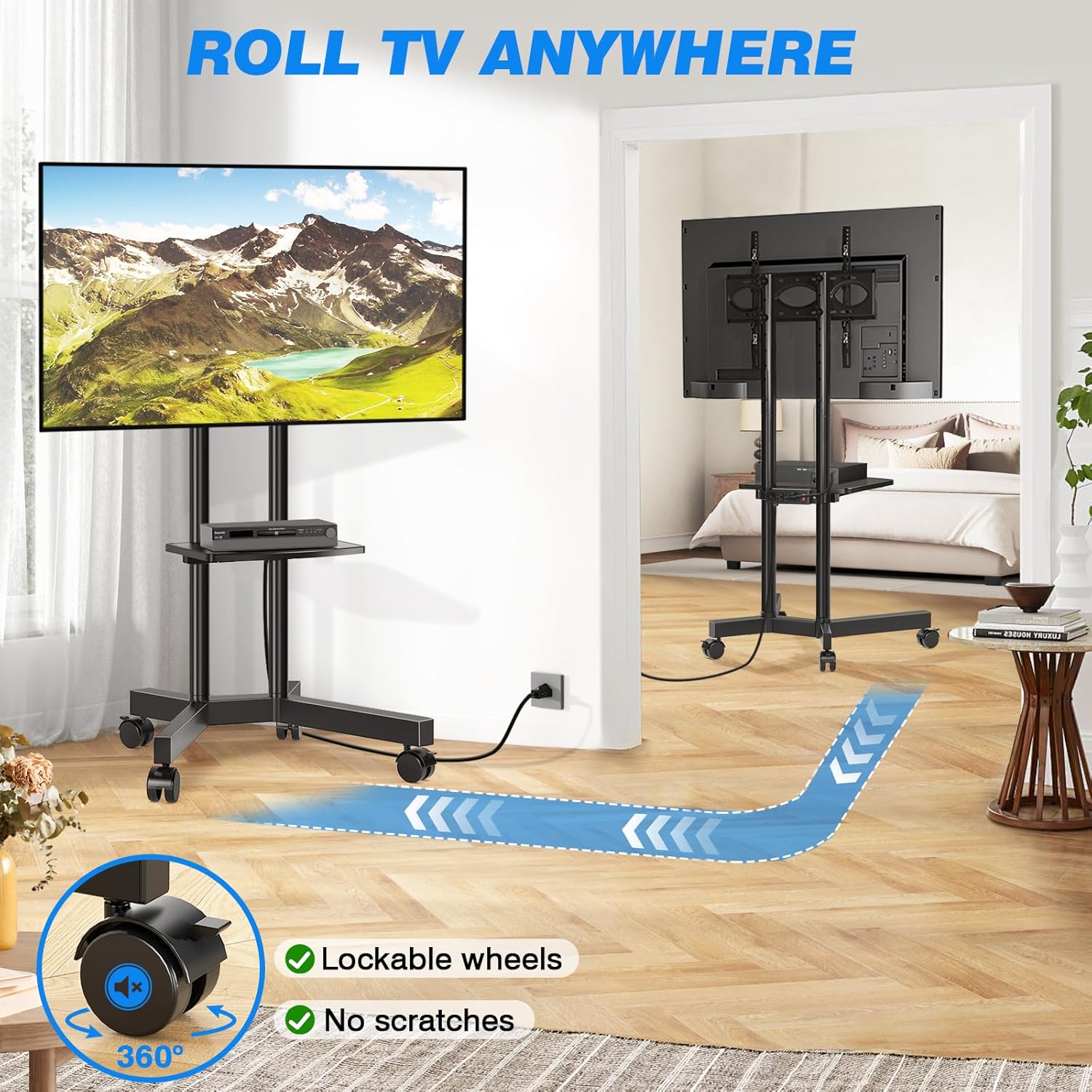
Figure 5: The TV cart's mobility with 360° lockable wheels.
- Sturdy and Safe Structure: Constructed with high-quality thickened steel support tubes and an X-shaped base for enhanced stability and reduced tilting. Features a safety lock design to prevent the TV from falling.
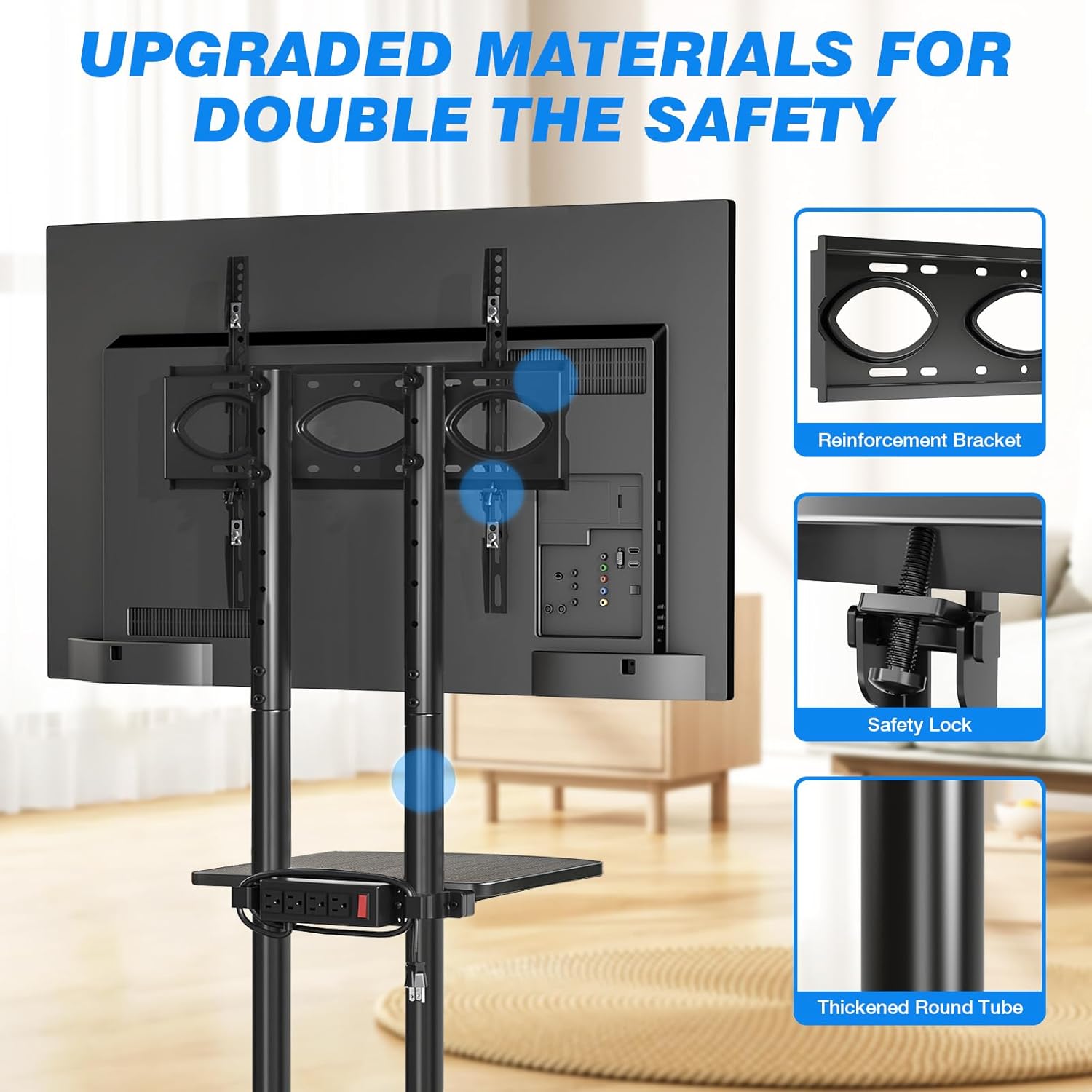
Figure 6: Structural safety features including reinforcement bracket, safety lock, and thickened steel.

Figure 7: The stable X-shaped steel base design.
3. Whakatakotoranga
| Huanga | Taipitopito |
|---|---|
| Waitohu | Rfiver |
| Tau tauira | DMT2007 |
| Taumaha Tūemi | 18.5 pauna |
| Ahu mōkihi | 17.63 x 12.64 x 6.54 inihi |
| Momo Whakaeke | Maunga Papa |
| Momo Nekehanga | Te whakaputa korero |
| Rauemi | Te whakarewa |
| Rahi TV Hototahi Morahi | 75 Inihi |
| Rahi TV Hototahi iti | 32 Inihi |
| Maximum TV Load Capacity | 88 lbs |
| Raukaha Uta Papa | 22 lbs |
| VESA Hototahi | 100x100mm ki te 400x400mm |
| Papata mana | 4 AC Sockets, 125V/12A, 6.5ft cord |
4. Tatūnga me te Runanga
Please follow these steps carefully for safe and proper assembly. It is recommended to have a second person assist with mounting the TV.
4.1 Te Wetewete me te Tautuhi Wahi
- Kia ata whakatuwhera i te kete ka tango i nga waahanga katoa.
- Verify all parts are present against the included parts list (refer to your product's specific parts diagram).
- Tiakina nga waahanga iti mai i nga tamariki.
4.2 Huihuinga turanga
- Attach the four base legs to the central support structure, ensuring they are securely fastened.
- Install the 360° rotating wheels into the designated slots on each leg. Ensure all wheels are firmly seated.
- Verify that the X-shaped base is stable and level.
4.3 Column and Shelf Installation
- Securely attach the vertical support columns to the assembled base.
- Slide the media shelf onto the support columns at your desired height. Tighten the locking mechanism to fix the shelf in place.
- Mount the power strip to the side of the shelf or column using the provided hardware.
4.4 TV Bracket Attachment
- Attach the TV mounting brackets to the back of your television, aligning with the VESA holes. Ensure the brackets are securely tightened.
- With assistance, carefully lift your TV and hook the mounted brackets onto the vertical support columns of the TV cart.
- Engage the safety lock mechanism on the TV brackets to prevent accidental dislodgement.
- Adjust the TV's height on the support columns as desired, then tighten all securing bolts.
5. Nga Tohutohu Whakahaere
5.1 Moving the TV Cart
- To move the cart, ensure all four wheels are unlocked.
- Gently push or pull the cart to your desired location. Avoid sudden jerks or excessive force.
- Once in position, press down on the locking levers on each wheel to secure the cart and prevent accidental movement.
5.2 Te Whakatikatika i te Teitei o te Pouaka Whakaata
- To adjust the TV height, loosen the securing bolts on the TV mounting brackets and the support columns.
- Me te āwhina, āta hiki ake, āta whakaheke rānei i te pouaka whakaata ki te teitei e hiahiatia ana viewte teitei.
- Once the desired height is achieved, securely tighten all securing bolts on the brackets and columns to ensure stability.
5.3 Te whakamahi i te Putanga Hiko
- Plug the power cord from the integrated power strip into a standard wall outlet.
- Connect your media devices (e.g., TV, DVD player, router, laptop) to the AC outlets on the power strip.
- Use the red one-key switch on the power strip to turn power on or off to all connected devices.
6. Tiaki
- Te horoi: Horoia te turanga ki te ngohengohe, damp kakahu. A ape i nga kai horoi me nga whakarewa ka taea te pakaru i te mutunga.
- Takitaki auau: Periodically check all bolts and screws to ensure they remain tight and secure, especially after moving the cart or adjusting the TV height.
- Tiaki wira: Keep the wheels free of debris to ensure smooth operation.
- Tae Hiko: Ensure the power cord is not pinched or damaged. Do not overload the power strip beyond its rated capacity (12A).
7. Te Raru
| Raruraru | Take pea | Rongoā |
|---|---|---|
| TV stand is unstable or wobbly. | Loose connections; uneven floor; TV too heavy or not centered. | Ensure all bolts are securely tightened. Move to a level surface. Verify TV weight is within limits and centered on the mount. |
| Kāore ngā wira e hurihuri maeneene, e raka tika rānei. | Debris in wheels; locking mechanism engaged; damaged wheel. | Clean any debris from the wheels. Ensure locking levers are disengaged for movement. If damaged, contact support for replacement. |
| Power strip is not providing power. | Power switch off; not plugged into wall outlet; overloaded circuit. | Ensure the red power switch on the strip is ON. Verify the main power cord is securely plugged into a working wall outlet. Reduce the number of devices if overloaded. |
| TV cannot be adjusted to desired height. | Securing bolts are too tight; reaching maximum/minimum height. | Loosen securing bolts before attempting adjustment. Check if the desired height is within the 44.1 to 56 inch range. |
8. Pūtāhui me te Tautoko
For warranty information or technical support, please contact Rfiver customer service. Refer to your purchase documentation or the official Rfiver webpaetukutuku mō ngā taipitopito whakapā me ngā tikanga motuhake o te pūtāhui.
Rfiver Official Webpae: Visit the Rfiver Store on Amazon


