1. Kupu Whakataki
This manual provides essential instructions for the safe operation, assembly, and maintenance of your Genesis Designs Smart Full Body Massage Chair, model GM1-W. Please read this manual thoroughly before using the product to ensure proper function and to prevent injury or damage.
The Genesis Designs GM1-W massage chair features 2D SL-track rollers, voice activation, a tablet remote control, 12 auto pre-programmed modes, and 6 massage techniques. It includes a zero-gravity function, built-in Bluetooth speakers, and a USB charging port. Airbag massage is provided for the shoulders, arms, waist, legs, and feet, along with a heated lumbar function and foot rollers.
2. Nga Korero Haumaru Nui
WARNING: To reduce the risk of electric shock, burns, fire, or injury, always follow these basic precautions:
- Read all instructions before using the massage chair.
- Kaua e whakamahi i nga taapiri kaore i te tūtohutia e te kaiwhakanao.
- Wewetehia mai i te putanga ina kore e whakamahia, i mua i te whakakakahu, i te tango ranei i nga waahanga, i mua i te horoi.
- He mea tino nui te tirotiro ina whakamahia ana tenei hua e, i runga, i nga tamariki ranei, i nga waatea, i nga taangata hauā ranei.
- Kaua e mahi i raro i te paraikete, i te urunga ranei. Ka puta te wera nui ka puta he ahi, he ru hiko, he whara tangata ranei.
- Kaua rawa e whakahaere i tenei hua mena he taura pakaru, he mono ranei, mena kaore i te pai te mahi, mena kua taka, kua pakaru ranei, kua taka ki te wai.
- Kia matara atu te taura mai i nga mata wera.
- Kaua e whakamahi i waho.
- Kaua e mahi ki te waahi e whakamahia ana nga hua aerosol (mapu) ki te waahi ranei e tukuna ana te hāora.
- Hei momotu, hurihia nga mana katoa ki te tuunga OFF, ka tango i te mono mai i te putanga.
- Ko tenei taputapu he mea mo te kainga anake.
- Consult a physician before using if you have any medical conditions, are pregnant, or have a pacemaker.
3. Ihirangi mokete
Manatokona kei roto nga waahanga katoa i roto i te kete:
- Genesis Designs GM1-W Massage Chair (Main Unit)
- Papa Mana Mamao
- Waea hiko
- Pukapuka Kaiwhakamahi (tenei tuhinga)

Whakaahua 3.1: "In The Box" diagram illustrating the main chair unit, the tablet remote control, and the power cord.
4. Tatūnga me te Runanga
The Genesis Designs GM1-W massage chair typically arrives partially assembled. Follow these steps for final assembly and placement.
4.1 Te Wetewete me te Whakanoho
- Carefully remove all packaging materials. It is recommended to retain packaging for future transport or service.
- Position the chair in a suitable location. Ensure there is enough space around the chair for full recline, especially for the zero-gravity function. The chair requires approximately 66.33 inches in length when fully reclined.
- Ensure the chair is placed on a level surface.

Whakaahua 4.1: Taha-mua view of the Genesis Designs GM1-W massage chair.

Whakaahua 4.2: Te taha view of the Genesis Designs GM1-W massage chair, illustrating its profile.
4.2 Te Mana Hononga
- Locate the power input port on the back or bottom of the chair.
- Connect the power cord securely to the chair.
- Monohia tetahi pito o te taura hiko ki tetahi putanga hiko kua oti te tu.
5. Nga Tohutohu Whakahaere
Your Genesis Designs GM1-W massage chair offers various functions for a personalized massage experience.
5.1 Mana Whakahaereview
The chair can be controlled via the handheld tablet remote or the quick-start buttons on the right armrest.

Whakaahua 5.1: Handheld tablet remote control interface.

Whakaahua 5.2: Quick-start control panel on the right armrest.
5.2 Starting a Massage
- Sit comfortably in the chair.
- Press the Power button on the tablet remote or the quick-start panel.
- Whiriwhiria tetahi o nga 12 auto pre-programmed modes or choose from 6 massage techniques using the tablet remote.
5.3 Nga Ahuatanga Matua me nga Mahi
- 2D SL-Track Rollers: The massage rollers follow the natural curve of your spine, extending from your neck to your thighs, providing a comprehensive massage.
- Zero Gravity Function: Activate zero gravity mode to recline the chair to a position that elevates your legs above your heart, reducing pressure on your spine and enhancing relaxation. The chair offers multiple recline levels.

Whakaahua 5.3: Illustration of the chair's zero gravity recline positions.
- Whakahohenga reo: Use voice commands to control various functions of the massage chair. Refer to the tablet remote interface for specific voice commands.
- Mirimiri Puke Air: Airbags located in the shoulders, arms, waist, legs, and feet inflate and deflate to provide compression massage. Adjust intensity via the tablet remote.
- Heated Lumbar Function: Activate the heating function for the lower back to soothe muscles and enhance relaxation.
- Foot Massage: The legrest can extend up to 6.25 inches to accommodate different user heights. Foot rollers provide a targeted massage to the soles of your feet.
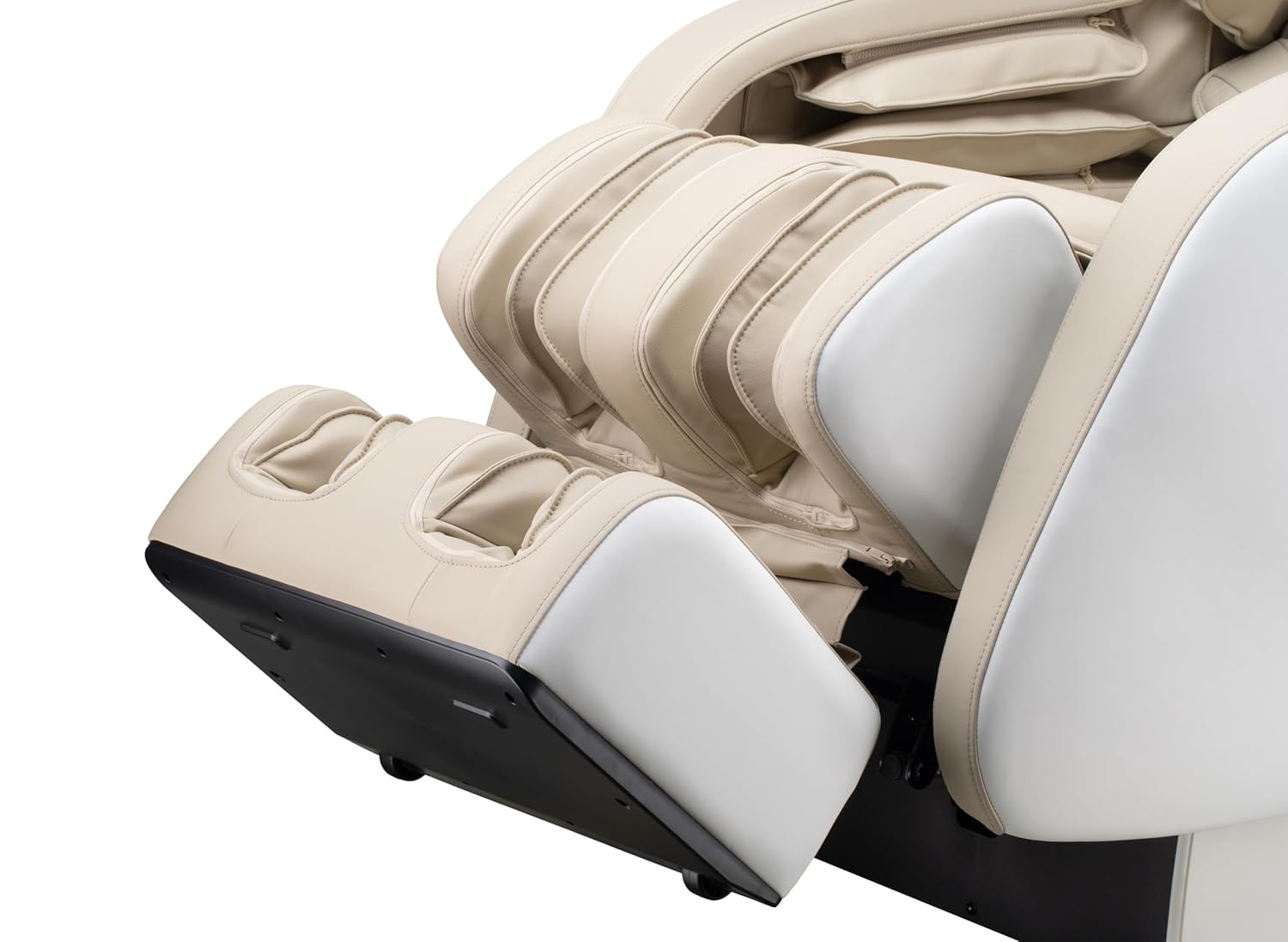
Whakaahua 5.4: Detail of the footrest with integrated foot rollers.
- Tukuoro Nihokikorangi: Connect your personal device via Bluetooth to enjoy audio during your massage.
- Whakahohehia te Nihokikorangi i runga i to taputapu.
- Rapua "Genesis Massage Chair" or similar on your device's Bluetooth settings.
- Whakahoahoa me te hono.
- Tauranga Kaihoko USB: A convenient USB port is available for charging your mobile devices.

Whakaahua 5.5: Ka mutuview of main features and their locations on the chair.
6. Tiaki me te Tiaki
Mā te tiaki tika ka roa te ora me te mahi tino pai o tō tūru mirimiri.
6.1 Te horoi
- Waho: Horoia kia ma ki te ngohengohe, damp cloth. Do not use abrasive cleaners, solvents, or harsh chemicals, as these may damage the upholstery.
- roto: Periodically vacuum any dust or debris from crevices.
- Ensure the chair is unplugged before cleaning.
6.2 Rokiroki
If storing the chair for an extended period, unplug it and cover it to protect from dust and moisture. Store in a cool, dry place.
7. Te Raru
If you encounter issues with your massage chair, refer to the following common problems and solutions:
| Raruraru | Take pea | Rongoā |
|---|---|---|
| Kāore te tūru e whakakā. | Kāore i te mau te mono i te taura hiko. Kāore he hiko mai i te putanga hiko. | Check power cord connection to chair and outlet. Test outlet with another device. |
| Massage rollers are not moving. | Chair is in standby mode. Program not selected. | Ensure chair is powered on. Select an auto program or manual massage technique. |
| Nihokikorangi kaore i te hono. | Bluetooth on device is off. Chair's Bluetooth is off or not discoverable. | Ensure Bluetooth is enabled on your device. Check tablet remote for Bluetooth activation. Try restarting both devices. |
| Voice activation not responding. | Microphone obstructed. Incorrect commands. | Ensure no obstructions near the microphone. Speak clearly and use the specified voice commands. |
| Nga haruru rereke i te wa e mahi ana. | Normal operational sounds. Loose component. | Some motor and airbag sounds are normal. If noise is excessive or new, discontinue use and contact customer support. |
If the problem persists after attempting these solutions, please contact Genesis Designs customer support for assistance.
8. Whakatakotoranga
| Āhuahira | Taipitopito |
|---|---|
| Tau tauira | GM1-W |
| Waitohu | Genesis Designs |
| Massage Track | 2D SL-Track |
| Upright Dimensions (L x W x H) | 57.67 x 29.72 x 44.33 inihi |
| Zero Gravity Dimensions (L x W x H) | 66.33 x 29.72 x 38.77 inihi |
| Taumaha Hua | 165 Pauna |
| Te whanui o te nohoanga | 21 inihi |
| Legrest Extension | Tae atu ki te 6.25 inihi |
| Nga Papatono Mirimiri | 12 Auto Modes, 6 Manual Techniques |
| Nga waahanga motuhake | Voice Activation, Bluetooth Speakers, USB Charging, Heated Lumbar, Foot Rollers |
| Tiwhikete | ETL Tiwhikete |
| UPC / GTIN | 811691028064 |

Whakaahua 8.1: Dimensional diagram of the massage chair.
9. Pūtāhui me te Tautoko Kiritaki
For warranty information, please refer to the documentation included with your purchase or contact Genesis Designs customer support directly. Keep your proof of purchase for warranty claims.
If you require technical assistance, have questions about operation, or need to report a problem, please contact Genesis Designs customer support through their official webpae, nga korero whakapā ranei e whakaratohia ana me to hua.


