1. Kupu Whakataki
The IMIKI FRAME LITE ST2 is a versatile smartwatch designed for daily use, offering a blend of style and functionality. It features a 1.96-inch IPS display, Bluetooth connectivity, and various health monitoring capabilities. This manual provides essential information for operating and maintaining your device.
2. Ihirangi mokete
Tena koa tirohia kei roto katoa nga taonga kei roto i to kete:
- IMIKI FRAME LITE ST2 Smartwatch
- Taura Whakapaa Aukume
- Pukapuka Kaiwhakamahi
3. Pūrere Neke Atuview
Familiarize yourself with the main components of your smartwatch.
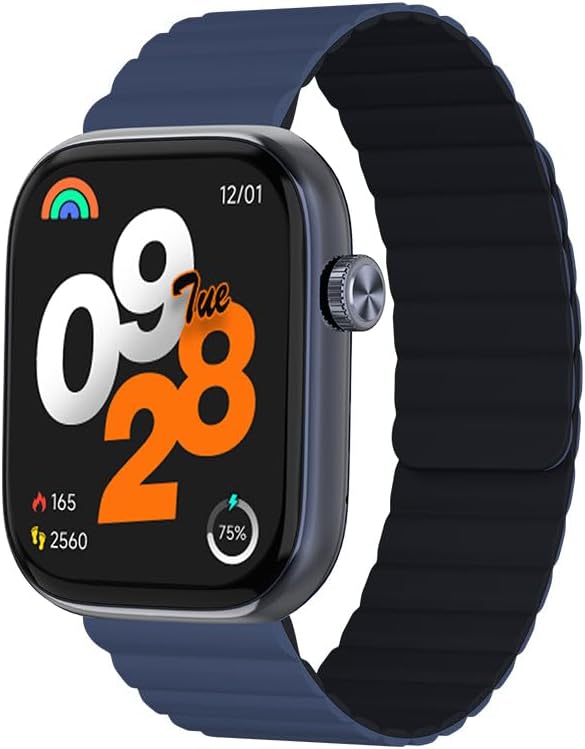
Whakaahua 1: Mua view of the IMIKI FRAME LITE ST2 Smartwatch, displaying the time, date, and activity metrics on its 1.96-inch IPS screen. The watch features a blue case and a blue magnetic strap.

Whakaahua 2: Te taha view of the IMIKI FRAME LITE ST2 Smartwatch, highlighting its slim profile and the integrated crown button for navigation and control.
4. Tatūnga
4.1 Te Whakataki i te Maataki Ataata
Before initial use, fully charge your IMIKI FRAME LITE ST2 Smartwatch.
- Honoa te taura utu aukume ki ngā pūwāhi utu kei muri o te mātaaratanga atamai.
- Monohia te pito USB o te taura ki roto i tētahi urutau hiko USB paerewa (kāore i roto) ki te tauranga USB rānei a te rorohiko.
- The watch display will indicate charging status. A full charge takes approximately 2 hours.
A fully charged 250 mAh battery provides up to 15 days of typical use or 5 days of intensive use.
4.2 Te Tāuta i te Taupānga Hoa
To unlock the full features of your smartwatch, download and install the companion application on your smartphone.
- Scan the QR code provided in the quick start guide or search for the official IMIKI app in the Apple App Store (for iOS) or Google Play Store (for Android).
- Tāutahia te taupānga ki tō waea atamai.
- Whāia ngā tohutohu kei te mata hei waihanga i tētahi pūkete me te whakarite i tō pūmanawa ngaiofile.
4.3 Tauhoa ki to Waea atamai
Ensure Bluetooth is enabled on your smartphone and the smartwatch is sufficiently charged.
- Open the IMIKI companion app on your smartphone.
- Whakatere ki te waahanga 'Pūrere', 'Tāpiri Pūrere' ranei i roto i te taupānga.
- The app will search for available devices. Select 'IMIKI FRAME LITE ST2' from the list.
- Whakaūtia te tono honohono i runga i tō waea atamai me te mātaaratanga atamai mēnā ka akiakihia.
- Once paired, the smartwatch will synchronize data with your phone.
5. Te whakahaere i te Smartwatch
5.1 Whakaterenga Taketake
- Mata Pa: Swipe ki maui, matau, whakarunga, whakararo ranei hei whakatere i nga tahua me nga whakamohiotanga. Pato hei kowhiri i nga mea.
- Patene Taha/Kaona: Press to wake the screen, return to the home screen, or access the app list. Rotate (if applicable) to scroll through lists.
5.2 Whakahaere Waea
With Bluetooth 5.3 connectivity, you can manage calls directly from your smartwatch when paired with your smartphone.
- Whakautu Waea: Tap the green icon on the watch screen when an incoming call is displayed.
- Whakakahore Waea: Patohia te ata whero hei whakakore i te waea taumai.
- Kaiawhina Reo: Access your smartphone's voice assistant directly from the watch for hands-free commands.
5.3 Health and Fitness Monitoring
The IMIKI FRAME LITE ST2 is equipped with sensors to track your health and fitness activities.
- Te Arotake i te Ngakau: The optical sensor continuously monitors your heart rate. View ngā raraunga wā-tūturu i runga i te mātaaratanga, i roto rānei i te taupānga.
- Te Inenga Hauora Toto (SpO2): Measure your blood oxygen saturation levels. Ensure the watch is worn snugly on your wrist for accurate readings.
- Aratau Mahi: Choose from 105 supported workout modes to track specific activities. The watch records statistics such as duration, calories burned, and heart rate during exercise.
- Aroturuki Moe: Monitor your sleep patterns, including deep sleep, light sleep, and wake times.
5.4 Whakaritenga
Personalize your smartwatch experience through the companion app.
- Mata Mata: Select from a variety of watch faces or create custom ones using the app.
- Tautuhinga Whakamōhiotanga: Manage which app notifications appear on your smartwatch.
6. Tiaki
6.1 Te horoi
Regular cleaning helps maintain the smartwatch's appearance and functionality.
- Horoia te mata me te tinana o te mātaaratanga ki te kakahu ngohengohe, kore-miro.
- Mo te paru maro, paku dampen te kakahu ki te wai. A ape i te whakamahi i nga matū kino, i nga taonga abrasive ranei.
- Horoia ngā hononga utu i ia wā, i ia wā, kia tika ai te utu.
6.2 Atete Wai
The IMIKI FRAME LITE ST2 has an IP68 water resistance rating, meaning it is protected against dust ingress and can withstand immersion in water up to 1.5 meters for 30 minutes. It is suitable for daily use, such as hand washing or light rain. However, it is not recommended for swimming, diving, or exposure to high-pressure water.
6.3 Rokiroki
Mena kāore e whakamahia ana mō te wā roa, rongoatia te mātaaratanga atamai ki te wāhi hauhautanga, maroke hoki. Me whakarite kei te kaha te pākahiko kia kore ai e mimiti rawa.
7. Te Raru
Mena ka pāngia koe e ngā raruraru me tō mataarataki atamai, tirohia ngā otinga noa e whai ake nei:
- Kia mataara kia kaua e huri: Me whakarite kua whakakiia te mataaratanga. Honoa ki te rihi mo te iti rawa 10 meneti.
- Kaore e taea te hono ki te waea atamai:
- Me mohio kei te whakahohea te Nihokikorangi ki to waea.
- Me mohio kei roto te mataaratanga i to waea.
- Tīmataria anō te maataki atamai me to waea atamai.
- Whakawetohia te keteroki Nihokikorangi i runga i to waea (mehemea e tika ana).
- Raraunga hauora hē: Me whakarite kia mau te wati ki runga i to ringaringa, kia kaua e piri rawa, kia kore rawa ranei. Horoia te pūoko kei muri o te mataaratanga.
- Ko nga whakamohiotanga kaore e puta: Check notification settings in the companion app and on your smartphone. Ensure the app is running in the background.
- Karekau te mata i te aro: Try restarting the smartwatch by pressing and holding the side button for several seconds.
8. Whakatakotoranga
| Āhuahira | Whakatakotoranga |
|---|---|
| Waitohu | IMIKI |
| Ingoa Tauira | IMIKI FRAME LITE ST2 |
| Rahi Mata | 1.96 Inihi |
| Momo Whakaatu | IPS |
| Hangarau Hononga | Nihokikorangi 5.3 |
| Pūrere Hototahi | Waea atamai (Android me iOS) |
| Pūhiko Raukaha | 250 mah |
| Te Whakamahinga Tikanga Te Ora Pūhiko | Tae atu ki te 15 ra |
| Intensive Usage Battery Life | Tae atu ki te 5 ra |
| Waa Whakatau | Tata ki te 2 haora |
| Whakatauranga Atete Wai | IP68 |
| Te Aroturuki Hauora | Blood Oxygen, Heart Rate |
| Aratau Mahi | 105 |
| Momo here | aukume |
9. Pūtāhui me te Tautoko
For warranty information and customer support, please refer to the warranty card included in your product packaging or visit the official IMIKI webpae. Puritia to riiki hoko hei tohu mo te hoko.
If you require further assistance or have questions not covered in this manual, please contact IMIKI customer service through their official channels.


