1. Kupu Whakataki
The KEF Q11 Meta is a flagship 3-way floorstanding speaker designed for immersive audio performance in larger rooms and home theater environments. It incorporates advanced acoustic technologies to deliver detailed, powerful, and accurate sound reproduction.
Āhuatanga matua:
- Hangarau Ngongo Rauemi-Mate (MAT): Absorbs 99% of unwanted sound from the rear of the driver, reducing distortion and enhancing sound purity.
- Huinga Atekōkiri Uni-Q o te Whakatipuranga 12: Acts as a single point source, dispersing sound evenly for a cohesive and immersive soundstage with improved clarity.
- Whakawhitinga Whakamahinga: Ensures seamless integration of all speaker components for optimal performance.
- Hybrid Aluminum Bass Drivers: Three 6.5-inch drivers provide stiff, piston-like movement for precise and agile bass response.
- Hoahoa o naianei: Minimalist aesthetic with a satin finish, available in Walnut, Satin Black, and Satin White.

Whakaahua 1: Mua view of the KEF Q11 Meta Floorstanding Speaker in Walnut. This image shows the speaker's elegant design and driver configuration.
2. He aha kei roto i te Pouaka
Carefully unpack the speaker and ensure all components are present. Retain the packaging for future transport or storage.
- KEF Q11 Meta Floorstanding Speaker (Walnut, Each)
- Kaari Raati
3. Tatūnga
3.1 Te Whakanohonga Kaikorero
He mea nui te whakanoho pai o te kaikorero kia whiwhi ai i te kounga oro pai rawa atu. Whakaarohia ēnei aratohu:
- Tatūnga Tirohanga: Whakatakotoria ngā kaikōrero kia ōrite te tawhiti mai i tō tūranga whakarongo matua, kia hanga ai he tapatoru ōrite.
- Tawhiti mai i nga pakitara: Experiment with placing the speakers away from the front and side walls to minimize bass reflections and improve imaging. A good starting point is 1-3 feet from the rear wall and 2-4 feet from side walls.
- Toe-roto: Angle the speakers slightly inward towards the listening position. Adjusting the toe-in can affect the soundstage width and focus.
- Acoustics Rūma: Soft furnishings, carpets, and curtains can help absorb sound and reduce unwanted reflections.

Whakaahua 2: Example of KEF Q11 Meta speakers integrated into a living room environment. Proper placement enhances the listening experience.
3.2 Te hono atu ki tētahi Ampkaikawe
The Q11 Meta speakers connect to your ampte kaiwhakaora mā te whakamahi i te waea kaikorero. Kia tino mohio koe ampKa wetohia te riipene i mua i te hono atu.
- Whakaritea te Waea Pūoro: Strip approximately 1/2 inch (12mm) of insulation from the ends of your speaker wires. Twist the bare strands tightly.
- Hono atu ki te Kaikōrero: Honoa te pūrua pai (+) (whero) o te kaikorero ki te pūrua pai (+) o tō pūoro amplifier. Connect the negative (-) terminal (black) on the speaker to the negative (-) terminal on your amplifier. Maintain correct polarity for both speakers.
- Hononga Haumaru: Ensure all connections are tight to prevent signal loss or short circuits.
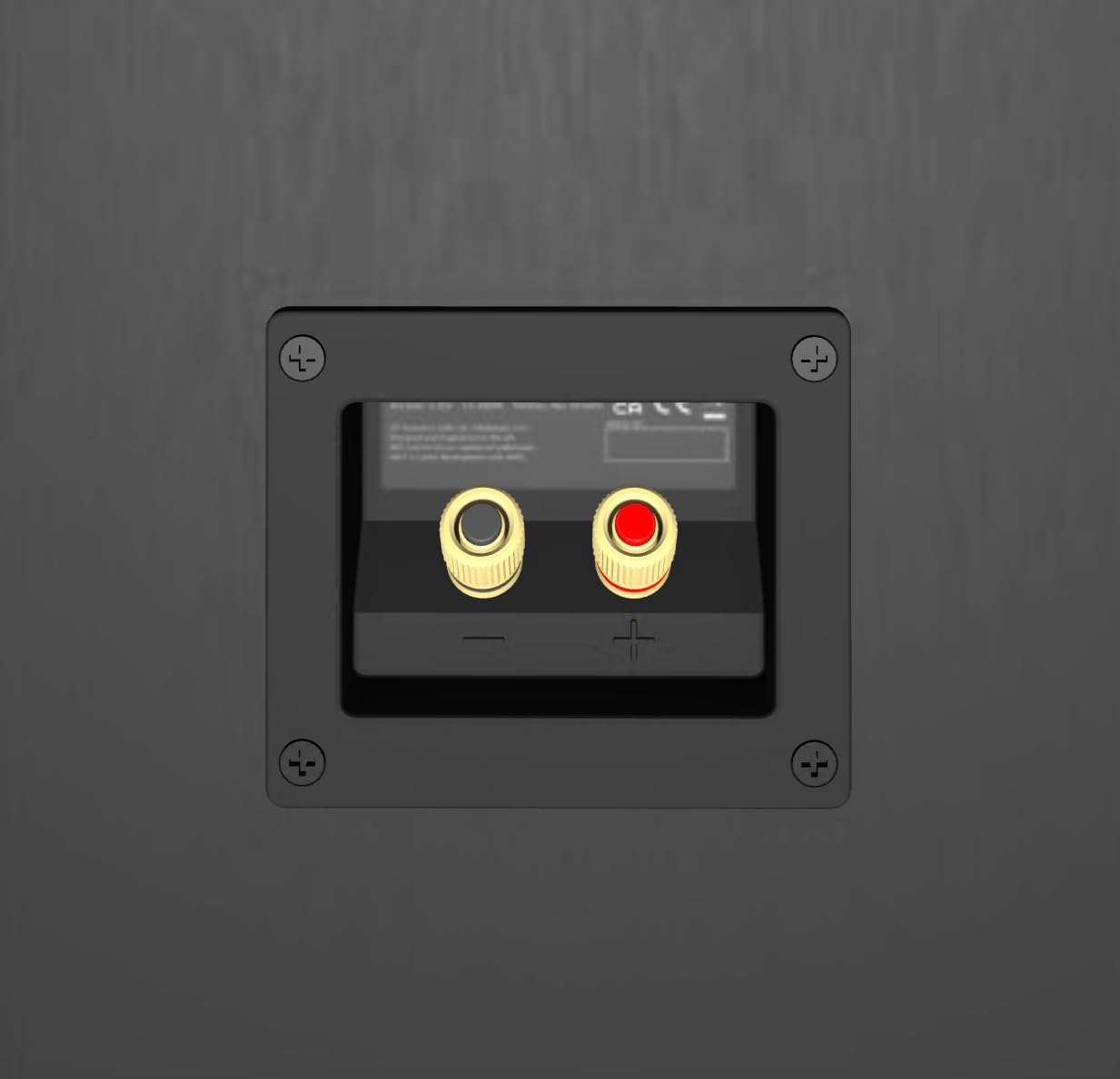
Whakaahua 3: Whakamuri view of the KEF Q11 Meta speaker, illustrating the speaker wire binding posts for amphononga hononga.
4. Nga Tohutohu Whakahaere
4.1 Whakanui-a-Tamatanga
After connecting your speakers, turn on your amplifier and select the appropriate input source. Start with the volume at a low level and gradually increase it.
4.2 Wā Whakatūpato
Like many high-fidelity speakers, the KEF Q11 Meta may benefit from a break-in period. This typically involves playing music at moderate volumes for several hours (e.g., 50-100 hours). During this time, the drivers will loosen up, and the sound quality may improve, becoming more open and refined.
4.3 Volume Control and Listening Levels
Always adjust the volume from your amplifier or source component. Avoid excessively high listening levels that can cause distortion or damage to the speakers and your hearing.
5. Tiaki
5.1 Te Whakapai i te Rūnanga Kāwanatanga
Wipe the speaker cabinet with a soft, dry, lint-free cloth. For stubborn marks, a slightly damp cloth can be used, followed immediately by a dry cloth. Avoid abrasive cleaners, solvents, or polishes, as these can damage the finish.
5.2 Cleaning the Drivers and Grilles
The Uni-Q driver and bass drivers should be cleaned gently with a soft brush or a dry, lint-free cloth. Avoid applying pressure to the cones. If your speakers include grilles, they can be carefully removed and dusted. Ensure they are securely reattached after cleaning.
6. Te Raru
If you encounter issues with your KEF Q11 Meta speakers, refer to the following common troubleshooting steps:
- Kore Oro:
- Tirohia nga hononga waea korero katoa i te kaikorero me te amplifier ends for proper contact and polarity.
- Me whakarite te ampKa whakakāhia te rama, ā, ka tīpakohia te pūtake tāuru tika.
- Kia mōhio kei te whakaitihia te oro, kei te whakaitihia rānei te rahi o te oro.
- Oro korikori:
- Whakaitihia te taumata oro i runga i to ampkaikawe
- Check speaker wire connections for any loose strands that might be causing a short circuit.
- Whakaritehia to ampkāore te lifier i te peia rawatia, i te tapatapahia rānei.
- Uneven Sound (one speaker louder/softer):
- Verify that both speakers are connected with correct polarity.
- Tirohia to amplifier's balance settings.
- Ensure speakers are placed symmetrically in the room.
- Te ngunguru, te haruru rānei:
- Ensure all audio cables are securely connected and not running parallel to power cables.
- Try connecting your audio equipment to a different power outlet or a power conditioner.
If the issue persists after following these steps, consult the KEF support resources or contact customer service.
7. Whakatakotoranga
Detailed technical specifications for the KEF Q11 Meta Floorstanding Speaker.
| Āhuahira | Whakatakotoranga |
|---|---|
| Momo Whakaeke | Papa Tu Tu |
| Rauemi | Konumohe |
| Ingoa Tauira | Q11 Meta |
| Momo Kaikorero | Pourewa |
| Nga Whakamahinga Manakohia | For Surround Sound Systems, For Music Players, For Televisions |
| Pūrere Hototahi | Television, Home Theater, Desktop, Laptop, Smartphone, Tablet, MP3 Player, Gaming Console |
| Tatau Waeine | 1.0 Tatau |
| Whirihoranga Hongere oro a tawhio noa | 2.0 |
| Tae | Walnut |
| Nga Waahanga kei roto | Kaari Raati |
| Rahi Hua (D x W x H) | 15"D x 8.3"W x 41.8"H |
| Taumaha Tūemi | 28.9 Kirokaramu (63.6 pauna) |
| Te aukati | 4 Ohm |
| He parewai | He teka |
| Momo Rarangi | He iti |
| Te maha o nga mea | 1 |
| Rahi Kaioro | 1061 Mirimita |
| Puna Mana | Hiko Hiko |
| Woofer Diamita | 6.5 Inihi |
| Momo Atekōkiri Ororongo | Atekōkiri Ranu |
| Nga Whakamahinga Motuhake mo te Hua | Home Theatre, Music Listening |
| UPC | 637203218996 |
| Kāhua | Q11 Meta Floorstanding |
| Kaihanga | KEF |
| Hanga | tapawhā tapawhā |
| Kaikorero Te Mana Putanga Morahi | 225 Watts |
| Whakautu auau | 44 KHz |
| Hangarau Hononga | Waea Korero |
| Aratau Putanga Ororongo | Tirooro |
8. Pūtāhui me te Tautoko
The KEF Q11 Meta Floorstanding Speaker comes with a limited warranty. Please refer to the included Warranty Card for specific terms and conditions. For further assistance, technical support, or to register your product, please visit the official KEF webpaetukutuku, whakapā atu ranei ki ta raatau ratonga kaihoko.
Ka kitea e koe etahi atu korero me nga rauemi tautoko i runga i te KEF Brand Store.
9. Hua Ataata
Video 1: KEF Q Series with Metamaterial. This video provides an overview of the KEF Q Series speakers, highlighting key technologies like Metamaterial Absorption Technology and the Uni-Q driver array.


