1. Kupu Whakataki
This manual provides instructions for the safe and effective use of your BAOFENG BL-W31 Li-ion Battery. This battery is designed for use with BAOFENG W31, WP31, and MP31 two-way radios.
The BL-W31 battery features a 1500mAh capacity and USB-C charging capability, ensuring reliable power for your communication needs.
2. Nga korero haumaru
Nga Tohutohu Haumaru Nui: To prevent damage, injury, or fire, observe the following precautions:
- Do not remove the plastic covering from the battery pack.
- Kaua e wetewete i te pākahiko.
- Kaua e maka te pākahiko ki te ahi.
- Kaua e whakarereke, kaua e utu te pākahiko ki nga waahi morearea.
- Kaua e porotiti-poto nga pito.
The battery incorporates advanced protection features including low heat dissipation, overcurrent protection, over-temperature protection, and PCM short circuit protection to enhance safety and longevity.
Must be recycled or disposed of properly. Recycling facilities may not exist in all areas.

This image displays the warning label on the BL-W31 battery, detailing critical safety precautions such as not disassembling or short-circuiting the battery, and proper disposal instructions.
3. Ihirangi mokete
Kei roto i to kete:
- 2 x BAOFENG BL-W31 Batteries
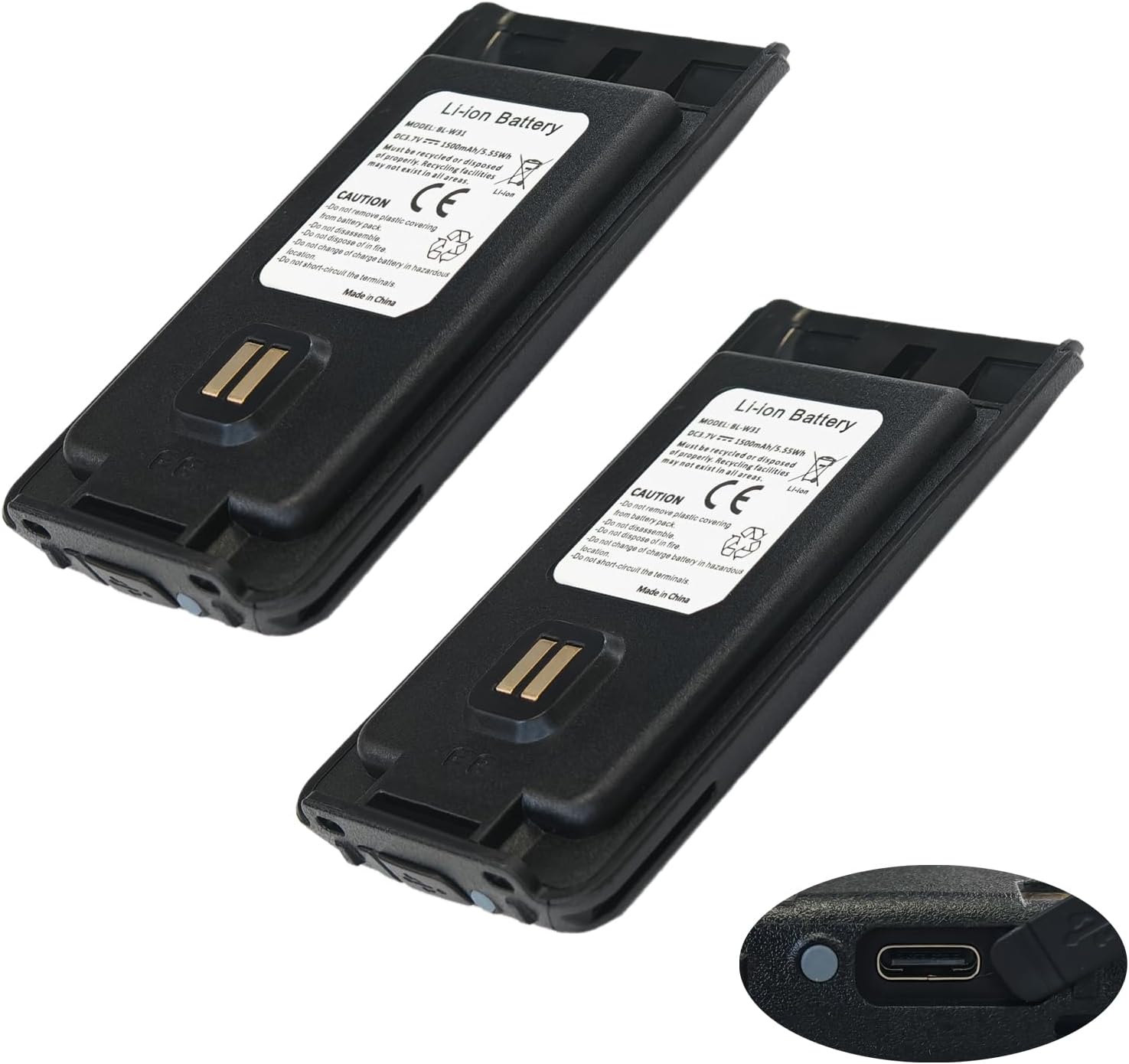
This image shows two BL-W31 batteries, highlighting their compact design and the integrated USB-C charging port on the bottom right of one battery.
4. Tatūnga
Tāuta i te Pūhiko:
- Ensure your radio is powered off.
- Align the battery with the battery compartment on your compatible BAOFENG radio (W31, WP31, or MP31).
- Kiriatahia te pākahiko ki te waahi kia paoho pai.
- Verify the battery is firmly seated before powering on the radio.
5. Mahi
Te Whakataki i te Pūhiko:
The BL-W31 battery features a convenient USB-C charging port.
- Locate the USB-C port on the battery.
- Connect a standard USB-C charging cable to the battery port.
- Honoa te pito kē atu o te taura USB-C ki tētahi pūtake hiko USB hototahi (hei tauira, te urutau pakitara, te tauranga USB rorohiko).
- The battery's indicator light will show charging status (refer to radio manual for specific light indications if charging via radio, or battery itself if it has one).
- Kia oti te whakakii, momotuhia te taura utu.

Ko tenei whakaahua e whakarato ana i nga korero taipitopito view of the BL-W31 battery's bottom, clearly showing the USB-C charging port and two small LED indicator lights, which typically display charging status.
6. Tiaki
Te Tiaki me te Rokiroki Pūhiko:
- Whakaorangia te pākahiko ki te waahi makariri, maroke kia matara atu i te ra me te wera nui.
- Avoid fully discharging the battery for extended periods. For long-term storage, charge the battery to approximately 50-70%.
- Clean the battery terminals periodically with a dry cloth to ensure good contact with the radio.
Te tukunga:
Dispose of the battery according to local regulations. Do not dispose of with household waste. Look for designated battery recycling facilities.
7. Te Raru
Nga take noa:
- Karekau te pākahiko e utu ana: Ensure the USB-C cable and power source are functioning correctly. Check for debris in the USB-C port.
- Battery not powering radio: Verify the battery is correctly installed and fully charged. Clean battery contacts on both the battery and the radio.
- Shortened battery life: This may indicate the battery is nearing the end of its lifespan. Ensure proper charging practices are followed.
If problems persist, contact BAOFENG customer support.
8. Whakatakotoranga
Whakatakotoranga Hua:
| Tau tauira | BL-W31 |
| Momo Pūhiko | Lithium Ion |
| Pūhiko Raukaha | 1500 mah |
| Voltage | 3.7V |
| Pūngao | 5.55 Wh |
| Irirangi Hototahi | BAOFENG W31, WP31, MP31 |
| Tauranga Whakatau | USB-C |
| Taumaha Tūemi | 3.7 hekere |
| Ahu mōkihi | 4.72 x 4.69 x 1.06 inihi |
9. Tautoko
For further assistance, technical support, or inquiries regarding compatible models, please contact BAOFENG customer service.
Refer to the official BAOFENG webpae mo nga korero whakapā.


