LEKATO B0DK2R3P8P

LEKATO Mechanical Metronome User Manual

Model: B0DK2R3P8P

Waitohu: LEKATO

1. Kupu Whakataki

The LEKATO Mechanical Metronome is a precision instrument designed to help musicians maintain accurate tempo and rhythm during practice. Featuring a classic pyramid design and durable metal movement, it is suitable for a wide range of instruments and skill levels.

Āhuatanga matua:

  • Hoahoa Tauhira: Traditional pyramid shape with an ash wood pattern for an elegant aesthetic.
  • Accurate Timing: Ensures precise tempo with a tolerance of only 0.04%.
  • Durable Metal Movement: High-hardness, precision all-metal mechanism for long-lasting performance without batteries.
  • Versatile Rhythm Patterns: Offers tempo range from 40 to 208 beats per minute (BPM) and rhythm patterns including 2, 3, 4, 6, and 0 (no bell).
  • Ideal for All Skill Levels: A valuable practice tool for beginners and experienced musicians alike.
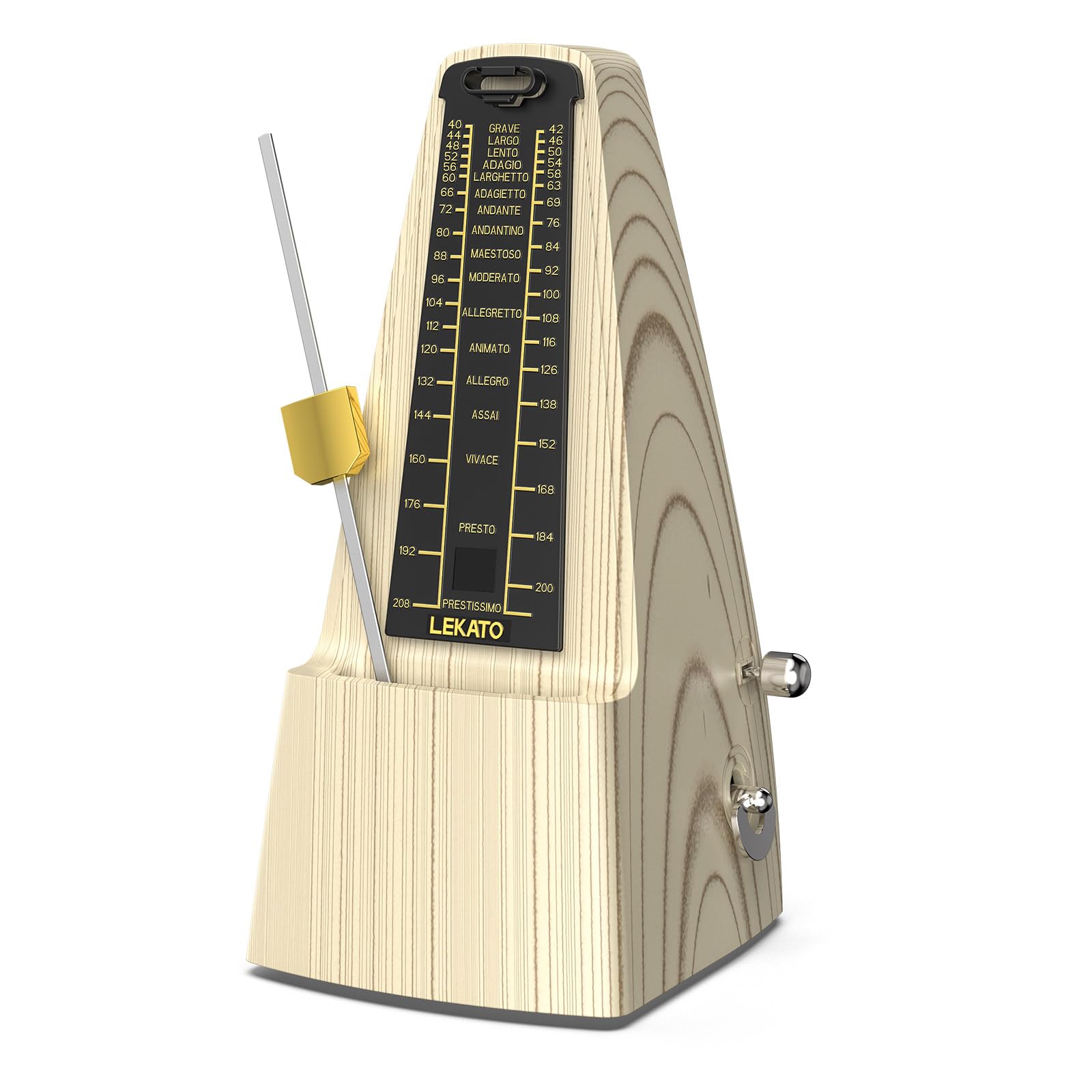
LEKATO Mechanical Metronome, front view.
Figure 1: LEKATO Mechanical Metronome, front view. This image shows the classic pyramid design of the metronome with its pendulum and tempo scale.
Ka mutuview of LEKATO Mechanical Metronome features: no battery, sturdy spring, metal movement, precision, precise beat, classic style, sufficient sound volume.
Whakaatu 2: Neke Atuview of LEKATO Mechanical Metronome features, highlighting its battery-free operation, sturdy spring, metal movement, precision, precise beat, classic style, and sufficient sound volume.

2. Tatūnga me te Whakamahi Tuatahi

2.1 Te Wetewete me te Tirotiro Tuatahi

Carefully remove the metronome from its packaging. Inspect for any visible damage. Ensure all components, including the dust cover and pendulum, are present.

2.2 Winding the Metronome

The LEKATO Mechanical Metronome is spring-wound and does not require batteries. To wind it, locate the winding key on the side of the unit. Turn the key clockwise until you feel resistance. Do not overwind.

2.3 Adjusting Tempo

The tempo is adjusted by sliding the pendulum weight up or down the pendulum rod. Slide the weight up for a slower tempo (fewer BPM) and down for a faster tempo (more BPM). Align the top edge of the weight with the desired BPM marking on the scale.

2.4 Setting Rhythm Patterns

The metronome features a beat selector to choose different rhythm patterns (e.g., 2/4, 3/4, 4/4, 6/8). This selector is typically a small lever or knob on the side of the metronome. Set it to '0' for no bell accent, or to the desired beat count for an audible accent on the first beat of each measure.

2.5 Timata me te Whakamutu

To start the metronome, gently push the pendulum to one side and release it. To stop, gently catch the pendulum and secure it in its resting position, often by sliding the pendulum weight to the top of the rod or engaging a brake mechanism if present.

Step-by-step guide on how to use the metronome: remove cover, rotate clockwork, select beat, adjust pendulum weight, move out pendulum, push pendulum to left and release.
Figure 3: Step-by-step guide on how to prepare and use the metronome, including removing the cover, winding the clockwork, selecting the beat, adjusting the pendulum weight, and starting the pendulum swing.
Te taha view of LEKATO Mechanical Metronome with dimensions: 25cm/9.8in height, 10cm/3.9in depth, 11.5cm/4.5in width.
Whakaahua 4: Taha view of the LEKATO Mechanical Metronome, illustrating its physical dimensions: approximately 25cm (9.8 inches) in height, 10cm (3.9 inches) in depth, and 11.5cm (4.5 inches) in width.
Close-up of the metronome's metal movement, highlighting its durability and precision.
Whakaahua 5: Whakatata view of the metronome's internal metal movement, emphasizing its robust construction for durability and precise rhythm generation.
Diagram illustrating the 5 rhythm patterns (2, 3, 4, 6, 0) available on the metronome.
Figure 6: Diagram showing the five selectable rhythm patterns (2, 3, 4, 6, and 0 for no bell) on the metronome, allowing for diverse musical applications.
Labeled diagram of the metronome's components: pendulum hook, pendulum weight, meter plate, beat selector handle, pendulum, clockwork.
Figure 7: Labeled diagram detailing the various parts of the metronome, including the pendulum hook, pendulum weight, meter plate, beat selector handle, pendulum, and internal clockwork mechanism.

3. Nga Tohutohu Whakahaere

3.1 Te Whakarerekētanga o te Tere

To change the tempo, simply slide the brass weight up or down the pendulum rod. The scale on the metronome indicates the beats per minute (BPM). Move the weight up for slower tempos and down for faster tempos. Ensure the top edge of the weight aligns with the desired BPM mark.

3.2 Beat Selection

Use the beat selector switch, usually located on the side of the metronome, to choose your desired beat accent. Options typically include 0 (no accent), 2, 3, 4, and 6 beats. This allows the metronome to produce an audible bell sound on the first beat of each measure, helping you keep track of time signatures.

Taipitopito view of the metronome's dial plate for tempo (Largo 40-60 bpm to Prestissimo 168-208 bpm) and beat selector (0, 2, 3, 4, 6 beats).
Whakaatu 8: Taipitopito view of the metronome's dial plate, showing tempo markings from Largo (40-60 bpm) to Prestissimo (168-208 bpm), and the beat selector for choosing rhythm patterns (0, 2, 3, 4, 6 beats).

3.3 Whakaaturanga Ataata

Video 1: This video demonstrates the general use of a mechanical metronome, including winding, setting tempo, and observing its operation for various instruments like piano and guitar.

4. Tiaki

Proper care ensures the longevity and accuracy of your metronome.

  • Pupuri Ma: Regularly wipe the metronome with a soft, dry cloth to remove dust and fingerprints.
  • Whakamahia te Uwhi Puehu: Always place the provided dust cover over the metronome when not in use to protect it from dust and accidental damage.
  • Aukati i nga Tikanga Tino: Do not expose the metronome to extreme temperatures, humidity, or direct sunlight, as this can affect its internal mechanism and wood finish.
  • Te hapai me te tiaki: Avoid dropping or subjecting the metronome to strong impacts.
LEKATO Mechanical Metronome with its protective dust cover in place.
Figure 9: The LEKATO Mechanical Metronome shown with its clear protective dust cover, emphasizing the importance of covering the unit when not in use to prevent dust accumulation and damage.

5. Te Raru

  • Metronome Not Ticking: Ensure the unit is fully wound. Check that the pendulum is not obstructed and is free to swing.
  • Inaccurate Tempo: Verify that the pendulum weight is correctly aligned with the desired BPM mark on the scale. Ensure the metronome is placed on a flat, stable surface.
  • Bell Not Ringing: Check the beat selector switch to ensure it is set to a number other than '0'. If the issue persists, the internal bell mechanism may require inspection.
  • Haruru rerekee: If the metronome produces grinding or unusual noises, stop use immediately and contact customer support. Do not attempt to force any parts.

6. Whakatakotoranga Hua

ĀhuahiraWhakatakotoranga
Taumaha Tūemi1.14 pauna
Hunga Hua4.72 x 9.46 x 4.33 inihi
Ingoa TaeLight Wood Metal Move
Momo RawaMetal Movement
Awhe Tempo40-208 BPM
Ngā Tauira Rhythm0, 2, 3, 4, 6

7. Pūtāhui me te Tautoko

For warranty information, technical support, or any questions regarding your LEKATO Mechanical Metronome, please refer to the contact information provided with your purchase or visit the official LEKATO webpae. Puritia to riirii hoko hei tohu mo te hoko mo nga kereme whakamana.

Tuhinga e pa ana - B0DK2R3P8P

Preview LEKATO M65 Metronome Pukapuka Kaiwhakamahi: Nga waahanga, te mahi, me nga korero
He pukapuka whakamahi matawhānui mo te LEKATO M65 mini metronome. Akohia nga ahuatanga, me pehea te whakahaere, nga whakaritenga, me nga panui nui. Kei roto nga korero mo nga momo manawataki, nga tautuhinga oro, oro patu, me te whakaputa oro.
Preview LEKATO WS-80 Ahokore Guitar System Owner's Manual
Tirohia te pukapuka a te rangatira a LEKATO WS-80 Wireless Guitar System. Akohia me pehea te whakarite, te whakamahi, me te raru i tenei kaiwhakawhiti ahokore 2.4GHz ISM me te kaikawe mo nga kita hiko, neke atu i te 8 haora o te ora o te pākahiko me te mono hurihuri 220-tohu. Arotauhia to tatūnga kita ki tenei otinga ahokore pono me te kawe.
Preview Paneoro Kītā LEKATO PA-1 AmpA-ringa Manual
Pukapuka kaiwhakamahi mō te Paneoro Kītā Hiko LEKATO PA-1 AmpPūoko Nihokikorangi. Kei roto ko ngā mōhiohio tatūnga, whakahaere, me te rapurongoā.
Preview LEKATO Guitar Looper Series Firmware Update Guide
Nga tohutohu mo te whakahou i te firmware i runga i to LEKATO Guitar Looper Series hei whakatau i nga take haruru tohu. Kei roto nga hikoinga mo te tango i te taupānga CubeSuite me te mahi i te whakamohoatanga OTA.
Preview Pukapuka Kaiwhakamahi mō te Looper Pro Guitar Effector - LEKATO
He pukapuka kaiwhakamahi whānui mō te LEKATO Looper Pro Guitar Effector. Akohia tōna kounga oro 48K/24bit, te kaha hopu oro 40-meneti, 9 ngā koropiko, he pūoro kua hangaia ki roto, he hononga USB mō te WAV. file kawemai/kaweake, me ngā tohutohu whakahaere taipitopito. He pai mō ngā kaitākaro kītā e rapu ana i ngā pūkenga whakatangi porowhita ngaio.
Preview LEKATO TANK-G Guitar Effect Processor Manual's Owner's Manual
Te pukapuka a te rangatira mo te LEKATO TANK-G Guitar Effect Processor, e whakaatu ana i ona ahuatanga, mahi, me te mahi. Kei roto ko nga korero mo nga tatūkē, te aratau ora, nga waahanga paanga, nga tawhā hangarau, me nga tango rorohiko.