Ka mutu te huaview
The Karma Dual Lightning Microphone is a wireless audio solution designed for vloggers and content creators. It features two wireless microphones and a Lightning receiver, enabling high-quality audio capture directly to compatible Apple devices.
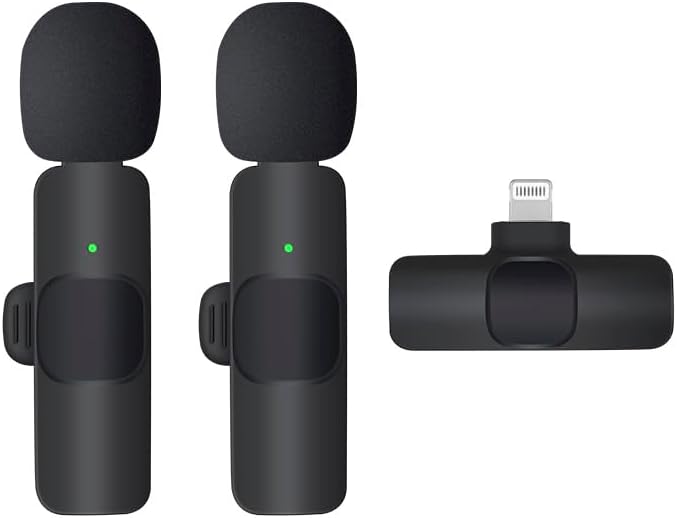
This image displays the complete Karma Dual Lightning Microphone system, including two wireless microphone transmitters and one Lightning receiver. The microphones are compact, black, and feature foam windscreens, with a small green indicator light visible on each. The receiver is also black and designed to plug directly into a Lightning port.
Ihirangi mokete
Manatokona kei roto katoa nga mea kei roto i te kete:
- 2 x Ngā Tukunga Hopuoro Ahokore
- 1 x Kaiwhiwhi Uira
- 1 x Charging Cable (USB-A to USB-C, typically)
- 1 x Manual Kaiwhakamahi (tenei tuhinga)
Aratohu Tatūnga
- Charge Microphones: Before first use, fully charge both wireless microphone transmitters using the provided charging cable. A red indicator light typically signifies charging, turning off or green when fully charged.
- Tūhono Kaiwhiwhi: Plug the Lightning receiver directly into the Lightning port of your iPhone or iPad. Ensure it is securely seated.
- Whakakāhia ngā Hopuoro: Press and hold the power button on each microphone transmitter until the indicator light turns green, indicating they are powered on and ready to pair.
- Takirua Aunoa: The microphones and receiver should automatically pair. A solid green light on the microphones indicates a successful connection. If the light flashes, pairing is in progress or has failed.
- Turanga Microphones: Clip the microphone transmitters to the collar or clothing of the speaker, ensuring the microphone head is facing towards the mouth for optimal sound capture.
Nga Tohutohu Whakahaere
Hopu Ororongo
- Ensure microphones are paired and connected (solid green light).
- Open your preferred audio or video recording application on your iOS device (e.g., Camera app, Voice Memos, third-party recording apps).
- Start recording. The audio input will automatically switch to the connected wireless microphones.
- Aroturukihia ngā taumata oro mēnā ka taea e tō taupānga, hei ārai i te tapahi, i te whakapohehe rānei.
Mahi Wahangu
Some models may feature a mute button on the microphone transmitter. Pressing this button typically toggles the microphone's audio output on or off. Refer to the specific product design for button location and indicator light behavior for mute status.
Te Tiaki me te Tiaki
- Te horoi: Whakamahia he kakahu ngohengohe, maroke hei horoi i ngā hopuoro me te kaiwhiwhi. Kaua e whakamahi i ngā wai horoi, i ngā whakarewa rānei.
- Rokiroki: Whakaorangia te taputapu ki te waahi makariri, maroke atu i te ra tika me te wera nui.
- Ora Pūhiko: To prolong battery life, fully charge the microphones before long periods of inactivity. Avoid completely draining the battery frequently.
- Te whakahaere: Handle the devices with care. Avoid dropping or subjecting them to strong impacts.
Raparongoā
| Raruraru | Take pea | Rongoā |
|---|---|---|
| Karekau he oro i tuhia. | Microphones not powered on or paired. Receiver not properly connected. App settings. | Ensure microphones have a solid green light. Re-plug the receiver. Check audio input settings in your recording app. |
| Poor audio quality/static. | Interference. Microphone too far from source. Low battery. | Move away from other wireless devices. Ensure microphone is close to the speaker. Charge microphones fully. |
| Microphones not pairing. | Pūhiko iti. Kei waho i te awhe. He pokanoa. | Charge microphones. Ensure microphones are within 20 meters of the receiver. Restart both microphones and receiver. |
Whakatakotoranga
- Tauira: B0DM23FX7X
- Momo: Pūnaha hopuoro Waeakore rua
- Hononga: Lightning (Receiver)
- Hototahi: iOS devices with Lightning port
- Ahu mōkihi: 7.87 x 7.87 x 7.87 inihi
- Taumaha Tūemi: 3.53 hekere
- Kaihanga: KARMA
- Wātea Tuatahi: Hōngongoi 17, 2025
Nga korero Whakaputanga
This Karma product is covered by a standard manufacturer's warranty. Please refer to the warranty card included in your product packaging or visit the official Karma website for detailed terms and conditions regarding warranty coverage, duration, and claims process. Keep your purchase receipt as proof of purchase.
Tautoko Kiritaki
For technical assistance, troubleshooting not covered in this manual, or warranty inquiries, please contact Karma customer support through the following channels:
- Webpae: Visit the Karma Store on Amazon
- Īmēra: Tirohia te kohinga hua, whai mana ranei webpae mo te whakapā imeera motuhake.
- Waea: Tirohia te kohinga hua, whai mana ranei webpae mo te whakapiri waea motuhake.
When contacting support, please have your product model number (B0DM23FX7X) and purchase date ready.


