Kupu Whakataki
Thank you for choosing the ToughTested ROC 5 Solar Power Bank. This rugged and reliable power bank is designed for outdoor and demanding environments, offering multiple charging options including MagSafe compatible wireless charging, USB-C Power Delivery, Quick Charge 3.0, and an emergency solar panel. This manual provides essential information for the safe and efficient use of your device.

Image: The ToughTested ROC 5 Solar Power Bank, a compact black and orange device with a solar panel, is shown attached magnetically to the back of a smartphone, illustrating its wireless charging capability. A hand holds the phone and power bank.
Ka mutu te huaview
Nga waahanga matua
- 5000mAh Pūhiko Raukaha: E whakarato ana i ngā utu maha mō ngā waea atamai me ētahi atu taputapu.
- MagSafe & Qi-Compatible Wireless Charging: Supports MagSafe for compatible iPhones and universal Qi for other wireless charging devices.
- USB-C PD 20W & Quick Charge 3.0: Offers fast wired charging for various devices.
- Paewhiri Whakataunga Solar: Designed for emergency recharging in remote locations.
- IP54 Hoahoa Taurangi: Resistant to dust and splashing water.
- Ko te rama rama arahina: Rama maha-aratau mō te whakamārama.
Waehanga
- Paewhiri Kaihono Hiko
- Wireless Charging Pad (Magnetic)
- Tauranga Whakauru / Huaputa USB-C
- USB-He Tauranga Putanga
- Rama Rama Whakaaturanga Rama
- Pātene Hiko
- Maramarama arahina

Whakaahua: He whakaaturanga whakairoirocasing the ToughTested ROC 5 Solar Power Bank with icons and text emphasizing its solar charging capability, IP54 waterproof design, and MagSafe compatibility. The power bank is depicted in an outdoor setting.
Tatūnga
Te Whakatau Tuatahi o te Peeke Hiko
Before first use, fully charge your ROC 5 Power Bank using the USB-C port. Connect the included USB-A to USB-C cable to a compatible USB wall adapter (not included) and the USB-C port on the power bank. The LED indicator lights will illuminate to show charging progress and battery level. A full charge is indicated when all LED lights are solid.

Image: A visual representation of the ToughTested ROC 5 Power Bank simultaneously charging a smartwatch via USB-C, a smartphone via USB-A, and another smartphone wirelessly. This illustrates its multi-device charging capabilities.
Nga Tohutohu Whakahaere
He Whakanui
- Connect your device's charging cable to either the USB-C (input/output) or USB-A (output) port on the power bank.
- Whakauruhia tetahi atu pito o te taura ki to rorohiko.
- Press the power button on the power bank to initiate charging. The LED indicators will show the remaining battery level.
Wireless Charging (MagSafe & Qi Compatible)
- Ensure your device is wireless charging compatible (Qi-enabled or MagSafe compatible). For MagSafe, ensure your iPhone (17/16/15/14/13 series) has an official MagSafe case or no case for optimal magnetic alignment.
- Align your device with the wireless charging pad on the power bank. For MagSafe, the magnets will assist in proper alignment.
- Press the power button on the power bank to activate wireless charging. Your device should indicate that it is charging.
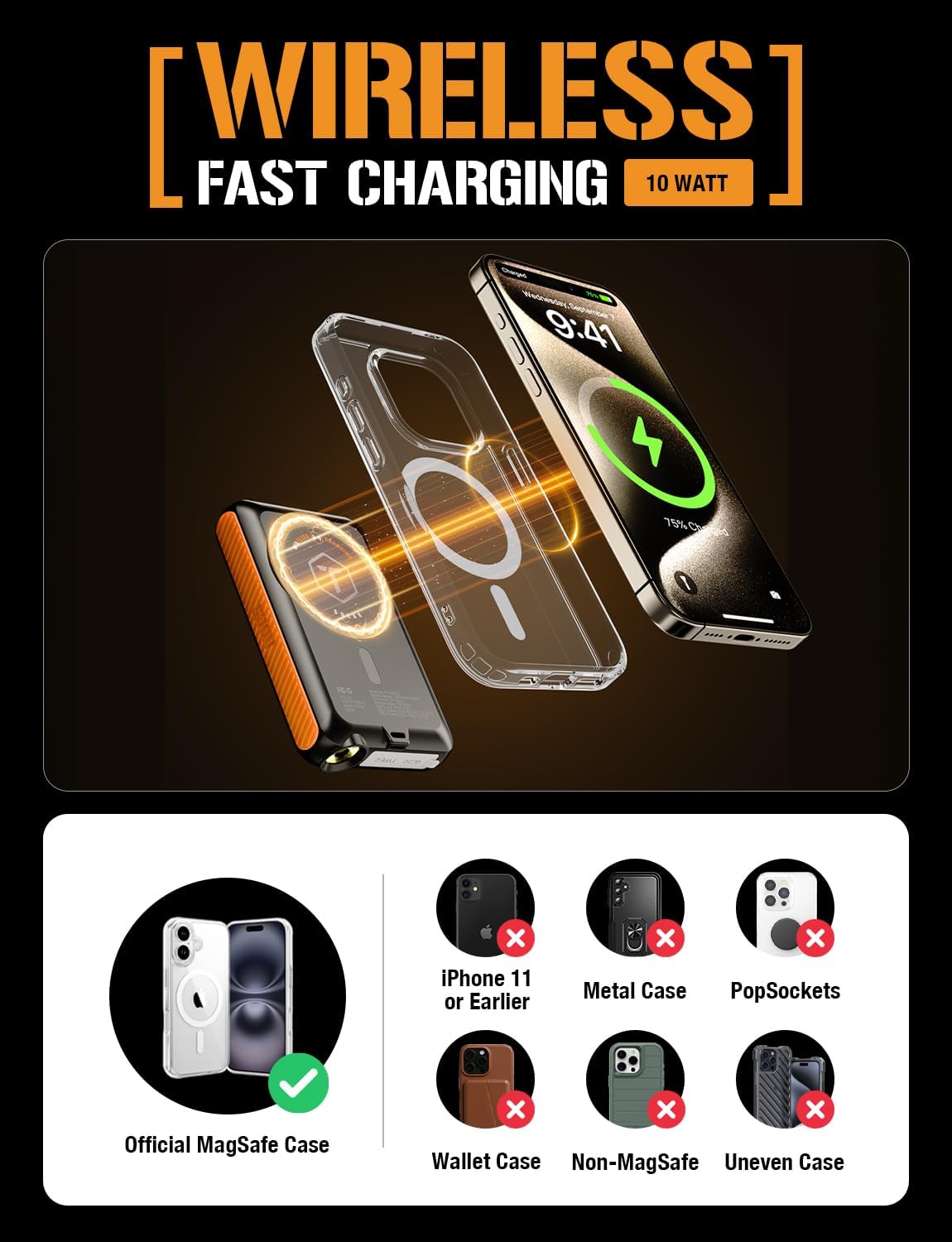
Image: A diagram showing the ToughTested ROC 5 Power Bank wirelessly charging an iPhone. It highlights the magnetic alignment for MagSafe compatibility and lists incompatible scenarios like metal cases or PopSockets.
Te Whakataunga Solar
The integrated solar panel is designed for emergency power replenishment and trickle charging in direct sunlight. It is not intended as a primary charging method due to its limited output (up to 100mA per hour). For daily use, recharge the power bank via its USB-C port.
- Place the solar panel directly facing strong sunlight.
- The LED indicators may show a slow charge, or the charge rate may be too low to register on the indicators if sunlight is not optimal.

Image: The ToughTested ROC 5 Solar Power Bank is shown attached to the side of a camouflage backpack, positioned to receive direct sunlight in a desert landscape, illustrating its use as an emergency solar reserve.
Maramarama arahina
To activate the multi-mode LED flashlight:
- Whakakā/Weto: Double-press the power button.
- Aratau Porohita: Once the flashlight is on, single-press the power button to cycle through modes (e.g., constant light, strobe, SOS).
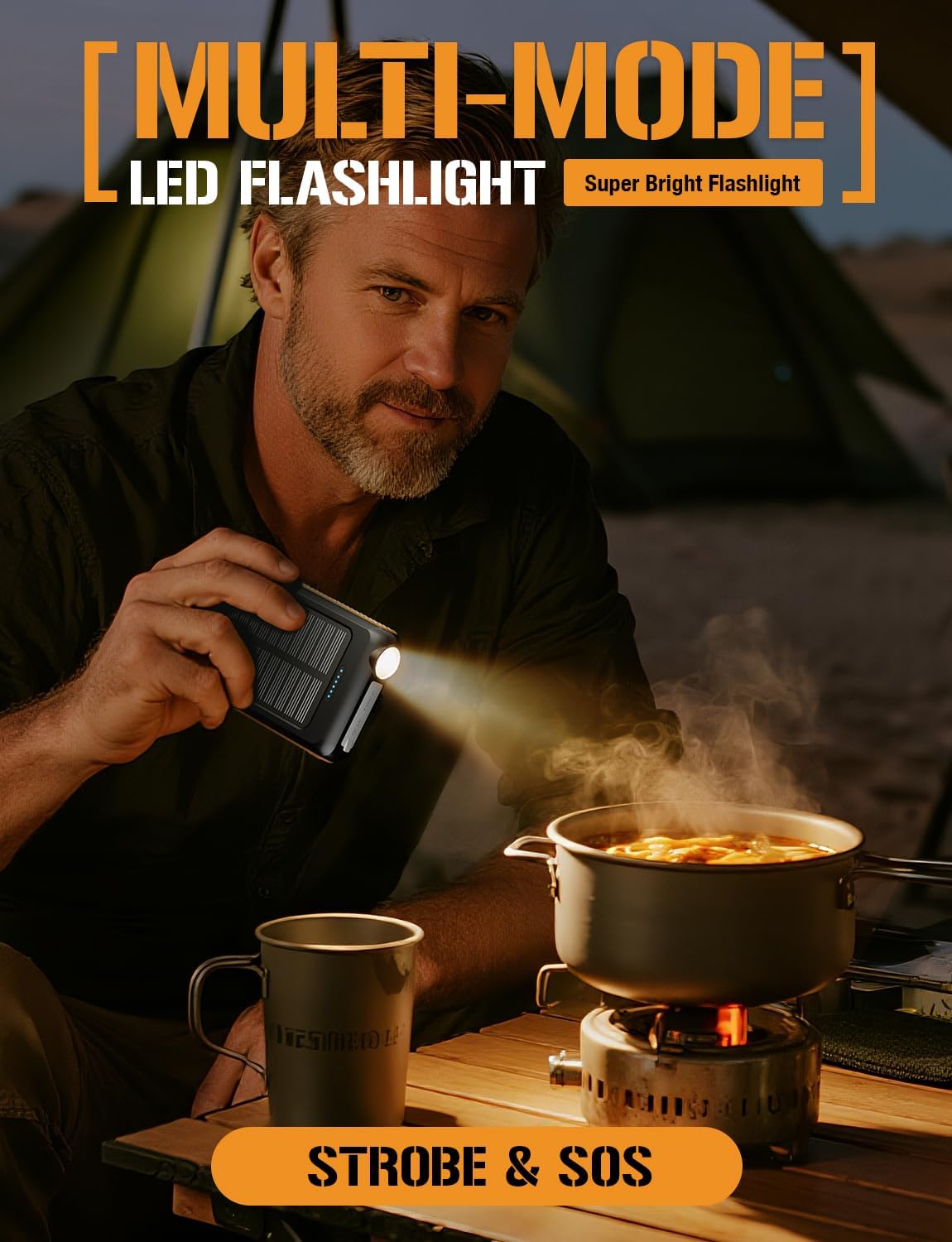
Image: A man is shown holding the ToughTested ROC 5 Power Bank, using its integrated LED flashlight to illuminate a cooking pot over a portable stove in a low-light outdoor setting, demonstrating its utility as a multi-mode flashlight.
Te tiaki
- Te horoi: Wipe the power bank with a dry, soft cloth. Avoid using harsh chemicals or abrasive materials.
- Rokiroki: Store the power bank in a cool, dry place away from direct sunlight and extreme temperatures. For long-term storage, ensure the battery is charged to approximately 50-75% to preserve battery health.
- Tiaki Pūhiko: To maximize battery lifespan, avoid fully discharging the power bank frequently. Recharge it regularly, even if not in active use.
Raparongoā
- Karekau te Peeke Hiko i te utu: Ensure the USB-C cable is securely connected to both the power bank and a working power source. Try a different cable or wall adapter.
- Device Not Charging (Wired): Verify the cable connection to both the power bank and your device. Ensure the power bank has sufficient charge and the power button has been pressed.
- Device Not Charging (Wireless): Check for proper alignment of your device on the wireless charging pad. Remove any thick cases or metallic objects that may interfere with wireless charging. Ensure the power bank has sufficient charge and the power button has been pressed.
- Puturi te Whakamahinga Solar: Solar charging is supplementary. Ensure the panel is in direct, strong sunlight. Cloud cover or indirect light will significantly reduce charging efficiency.
- Kare e Mahi ana te rama rama: Double-press the power button to turn the flashlight on or off. Ensure the power bank has sufficient charge.
Whakatakotoranga
| Tau tauira | TT-PBW-5C |
| Pūhiko Raukaha | 5000 mah |
| Hunga Hua | 5.6 x 2.8 x 0.6 inihi |
| Taumaha Tūemi | 7.8 hekere |
| Momo Tuhono | Momo USB A, Momo USB C |
| Putanga Whakakona Ahokore | MagSafe Compatible, Qi Compatible |
| Putanga USB-C | PD 20W |
| USB-He Putanga | QC 3.0 |
| Tāuru Tiaki Solar | Up to 100mA (Emergency Reserve) |
| Ātete Huarere | IP54 (Tauturu i te puehu me te paraihe) |
Nga korero haumaru
- Kaua e tukuna te peeke hiko ki te ahi, ki te wai, ki te wera nui ranei.
- Do not disassemble, puncture, or modify the device.
- Kaua e taea e nga tamariki.
- Kaua e tukua te pēke hiko kia marere, kia pā kino rānei.
- Ki te pupuhi te pēke hiko, ki te wera rawa, ki te puta rānei he haunga rerekē, kati tonu te whakamahi.
- Whakakorehia te hua kia rite ki nga ture o te rohe.
Pūtāhui me te Tautoko
The ToughTested ROC 5 Solar Power Bank comes with a 5-Tau Pūtāhui, reflecting our commitment to quality and durability. For warranty claims, technical support, or further assistance, please visit the official ToughTested webpaetukutuku, whakapā atu rānei ki te ratonga kiritaki mā tō kaihokohoko.

Image: The ToughTested ROC 5 Power Bank, its user guide, a USB cable, and a prominent '5 Year ToughCare' warranty badge are displayed together in a rugged outdoor environment, emphasizing the product's durability and extended support.


