1. Hua Neke Atuview
The Dormakaba DP 850 is an intelligent door lock designed for enhanced security and convenience. It features a push-pull handle and an automatic motor lock body. This lock offers multiple access methods and integrated safety features.
Ko nga ahuatanga matua ko:
- Tikanga Uru Maha: Fingerprint, RFID Cards, PIN Code, Bluetooth Low Energy (BLE) via mobile app, and Mechanical Override Keys.
- Innovative Push-Pull Handle: Allows for effortless operation in either direction.
- Automatic Motor Lock Body: Provides secure locking.
- Āhuatanga Haumaru Arā Atu Anō: Includes alarms for multiple failed entry attempts, high-temperature warnings, break-in attempts, and child lock functionality.
- Hanga Roa: Made with a metal body.
2. Nga Taonga
Familiarize yourself with the components of your Dormakaba DP 850 Smart Door Lock:

Whakaahuatanga Whakaahua: A detailed diagram illustrating the outdoor and indoor units of the Dormakaba DP 850 Smart Door Lock. Key components are labeled with letters A through O for easy identification. The outdoor unit shows the keypad, RFID reader, fingerprint sensor, and handle. The indoor unit displays the battery compartment, emergency power terminal, and various buttons.
Outdoor Unit Components:
- Battery Warning Lamp: E tohu ana i te mana o te pākahiko iti.
- Pānui Kāri RFID: Mō te wetewete mā te whakamahi i ngā kāri RFID.
- BLE Display Lamp: Indicates Bluetooth Low Energy status.
- Status Display Lamp: Provides visual feedback on lock status.
- Papapātuhi: Hei whakauru i ngā waehere PIN.
- Fingerprint Sensor (DP850): For biometric unlocking.
- Kakau o Waho: The exterior push-pull handle.
- [Reset] Button: Used for resetting the lock.
Indoor Unit Components:
- Emergency Power Supply Terminal: For external power in case of battery depletion.
- [Register] Button: Used for registering new users (fingerprints, cards, PINs).
- [CLOSE] Button: For manual locking from the inside.
- Blocking Indoor Handle: A mechanism to prevent the indoor handle from operating.
- Kakau o roto: The interior push-pull handle.
- Uwhi Pūhiko: Ka tiaki i te wāhanga pākahiko.
- Pūhiko: Power source for the lock.
3. Ihirangi mokete
Verify that all items are present in your Dormakaba DP 850 Smart Door Lock package:
- Dormakaba DP 850 Smart Door Lock Unit (Outdoor and Indoor)
- RFID Card(s)
- Tiu mo te whakaurunga
- Strip (likely for cable management or sealing)
- Manual Key(s) (3 keys included)
4. Tatūnga me te Tāuta
Proper installation is crucial for the functionality and security of your smart door lock. It is recommended to utilize professional installation services where available.
4.1 Ngā Whakaritenga mō te Kūaha
- Te Matotoru Kuaha Tika: The lock is designed for doors with a thickness between 40mm and 75mm.
- Ensure the door frame and existing mortise cutout are compatible with the DP 850 lock body dimensions.

Whakaahuatanga Whakaahua: He tata view of a door edge with the mortise lock installed. Text overlays indicate 'Suitable Door Thickness 40-75mm' and 'Double Deadbolt Security', highlighting these key installation and security features.
4.2 Nga Waahi Whakataunga (Whanui)
While professional installation is advised, the general steps involve:
- Whakapaia te tatau: Ensure the door is clean and the mortise cutout is correctly sized.
- Tāutahia te Tinana Maukati Mortise: Insert the mortise into the door edge and secure it with screws.
- Tāutahia te Wāhanga o Waho: Mount the outdoor unit, feeding necessary cables through the door.
- Tāutahia te Wāhanga o Roto: Connect the cables from the outdoor unit to the indoor unit and secure the indoor unit to the door.
- Whakauruhia nga Pataha: Open the battery cover on the indoor unit and insert the required batteries (refer to the diagram for battery location).
- Taumahinga Whakamatau: I muri i te whakaurunga, whakamatautauhia nga tikanga wetewete katoa me te whakarite kia pai te mahi o te raka.
4.3 Free Installation Service
Dormakaba offers free installation services in multiple cities. Please refer to the provided map or contact customer support to check if your location is covered.
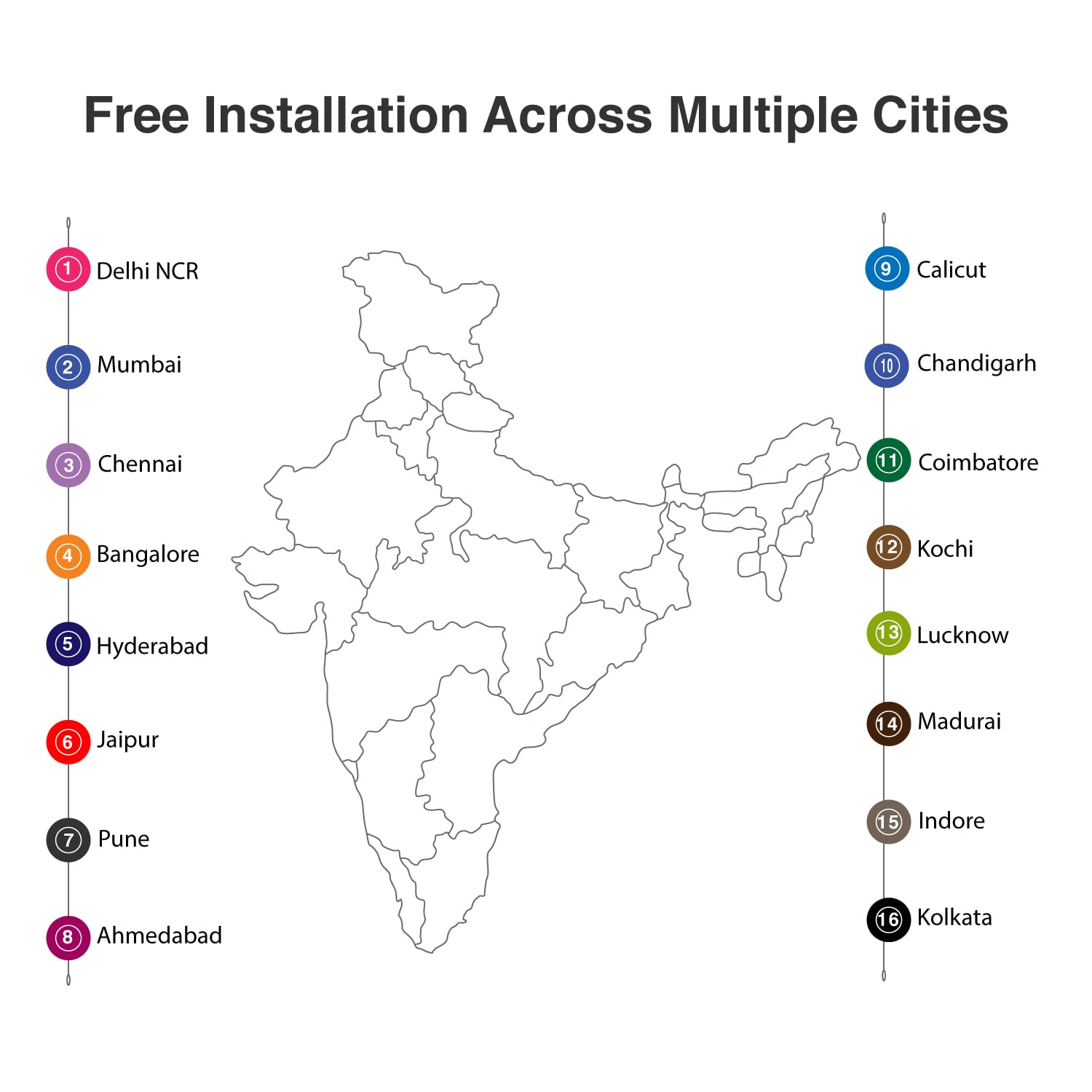
Whakaahuatanga Whakaahua: A map of India with numbered markers indicating cities where free installation services are available. These cities include Delhi NCR, Mumbai, Chennai, Bangalore, Hyderabad, Jaipur, Pune, Ahmedabad, Calicut, Chandigarh, Coimbatore, Kochi, Lucknow, Madurai, Indore, and Kolkata.
5. Nga Tohutohu Whakahaere
The Dormakaba DP 850 Smart Door Lock provides six methods for access control.

Whakaahuatanga Whakaahua: An infographic displaying six distinct unlocking methods for the Dormakaba DP 850 Smart Door Lock. Icons represent Fingerprint, Password, OTP (One-Time Password), Smart App (Bluetooth), Mechanical Key Override, and RFID, illustrating the versatility of access options.
5.1 Nga Tikanga Wewete
- Kauira: Place your registered finger on the fingerprint sensor. The lock will unlock upon successful verification. Up to 100 fingerprints can be registered.
- RFID Cards: Present a registered RFID card to the RFID card reader area. The lock will unlock. Up to 100 RFID cards can be registered.
- Screen Touch PIN Code: Enter your 4-12 digit PIN code on the keypad, followed by the '#' key. The lock will unlock. Up to 4 PIN codes can be stored.
- BLE (Bluetooth Low Energy) Mobile App: Use the dedicated mobile application on a registered device to unlock the door via Bluetooth. Up to 10 mobile devices can be paired.
- Mechanical Override Keys: In case of emergency or battery failure, insert and turn one of the three provided mechanical keys to unlock the door.
- Push & Pull Handle: The innovative handle allows for intuitive opening. Simply push or pull the handle to open the door once unlocked by any of the above methods.

Whakaahuatanga Whakaahua: A visual representation of the Dormakaba DP 850 Smart Door Lock's push-pull handle mechanism. The image highlights the ergonomic design that allows the handle to be pushed or pulled for door operation, emphasizing its ease of use.
5.2 Rehitatanga Kaiwhakamahi
To register new fingerprints, RFID cards, or PIN codes:
- Pehia te [Rēhita] pātene i te waeine o roto.
- Follow the voice prompts or visual cues on the lock's display.
- For fingerprints, place your finger on the sensor multiple times as instructed.
- For RFID cards, present the card to the reader.
- For PIN codes, enter your desired code and confirm it.
- Ensure successful registration is confirmed by the lock.
5.3 Maukati i te Kuwaha
The Dormakaba DP 850 features an automatic motor lock body, which typically locks automatically after the door is closed. You can also manually lock it from the inside by pressing the [CLOSE] pātene.
5.4 Child Lock Functionality
To activate or deactivate the child lock, locate the blocking indoor handle mechanism on the indoor unit. Engage this mechanism to prevent the indoor handle from being operated, ensuring children cannot accidentally open the door from the inside.
6. Āhuatanga Haumaru
The Dormakaba DP 850 Smart Door Lock incorporates several safety and alarm features to enhance security:

Whakaahuatanga Whakaahua: An infographic illustrating the various alarm features of the Dormakaba DP 850 Smart Door Lock. Icons and text describe alarms for high temperature, wrong PIN entry, low battery, high voltage prevention, and break-in attempts, highlighting the lock's comprehensive security.
- Alarm for Multiple Failed Entry Attempts: If an incorrect PIN code or unregistered fingerprint/card is attempted multiple times, an alarm will sound, and the lock may temporarily disable entry.
- High-Temperature Warning System: In case of abnormally high temperatures (e.g., fire), the lock may trigger an alarm and automatically unlock to facilitate escape.
- Break-in Attempt Alarm: If the lock detects forced entry or tampering, an alarm will be activated.
- Whakaoho Pūhiko Iti: The battery warning lamp (A) will illuminate, and an audible alert will sound when the battery level is low, prompting replacement.
- He kaha Voltage Prevention: The lock is designed with protection against high voltage ngaru.
7. Tiaki
To ensure the longevity and optimal performance of your Dormakaba DP 850 Smart Door Lock, follow these maintenance guidelines:
- Te horoi: Horoia te mata o te raka ki te kakahu ngohengohe, maroke. Āta karohia te whakamahi i ngā kaihoroi whakakoi, ngā whakarewa, ngā matū kino rānei, nā te mea ka kino pea te āhua o te raka me ngā wāhanga hiko.
- Whakakapinga Pūhiko: When the low battery alarm activates, replace all batteries promptly. Use high-quality alkaline batteries of the specified type. Refer to the Components section for battery location (O) and cover (N).
- Mechanical Key Usage: Keep the mechanical override keys in a safe, accessible location outside the secured area for emergency use. Test them periodically to ensure they function correctly.
- Te Tiaki i te Pūoko Taputapu: Keep the fingerprint sensor clean and dry. Avoid scratching its surface.
8. Te Raru
If you encounter issues with your Dormakaba DP 850 Smart Door Lock, refer to the following common problems and solutions:
- Maukati Kaore i te Whakautu:
- Tirohia te taumata pākahiko. Whakakapihia nga pākahiko ki te iti.
- If completely unresponsive, use the emergency power supply terminal (I) with a 9V battery or the mechanical override key.
- Maama Maihao Kaore i te Mohiotia:
- Me mohio kei te ma, kei te maroke to maihao.
- Whakamātauria te whakanoho anō i tō maihao ki te pūoko.
- If issues persist, re-register your fingerprint.
- Kāore te Waehere PIN e Mahi:
- Ensure you are entering the correct PIN code.
- Check if the keypad is illuminated and responsive.
- If multiple incorrect attempts trigger an alarm, wait for the lockout period to expire.
- Kāri RFID Kaore i kitea:
- Ensure the card is correctly presented to the RFID reader (B).
- Verify the RFID card is registered to the lock.
- Lock Alarms Continuously:
- Identify the type of alarm (e.g., low battery, break-in, high temperature) from the status display lamp or audible cues.
- Address the underlying cause (e.g., replace batteries, secure the door).
- Door Does Not Lock Automatically:
- Check if the door is fully closed and aligned with the frame.
- Inspect the mortise and strike plate for obstructions.
If these steps do not resolve the issue, please contact Dormakaba customer support.
9. Whakatakotoranga
| Āhuahira | Whakatakotoranga |
|---|---|
| Ingoa Tauira | DP-850 |
| Waitohu | dormakaba |
| Momo Maukati | Biometric, Deadbolt, Keypad |
| Rauemi | Te whakarewa |
| Tae | Koura Ma |
| Rahi Tūemi (L x W x H) | 23 x 90 x 420 Millimeters (2.3 x 9 x 42 cm) |
| Taumaha Tūemi | 5.25 Kirokaramu (5 kg 250 g) |
| Te Matotoru Kuaha e taunakitia ana | 40-75 mm |
| Te Maama Maihao | Tae atu ki te 100 |
| Te kaha o te kaari RFID | Tae atu ki te 100 |
| Te Rahi Waehere PIN | Up to 4 (4-12 digits) |
| BLE Device Capacity | Up to 10 mobile devices |
| Tikanga Mana | Pa, Reo |
| Kawa Hononga | Nihokikorangi |
| Nga Waahanga kei roto | RFID Card, Screws, Strip, Manual Key (3) |
10. Nga Korero Whakaputanga
The Dormakaba DP 850 Smart Door Lock comes with a 1-tau pūtāhui from the date of purchase. This warranty covers manufacturing defects and ensures the product functions as intended under normal use. Please retain your proof of purchase for warranty claims. For detailed terms and conditions, refer to the warranty card included in your package or contact Dormakaba customer support.
11. Tautoko me nga korero Whakapā
For technical assistance, installation queries, or warranty claims, please contact Dormakaba customer support:
- Kaihanga: Dormakaba India Private Limited
- Kai kawemai/Pake: Build pro Technologies India Pvt.Ltd
- Refer to your product packaging or the official Dormakaba webpaetukutuku mō ngā taipitopito whakapā hou, tae atu ki ngā nama waea me ngā wāhitau īmēra.


