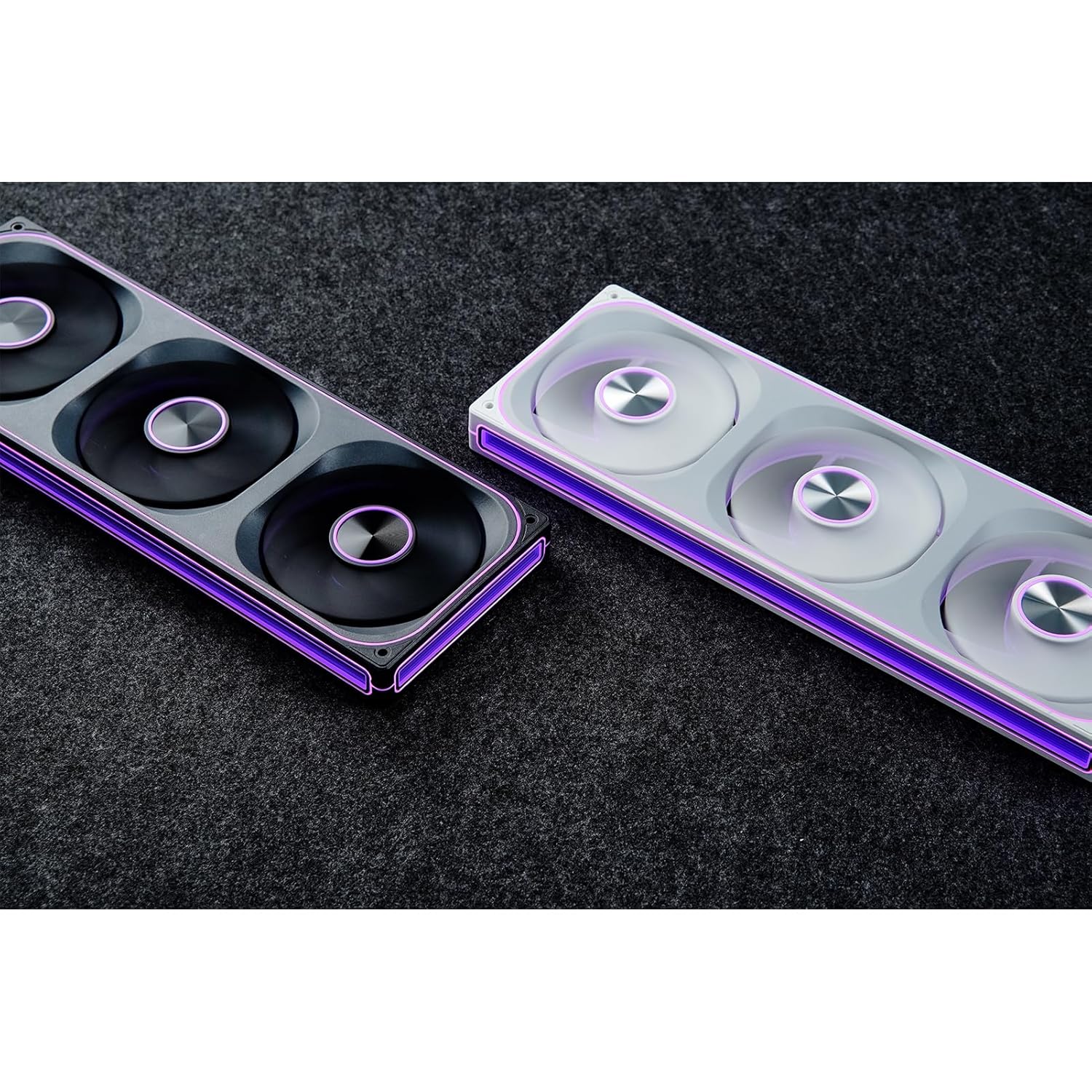
This manual provides detailed instructions for the installation, operation, and maintenance of your JONSBO ZA-240B PC Case Fan. Please read this manual thoroughly before installation and use to ensure proper function and longevity of the product. The JONSBO ZA-240B is an all-in-one unit featuring two 120mm ARGB fans, designed for efficient cooling and customizable lighting within a PC chassis.
2. Nga korero haumaru
Me mohio kua whakawetohia to rorohiko rorohiko me te wetewete mai i te putanga o te pakitara i mua i te whakaurunga, te tiaki ranei.
Avoid touching the fan blades while the fan is operating.
Handle the fan unit carefully to prevent damage to components or wiring.
Do not expose the product to moisture or extreme temperatures.
Use only compatible power and ARGB connectors as specified. Incorrect connections may cause damage.
Kaua e taea e nga tamariki.
3. Ihirangi mokete
Manatokona kei roto katoa nga mea kei roto i te kete:
JONSBO ZA-240B PC Case Fan Unit (with 2x120mm ARGB Fans)
Whakaeke Tiu
Tuhinga (tenei pukapuka)
Image: JONSBO ZA-240B fan unit with its integrated cables for power and ARGB connection.
4. Nga Hua o te Hua
Hoahoa Katoa-i-Kotahi: Single frame unit integrating two 120mm ARGB fans, simplifying installation and cable management.
ARGB Infinity Mirror: Features 4-sides thousand-layer mirror illusion with 52 lamp beads around the circumference and 18 in the axis for dynamic lighting effects.
Addressable RGB Sync: Direct 3-pin ARGB connection to compatible motherboards for synchronized lighting control and over 16 million color effects.
Mana PWM: Quiet and low-noise PWM fan operation with an integrated male/female head for speed regulation.
Aluminum Nameplate: Includes an aluminum CD pattern nameplate for enhanced aesthetics.
Simplified Cabling: One-line connection to the motherboard for both fan power and ARGB lighting.
Whakaahua: Mua view of the JONSBO ZA-240B PC Case Fan showcasing its ARGB lighting and infinity mirror effect.
5. Tatūnga me te Tāuta
Follow these steps to install the JONSBO ZA-240B PC Case Fan into your computer chassis:
Whakaritehia to Pūnaha: Power off your computer and unplug it from the power outlet. Open your PC case to access the interior.
Tautuhia te Tauwāhi Whakapiki: Determine the desired mounting location for the fan unit (e.g., top, front, bottom, or side of the case). Ensure there is sufficient clearance.
Secure the Fan Unit: Align the fan unit with the screw holes in your PC case. Use the provided mounting screws to firmly attach the fan unit to the chassis. Do not overtighten.
Image: JONSBO ZA-240B fan unit installed at the top of a PC case, demonstrating typical mounting.
Honoa te taura PWM: Locate an available 4-pin PWM fan header on your motherboard. Connect the 4-pin PWM connector from the fan unit to this header. This allows the motherboard to control fan speed.
Honoa te taura ARGB: Locate an available 3-pin 5V Addressable RGB header on your motherboard. Connect the 3-pin ARGB connector from the fan unit to this header. Ensure the arrow on the connector aligns with the +5V pin on the motherboard header to prevent damage. Do not connect to a 12V RGB header.
Whakaha Uepu: Route the cables neatly to avoid interference with other components and to improve airflow.
Katia te Puka me te Hia: Once all connections are secure, close your PC case, plug in the power cable, and power on your system.
6. Mahi
Mana Tere Pā (PWM)
The JONSBO ZA-240B fan unit utilizes Pulse Width Modulation (PWM) technology, allowing your motherboard to dynamically adjust fan speeds based on system temperature. This ensures optimal cooling performance while minimizing noise levels. You can configure fan curves through your motherboard's BIOS/UEFI settings or using compatible software provided by your motherboard manufacturer.
Mana Whakamārama ARGB
The Addressable RGB (ARGB) lighting of the ZA-240B can be controlled via your motherboard's ARGB software (e.g., ASUS Aura Sync, MSI Mystic Light Sync, GIGABYTE RGB Fusion, ASRock Polychrome Sync). Ensure your motherboard supports 3-pin 5V ARGB headers. This software allows you to customize lighting effects, colors, and synchronization with other ARGB components in your system.
Image: The JONSBO ZA-240B fan unit displaying its customizable ARGB lighting within a computer system.
7. Tiaki
Regular maintenance helps ensure optimal performance and extends the lifespan of your fan unit.
Tango Puehu: Periodically clean dust from the fan blades and frame using compressed air or a soft brush. Ensure the system is powered off and unplugged before cleaning.
Tirotiro: Occasionally inspect the fan and its cables for any signs of wear, damage, or loose connections.
8. Te Raru
Putanga
Take pea
Rongoā
Karekau te paahi e huri
Loose or incorrect PWM cable connection. Insufficient power.
Check the 4-pin PWM cable connection to the motherboard. Ensure the motherboard is supplying power to the fan header.
Ko te rama ARGB kaore e mahi
Loose or incorrect ARGB cable connection. Connected to 12V RGB header. Motherboard ARGB software not configured.
Verify the 3-pin ARGB cable is securely connected to a 5V ARGB header. Ensure it is not connected to a 12V RGB header. Check motherboard ARGB software settings.
He nui rawa te haruru o te pā
Fan speed set too high. Obstruction.
Adjust fan speed settings in your motherboard's BIOS/UEFI or software. Ensure no cables or objects are obstructing the fan blades.
He pai te mahi whakamatao
Insufficient airflow. Dust buildup. Incorrect fan orientation.
Ensure proper airflow within the case. Clean dust from fans. Verify fan is oriented to push or pull air in the desired direction.
9. Whakatakotoranga
Āhuahira
Taipitopito
Tau tauira
ZA-240B
Rahi Kaiwhaiwhai
2 x 120mm (integrated unit)
Fan Thickness
28mm
Tere Hurihuri
700-2400 RPM (±10%)
Taumata Haruru
21.3-37.3 dB(A)
Tūhono Hiko
4-PWM PWM
Hononga ARGB
3-Pin 5V ARGB
Voltage
DC 12 Volts (Pā), 5 Volts (LED)
Wattage
5.16 watts (Fan), 5.80 watts (LED)
Pūrere Hototahi
Take PC
Ngā Ahu (Mōkihi)
29.97 x 15.75 x 4.19 cm
Taumaha (Mōkihi)
707.6 g
10. Pūtāhui me te Tautoko
Mō ngā mōhiohio pūtāhui me te tautoko hangarau, tirohia te paetukutuku mana o JONSBO webpae, whakapā atu ranei ki to kaihoko. Puritia to tohu hoko mo nga kereme whakamana.
Tuhinga e pa ana - ZA-240B
Jonsbo Fan Tohutohu Haumaru me nga Whakatupato Ko tenei tuhinga e whakarato ana i nga tohutohu haumaru me nga whakatupato mo te Jonsbo Fan, e hipoki ana i te haumaru miihini, te haumaru hiko, te whakamahana, me te tiaki. Ko te tikanga mo te whakahaere haumaru me te whakamahi tika i te hua.
Jonsbo D31 Ko te Aratohu Whakataunga me nga Tohu Rorohiko He aratohu matawhānui mo te kete rorohiko Jonsbo D31, e hipoki ana i nga rarangi waahanga, nga tohu tahuhu, PSU me te whakaurunga kaari whakairoiro, nga whiringa whakamahana, me te hototahi. Kei roto i nga waahanga taipitopito mo te hanga i to PC.
JONSBO C6 PC Case: Pukapuka Kaiwhakamahi me te Aratohu Whakauru Te pukapuka a te kaiwhakamahi me te aratohu whakaurunga mo te keehi JONSBO C6 PC. Ko tenei tuhinga e whakaatu ana i nga ihirangi o te kete, te tautuhi wae, me nga tohutohu whakahiato mo te hanga i to PC.
JONSBO NV10 PC Case Tāuta Aratohu He aratohu whakaurunga matawhānui mo te keehi PC JONSBO NV10, te whakamaarama i nga korero o te kete, nga waahanga, nga hononga, me nga tohutohu huihuinga mo te hanga i to rorohiko.
JONSBO N5 NAS Case Aratohu Kaiwhakamahi Aratohu kaiwhakamahi matawhānui mo te keehi JONSBO N5 NAS, e whakaatu ana i nga whakaritenga o nga hua, rarangi waahanga, me nga tohutohu whakaurunga taahiraa-i-te-taahiraa mo nga waahanga penei i te tuku hiko, papahoahoa, puku rokiroki, me te whakamatao.
JONSBO T9 He Aratohu Kaiwhakamahi Take a te Rūnanga Motuhake He aratohu matawhānui mo te JONSBO T9 Separated Cabinet Case, e whakaatu ana i nga whakaritenga o nga hua, rarangi waahanga, me nga tohutohu whakaurunga-a-taahiraa mo nga kaihanga PC.