1. Kupu Whakataki
The UanTii All-in-One Smart Matter Plug is a versatile smart home device designed to integrate seamlessly with various smart home ecosystems, including Apple HomeKit, Amazon Alexa, Google Home, Samsung SmartThings, and Tuya/Smart Life. This smart plug allows you to control your home appliances remotely, set schedules, and use voice commands for a truly automated experience. Its Matter certification ensures enhanced compatibility and stability within your local network.

Figure 1: UanTii Smart Matter Plug and its multi-platform compatibility.
2. Nga korero haumaru
Pānuihia, kia mārama hoki ngā tohutohu haumaru katoa i mua i te whakamahinga o tēnei hua. Ki te kore e whai i ēnei tohutohu, ka pāngia pea koe e te ru hiko, te ahi, ētahi atu tūponotanga kino rānei.
- Kaua e wetewete, whakarereke ranei i te taputapu.
- Kaua e tukuna te taputapu ki te wai, ki te makuku nui ranei.
- Do not use the device with appliances that exceed its maximum load capacity (16A, 3680W).
- Me whakarite kua whakaurua katoatia te mono ki roto i te putanga pakitara.
- Kaua e taea e nga tamariki.
- Use only in dry, indoor environments.
3. Ihirangi mokete
Your UanTii Smart Matter Plug package should contain the following:
- 1 x UanTii All-in-One Smart Matter Plug
- 1 x Pukapuka Tohutohu (tenei tuhinga)
4. Tatūnga
Before setting up your UanTii Smart Matter Plug, ensure your smartphone's operating system is iOS 16.1 or later, or Android 8.1 or later. The plug requires a 2.4GHz Wi-Fi network for initial setup and operation.
4.1 Matter Hub Requirement
A Matter-enabled hub is required to add Matter devices to Apple HomeKit, Google Home, and Alexa apps. Ensure your hub and the plug are on the same local area network (LAN) and that Bluetooth is enabled on your phone during the initial pairing process.

Whakaahua 2: Examples of Matter-compatible hubs required for integration.
4.2 Te taapiri i te Pūrere
- Plug the UanTii Smart Matter Plug into a standard wall outlet.
- Me whakarite kua whakakāhia te Nihokikorangi o tō waea atamai.
- Open your preferred smart home app (e.g., Apple Home, Google Home, Alexa, Tuya Smart, or Smart Life).
- Follow the app's instructions to add a new device. You will typically be prompted to scan the QR code located on the device or its packaging.
- Once scanned, the app will guide you through connecting the plug to your 2.4GHz Wi-Fi network.
- For Tuya/Smart Life App, no separate hub is needed, only a 2.4GHz Wi-Fi connection.

Figure 3: Scan the QR code on the device to add it to your smart home system. Example QR code: 0000-123-0000
4.3 Important Notes for Specific Apps:
- HomeKit/Google Home/Alexa APP: Primarily supports voice function and on/off control.
- Tuya App: Offers timer function, on/off control, and voice function (when integrated with Alexa and Google Home).
5. Te Whakahaere i te Mono Atamai
5.1 Mana Mamao Taupānga
Once connected, you can control the smart plug from anywhere using the Tuya/Smart Life APP. Turn appliances on or off, and manage schedules directly from your smartphone.

Figure 4: Remote control of appliances via the Tuya Smart or Smart Life app.
5.2 Mana Reo
The UanTii Smart Matter Plug supports voice commands through Siri, Amazon Alexa, and Google Assistant, providing a hands-free control experience.

Figure 5: Use voice commands with your preferred assistant to control the plug.
5.3 Ngā Mahi Taima me te Whakaritenga
Automate your appliances by setting timers and schedules. This feature is exclusively available through the Tuya/Smart Life APP.

Figure 6: Set daily schedules for your appliances using the Tuya/Smart Life app.
5.4 Network Stability with Matter
Thanks to Matter certification, devices in your local network can operate smoothly even if your internet connection goes offline, ensuring reliable performance.

Figure 7: Enjoy stable control even without an internet connection. Learn more about Matter at 168150
5.5 High Power Capacity
The UanTii Smart Matter Plug supports a maximum current of 16A, making it suitable for a wide range of household appliances.
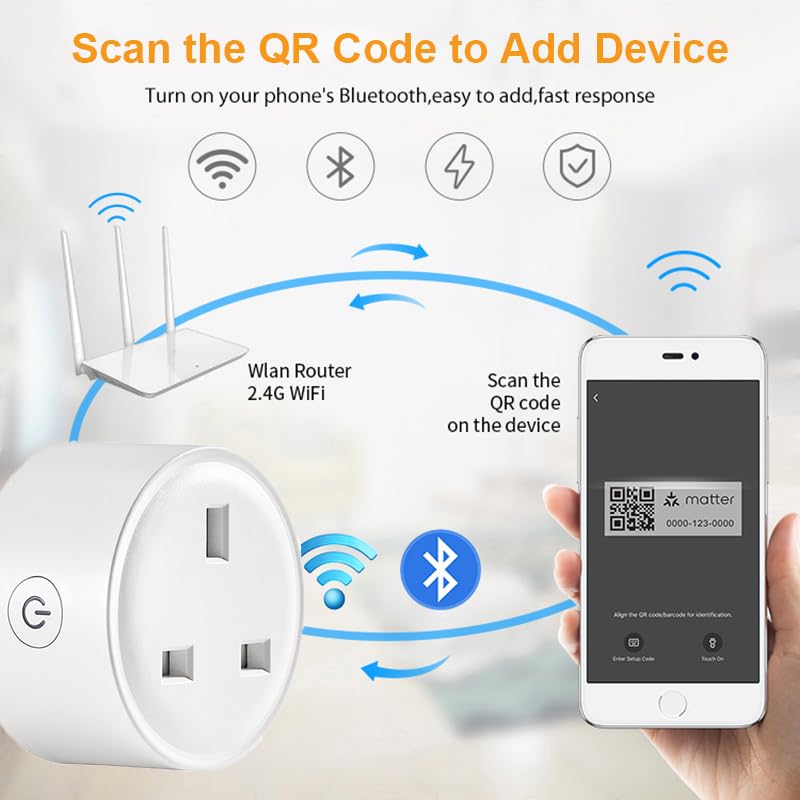
Figure 8: The 16A capacity allows connection to most electrical appliances.
6. Tiaki
To ensure the longevity and proper functioning of your UanTii Smart Matter Plug, follow these simple maintenance guidelines:
- Horoia te taputapu ki te kakahu ngohengohe, maroke. Kaua e whakamahi i ngā horoi wai, i ngā horoi āerosol rānei.
- A ape i te whakanoho i te taputapu ki te ra tika, ki te tata ranei ki nga puna wera.
- Kaua e tukuna te taputapu ki te tino mahana me te makuku.
- Ensure the plug pins are clean and free from debris before inserting into a socket.
7. Te Raru
If you encounter issues with your UanTii Smart Matter Plug, refer to the following common solutions:
| Raruraru | Te Take Taea / Rongoa |
|---|---|
| Kāore te pūrere e hono ana ki te taupānga. |
|
| Ko te whakahaere reo kaore e mahi. |
|
| Timer/Schedule not working. |
|
| Plug is unresponsive. |
|
8. Whakatakotoranga
| Āhuahira | Whakatakotoranga |
|---|---|
| Tau tauira | UTMAPS012 |
| Te Mana Whakatau | AC 100~240V 50/60Hz |
| Whakatauhia o naianei | 16A |
| Te Kaha Uta Morahi | 3680W |
| Kohi Taatata | 0.46W |
| Momo Wi-Fi | 2.4GHz |
| Paerewa Wi-Fi | IEEE 802.11b/g/n |
| Haumākū Mahi | 0% ~ 85%RH (Non-Condensing) |
| Te Mahana Mahi | 0℃ ~ 50℃ (32°F ~ 122°F) |
| Rauemi | Parahi (Rauemi Whakapā) |
| Ahu | 7 x 7 x 6 cm |
| Taumaha | 80 g |
| Whenua Taketake | Haina |
9. Pūtāhui me te Tautoko
For warranty information and technical support, please refer to the contact details provided with your purchase or visit the official UanTii webpae. Puritia to riirii hoko hei tohu mo te hoko mo nga kereme whakamana.