1. Hua Neke Atuview
The Mastech MS850D is a 6000-count True RMS auto-ranging digital multimeter designed for precise electrical measurements. It is suitable for professionals, technicians, and enthusiasts, offering a wide range of functions for various electrical applications.

Whakaahua 1: Mua view of the Mastech MS850D Digital Multimeter, displaying a measurement of 198.7 mV.
Āhuatanga matua:
- 6000 Counts Auto Ranging: Provides precise measurements across various ranges automatically.
- RMS Pono: Ka whakarite i nga panui tika mo nga ngaru AC kore-sinusoidal.
- Ngā Āheinga Ine Whānui: Ine AC/DC Voltage, AC/DC Current, Resistance, Capacitance, Frequency, and Temperature.
- Tiwhikete Haumaru: CAT III 600V rating for safe use in electrical testing environments.
- Ngā Mahi Māmā-Kaiwhakamahi: Includes Buzzer/Continuity, Diode Test, Transistor Test (optional), MAX/MIN, REL, Non-Contact Voltage (NCV) Detection, Live Wire Recognition, Data Hold, Flashlight, and Auto Power Off.
- Hoahoa Kiato: Ergonomic dimensions (150mm x 75mm x 47mm) and lightweight (284g) for easy handling.
2. Ihirangi mokete
Manatokohia ko nga mea katoa kei raro nei kei roto i to kete:
- 1 x Mastech MS850D-6000 Counts True RMS Auto Ranging Digital Multimeter
- 1 x Temperature probe
- 1 x Pair of Test leads
- 2 x Batteries (AAA type, 1.5V)
- 1 x Pukapuka Kaiwhakamahi
3. Nga korero haumaru
WHAKATŪPATO: To avoid electric shock or personal injury, read all safety information before using this product. Use the multimeter only as specified in this manual; otherwise, the protection provided by the multimeter may be impaired.
- Me whakarite kia pai te mahi a te mita maha i mua i te whakamahinga.
- Kaua e tono nui ake i te reiti voltage, as marked on the multimeter, between the terminals or between any terminal and earth ground. The MS850D is rated for CAT III 600V.
- Kia tupato ki te mahi tahi me te voltagkei runga ake i te 30V AC RMS, te tihi 42V, te 60V DC ranei. Ko enei voltaghe morearea ohorere.
- Do not use the multimeter if the test leads are damaged or if the meter appears damaged.
- Ensure the rotary switch is in the correct position for the measurement you intend to make.
- Kaua rawa e honoa te arahi whakamatautau ki te voltagte pūtake ina whakatakotoria te pana hurihuri ki te aratau iahiko, ātete, tonutanga rānei.
- Whakakapia te pākahiko me ngā fiusi ki te momo me te whakatauranga kua tohua anake.
- Kaua e whakahaerehia te mita maha i roto i ngā taiao pahū, te kohu, te puehu rānei.
- Puritia nga maihao ki muri o nga kaitiaki maihao i runga i nga rangahau whakamatautau i te wa e ine ana.
4. Tatūnga
4.1 Tāuta Pūhiko
The MS850D multimeter requires two 1.5V AAA batteries for operation. To install or replace batteries:
- Ensure the multimeter is powered off and disconnect all test leads.
- Kimihia te taupoki o te wāhanga pākahiko kei muri o te mita maha.
- Whakamahia he huriwiri ki te wetewete i te tīwiri e mau ana i te uhi pūhiko.
- Remove the cover and insert the two AAA batteries, observing the correct polarity (+ and -).
- Whakakapihia te taupoki puhiko ka whakakikīhia te tīwiri.
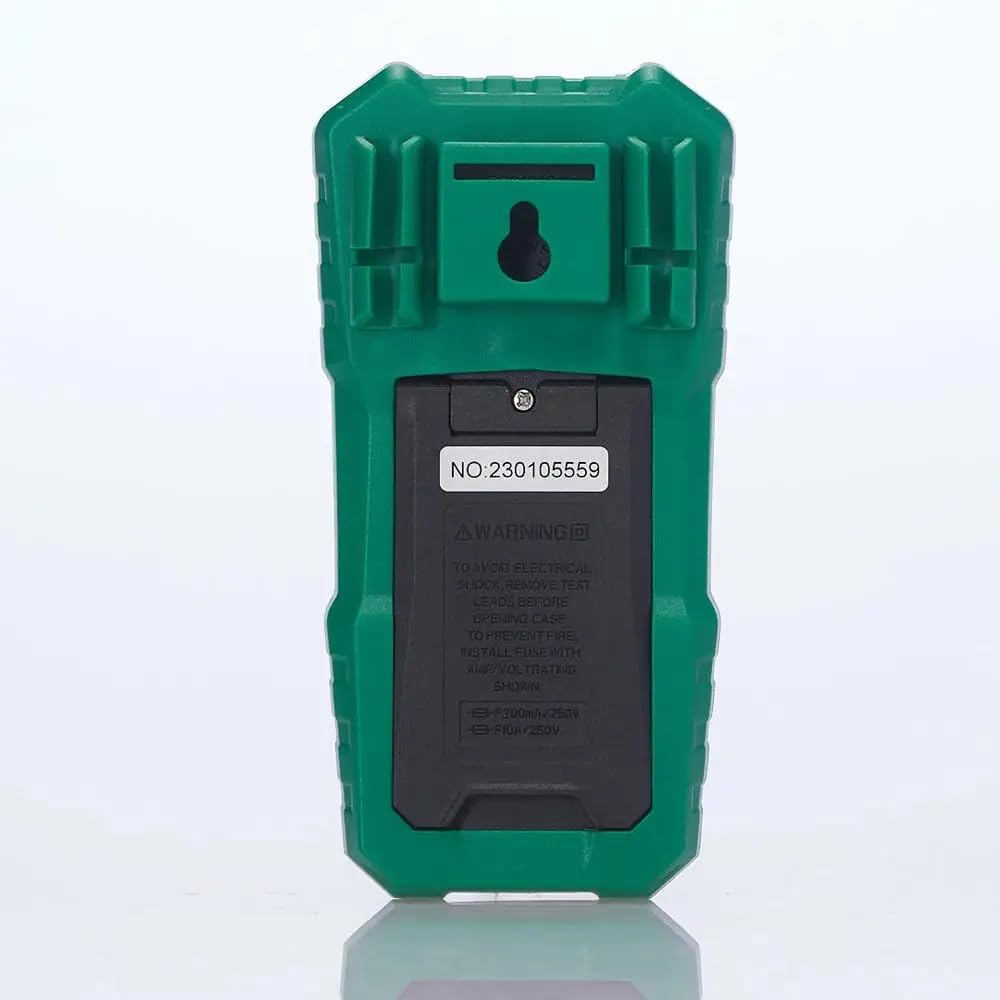
Whakaahua 2: Whakamuri view of the multimeter, illustrating the battery compartment and safety warnings.
4.2 Te hono i nga kaiarahi Whakamātautau
Proper connection of test leads is essential for accurate and safe measurements.
- Whakauruhia te mata whakamatautau pango ki roto i te COM Hononga tāuru (noa).
- Mo te nuinga voltage, resistance, continuity, capacitance, frequency, and temperature measurements, insert the red test lead into the VΩmA Jack tāuru.
- For current measurements up to 600mA, insert the red test lead into the VΩmA Jack tāuru.
- For current measurements between 600mA and 10A, insert the red test lead into the 10A MAX Jack tāuru.

Whakaahua 3: Koki view of the multimeter, highlighting the input jacks for test leads.
5. Nga Tohutohu Whakahaere
This section details how to use the Mastech MS850D for various measurements.
5.1 Kei te Hiko / Weto
Rotate the central dial from the "OFF" position to any desired measurement function to power on the multimeter. To power off, rotate the dial back to the "OFF" position.
5.2 Rotary Switch Functions
The rotary switch selects the primary measurement function:
- V~ (AC Voltage): Measures alternating current voltage.
- V- (DC Voltage): Measures direct current voltage.
- Hz/% (Frequency/Duty Cycle): Measures frequency and duty cycle.
- Ω (Resistance): Measures electrical resistance.
- Continuity/Diode: Checks for circuit continuity and tests diodes.
- NCV/Te ora: Kore-Whakapā Voltage detection and Live Wire recognition.
- °C/°F (Temperature): Measures temperature using the included probe.
- hFE (Transistor Test): Measures transistor gain (requires optional socket).
- μA~ / μA- (AC/DC Microampe) Measures microamphe o naianei.
- mA~ / mA- (AC/DC Milliampe) Measures milliamphe o naianei.
- A~ / A- (AC/DC Ampe) Nga mehua ampere current (up to 10A).
5.3 Nga Mahi Patene
- SEL (Select): Ka huri i waenga i ngā mahi rerekē i roto i te tūranga pana hurihuri kotahi (hei tauira, te hiko AC/DCtage, continuity/diode, °C/°F).
- Tohu: Ka whakatio i te panui o naianei kei te whakaaturanga. Patohia ano kia tukuna.
- MIN/MAX/REL:
- Press once to enter MIN/MAX mode. The multimeter will record the minimum and maximum values. Press again to cycle between MIN, MAX, and current reading.
- Long press to activate REL (Relative) mode. This subtracts the current reading from all subsequent readings, useful for measuring changes.
- Flashlight Button (often combined with backlight): Activates the built-in flashlight for illuminating the measurement area.
5.4 Specific Measurement Procedures
5.4.1 Rererangitage Inenga (AC/DC)
- Whakatakotoria te pana hurihuri ki V~ mo AC voltage ranei V- mo DC voltage. Use the SEL button to switch between AC and DC if the position combines them.
- Tūhono i te mata whakamātautau pango ki te COM Jack me te whakamatautau whero arahi ki te VΩmA koki.
- Tūhonoa ngā probe whakamātautau kia whakarara puta noa i te ara iahiko, i te wāhanga rānei e inehia ana.
- Pānuihia te voltage uara kei runga i te whakaaturanga.
5.4.2 Inenga o naianei (AC/DC)
TUpato: Never connect the multimeter in parallel with a voltage source when measuring current. Always connect in series with the load.
- Determine if the current is AC or DC.
- Set the rotary switch to the appropriate current range (μA, mA, or A). Use the SEL button to switch between AC and DC.
- Tūhono i te mata whakamātautau pango ki te COM koki.
- For currents up to 600mA, connect the red test lead to the VΩmA jack. For currents up to 10A, connect the red test lead to the 10A MAX koki.
- Open the circuit where the current is to be measured and connect the multimeter in series.
- Pānuihia te uara o nāianei i te whakaaturanga.
5.4.3 Ine Atete
- Tautuhia te pana hurihuri ki te Ω tūnga.
- Tūhono i te mata whakamātautau pango ki te COM Jack me te whakamatautau whero arahi ki te VΩmA koki.
- Me mohio kua whakakorehia te hiko, te waahanga ranei i mua i te ine i te parenga.
- Honoa ngā pūwero whakamātautau puta noa i te wāhanga.
- Panuihia te uara aukati kei runga i te whakaaturanga.
5.4.4 Whakamātautau Tonu
- Tautuhia te pana hurihuri ki te Te Haere Tonu/Te Taioata position. Use SEL to select continuity mode (usually indicated by a speaker icon).
- Tūhono i te mata whakamātautau pango ki te COM Jack me te whakamatautau whero arahi ki te VΩmA koki.
- Honoa ngā probe whakamātautau puta noa i te ara iahiko, i te wāhanga rānei.
- Mena kei raro iho te ātete i te 50Ω, ka tangi te buzzer, e tohu ana i te haere tonu.
5.4.5 Whakatautau Diode
- Tautuhia te pana hurihuri ki te Te Haere Tonu/Te Taioata position. Use SEL to select diode mode (usually indicated by a diode symbol).
- Tūhono i te mata whakamātautau pango ki te COM Jack me te whakamatautau whero arahi ki te VΩmA koki.
- Honoa te pūwero whero ki te anode me te pūwero pango ki te cathode o te diode. Ka whakaatuhia te tere whakamua e te whakaaturanga.tage maturuturu.
- Whakahurihia ngā pūwero. Me whakaatu te whakaaturanga i te "OL" (Open Loop) mō te diode pai.
5.4.6 Inenga Raukaha
- Tautuhia te pana hurihuri ki te Te kaha position (often combined with Hz/% or other functions, use SEL to select).
- Tūhono i te mata whakamātautau pango ki te COM Jack me te whakamatautau whero arahi ki te VΩmA koki.
- Me whakarite kia tino pau te hiko o te pūnga i mua i te ine hei ārai i te kino o te mita maha.
- Honoa ngā probe whakamātautau ki ngā pito o te capacitor.
- Panuihia te uara capacitance kei runga i te whakaaturanga.
5.4.7 Ine Auautanga
- Tautuhia te pana hurihuri ki te Hz /% position. Use SEL to select frequency mode.
- Tūhono i te mata whakamātautau pango ki te COM Jack me te whakamatautau whero arahi ki te VΩmA koki.
- Tūhonohia ngā porotiti whakamātautau ki te pūtake tohu.
- Pānuihia te uara auau kei runga i te whakaaturanga.
5.4.8 Te Ineina o te Hahana
- Tautuhia te pana hurihuri ki te ° C / ° F. position. Use SEL to switch between Celsius and Fahrenheit.
- Honoa te pūoko pāmahana ki te COM a VΩmA jacks, observing polarity if specified by the probe.
- Whakatakotoria te pito o te ine pāmahana ki runga, ki te taha rānei o te mea e inehia ana te pāmahana.
- Pānuihia te uara pāmahana kei runga i te whakaaturanga.
5.4.9 Whakapā-kore Voltage (NCV) Rapunga
- Tautuhia te pana hurihuri ki te NCV/Te ora tūnga.
- Move the top front part of the multimeter close to the conductor or outlet.
- Ka tangi te mita maha i tētahi tangi pī, ā, ka mura te rama tohu NCV mēnā ka puta te hau ACtage is detected, with the frequency of beeps and flashes increasing with voltagte kaha.
6. Tiaki
Ma te tiaki tika ka mau te roa me te tika o to mita maha.
6.1 Te horoi
- Mukua te keehi me te panuiamp kakahu me te horoi ngawari. Kaua e whakamahi i te abrasive me te whakarewa.
- Keep the input terminals free of dirt and moisture.
6.2 Whakakapinga Pūhiko
Refer to Section 4.1 for detailed instructions on battery replacement. Replace batteries when the low battery indicator appears on the display.
6.3 Whakakapinga Puka
If the current measurement function fails, the fuse may need replacement. The MS850D uses two fuses:
- F1: F300mA/250V (for mA/μA range)
- F2: F10A/250V (for 10A range)
To replace fuses:
- Ensure the multimeter is powered off and disconnect all test leads.
- Whakatuwheratia te taupoki o te wāhanga pākahiko (tirohia te Wāhanga 4.1).
- Carefully remove the old fuse(s) and replace with new fuses of the exact same type and rating.
- Whakakapihia te taupoki puhiko ka whakakikīhia te tīwiri.
7. Te Raru
If you encounter issues with your Mastech MS850D, refer to the following common problems and solutions:
| Raruraru | Take pea | Rongoā |
|---|---|---|
| Kaore he whakaaturanga, he whakaaturanga atarua ranei | Nga papahiko iti, mate ranei | Whakakapia ngā pākahiko (tirohia te Wāhanga 4.1). |
| Ko nga korero e he ana | Incorrect function selected; Loose test leads; Damaged test leads; Out of range measurement | Verify rotary switch position; Ensure test leads are securely connected; Inspect test leads for damage; Check if the measurement is within the multimeter's specified range. |
| Ko te inenga o naianei kaore e mahi | Ka pupuhihia | Whakakapihia te ngongo e tika ana (tirohia te Wahanga 6.3). |
| "OL" (Taumaha rawa) e whakaaturia ana | Measurement exceeds the selected range or multimeter's maximum capacity | Select a higher range if available, or confirm the measurement is within the multimeter's limits. |
8. Whakatakotoranga
Detailed technical specifications for the Mastech MS850D Digital Multimeter:

Figure 4: Detailed specifications and packaging information for the Mastech MS850D.
| Inenga | Awhe | Tika |
|---|---|---|
| DC Voltage | 600mV, 6V, 60V, 600V | ±(0.8%+5) |
| AC Voltage | 600mV, 6V, 60V, 600V | ±(1.0%+10) |
| DC Naianei | 600μA, 6000μA, 60mA, 600mA, 6A, 10A | ±(2.0%+5) (μA/mA), ±(3.0%+5) (A) |
| AC o nāianei | 600mA, 6A, 10A | ±(2.5%+5) (mA), ±(3.0%+5) (A) |
| Ātete | 600Ω, 6KΩ, 60KΩ, 600KΩ, 6MΩ, 60MΩ | ±(1.0%+5) (600Ω-6MΩ), ±(1.2%+5) (60MΩ) |
| Te kaha | 60nF, 600nF, 6μF, 60μF, 600μF, 6mF, 60mF, 100mF | ±(4.0%+25) (60nF-600μF), ±(5.0%+25) (6mF-100mF) |
| Auautanga | 10Hz, 100Hz, 1KHz, 10KHz, 100KHz, 1MHz, 10MHz | ±(0.5%+4) |
| Te pāmahana | -20°C to 0°C, 0°C to 400°C, 400°C to 1000°C | ±(4°C), ±(3.0%+3), ±(2.0%+3) |
| Whakaatu | 6000 Tatau | |
| Whakatauranga Haumaru | CAT III 600V | |
| Puna Mana | 2 x 1.5V AAA Pūhiko | |
| Ahu (L x W x H) | 150mm x 75mm x 47mm (tata.) | |
| Taumaha | 284g (hua) | |
9. Pūtāhui me te Tautoko
The Mastech MS850D Digital Multimeter is manufactured by Mastech and imported by REES52. For warranty information, technical support, or service inquiries, please refer to the warranty card included with your product or contact the seller/manufacturer directly.
Tena koa pupurihia to tohu mo te hoko mo nga kereme whakamana.
- Kaihanga: mastech
- Kai kawemai: REES52
- Tau tauira: MS850D


