1. Kupu Whakataki
The Protimeter SurveyMaster Dual-Function Moisture Meter (Model BLD5375) is a versatile instrument designed for accurately assessing moisture levels in various building materials. It features both pin and non-invasive measurement capabilities, allowing for comprehensive moisture evaluation both on and below the surface. This manual provides essential information for the proper setup, operation, and maintenance of your device.
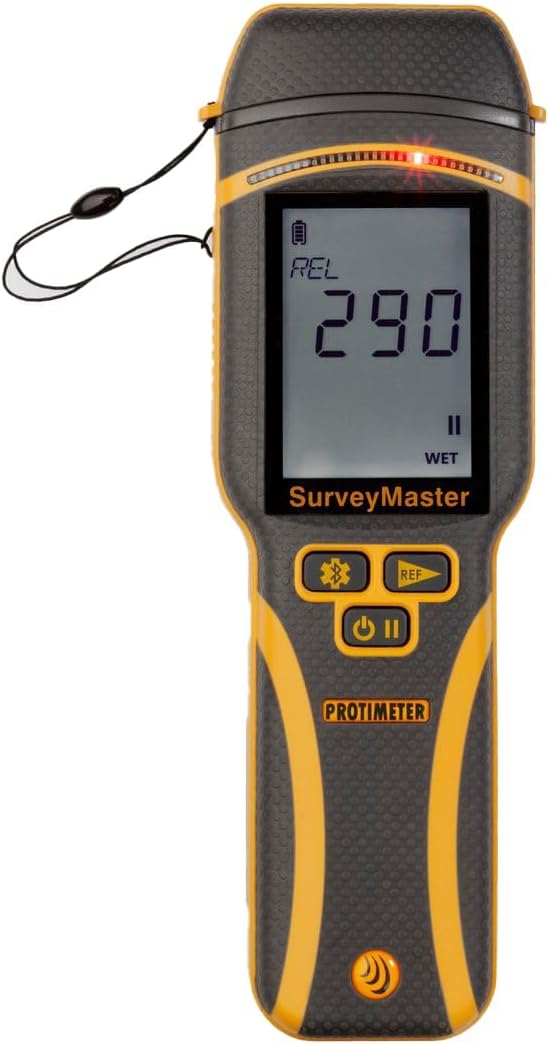
Figure 1: Protimeter SurveyMaster in non-invasive mode, displaying a relative moisture reading.
2. Tatūnga
2.1. Te Wetewete me nga Waahanga Whakauru
Upon opening the product packaging, verify that all components are present. The Protimeter SurveyMaster BLD5375 package typically includes:
- Protimeter SurveyMaster Instrument
- Te Kawe i te Keehi
- Heavy Duty (HD) Moisture Content (MC) Pin Probe
- Aratohu Timata Tere
- Wood Calibration Chart
- Pins e manawapa
- Rooru Wrist

Figure 2: The Protimeter SurveyMaster and its standard accessories, including the carrying case and pin probe, as found in the product packaging.
2.2. Tāuta Pūhiko
The SurveyMaster operates on two AA batteries. These batteries are pre-installed at the factory. To activate the device for first use, locate the battery compartment on the back of the meter and remove the protective tab. Ensure the battery cap is securely clipped back into place after removing the tab.

Whakaahua 3: Taha view of the Protimeter SurveyMaster, highlighting the battery compartment and the port for external probes.
3. Mahi
3.1. Te Whakakaha me te Kōwhiringa Aratau
To power on the SurveyMaster, press and hold the lower button located on the front panel. The device features a large display for clear readings. Once powered on, you can switch between pin mode and non-invasive mode by pressing the right-hand button.

Figure 4: The Protimeter SurveyMaster in pin mode, displaying a moisture percentage reading. The protective cap is attached to the lanyard.
3.2. Non-Invasive Measurement
The non-invasive mode allows for moisture detection below surfaces such as vinyl, tile, and directly on building materials. This mode can measure up to 3/4 inch (19mm) deep and is designed to penetrate surface moisture, providing a significant advantage in various inspection scenarios.

Figure 5: An inspector using the non-invasive mode of the Protimeter SurveyMaster on a wooden floor to detect hidden moisture.
3.3. Pin Measurement
For direct moisture content readings, extend the pins from the top of the device. The pin mode provides precise measurements for materials like wood and drywall. Spare pins are included in the package for replacement. The included HD MC Pin Probe can be connected to the side port for extended reach or specialized applications.

Figure 6: The Protimeter SurveyMaster with the external HD MC Pin Probe connected, ready for pin measurements.

Figure 7: An inspector using the Protimeter SurveyMaster's integrated pins to measure moisture directly on a wall surface.
3.4. Bluetooth Connectivity and Protimeter Connect App
The SurveyMaster features Bluetooth capabilities, allowing it to connect with the Protimeter Connect app. This app enables users to save and download readings with time and date stamps, and also to take photos associated with the readings for comprehensive documentation. To activate or deactivate Bluetooth, press and hold the left-hand button. A flashing Bluetooth symbol indicates it's not connected, while a solid symbol indicates a successful connection.
3.5. Reference Mode
The reference mode allows you to store a "dry standard" reading. Subsequent measurements can then be compared against this stored reference, showing how many points above or below the original reading they are. This feature is useful for tracking changes in moisture levels relative to a known dry state. The reference reading remains in the meter's memory until the device is turned off.
3.6. Settings and Calibration
Access the settings menu by pressing the left-hand button. Here, you can adjust various parameters:
- Reo: Hurihia te reo whakaatu.
- Pipi: Turn the audible beeper on or off.
- Maama Whakamuri: Adjust the display backlight intensity (e.g., set to 10 for bright outdoor conditions).
- Weto-Aunoa: Configure the automatic shut-off time (0-10 minutes) or disable it.
- Dry/At Risk/Wet Indicators: Toggle the visual moisture indicators on or off.
The meter performs an automatic calibration check for the pin mode every 50 power cycles. Additionally, the non-invasive function can be field-calibrated to ensure accuracy. This provides confidence in the meter's readings at all times.
4. Tiaki
To ensure the longevity and accuracy of your Protimeter SurveyMaster, follow these maintenance guidelines:
- Te horoi: Wipe the device with a dry, soft cloth. Avoid using abrasive cleaners or solvents.
- Pin Replacement: Replace worn or damaged pins using the spare pins provided.
- Rokiroki: Store the meter in its provided carrying case in a dry, cool environment when not in use.
- Tiaki Pūhiko: While the meter uses long-lasting AA batteries, replace them when the battery indicator shows low power to maintain optimal performance.
5. Te Raru
For detailed troubleshooting steps or if you encounter issues not covered in this manual, please refer to the full user manual available via the QR code on the back of the meter or in the Quick Start Guide. This QR code also provides access to instructional videos and additional support information.
Video: Protimeter SurveyMaster Moisture meter with Bluetooth BLD5375. This video provides a comprehensive overview of the meter's features and basic operation, including unboxing, battery installation, mode selection, and settings.
6. Whakatakotoranga
| Tau tauira | BLD5375 |
| Kaihanga | Amphenol Pūoko Arā |
| Taumaha Tūemi | 1.32 pauna |
| Hunga Hua | 9 x 6 x 3 inihi |
| Puna Mana | Battery Powered (2x AA Alkaline) |
| Momo Ine | Dual-Function (Pin and Non-Invasive) |
| Non-Invasive Depth | Up to 3/4 inch (19mm) |
| Hononga | Bluetooth (for Protimeter Connect app) |
| Te whakatikatika | Automatic (pin mode every 50 cycles), Field-calibratable (non-invasive mode) |
7. Raihana me te Tautoko
The Protimeter SurveyMaster BLD5375 comes with a e rua tau te whakamana. For additional warranty information or to register your product, please visit the official Protimeter website. Online resources, including the full manual and instructional videos, are also available to assist with any operational or technical queries.
For further assistance, please contact Protimeter customer support through their official channels.


