1. Kupu Whakataki
This manual provides essential information for the safe and efficient operation of your Anern 3600W Hybrid Solar Inverter. This all-in-one unit integrates a 3600W pure sine wave inverter, a 120A MPPT solar charge controller, and a battery charger. It is designed to convert 24V DC power to 110V/120V AC power, suitable for various home backup, RV, and off-grid applications. Please read this manual thoroughly before installation and use.

Figure 1: Anern 3600W Hybrid Solar Inverter (Model Anern-3600)
2. Nga korero haumaru
Observe the following safety precautions to prevent injury and damage to the inverter or connected equipment:
- Ko te whakaurunga me mahi e nga kaimahi mohio.
- Me whakarite kia u nga waea katoa ki nga waehere hiko o te rohe me te motu.
- Kaua e wetewete te inverter. Kaore he waahanga e taea ana e te kaiwhakamahi ki roto.
- Disconnect all power sources (PV, battery, AC input) before performing any wiring or maintenance.
- Avoid contact with live terminals.
- Install the inverter in a well-ventilated area, away from flammable materials and moisture.
- Me whakarite tika te turanga o te inverter.
- This inverter is equipped with multiple protection features including overcurrent, low-voltage, short-circuit, overheating, and overload protection.

Figure 2: Inverter Protection Features and Wi-Fi Monitoring Capability
3. Nga Hua o te Hua
The Anern 3600W Hybrid Solar Inverter offers a range of features for reliable power management:
- Pūnaha Whakauru: Combines a 3600W pure sine wave inverter, 120A MPPT solar charge controller, and battery charger.
- Tino Tino: Solar charge module utilizes optimized MPPT tracking technology for up to 98% efficiency.
- Hototahitanga Pūhiko: Supports 24V Lead-Acid (Sealed, AGM, Gel, Flooded) and Lithium batteries. Includes built-in lithium activation.
- Mahi Kore-Pikohiko: Capable of powering loads directly from the PV array without a connected battery.
- Putanga AC Takirua: Provides two AC outputs for flexible load management.
- Whakaaturanga LCD: Features a responsive RGB LCD screen and indicator LEDs for real-time monitoring and configuration.
- Aratau Mahi Maha: Offers 4 charging modes and 2 output modes to suit diverse application needs.
- Parenga Matawhānui: Includes protection against overvoltage, whakahekeheketage, reverse polarity, short circuits, overheating, and overload.
- Aroturuki Mamao: Supports Wi-Fi monitoring for system control via a mobile application.

Figure 3: Key Specifications and Features Overview

Figure 4: Battery Compatibility and Battery-Free Operation
4. Ihirangi mokete
Manatokona kei roto katoa nga taonga ki to kete:
- Anern 3600W Hybrid Solar Inverter (Model Anern-3600)
- Pukapuka Kaiwhakamahi (tenei tuhinga)
- Mounting accessories (if applicable, check packaging)
- Communication cable (if applicable, for Wi-Fi module)
5. Tohutohu Tatūnga
5.1. Te Wetewete me te Tirotiro
Carefully unpack the inverter and inspect it for any shipping damage. If any damage is found, contact your supplier immediately.
5.2. Te Whakamau i te Inverter
Select a suitable location for mounting the inverter. It should be:
- Indoors, protected from direct sunlight, rain, and dust.
- Well-ventilated to ensure adequate heat dissipation.
- Mounted vertically on a solid surface.
- He waatea mo te waea me te tiaki.
Use appropriate mounting hardware (not always included) to secure the inverter to the wall.
5.3. Hononga Waea
All wiring must be performed with all power sources disconnected. Refer to the wiring diagram (usually found on the inverter or in a detailed wiring section of the full manual) for specific terminal connections.
- Hononga Pūhiko: Connect the 24V battery bank to the inverter's battery terminals. Ensure correct polarity (+ to + and - to -). Use appropriately sized cables and fuses.
- Hononga Huanga PV: Connect the solar panel array to the PV input terminals. Observe correct polarity and ensure the PV input voltage and current are within the inverter's specifications (Max PV Power 4200W, Max DC Voltage 500VDC).
- Hononga Whakauru AC (Whatunga/Hikohanga): If connecting to a utility grid or generator, connect the AC input to the designated terminals.
- AC Output Connection (Loads): Connect your AC loads (appliances) to the inverter's AC output terminals. The inverter features dual AC outputs.
- Whakapapa: Tūhonohia te kāpeka whenua o te kaihurihuri ki te papa whenua pono.
5.4. Te Whakaoho me te Whirihoranga Tuatahi
After all connections are secure and verified:
- Whakakāhia te pakaru / whakakā pākahiko.
- Turn on the PV array breaker/switch.
- If applicable, turn on the AC input breaker.
- The inverter will power on and the LCD display will illuminate.
- Use the control buttons on the LCD panel to configure system settings such as charging current, voltage thresholds, and priority modes according to your requirements.
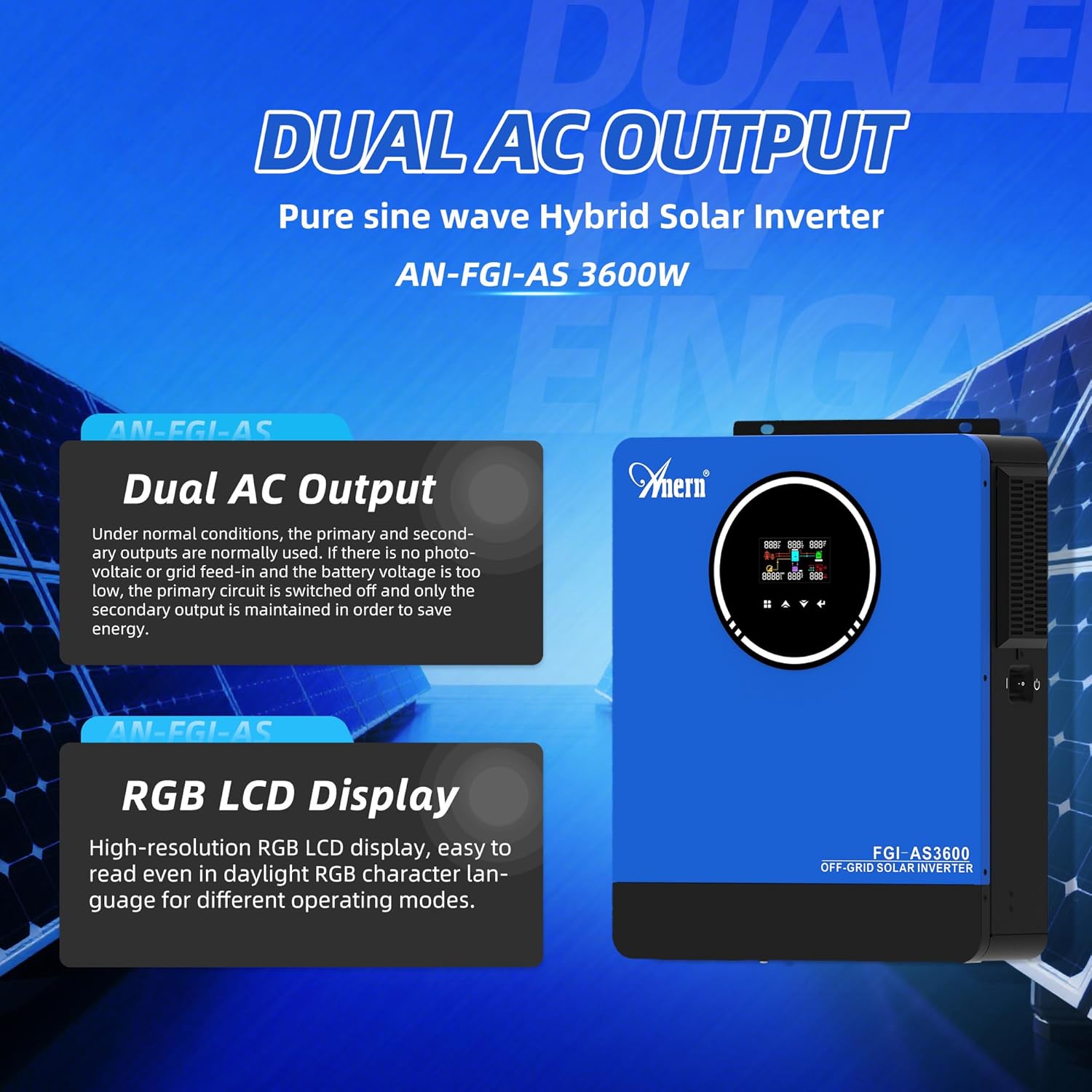
Figure 5: Dual AC Output and RGB LCD Display for Configuration
6. Aratau Mahi
The inverter supports various charging and output modes to optimize power usage.
6.1. Tikanga Aratau
You can select one of four charging modes:
- Only Solar: The inverter charges the battery exclusively from solar energy.
- Mains Supply Priority: The inverter prioritizes charging from the utility grid (mains supply). Solar energy will supplement if available.
- Mana Matua: The inverter prioritizes charging from solar energy. The utility grid will be used if solar power is insufficient.
- Mains Supply and Solar Charging Combination: The inverter uses both mains supply and solar energy to charge the battery simultaneously.
6.2. Aratau Putanga
The inverter offers two output modes for continuous power supply:
- Power Bypass: In this mode, loads are powered directly from the AC input (utility grid or generator), bypassing the inverter. The inverter acts as a charger.
- Putanga Hurihuri: Loads are powered by the inverter, drawing energy from the battery or directly from the PV array (if in battery-free mode).

Figure 6: Charging and Output Mode Diagram
7. Tiaki
Ko te tiaki i nga wa katoa ka whakarite i te mahi tino pai me te roa o to kaihurihuri:
- Te horoi: Periodically clean the inverter's exterior and ventilation openings to prevent dust buildup, which can hinder cooling. Use a dry, soft cloth.
- Taki Hononga: Annually inspect all electrical connections for tightness and corrosion. Loose connections can cause overheating and poor performance.
- Taki Taiao: Me whakarite kia noho tonu te taiao whakaurunga i roto i nga awhe pāmahana me te makuku.
- Tirohanga Pūhiko: Mena kei te whakamahi koe i ngā pākahiko waikawa-mata, tirohia ngā taumata irahiko me te āhua o te pito kia rite ki ngā aratohu a te kaihanga pākahiko.
- Whakahōu Firmware: Tirohia te kaihanga webpae mo nga whakahōunga mārō e wātea ana mō te whakapai ake i ngā mahi, ngā āhuatanga hou rānei.
8. Te Raru
Kei roto i tēnei wāhanga ngā otinga mō ngā take noa. Mō ngā raruraru kāore i te rārangihia i konei, whakapā atu ki te tautoko hangarau.
| Raruraru | Take pea | Rongoā |
|---|---|---|
| Inverter does not power on | Kāore he hononga pākahiko; te kaha o te pākahikotage too low; Loose wiring; Blown fuse. | Tirohia nga hononga pākahiko me te voltage; Ensure battery breaker is on; Inspect fuses. |
| Kaore he putanga AC | Taumaha rawa; Porowhita poto; Hapa hurihuri; Kua motu te kaiwawao putanga AC. | Reduce load; Check for short circuits in wiring; Reset AC output breaker; Restart inverter. |
| Battery not charging from PV | PV array disconnected; Insufficient sunlight; PV voltage too low/high; MPPT controller fault. | Check PV connections; Verify sunlight conditions; Ensure PV voltage is within range; Check MPPT settings. |
| Overload warning/shutdown | Connected load exceeds inverter capacity. | Whakaititia te tapeke kawenga hono ki te inverter. |
| Whakatupato pāmahana teitei | Poor ventilation; Ambient temperature too high; Fan malfunction. | Ensure adequate airflow around the inverter; Relocate to a cooler area; Clean vents. |
9. Whakatakotoranga
Detailed technical specifications for the Anern 3600W Hybrid Solar Inverter:
| Āhuahira | Whakatakotoranga |
|---|---|
| Tau tauira | Anern-3600 |
| Te Mana Whakatau | 3600W |
| Te Mana Puke | 7200W |
| DC Whakauru Voltage | 24VDC |
| AC Putanga Voltage | 110V/120VAC |
| Aurere Putanga AC | 50Hz/60Hz (Rapu Aunoa) |
| Hangangaru | Wore Hine Pure |
| Kaiwhakahaere Utu MPPT | 120A |
| Max PV Array Power | 4200W |
| Max PV DC Voltage | 500VDC |
| Hototahi Pūhiko | 24V Lead-Acid (Seal, AGM, Gel, Flooded), Lithium |
| Hunga Hua | 20.47 x 17.72 x 8.46 inihi |
| Taumaha Tūemi | 22.2 pauna |
10. Pūtāhui me te Tautoko
For warranty information, please refer to the documentation provided with your purchase or contact Anern customer service. If you encounter any issues or require technical assistance, please reach out to Anern support through their official webpae tukutuku, ngā hongere whakapā rānei.