Ka mutu te huaview
The Dlyfull DB1 Universal Battery Tester and B1L Small Battery Tester are designed to provide accurate and convenient battery voltage and health assessments for a wide range of battery types. The DB1 offers a digital LCD display and broad compatibility, while the B1L provides a quick analog test for common household batteries.

Image: The Dlyfull DB1 Universal Battery Tester (left) features a digital display and a slot for cylindrical batteries, while the Dlyfull B1L Small Battery Tester (right) is a compact analog meter with probes for various battery types.
DB1 Universal Battery Tester: Setup and Operation
Initial Setup (DB1)
The DB1 Universal Battery Tester is powered by a built-in rechargeable battery. Before first use, it is recommended to fully charge the device using the provided USB-C input.
- Connect a USB-C cable to the input port on the DB1 tester.
- Honoa te pito kē atu o te taura USB-C ki tētahi pūtake hiko USB hototahi (hei tauira, te tauranga USB rorohiko, te urutau pakitara).
- Allow the device to charge until the battery indicator on the LCD shows a full charge. A full charge provides up to 15 hours of continuous use.

Image: The DB1 Universal Battery Tester showing its USB-C charging port and an illustration of its internal rechargeable battery, indicating over 15 hours of continuous use on a full charge.
Operating the DB1 Tester
- Hiko Whakaka/Weto:
Patohia poto te V-SELECT button to power on the device. To power off, long press the V-SELECT pātene.
- Tīpako Momo Pūhiko:
After powering on, briefly press the V-SELECT button repeatedly to cycle through the supported battery voltage types (1.2V, 1.5V, 3.0V, 3.7V, 9.0V). Ensure the selected voltage matches the battery you are testing.
- Mana Buzzer:
Quickly double press the V-SELECT button to toggle the buzzer alert on or off.
- Kōkuhu Pūhiko:
Place the battery into the magnetic battery slot. Slide the magnetic slider to secure the battery firmly in place. The magnetic design prevents slipping and allows for easy one-handed operation.
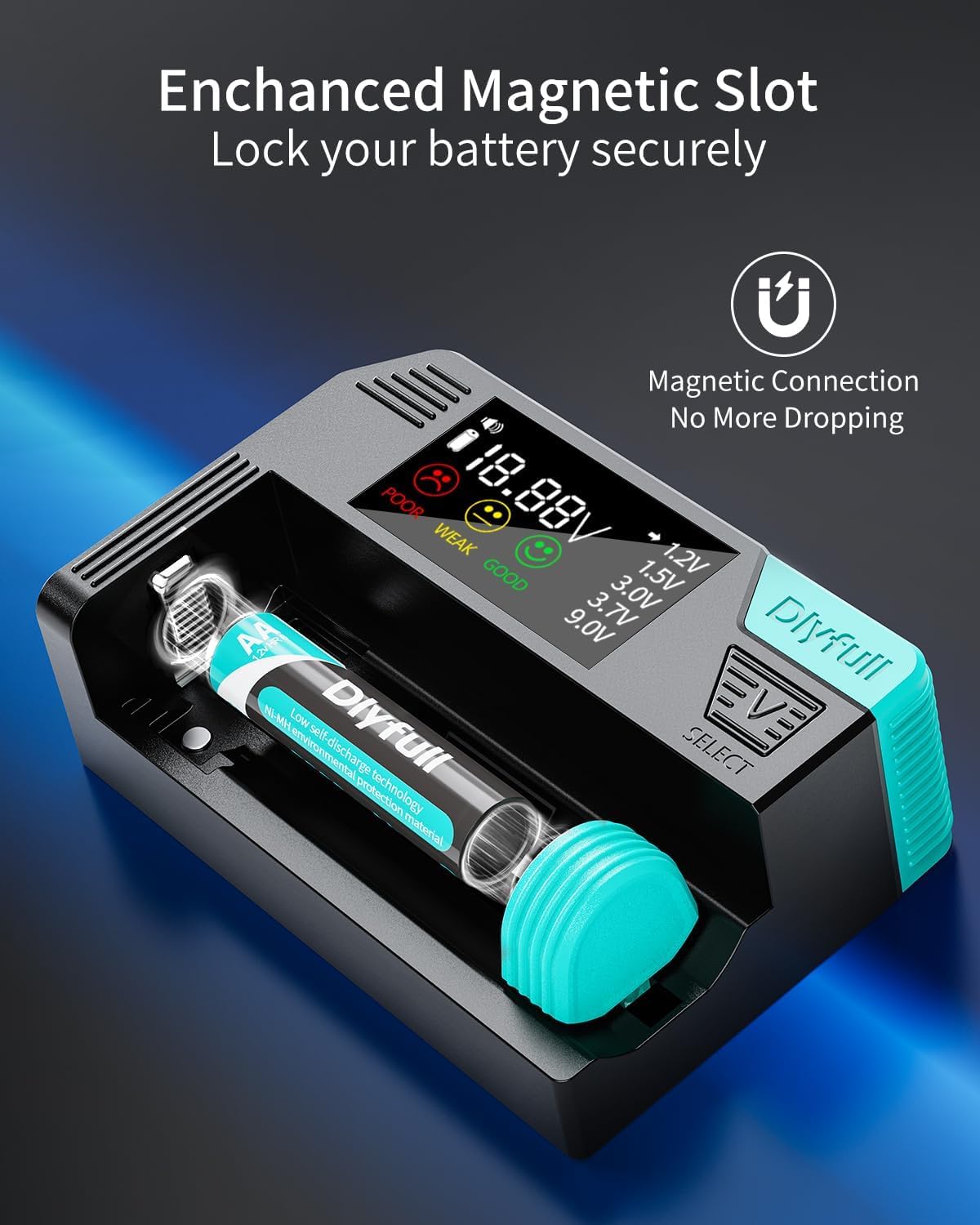
Whakaahua: He tata view of the DB1 Universal Battery Tester's magnetic slot, showing a cylindrical battery securely held in place by the adjustable magnetic slider, highlighting the "Magnetic Connection No More Dropping" feature.
- Panui Whakaaturanga:
The precise LCD display will show the battery voltage and its health status (Good, Weak, or Poor). The built-in battery status indicator is also visible.

Image: The DB1 Universal Battery Tester's LCD screen displaying "18.88V" and indicating battery health with "POOR", "WEAK", and "GOOD" indicators, along with voltage ranges for different battery types and a buzzer alert icon.
DB1 Supported Battery Types
The DB1 is highly compatible with a wide range of battery types and sizes, including:
- 1.2V Ni-MH/CD (e.g., AA, AAA, C, SC, D, N)
- 1.5V Alkaline (e.g., AA, AAA, C, D, N, LR44, button cells)
- 3.0V Lithium (e.g., CR123A, CR2032, CR2)
- 3.7V Li-ion (e.g., 18650, 21700, 26650)
- 9.0V (e.g., 6LR61, PP3)

Image: An illustration demonstrating the extensive compatibility of the DB1 Universal Battery Tester, showing various battery sizes and types such as 3.7V (21700, 26650, 18650), 1.5V (D, CR123A, CR2), 1.2V (AA, AAA), 1.5V (AA, AAA), 9.0V, 3.0V (CR2032), and 1.5V (AG13/LR44), with the DB1 tester below.

Image: The DB1 Universal Battery Tester shown testing three different battery types: a cylindrical battery, a button cell, and a 9V battery, illustrating its versatility and ease of use for various battery forms.
B1L Small Battery Tester: Operation
The B1L Small Battery Tester is a simple, analog device for quick checks of common household batteries.
Operating the B1L Tester
- For Cylindrical Batteries (AA, AAA, C, D):
Place the positive (+) end of the battery against the fixed contact point and the negative (-) end against the movable arm. The needle on the meter will indicate the battery's charge level.
- Mo nga Pohiko 9V:
Align the terminals of the 9V battery with the two small contact points at the top of the tester. The needle will show the charge level.
- For Button Cell Batteries:
Place the button cell battery between the two small probes on the side of the tester. Gently press the red lever to make contact. The needle will indicate the charge level.
- Reading the Meter:
The meter has color-coded sections: HE pai (matomato), MAHI (yellow), and REPLACE/POOR (red). The needle's position indicates the battery's condition.
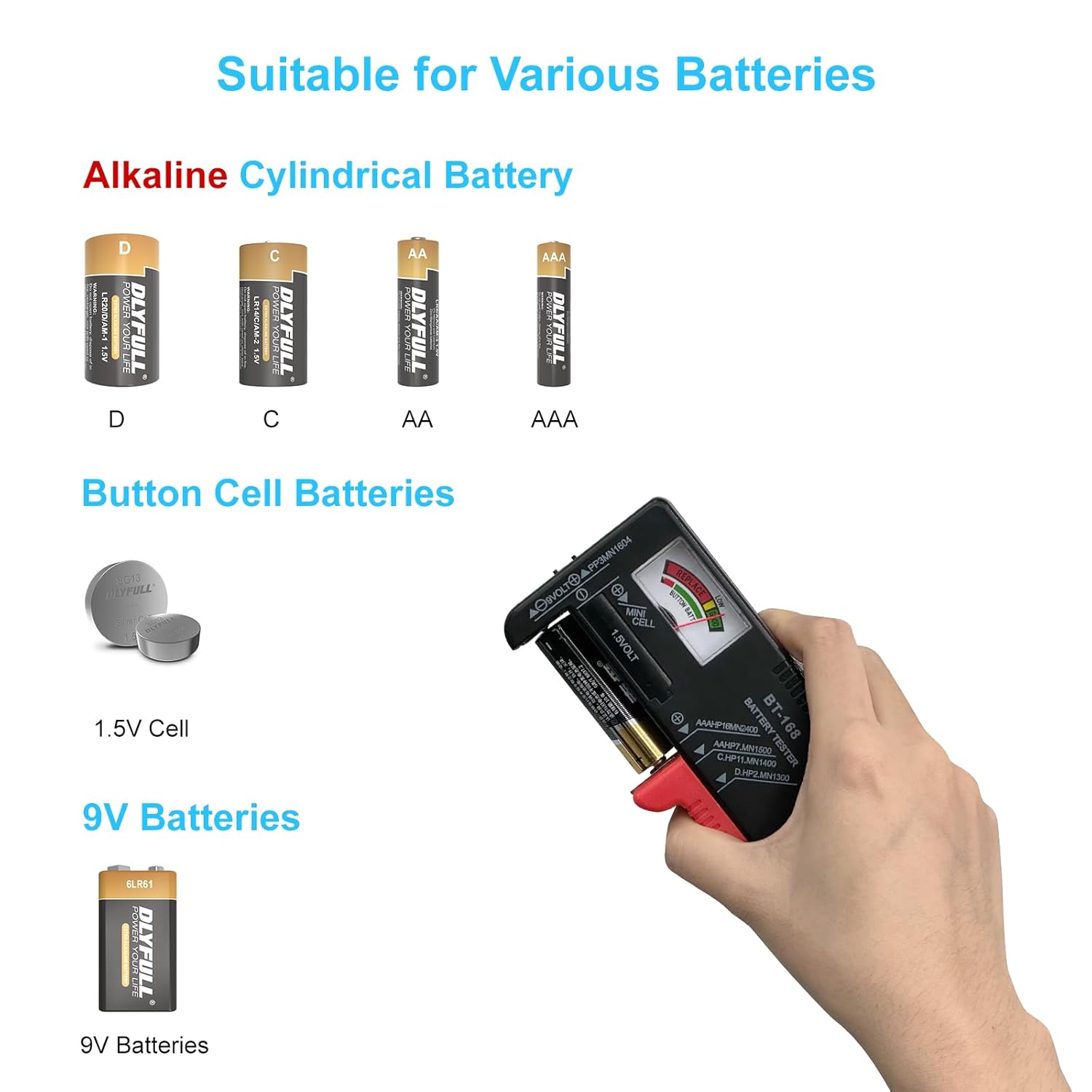
Image: The B1L Small Battery Tester demonstrating its compatibility with various battery types, including Alkaline Cylindrical Batteries (D, C, AA, AAA), Button Cell Batteries (1.5V Cell), and 9V Batteries, with examples of each battery type.

Image: A collage of four images showing the B1L Small Battery Tester in action, demonstrating how to quickly test 9V batteries, cylindrical batteries (AA/AAA), and button cell batteries by making contact with the appropriate terminals.
Te tiaki
Proper maintenance ensures the longevity and accuracy of your Dlyfull battery testers.
- Te horoi: Use a soft, dry cloth to wipe the exterior of both testers. Do not use abrasive cleaners or immerse the devices in water.
- Rokiroki: Store the testers in a cool, dry place away from direct sunlight and extreme temperatures.
- DB1 Battery Care: For optimal battery life, avoid fully discharging the DB1's internal battery frequently. Recharge when the low battery indicator appears.
Raparongoā
| Raruraru | Take pea | Rongoā |
|---|---|---|
| DB1: He putea, he atarua ranei te whakaaturanga. | Low internal battery. | Charge the DB1 using a USB-C cable. |
| DB1: Kore i tika voltage te panui. | Incorrect battery type selected; Poor contact with battery terminals. | Press V-SELECT to cycle to the correct battery voltage. Ensure the battery is securely placed in the magnetic slot. |
| B1L: Needle does not move. | No contact with battery terminals; Battery is completely dead. | Ensure firm contact with both positive and negative terminals. Test with a known good battery to confirm tester functionality. |
| Both testers: Device not responding. | Extreme temperature exposure; Physical damage. | Move to a suitable operating temperature. If physically damaged, contact customer support. |
Whakatakotoranga
DB1 Universal Battery Tester
- Hototahi: 1.2V Ni-MH/CD, 1.5V Alkaline, 3.0V Lithium, 3.7V Li-ion, 9.0V batteries.
- Rahi Tautokona: AAA, AA, C, SC, D, N, button cells, CR123A, CR2032, LR44, 18650, 21700, 26650, 9V (6LR61, PP3), and more.
- Whakaatu: Smart LCD with voltage and health indicators (Good, Weak, Poor).
- Āhuatanga: One-touch operation, magnetic battery slot, buzzer alert (toggleable).
- Mana: Rechargeable internal battery via USB-C input.
- Ora Pūhiko: Up to 15 hours continuous use on a full charge.
- Ahu: Approximately 96mm (height) x 65mm (width) x 32mm (depth).
- Taumaha: Tata ki te 93g.

Image: The DB1 Universal Battery Tester held in a hand to illustrate its compact and portable size, with an inset diagram showing its dimensions (96mm height, 65mm width, 32mm depth) and weight (93g).
B1L Small Battery Tester
- Hototahi: 1.5V (AA, AAA, C, D, button cells), 9V (6LR61, PP3) batteries.
- Whakaatu: Analog meter with color-coded indicators (Good, Weak, Replace).
- Mahi: Manual contact probes.
Pūtāhui me te Tautoko
DLYFULL is committed to providing reliable quality and no-hassle service. For any questions, issues, or support needs regarding your DB1 Universal Battery Tester or B1L Small Battery Tester, please contact DLYFULL customer service.
You can typically find contact information on the DLYFULL official website or through the retailer where you purchased the product. Please have your product model and purchase details ready when contacting support.
For more information about DLYFULL products, you may visit the official DLYFULL store on Amazon: DLYFULL Store.


