1. Hua Neke Atuview
The Roborock Q7 L5+ is an advanced robot vacuum cleaner designed to provide efficient and thorough cleaning for your home. It combines powerful vacuuming with mopping capabilities and features an automatic emptying dock for convenience. This manual will guide you through its setup, operation, and maintenance.

Image 1.1: Roborock Q7 L5+ Robot Vacuum Cleaner and Auto-Empty Dock.
Ihirangi mokete
- Karetao Korehau horoi (1)
- Auto-Empty Dock (1)
- Dust Bags (2, one pre-installed)
- Waea Hiko (1)
- Mop Module (1)
- Waterproof Mat (1)
- Pukapuka Kaiwhakamahi (1)
2. Tatūnga
2.1 Unboxing and Dock Placement
- Kia ata tangohia nga waahanga katoa mai i te kete.
- Place the Auto-Empty Dock against a wall on a hard, level surface. Ensure there is at least 0.5 meters (1.6 feet) of clear space on both sides and 1.5 meters (4.9 feet) in front of the dock for optimal robot navigation.
- Honoa te taura hiko ki te tauranga ka mono ki te putanga hiko.
2.2 Whakataki Tuatahi
Place the robot vacuum onto the charging contacts of the Auto-Empty Dock. The robot will automatically begin charging. For first-time use, ensure the robot is fully charged before operation. The indicator light on the robot will show charging status.
2.3 Connecting to the Roborock App
- Download the Roborock app from your smartphone's app store (iOS or Android).
- Whakatuwheratia te taupānga me te hanga i tetahi kaute, takiuru ranei.
- Follow the in-app instructions to add your Roborock Q7 L5+ device. This typically involves pressing specific buttons on the robot to enter pairing mode and connecting to its temporary Wi-Fi network.
- Once connected, you can access all smart features, including mapping, scheduling, and cleaning mode selection.
3. Mahi
3.1 Te Timata me te Whakamutu i te Whakapai
- Tīmata te horoi: Press the power button on the robot or use the Roborock app to start a cleaning cycle. The robot will automatically map your home using LiDAR navigation and plan an optimized cleaning path.
- Tatari/Toki ano: Press any button on the robot or use the app to pause a cleaning cycle. Press again to resume.
- Hoki ki te Wau: Press the home button on the robot or use the app to send the robot back to its Auto-Empty Dock for charging and dustbin emptying.

Image 3.1: Precision LiDAR Navigation for efficient path planning.
3.2 Ngā Aratau me ngā Āhuatanga Horoi
- Momo Kaha: The Q7 L5+ features 8000Pa HyperForce suction, effectively removing dust, debris, and pet hair from various floor types.

Image 3.2: 8000Pa HyperForce Suction for deep cleaning.
- Vacuum and Mop 2-in-1: The robot can vacuum and mop simultaneously. Adjust water flow levels via the app to suit different floor types.
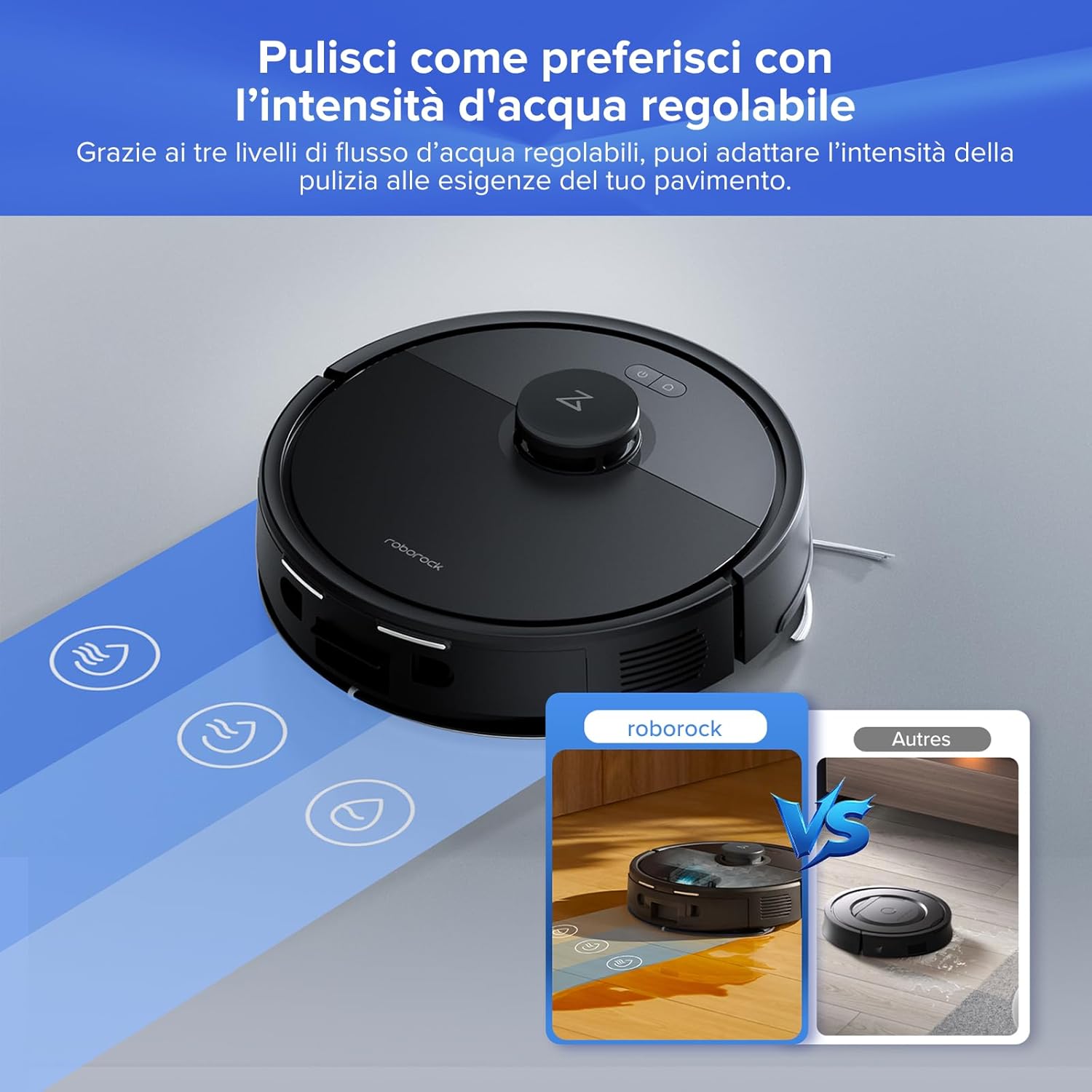
Image 3.3: Adjustable water levels for customized mopping.
- Whakanuia te whariki: The robot automatically detects carpets and increases suction power for a deeper clean.
- Piki Aarara: The Q7 L5+ can easily overcome obstacles, thresholds, and carpets up to 2 cm (0.8 inches) in height.
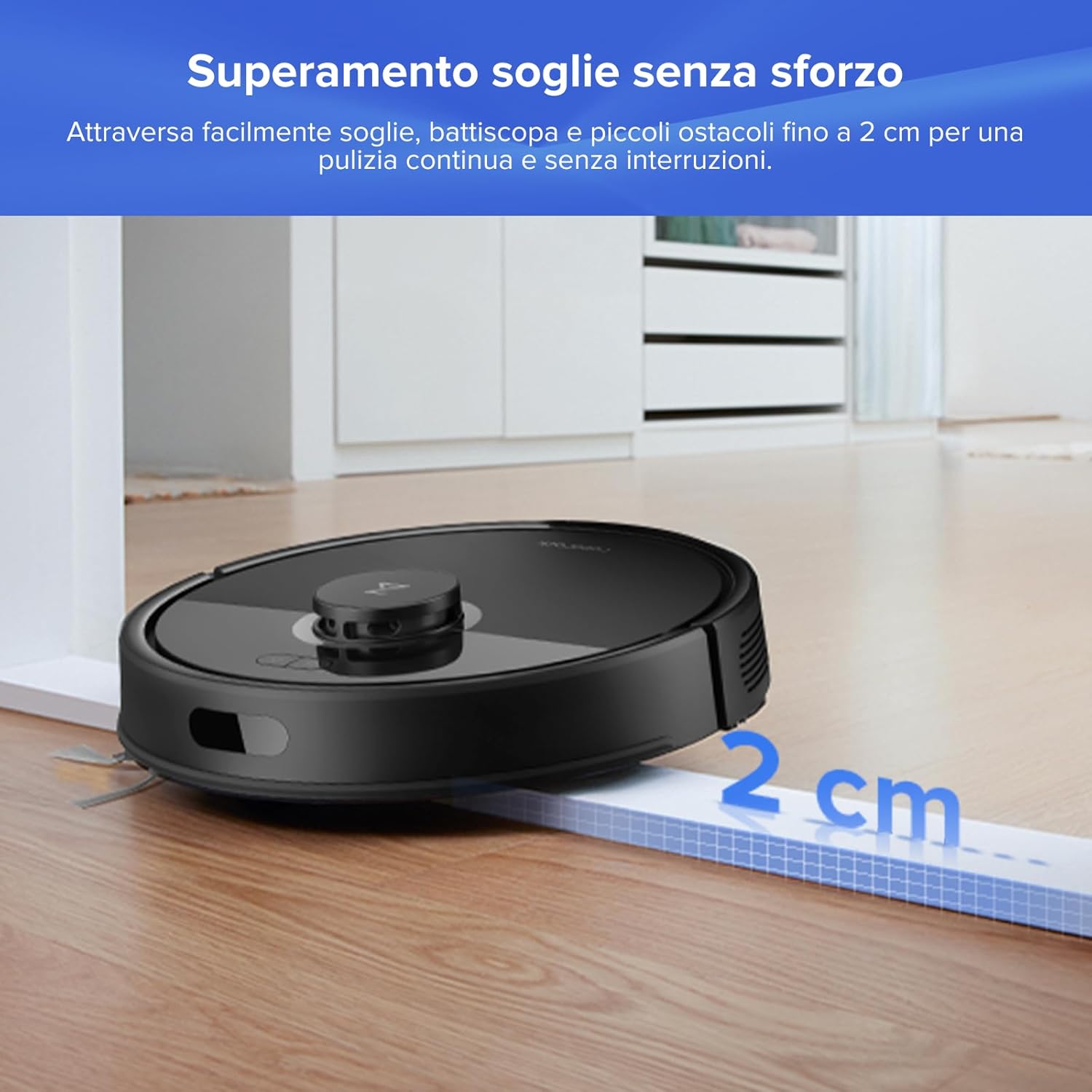
Image 3.4: Effortless obstacle climbing up to 2 cm.
3.3 Smart Features via Roborock App
- Multi-floor Mapping: The robot can store up to 3 different floor maps, making it suitable for multi-level homes.
- Whakapaipai Whakaritea: Define specific rooms or areas for cleaning, set no-go zones, and virtual walls to restrict access.
- Whakahōtaka: Program daily cleaning schedules to automate your cleaning routine.
- Mana Reo: Integrate with Amazon Alexa or Google Home for hands-free control.
- Maukati Tamariki: Activate the child lock feature in the app to prevent accidental starts by children or pets.
- Whakataunga Atu-Tuinga: Schedule charging during off-peak hours to save energy.

Image 3.5: Roborock App interface for comprehensive control.
4. Tiaki
Regular maintenance ensures optimal performance and extends the lifespan of your Roborock Q7 L5+.
4.1 Auto-Empty Dock and Dust Bag
- The Auto-Empty Dock automatically transfers dust from the robot's dustbin to a larger dust bag in the dock, allowing for up to 7 weeks of hands-free cleaning.
- Whakakapi Puke Puehu: When the dust bag is full (indicated by the app or dock light), open the dock's top cover, remove the full bag, and insert a new one. Ensure the bag is properly sealed before disposal.
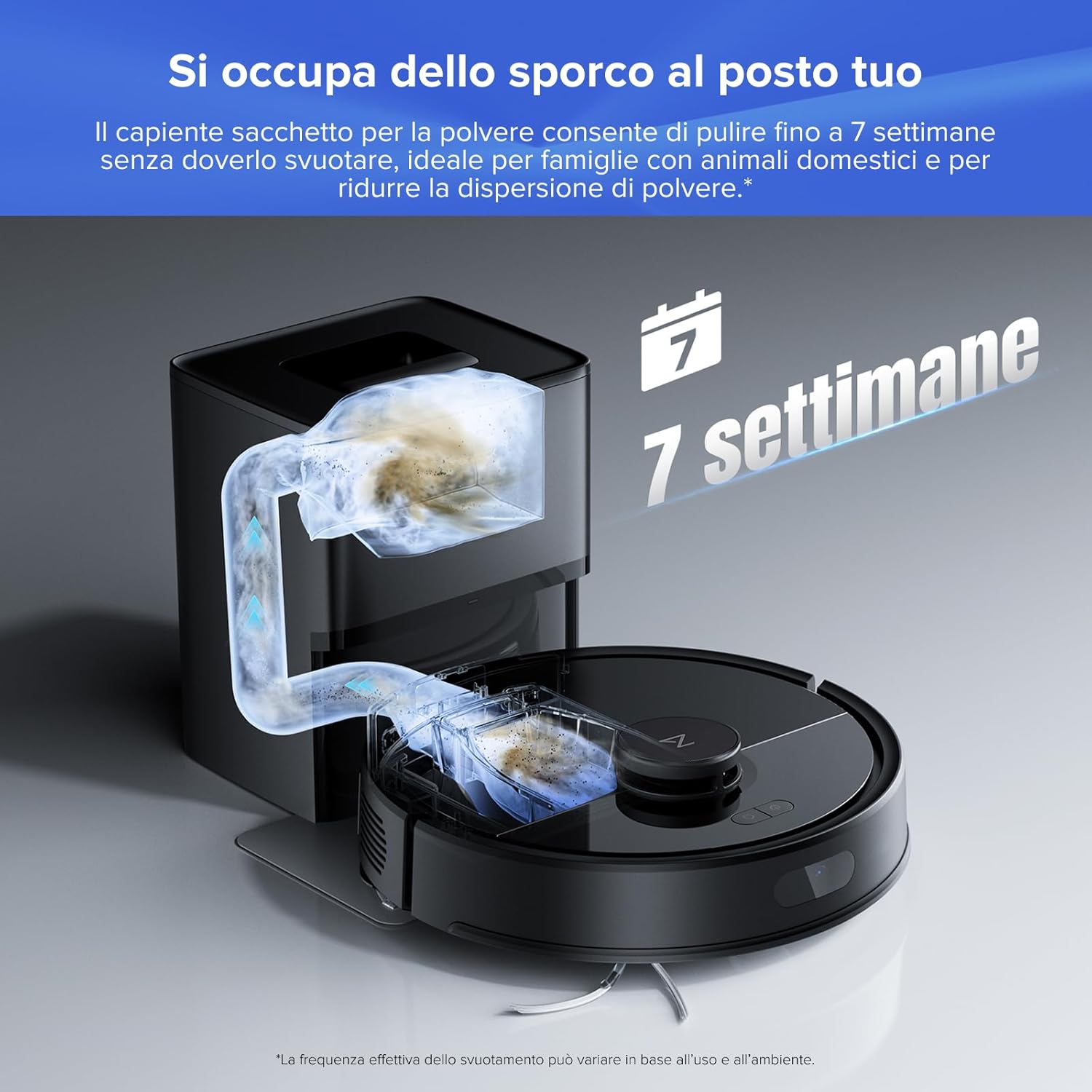
Image 4.1: Auto-Empty Dock for up to 7 weeks of cleaning without manual emptying.
4.2 Brushes and Filters
- Paraihe Matua: The robot features a dual anti-tangle system with JawScrapers to prevent hair from tangling around the main brush. Regularly check and clean the main brush by removing it from the robot and cutting away any tangled hair.
- Paraihe Taha: Inspect the side brush for tangled hair or debris. Remove and clean as needed.

Image 4.2: Dual Anti-Tangle System for reduced maintenance.
- Tātari hau: The multi-layered air filter should be cleaned periodically. Tap it gently to remove dust or rinse it with water if it's washable (refer to specific instructions in the full manual). Ensure it is completely dry before re-inserting.
4.3 Water Tank and Mop Cloth
- Tāke Wai: After mopping, empty any remaining water from the tank to prevent odor and mold.
- Mop Cloth: Remove the mop cloth after each use and wash it. It can be hand-washed or machine-washed.
5. Te Raru
If you encounter issues with your Roborock Q7 L5+, refer to the following common problems and solutions:
| Raruraru | Take pea | Rongoā |
|---|---|---|
| Karekau te karetao e utu | Charging contacts are dirty; Power cable not connected | Clean charging contacts on robot and dock; Ensure power cable is securely plugged in. |
| Ka mau te karetao i nga wa maha | Too many obstacles; Loose cables/rugs | Clear the cleaning area; Use No-Go Zones in the app for problem areas. |
| He kino te mahi momi | Kī tonu te ipu para; purua te tātari; raruraru te paraihe matua | Empty dustbin/replace dust bag; Clean or replace filter; Clean main brush. |
| Ngā rārangi rau mopi | Mop cloth dirty; Insufficient water flow | Wash mop cloth; Increase water flow setting in the app. |
| Nga take hononga taupānga | Kupuhipa Wi-Fi hē; tawhiti rawa te pouara; whatunga 5GHz | Ensure correct 2.4GHz Wi-Fi; Move robot closer to router; Reset Wi-Fi on robot and re-pair. |
For more detailed troubleshooting, please refer to the comprehensive user manual available on the Roborock webpae, whakapā atu ranei ki te tautoko a te kaihoko.
6. Whakatakotoranga
Key technical specifications for the Roborock Q7 L5+ Robot Vacuum Cleaner:
| Āhuahira | Taipitopito |
|---|---|
| Waitohu | roborock |
| Ingoa Tauira | Q7 L5+ Set |
| Tae | Pango |
| Ngā Ahu o te Hua (Robot) | 32.5 x 32.5 x 9.9 cm (12.8 x 12.8 x 3.9 inihi) |
| Ngā Ahu o te Hua (Tauranga) | 21.2 x 17.8 x 25.9 cm (8.35 x 7.01 x 10.20 inihi) |
| Taumaha | 4.8 kg (10.58 lbs) |
| Te Mana Momo | 8000 Pa HyperForce |
| Taumata Haruru | 60 Decibels |
| Wā Whakahaere Pūhiko | Tae atu ki te 2 haora 30 meneti |
| Mopping Area Coverage | Up to 220 m² (2368 sq ft) in standard mode |
| Momo Whakaterenga | LiDAR (PreciseSense) |
| Dust Bag Capacity (Dock) | 2.7L (up to 7 weeks of use) |
| Pūrere Hototahi | Smartphone (Roborock App), Amazon Alexa, Google Home |

Image 6.1: Package contents and product dimensions.
7. Pūtāhui me te Tautoko
For warranty information, technical support, or service inquiries, please refer to the official Roborock website or contact Roborock customer service directly. Keep your purchase receipt as proof of purchase for warranty claims.


